Overview
The AULA Hero 99 — Wired gaming keyboard with Hall effect magnetic switches is a USB-C wired board for Windows users who want rapid trigger but don't want to give up a number pad. Its 8000 Hz polling rate, 128000 Hz scan rate and 0.1–3.4 mm rapid trigger range are near the top of the magnetic-switch class.
However, the web driver that unlocks the advanced settings is Windows-only. With 101 keys, you should also check the layout in the product photos.
Mac users and anyone who needs a Japanese JIS layout should think carefully before buying.
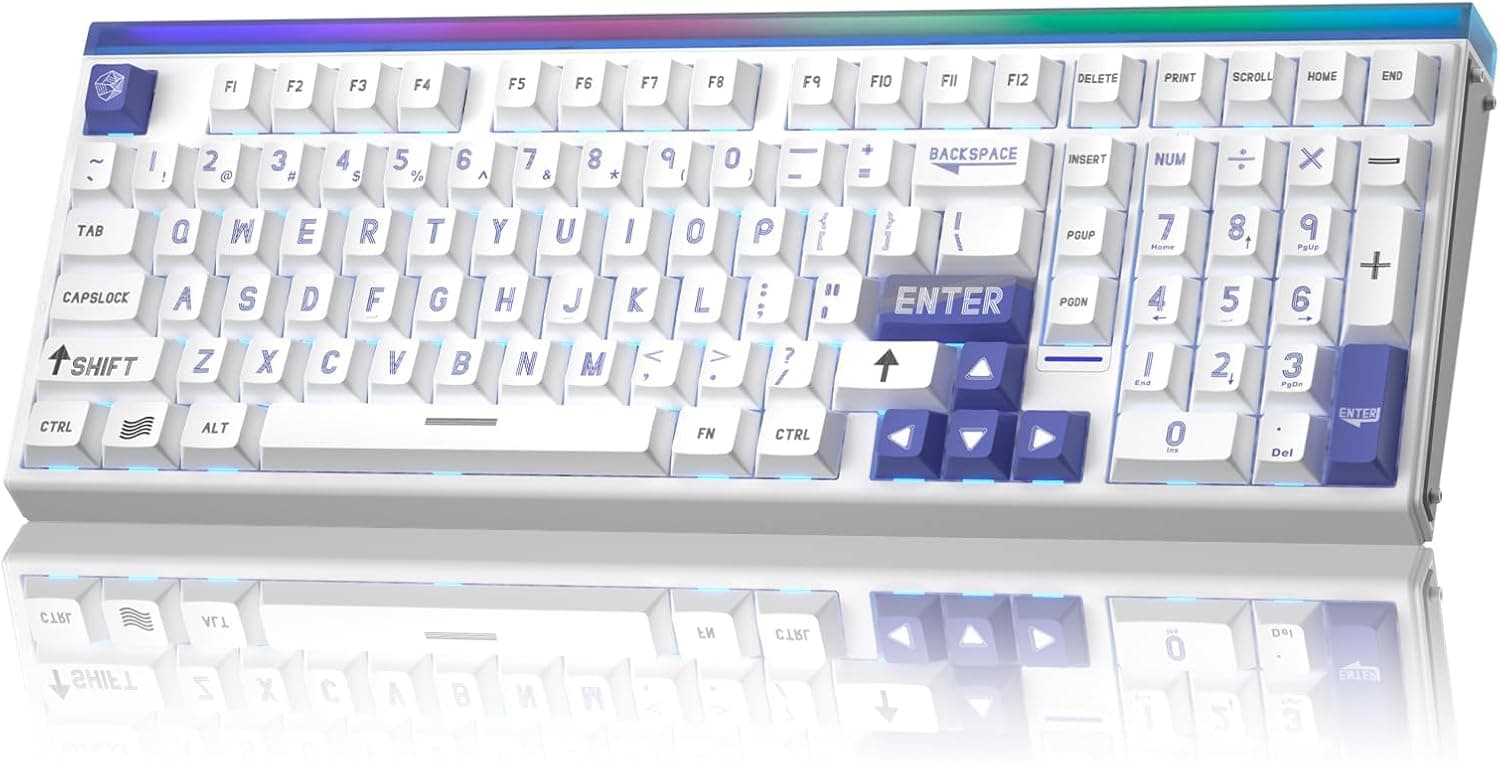
The board uses a 101-key 98% layout. It takes up less desk width than a full-size board but keeps the numpad.
The stock switches are Wing Chun magnetic switches in hot-swap sockets, so you can change switches without soldering. In the browser-based driver you can remap keys, record macros, tune the RGB lighting, and use advanced functions such as DKS (Dynamic Key Stroke), MT (Mod Tap), TGL (Toggle) and SOCD.
What Magnetic Switches and Rapid Trigger Change
A conventional mechanical switch registers a press when its metal contacts touch, so the actuation point is fixed at the factory. A Hall-effect switch uses a sensor to read the magnet's position and measures how far the key has travelled.
That lets software set the actuation depth. On the AULA Hero 99, the rapid trigger range is 0.1–3.4 mm with 0.005 mm precision.
Rapid trigger releases a key as soon as it starts moving up, and registers it again as soon as it moves down. In an FPS, this speeds up quick left-right strafing and stopping to shoot.
The manufacturer advertises a zero-dead-zone design.
In general terms, the advanced driver functions work as follows. Check the driver itself for exact behaviour.
| Function | General meaning | Example use |
|---|---|---|
| DKS | Assigns different actions to different press depths of one key | Walk on a light press, run on a full press |
| MT (Mod Tap) | Tap and hold do different things | Tap for a letter, hold for Ctrl |
| TGL (Toggle) | Each press switches on or off | Hold crouch or walk without holding the key |
| SOCD | Sets what happens when opposite keys (A and D) are pressed together | The last key pressed wins, for faster direction changes |
SOCD is useful, but some games restrict it in their rules or on official servers (Counter-Strike 2's official servers are a known example). Check the game's rules before you use it in ranked or tournament play.
Reading the Numbers (8000 Hz and 0.125 ms)
The 0.125 ms latency figure matches the 8000 Hz polling rate, which sends a report every 0.125 ms.
It is not the full delay from key press to what you see on screen. Treat it as the shortest USB report interval.
On-screen delay depends much more on the game's frame rate and the monitor's refresh rate.
The 128000 Hz scan rate is how often the keyboard reads its own switches internally. Because it is higher than the polling rate, the keyboard is less likely to miss a press before reporting to the PC.
A very high polling rate like 8000 Hz can increase CPU load, though. On older PCs or in some games, dropping to 1000 Hz may be more stable.
Check the product page to see whether the driver lets you change this.
Compatibility Guide
What you can do with this keyboard depends heavily on the operating system.
| Environment | What works |
|---|---|
| Windows | Everything, via the web driver: rapid trigger, remapping, macros, lighting |
| macOS | Typing only; no driver support |
| Game consoles | Typing only; no driver support |
The data provided doesn't say whether settings made on Windows are stored on the keyboard and carry over to a Mac. If you mainly use a Mac, don't buy it counting on that.
Web drivers usually rely on WebHID, so you will typically need a Chromium-based browser such as Chrome or Edge. Check that your usual browser supports it.
The switch sockets only accept magnetic switches. Standard MX-compatible mechanical (contact) switches will not work.
Magnetic switches also differ in magnet strength and shape between brands, so a switch labelled Hall effect is not automatically compatible. If you replace switches, the safest choice is one that AULA lists as supported.
The keycaps are standard Cherry MX compatible, so aftermarket keycap sets will fit.
At 8000 Hz, plug the keyboard straight into a rear motherboard port rather than a hub or a front-panel port. The USB-C cable is detachable, so you can swap it for one that suits your desk.
When running at high polling rates, test with the included cable first. Because a 98% layout is compressed, keys such as Insert, Home or PageUp may be on an Fn layer.
If you use those keys often, check the key layout in the product photos.
Product Info
The price depended a lot on when it was captured. Amazon.co.jp listed it at ¥24,372 as of July 8, 2026, and ¥19,855 as of August 24, 2026, a gap of about ¥4,500.
Prices change with sales and sellers, so check the current listing before you buy.Check the retailer's page for the latest user reviews.
That is a small number of reviews, so the rating may change over time.
| Item | Value |
|---|---|
| Polling rate | 8000 Hz |
| Scan rate | 128000 Hz |
| Keys / layout | 101 keys / 98% with numpad |
| Switches | Hall-effect magnetic (Wing Chun) |
| Rapid trigger range | 0.1–3.4 mm |
| Precision | 0.005 mm |
| Latency | 0.125 ms |
| Connection | USB-C wired |
| Hot-swap | Yes (magnetic switches) |
| Backlight | RGB with light box |
According to the original listing, the box includes a USB-C cable, a keycap puller, a switch puller and a quick-start guide. The chassis is plastic in a white and blue colour scheme, and an RGB light box lets light spill from the top of the board.
Warranty length and who handles warranty claims may depend on the seller, so confirm them when you buy.
Competitor Comparison
Comparing it with boards people often weigh against it shows where the Hero 99 fits.
| Option | Key traits | Best for |
|---|---|---|
| AULA Hero 99 | Magnetic, 8000 Hz, 98% with numpad, wired | Players who also type a lot of numbers |
| Hyekit x MCHOSE ACE 68 | Magnetic, 8K Hz, 60% wired | Players who skip the numpad to get more mouse space |
| RK ROYAL KLUDGE X104 | Wired full-size mechanical | Users who want every key and don't need rapid trigger |
| LEOBOG A98 | Wireless mechanical with numpad | Users who value a cable-free desk over response speed |
If you only play FPS games, a 60% magnetic board gives you more room to move the mouse. The Hero 99 makes sense when you want both a numpad and magnetic-switch performance.
If you won't use rapid trigger, a regular mechanical keyboard is enough.
Recommended Users
First, competitive FPS players on Windows. Rapid trigger and fast response help when you strafe and shoot in games like Valorant and Apex Legends, and DKS and SOCD let you tune your controls further.
If you mainly play RPGs or strategy games, these strengths go largely unused and the price is harder to justify.
Second, people who want one board for both work and play. The compact layout with a numpad handles number entry while saving desk space, and shortcuts assigned in the web driver cut down on repetitive office tasks.
Typing is said to be fairly loud, though, so think twice if you work in a shared, quiet office.
Finally, keyboard enthusiasts who like to tinker. Hot-swap sockets and a flexible driver let you fine-tune the feel and behaviour.
If you never plan to remap keys or swap switches, these features are more than you need, and a cheaper membrane or regular mechanical board will do.
Before You Buy
The driver is Windows-only. You can type on macOS and consoles, but the features that make this board worth buying, such as rapid trigger tuning, won't be available.
If your main machine is a Mac, look at other options.
Check the layout (US/ANSI or Japanese JIS). A 101-key count is typical of English-layout 98% boards, which have fewer keys than a full Japanese JIS layout.
The Enter key shape, symbol positions and the way you switch input languages all differ, so check the legends in the product photos.
Not every switch will fit. The sockets are hot-swap, but they only take compatible magnetic switches.
Your existing MX-compatible mechanical switches won't work. After swapping, confirm in the driver that the new switches respond correctly, including any calibration they need.
8000 Hz needs the right setup. Running through a hub or on a PC without much headroom can cancel out the benefit and may add CPU load.
Lower the polling rate if needed.
Watch game rules. Input-assist features such as SOCD and DKS are restricted in some titles.
Check the rules before using them in ranked or tournament play.
Verify the listing. On the Amazon page for this item, the manufacturer is listed as Strikonx rather than AULA, and the seller is listed as 日興 福岡店.
That may just be an importer's name, but listing details can be wrong. Use the product photos and title to confirm you are getting the AULA Hero 99, and ask the seller who handles warranty claims before you buy.
**Price and reviews change.Check the retailer's page for the latest price.
FAQ
Q. Does it work on a Mac? A.
You can type on it, but the web driver doesn't support macOS, so you can't change rapid trigger or other advanced settings.
Q. How fine is the rapid trigger setting? A.
The range is 0.1–3.4 mm with 0.005 mm precision.
Very shallow settings cause accidental presses, so start a little deeper and work down.
Q. Can I use my existing mechanical switches? A.
No. The sockets only take magnetic switches.
The keycaps are Cherry MX compatible and can be swapped.
Q. Is it a Japanese JIS layout? A.
With 101 keys it is most likely an English-style layout, but check the legends in the product photos to be sure.
Q. Is 8000 Hz always better? A.
Not necessarily. On-screen delay also depends on frame rate and monitor performance, and some PCs run more stably at 1000 Hz.
Product Disclosure (Amazon)
- Manufacturer: Strikonx
- Seller: 日興 福岡店
- Fulfilled by: 日興 福岡店
- ASIN: B0G4TFF37Q
- Note: This article covers a manufacturer-made product based on Amazon listing details.