Overview
The CORSAIR K65 PRO MINI — Compact 65% gaming keyboard with OPX optical switches is a wired 65% keyboard built around CORSAIR's in-house OPX optical-mechanical switches and a polling rate of up to 8000Hz. It drops the number pad and the function-key row but keeps dedicated arrow keys.
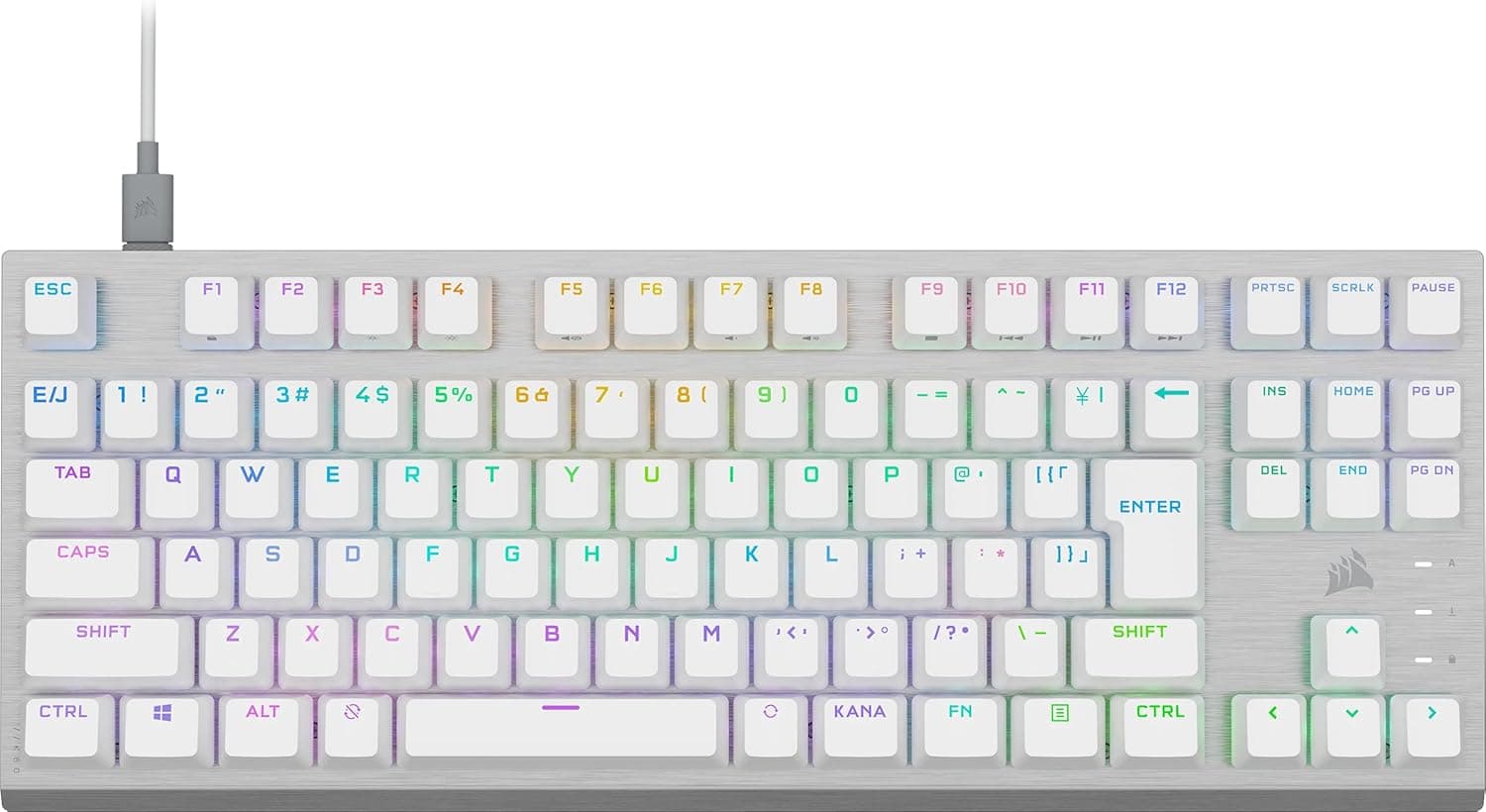
This model (CH-91A401A-JP) uses a Japanese layout without kana legends, so symbol positions match what Japanese-layout typists already know.
The short verdict: it suits players who mainly play FPS or other reaction-heavy games and want to free up desk width for the mouse. It is a poor fit for people who use F1-F12 constantly, prefer tactile switches, or want a wireless keyboard.
The sections below look at what the performance features actually deliver and what you give up with a 65% Japanese layout.
What OPX Switches and 8000Hz Polling Really Do
OPX is an optical switch: pressing a key interrupts a light beam, and that is how the keypress is detected. Because there is no metal contact bouncing, the keyboard does not need to wait out contact chatter, which is the general advantage of optical switches.
The switch is linear, sliding straight down with no bump. That suits rapid tapping and held inputs in games, but typists who want a clear tactile point may find it unsatisfying.
Polling rate is how often the keyboard reports to the PC. At a typical 1000Hz the interval is 1 ms; at 8000Hz it is 0.125 ms, so in theory the reporting delay shrinks by just under 1 ms.
On a 60Hz monitor, however, a single frame lasts about 16.7 ms, so the difference is hard to notice.
The benefit is most realistic with a high-refresh monitor in competitive shooters or rhythm games.
Keep in mind that 8000Hz means eight times as many reports, which adds load on the PC. If your CPU has little headroom or frame rates become unstable, check iCUE for an option to lower the polling rate.
Being able to reach 8000Hz is not the same as needing to run at 8000Hz all the time; pick the value that stays stable on your system.
What Changes with a 65% Japanese Layout
A 65% layout removes the number pad and function row from a full-size board while keeping the arrow keys. F1-F12 are entered with the Fn key, so if you rely on F5 to refresh, F2 to rename, or F-keys bound to in-game actions, expect an adjustment period.
In MMOs where many skills or macros live on F-keys, this is likely to be the biggest frustration.
Japanese-layout 65% boards are much rarer than US-layout ones. That makes this model valuable if you want to go compact without relearning symbol positions, but it also means aftermarket keycap sets that fit a Japanese 65% layout are harder to find.
The keys used for IME switching may also sit in different places than on a full-size board, so check the layout in the product images before buying.
Compatibility Guide
The keyboard connects by wire from USB Type-C on the keyboard to USB Type-A on the host, using a 1.8 m cable.
You need a free USB Type-A port. On laptops with only Type-C ports, you will need an adapter or a C-to-C cable.
There is no wireless mode.
Supported operating systems are Windows 10 or later and macOS 10.15 or later.
It also works with PlayStation 4/5, Xbox One and Xbox Series X|S, wired only. Key remapping and detailed RGB settings are handled in CORSAIR's iCUE software on PC.
The 8MB onboard memory stores up to 50 profiles, so settings saved to the keyboard are easier to carry to machines without iCUE.
If you use 8000Hz, connect directly to a rear motherboard USB port rather than through a hub, monitor USB port or KVM switch. Devices in between that were not designed for high polling rates can make input unstable.
The keyboard measures 315 x 105.4 x 35.8 mm.
Full-size keyboards are generally around 440 mm wide, so you gain roughly 100 mm or more of desk space, which matters most for low-sensitivity players who swing the mouse widely. At 35.8 mm tall, consider a separate wrist rest if your wrists tire from being raised.
Product Info
rmation
| Item | Detail |
|---|---|
| Key switch | CORSAIR OPX optical-mechanical (linear) |
| Polling rate | Up to 8000Hz |
| Key rollover | Full NKRO, 100% anti-ghosting |
| Onboard memory | 8MB (up to 50 profiles) |
| Backlight | Per-key programmable RGB |
| Connectivity | Wired USB Type-C to Type-A |
| Cable length | 1.8 m |
| Dimensions (WxDxH) | 315 x 105.4 x 35.8 mm |
| Supported OS | Windows 10 or later, macOS 10.15 or later |
| Layout | Japanese (no kana legends) |
The model number is CH-91A401A-JP, released in 2023. Full NKRO and 100% anti-ghosting mean that pressing movement keys while jumping or crouching should not drop inputs.
RGB can be set per key, and iCUE also handles key assignments and macros.
Check the retailer's page for the latest price.co.jp as of May 27, 2026, and ¥16,307 at Rakuten (VlookupStore) as of August 11, 2026.
The same product differed by more than ¥3,000 depending on store and timing, so compare several retailers before buying. Prices change frequently with sales, so check the product page for the current price.
Check the retailer's page for the latest user reviews.
Compared with Alternatives
| Product | Size | Key differences |
|---|---|---|
| CORSAIR K65 PRO MINI | 65% | OPX optical, up to 8000Hz, wired, Japanese layout |
| CORSAIR K70 RGB PRO | Full-size | Same OPX and 8000Hz, detachable palm rest |
| Keychron K1 Ultra 8K | 80% | Wireless, US layout |
| HITIME x XVX M67 | 60% | Wireless, QMK support |
The closest alternative is CORSAIR's own K70 RGB PRO. It shares the OPX switches and 8000Hz polling; the differences are size and the included palm rest.
If you cannot give up the F-row or number pad, or want somewhere to rest your wrists, the K70 RGB PRO is the safer choice. If desk width comes first, the K65 PRO MINI fits better.
If you want to drop the cable, wireless boards such as the Keychron K1 Ultra 8K are options, but that one uses a US layout. For people set on a Japanese layout, the ability to go compact without changing layouts is the main reason to pick the K65 PRO MINI.
The even smaller 60% HITIME x XVX M67 handles arrow keys differently, so if you want dedicated arrows, 65% is easier to live with.
Recommended Users
- FPS and competitive gamers: Players who want faster input registration from optical switches and up to 8000Hz polling, plus more room for mouse movement.
- People with small desks: At 315 mm wide it is narrower than a tenkeyless board and sits comfortably next to a mousepad or paperwork.
- Users who want a compact Japanese layout: There are few 65% Japanese-layout options, so this suits people who do not want to relearn symbol positions.
- Anyone curious about high polling rates: You can try eight times the usual reporting rate, though the difference shows most on a high-refresh monitor.
Before You Buy
There is no function row. F1-F12 require the Fn key.
If you use F-keys often for games or work, expect slower input until you adapt, or remap keys in iCUE. If that is a dealbreaker, a full-size OPX model will likely satisfy you more.
Linear switches only. If you want a tactile bump or a clicky sound, this is not for you.
Because the switches are optical, this is not a board meant for freely swapping in standard mechanical switches. If you want to tune the typing feel yourself, look at a hot-swappable model instead.
8000Hz is not magic. On a 60Hz monitor you will barely notice it, and on some PCs the extra load can make things less stable.
The payoff is largest with a high-refresh monitor and a PC with CPU headroom.
Wired only. The cable is detachable, but there is no wireless mode.
If you plan to use it with a console from the couch, check whether 1.8 m is long enough.
Confirm the layout by model number. The Japanese-layout version is CH-91A401A-JP.
Overseas stores and eBay search results can mix in same-name products with US or other layouts, so check both the model number and the product images before buying. The listed accessories can also vary by store and time of sale, so confirm them on the product page.
FAQ
Q. Does it work with PS5 or Xbox?
A. Yes, it supports PlayStation 4/5, Xbox One and Xbox Series X|S, wired only.
Q. Is 8000Hz always an advantage? A.
In theory the reporting interval drops from 1 ms to 0.125 ms, but whether you feel it depends on your monitor refresh rate and PC performance.
Lower it in iCUE if things become unstable.
Q. How do I use the F-keys?
A. Press them together with Fn. If you use certain F-keys often, remap them to easier keys in iCUE.
Q. Does it work on a Mac? A.
macOS 10.15 or later is supported.
How the Japanese-layout keys are recognized can vary by setup, so check the keys you use to switch input modes first.
Q. Are settings kept without a PC? A.
The 8MB onboard memory stores up to 50 profiles. Save settings made in iCUE to the keyboard and they are easier to use on other devices.
Product Disclosure (Amazon)
- Manufacturer: CORSAIR
- Seller: Amazon.co.jp
- Fulfilled by: Amazon.co.jp
- ASIN: B0C5MDR765
- Note: This article covers a manufacturer-made product based on Amazon listing details.