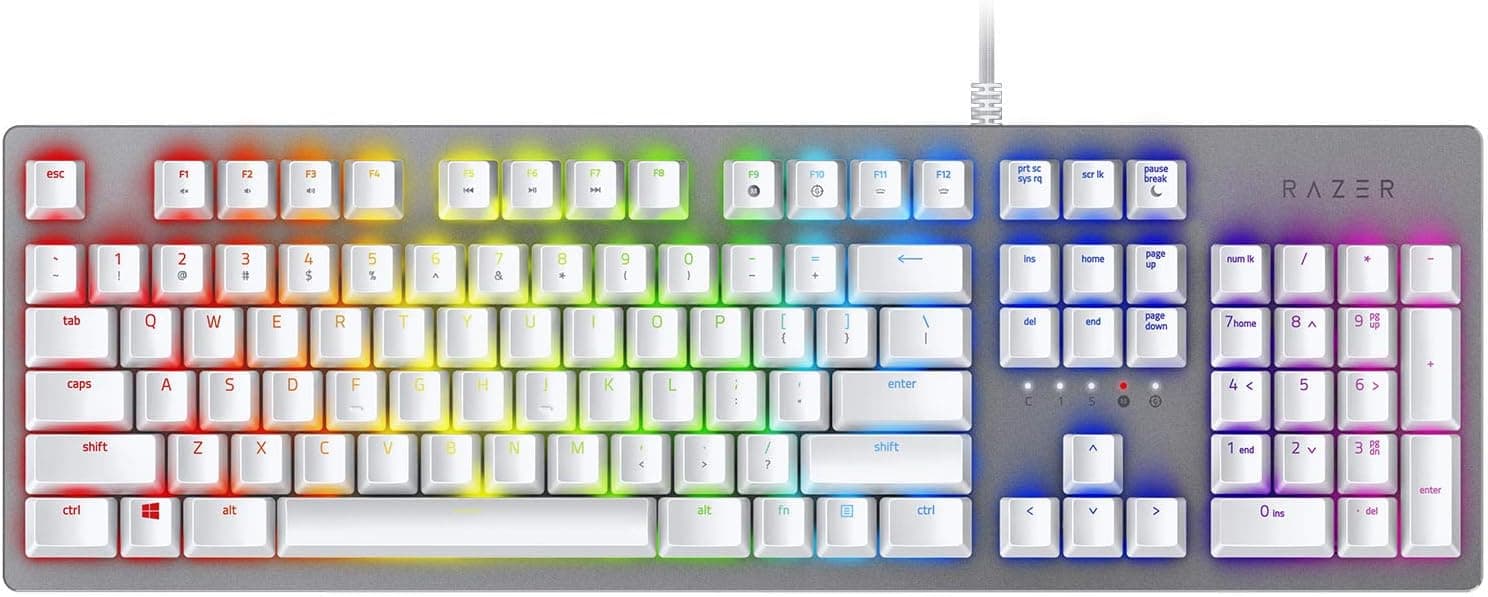
This article covers Razer Blackwidow JP Green Switch メカニカルゲーミングキーボード日本語配列 【日本正規代理店保証品】 RZ03-02860800-R3J1 — not as a spec recital, but from the angle of whether you will regret buying it. Short answer: it is a well-executed full-size board if your environment tolerates the noise, but the loud clicky switches and wired-only design rule out a lot of people.
Overview
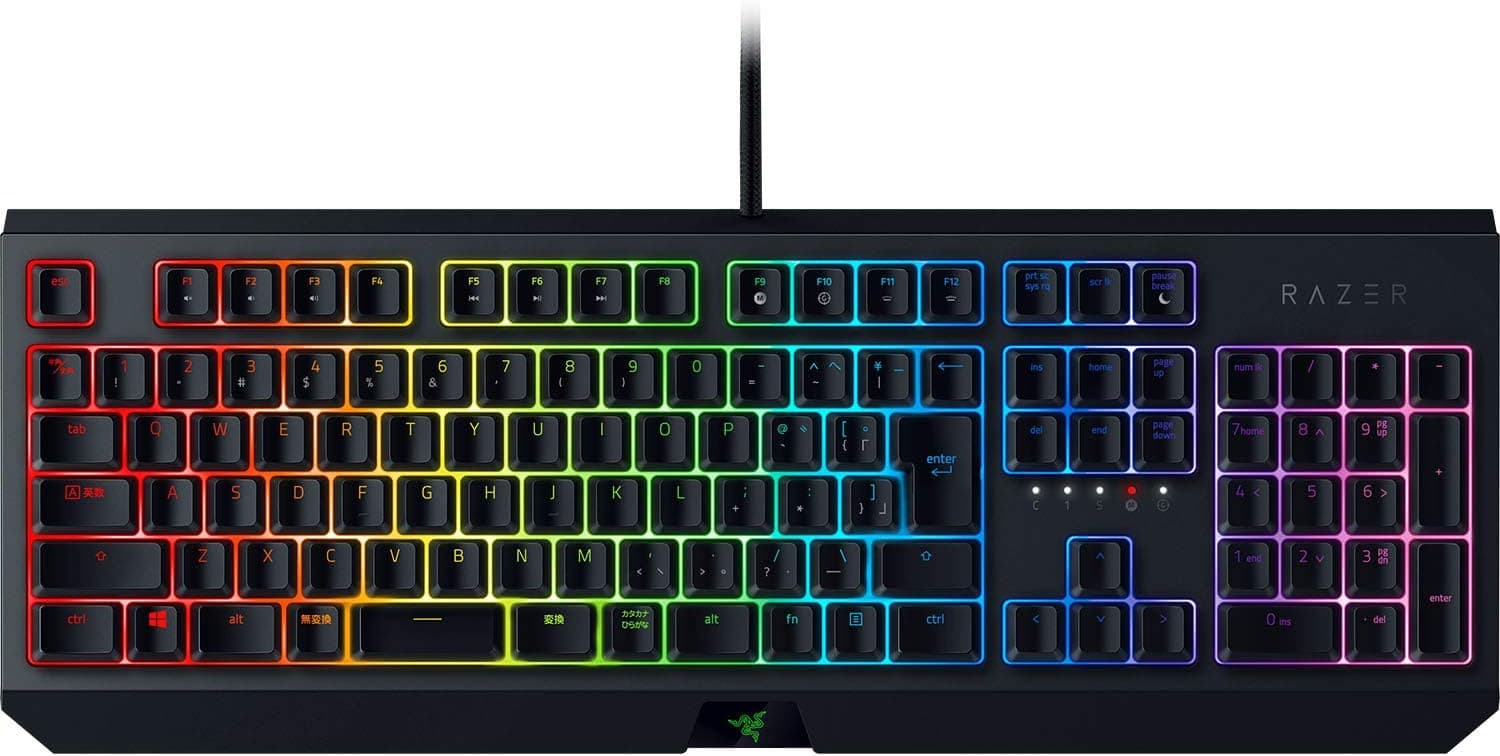
The Razer BlackWidow JP is a full-size mechanical gaming keyboard built around the Japanese (JIS) layout. It uses Razer Green switches, which have a clear tactile bump partway through the travel and produce an audible click at that same point.
The switches are rated for 80 million keystrokes, so even at ten thousand keystrokes a day, switch life is not the thing that will fail first. Lighting is per-key Razer Chroma RGB, onboard memory holds up to five profiles, and the connection is USB Type-A wired only, with cable routing available out of the top, left, or right.
This is for people who want to feel and hear that a key registered. If quietness, desk footprint, or wireless freedom is your top priority, this is not the board.
On Amazon.co.jp it holds 4.4 stars across 389 reviews (88% positive, captured 26 June 2026) — a stable score for a design this mature.
Compatibility Guide
Keyboard compatibility rarely fails on sockets. It fails on OS, ports, software, and physical desk space.
| Item | This keyboard | What actually bites |
|---|---|---|
| OS | Windows 7+ (Synapse 3 best on Win 10/11) | Deep configuration assumes Windows |
| Connection | USB Type-A, wired | USB-C-only laptops need an adapter or hub |
| Software | Razer Synapse 3 | Runs resident; account sign-up prompted |
| Rollover | N-key rollover + anti-ghosting | Simultaneous presses register reliably |
| Layout | Japanese (JIS) / QWERTY | OS layout setting must match |
OS and software. Chroma lighting, macros, and profile switching all assume Razer Synapse 3, which is a Windows-first story.
It types fine on macOS, but do not expect meaningful lighting or macro control there. Worse, a JIS board on macOS can mismatch printed legends and actual output for symbols like @ and _.
Mac-primary users should look elsewhere.
Ports and cabling. Type-A means thin laptops with only Type-C ports need a hub.
The cable is thick; three-way routing helps, but on a shallow desk you should decide which side it exits before you build the setup.
Size and desk space. Full-size means a numpad, and a numpad eats mouse room.
Low-sensitivity FPS players who make big arm sweeps will feel that width directly — a TKL or compact board suits them better. The wrist rest is sold separately, and the front edge sits fairly high, so budget for a palm rest if you type for hours.
Windows layout setting. If Windows treats the board as a 101-key US layout, symbols like @ and : will land in the wrong place.
Set the OS keyboard layout to Japanese (106/109) first. That is a universal JIS quirk, not a defect in this unit.
Product Info
The core specs: Razer Green switches (tactile and clicky), 80-million-keystroke rating, per-key Razer Chroma RGB backlighting, wired USB Type-A connection, N-key rollover with anti-ghosting, onboard memory for up to five profiles, three-way cable routing, Japanese (JIS) / QWERTY layout, and Razer Synapse 3 support. The model number is RZ03-02860800-R3J1, sold as a Japanese authorised-distributor warranty item.
Pricing depends heavily on when it was captured. On Amazon.co.jp the same ASIN was recorded at ¥12,000 on 26 June 2026 and ¥16,580 on 26 August 2026 — a swing of over ¥4,000 in two months.
This is an older model whose price now moves with stock levels, so treat both figures as snapshots and check the current price on the product page before you buy.
A foreign marketplace listing shows $233.00 (captured 2 August 2026), which does not match the domestic street price by an order of magnitude.
That figure is likely a parallel import, a reseller markup, or data scraped from a different item — do not base a purchase decision on it.
Reviews: 389 on Amazon.co.jp at 4.4 stars, 88% positive (captured 26 June 2026).
With 389 reviews the score is no longer noise. A 4.4 means most buyers are happy while a real minority is clearly unhappy — and that complaint is almost always the noise level.
What the Green Switch Actually Feels Like
Razer Green is a clicky switch: it snaps audibly at the actuation point. The upside is certainty — you know a key registered without bottoming out, which helps with single-tap firing rhythm in FPS titles and with fast long-form typing.
The downside cannot be engineered away. Swapping keycaps or adding O-rings dampens bottom-out noise, but the click itself comes from inside the switch and stays.
Buy this expecting "slightly loud" and you will discover it on voice chat and from housemates.
How It Compares
At similar money you can now get hot-swappable and wireless custom boards. Hot-swap lets you change your mind about switch feel after purchase; this board does not.
It is a commit-up-front product, and that is the real decision point.
What still argues for it: guaranteed Japanese layout availability, domestic distributor warranty support, and clean integration with the rest of the Razer Chroma ecosystem. If you already know you like clicky switches, it is a low-risk pick.
Best Use Cases
- Writers and heavy typists who like clicky feedback. In a private room, the sound and bump set a working rhythm. The JIS layout keeps henkan/muhenkan keys where Japanese input expects them.
- FPS players who care about input timing. N-key rollover and anti-ghosting mean presses do not get dropped, and the tactile bump marks the actuation point.
- RGB and profile enthusiasts. Per-key Chroma plus five onboard profiles means your settings travel with the board to another PC.
- Buyers who want a safe, known quantity. Sold through the Japanese authorised channel with a JIS layout — a straightforward first clicky mechanical.
Things to Check Before Buying
1. It is louder than you think — the single biggest pitfall. Microphones pick up the click on voice chat and video calls.
If you share a room, type at night near family, or want to bring it to an office, consider a quieter switch (Razer Orange) or a different product entirely.
2. Wired only, with no escape route. No Bluetooth, no 2.4GHz dongle.
It fundamentally does not fit a clean-desk or multi-device workflow.
3. Full-size steals mouse room. Measure your desk if you play at low sensitivity.
4. Synapse 3 is assumed. Lighting and macros need the software and an account.
The saving grace is onboard memory: write your profiles once and they persist without Synapse running.
5. No wrist rest included. The box is essentially keyboard plus cable. Add a palm rest to the budget if you type long sessions.
6. Verify the listing yourself. Retail listing metadata — manufacturer, model number, accessories, price — sometimes carries data from a different product.
The $233.00 marketplace figure is a clear example of that mismatch.
Before ordering, confirm the product image and title show RZ03-02860800-R3J1 along with the Japanese layout and authorised-distributor wording. US-layout or different-switch variants are sometimes bundled onto the same listing page.
7. It is a mature design. Launched around 2019, it has no hot-swap sockets and no magnetic/analogue switches.
If you want current-generation features, shop a different category — though maturity also means plenty of available information and proven reliability.
FAQ
Q. How loud is it, and can it be silenced? A.
The click is generated inside the switch, so keycaps and O-rings will not remove it. You can soften bottom-out noise only.
If quiet is a requirement, pick something else.
Q. Does it work on macOS? A.
It types, but Synapse-dependent Chroma and macro control is limited, and JIS symbol positions can disagree with the printed legends on macOS. Mac-primary users should look elsewhere.
Q. Do I have to install Razer Synapse? A.
No — it works as a keyboard out of the box. Synapse is for lighting, macros, and profile editing.
Onboard memory stores up to five profiles, so you can configure once and run without it resident.
Q. Is it good for FPS? A.
N-key rollover and anti-ghosting keep inputs clean and the tactile bump marks actuation. But full-size costs mouse space, and there is no adjustable actuation like modern magnetic rapid-trigger boards offer.
Q. What does it cost? A.
Amazon.co.jp recorded ¥12,000 on 26 June 2026 and ¥16,580 on 26 August 2026.
It moves with stock and timing — check the live price at purchase.
Q. What about warranty? A.
Units sold as Japanese authorised-distributor stock get domestic support. Parallel imports may route elsewhere, so read the seller's wording first.
Product Disclosure (Amazon)
- Manufacturer: Razer(レイザー)
- ASIN: B07QRGRRNW
- Note: This article covers a manufacturer-made product based on Amazon listing details.