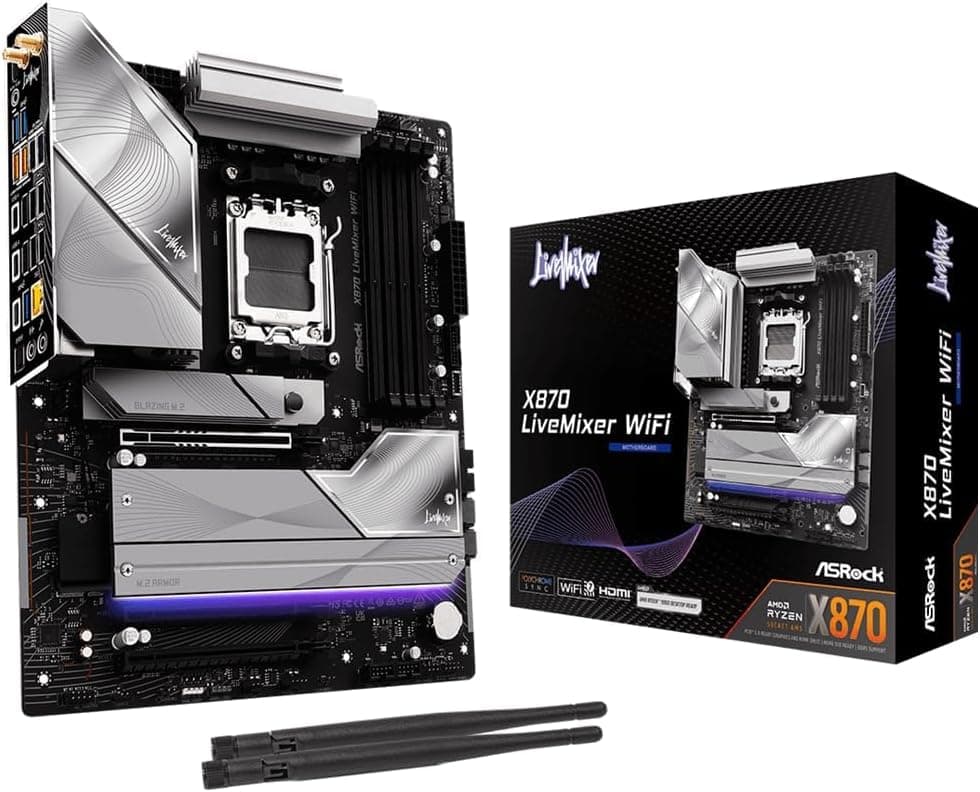
This article examines the ASRock X870 Livemixer WiFi motherboard for AMD Ryzen 9000 using only ASRock's official spec page.
Overview
The X870 LiveMixer WiFi is an ATX motherboard built on the AMD X870 chipset. The official CPU entry reads "Supports AMD Socket AM5 Ryzen™ 9000, 8000 and 7000 Series Processors*", and its note says "The availability of expansion slots may vary by CPU".
The short version: it is a well-expanded board. Even so, the speed of the graphics slot and the M.2 sockets, and the bandwidth that one of the CPU-connected M.2 sockets shares with the rear USB4 Type-C ports, depend on the CPU series and on which other slots are in use.
Each condition is set out in the Compatibility Guide.
Compatibility Guide
These are the fit checks from the official spec table. Each value that has conditions is given once, in its own item, with all of them.
Graphics slot: From the CPU, "1 x PCIe 5.0 x16 Slot (PCIE1), supports x16 mode", and PCIE1 runs at Gen5x16 with 9000 and 7000 series processors, Gen4x8 with 8000 (Phoenix 1) series processors and Gen4x4 with 8000 (Phoenix 2) series processors.
CPU-connected M.2: The "Blazing M.2" sockets M2_1 and M2_2 are both listed as type 2280 PCIe Gen5x4 (128 Gb/s); M2_1 runs at Gen5x4 with 9000 and 7000 series processors and Gen4x4 with 8000 (Phoenix 1 and Phoenix 2) series processors, M2_2 runs at Gen5x4 with 9000 and 7000 series processors, Gen4x4 with 8000 (Phoenix 1) series processors and is unavailable with 8000 (Phoenix 2) series processors, and the page notes that if M2_2 is occupied, both rear USB4 Type-C Ports and M2_2 will downgrade to x2 mode, and that you can switch M2_2 to x4 mode in BIOS setting, but doing so will disable USB4_TC1 and USB4_TC2.
Rear USB4 Type-C ports: The two rear USB4 Type-C ports (40 Gb/s, USB PD 3.0 charging up to 5V@3A (15W)) output video up to 8K 30Hz, but only the CPU's integrated graphics can be shown through them (a Type-C monitor needs an AM5 Ryzen 9000 / 8000 / 7000 processor with integrated graphics), the USB4 controller runs at Gen4x2 with 8000 (Phoenix 2) series processors, and the condition under which an occupied M2_2 changes these ports is quoted as the page states it under "CPU-connected M.2" above.
Chipset slots and M.2: The chipset provides "2 x PCIe 3.0 x16 Slots (PCIE2 and PCIE3), support x4 mode" and two PCIe Gen4x4 (64 Gb/s) Hyper M.2 sockets, M2_3 (type 2280) and M2_4 (type 2230/2242/2260/2280), and an occupied M2_3 drops PCIE2 to x2 mode while an occupied M2_4 drops PCIE3 to x2 mode.
Memory: "4 x DDR5 DIMM Slots", supporting DDR5 ECC/non-ECC un-buffered memory "up to 8000+(OC)*" with a maximum capacity of 256GB and XMP and EXPO memory modules, with a note pointing to the Memory Support List on ASRock's website for supported memory.
Case and power connectors: The form factor is "ATX Form Factor: 12.0-in x 9.6-in, 305 x 244 mm", on an 8 Layer PCB.
Power connectors are one 24 pin ATX and two 8 pin 12V.
Product Info
Here are the key official values, with what each one means for a buyer.
- Power delivery: Listed as "16+2+1 Power Phase, 80A Dr.MOS for VCore+SOC+MISC with Enlarged Heatsink Armor". The VCore circuit also lists "20K Long-lasting Black Caps".
- Networking: Wired LAN is "5 Gigabit LAN 10/100/1000/2500/5000 Mb/s" on a Realtek RTL8126. Wireless is an "802.11be 2x2 Wi-Fi 7 Module" covering the 2.4GHz, 5GHz and 6GHz bands (160MHz channel bandwidth on 6GHz) with Bluetooth 5.4, but the Wi-Fi 7 module is supported by Windows® 11 only with no driver for Windows® 10, and the 6GHz band depends on the regulations of each country and region and is activated in supported countries through Windows® Update and software updates once available.
- USB: The rear has one USB 3.2 Gen1 Type-C, seven USB 3.2 Gen1 Type-A and six USB 2.0 ports. For the front, there is a "Front Panel Type C USB 3.2 Gen2x2 Header (20 Gb/s)".
- Storage: Two SATA3 6.0 Gb/s connectors. RAID 0 and RAID 1 are supported for SATA, and RAID 0, RAID 1 and RAID 10 for M.2 NVMe.
- Audio: "7.1 CH HD Audio with Content Protection (Realtek ALC4082 Audio Codec)", plus Nahimic Audio.
- Fan headers: Two CPU fan, three chassis fan and one AIO pump connector, all 4-pin. CPU_FAN1 supports up to 1A (12W); CPU_FAN2, CHA_FAN1~3 and AIO_PUMP support up to 3A (36W).
- Lighting headers: One RGB LED header (up to 12V/3A, 36W in total) and three addressable LED headers (up to 5V/3A, 15W in total).
- In the box: Two SATA data cables, two ASRock WiFi antennas and one thermistor cable.
Best Use Cases
- Builders who prioritise fast CPU-connected SSD slots. The CPU-connected M.2 speeds and the bandwidth one of those sockets shares with the rear USB4 Type-C ports are set out under "CPU-connected M.2" in the Compatibility Guide.
- Builders who care about onboard audio. The official entry gives the audio codec as Realtek ALC4082, with Nahimic Audio support.
- Fast wired networking. The wired LAN is 5 Gigabit LAN.
Things to Consider
Here is what to check before buying, following the official values.
First, differences by CPU series. The graphics slot speed, the CPU-connected M.2 speeds and whether one of those M.2 sockets is available at all change with the CPU series.
The conditions are in the Compatibility Guide.
Second, one of the CPU-connected M.2 sockets versus the rear USB4 Type-C ports.
Whether that socket is in use, and the BIOS setting, change how the rear USB4 Type-C ports run. Read the conditions in the Compatibility Guide before planning the build.
Third, operating system support for wireless. The wireless module has an operating system condition, and the usable bands depend on regulations in each country and region.
The conditions are under "Networking" in Product Info.
Finally, video from the rear USB4 Type-C ports. Whether you get video depends on the CPU's integrated graphics.
The conditions are in the rear USB4 Type-C ports item of the Compatibility Guide. See the maker's official spec table for full details.
FAQ
Q. How many power phases does it have?
A. The official wording is "16+2+1 Power Phase, 80A Dr.MOS for VCore+SOC+MISC".
Q. Can it boot from an NVMe SSD?
A. The spec table says "Supports NVMe SSD as boot disks".
Q. Is there a button for updating the BIOS?
A. The rear panel lists a "BIOS Flashback Button".
Product Disclosure (Amazon)
- Manufacturer: ASRock
- Seller: Amazon.co.jp
- Fulfilled by: Amazon.co.jp
- ASIN: B0FN44YQKY
- Note: This article covers a manufacturer-made product based on Amazon listing details.