This article takes a closer look at AOC GM170 有線ゲーミングマウス ブラック 人間工学に基づいたゲーマーコード付きマウス USB コンピューターマウス 7つのボタン付き 調節可能 7200DPI 光学式ゲームマウス RGB照明 PC ノートパソコン デスクトップ用, based on its published specifications and buyer feedback, including the trade-offs you should know before buying.
Overview
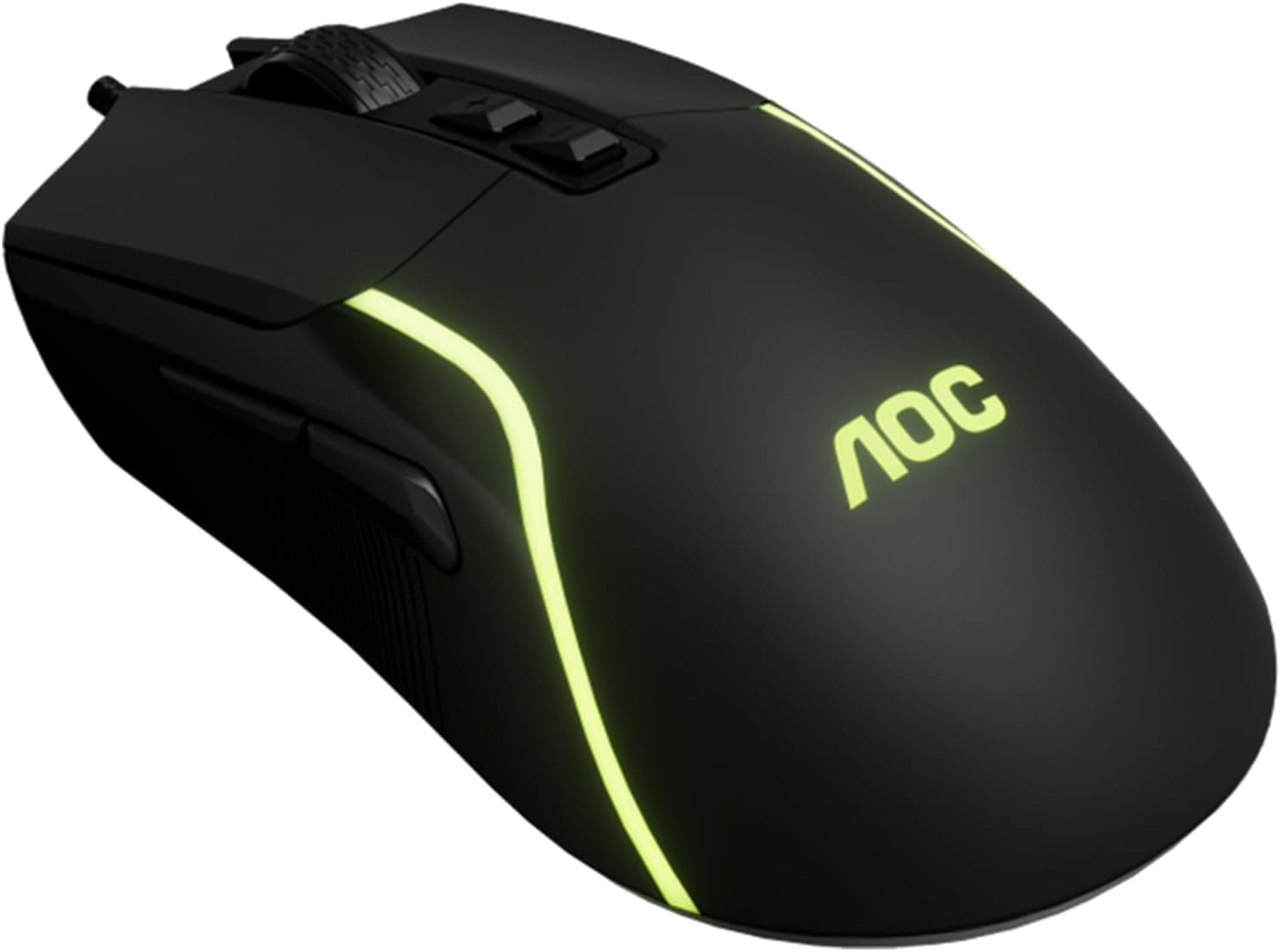
The AOC GM170 is a wired gaming mouse with a 7200 DPI optical sensor, seven buttons, and 7-color gradient RGB lighting. It weighs 106g, uses a 1.5m braided cable, and works on Windows, macOS, Chrome OS, and Linux with no driver installation.
It sits firmly in the entry class, aimed at people who want to try a gaming mouse for the first time or simply need one wired mouse with side buttons.
The defining spec here is not DPI but report rate. The stated 125Hz means the mouse reports its position roughly once every 8ms, against the 1000Hz that most gaming mice treat as standard.
For desktop work and slower-paced games the difference is hard to notice, but in competitive FPS play it is exactly what makes aim feel stuttery. How you feel about 125Hz — not about the 7200 DPI headline — decides whether this mouse is right for you.
| What to check | Actual value | How to read it |
|---|---|---|
| Max DPI | 7200 (6 steps) | Plenty; the headline number is not the deciding factor |
| Report rate | 125Hz | The real weak point. A handicap in competitive FPS |
| Weight | 106g | Heavier than today's 50–70g lightweight mice |
| Buttons | 7 | Two side buttons plus a DPI switch |
| Connection | USB-A wired, 1.5m braided | No latency worries, no batteries |
| OS support | Windows / macOS / Chrome OS / Linux | Plug and play |
As captured in May 2026, buyer ratings stood at 4.6 out of 5 across 36 reviews, or a 92% positive rate.
That is a small sample, so treat the average as indicative rather than conclusive — though it does suggest owners rarely find serious fault with it as a budget starter mouse.
Compatibility Guide
The connection is USB-A only. If your laptop has just USB-C ports — many thin notebooks and recent MacBooks do — you will need a USB-C adapter or hub.
That is less a flaw than a common mix-up you can avoid by counting the ports on your machine first.
It is plug and play, with no dedicated driver required. Basic movement, clicks, and DPI switching work the moment you plug it in on Windows, macOS, or a Chromebook.
The flip side is that this is not a software-configurable product: don't expect complex macro assignment, arbitrary DPI values, or locking the RGB to a fixed color. To change what the seven buttons do, you'll rely on in-game key config or a general-purpose remapping utility.
The 1.5m cable is comfortable when the PC sits on the desk.
If your tower lives under the desk or further away, measure from the port to your hand before ordering. The braided sleeve resists fraying, but a cable never offers wireless freedom — a mouse bungee that lifts the cord makes a noticeable difference to how the GM170 feels in use.
Published dimensions are 127mm long and 40mm high. At 127mm this is a normal-sized right-handed ergonomic shell, best suited to a palm grip.
Fingertip-grip users and people with smaller hands may find it large. Width is not published, so check the product photos for hand-to-mouse proportion if grip comfort matters to you.
Product Info
The optical sensor steps through six DPI levels — 1200 / 1800 / 2400 / 3200 / 4800 / 7200 — via an on-board button. On a 1080p display most people settle around 800–1600 DPI and never reach 7200.
Think of the six steps as a quick way to jump between low, medium, and high rather than as fine-grained tuning. Switch life is rated at 3 million clicks.
That is short next to the 50-million-plus ratings on premium mice, but at 3,000 clicks a day it still works out to more than two years — reasonable for this class.
The RGB lighting is a 7-color gradient that cycles automatically. There is no software to freeze it on a single color, so it suits people who just want lighting without setup, not people colour-matching a desk.
As captured on 27 August 2026, the price on Amazon.co.jp was ¥7,907.
Prices move often and can drop sharply during sales, so always confirm the current figure on the product page. Frankly, around ¥7,900 is not a bargain for a 125Hz, 106g mouse — the same bracket includes 1000Hz models and 70g lightweight designs — which makes this one worth buying on discount.
It is described as a 2025-era release; confirm warranty terms on the manufacturer or retailer page. Only the mouse itself is included; no software or spare skates.
Best Use Cases
This mouse fits the following people well:
- First-time gaming mouse buyers: you get side buttons, DPI switching, and RGB in one cheap package, with a low cost of changing your mind later.
- Anyone tired of wireless batteries: wired means no charging, no dead batteries, always ready.
- Mixed work-and-play users: mapping browser back/forward to the side buttons alone speeds up daily work. 106g is heavy for competition but reads as stability in a palm grip.
- People wanting a backup or travel mouse: driver-free operation on any OS makes it an easy spare to keep in a bag.
Things to Consider
Before Buying
The 125Hz report rate is the trade-off that matters. It sends position data 125 times per second, one-eighth of a 1000Hz mouse.
If you play Apex Legends or VALORANT and expect to hold your own against strong opponents, that alone is reason to rule this out. If your time goes to simulation games, turn-based RPGs, or browser work, you will not perceive the difference.
This product splits cleanly along the competitive-versus-casual line.
Weight is the second point. 106g is not heavy in absolute terms, but with 50–70g mice now common, anyone switching down from one will notice the difference immediately.
Don't buy this expecting a lightweight feel.
Don't over-read the 7200 DPI figure either. DPI describes cursor travel per inch of movement, not sensor quality.
You will almost certainly never run it at 7200, so it shouldn't be your reason to buy.
The absence of configuration software is worth internalising too. Saved button profiles, custom DPI values, turning the RGB off or locking a color — the things premium mice do routinely — are not available here.
The "I don't want it to glow" use case is especially poorly served.
Finally, a note on the Amazon listing itself. In this price bracket, listed manufacturer names, model numbers, and related-item prices are sometimes registered incorrectly.
If what you see on the page doesn't match this article, confirm the actual product (AOC GM170) from the product images and title. The price above is a point-in-time capture and may differ from today's.
FAQ
Q. Is it usable for FPS games? A.
For casual play, yes. For ranked or competitive play, the 125Hz report rate is a real handicap — choose a 1000Hz mouse instead.
Q. Can left-handed users use it? A.
Ergonomic shells with side buttons are generally designed for the right hand. If you mouse left-handed, look for an ambidextrous design.
Q. Can I remap the buttons?
A. No dedicated utility is bundled, so use in-game key configuration or a general-purpose remapping tool.
Q. Can the RGB lighting be turned off? A.
Guidance on switching the lighting off or locking a color varies by batch. Check the lighting notes in the product page specification list before buying if this matters.
Q. Will it work on a USB-C-only PC? A.
The plug is USB-A, so you need an adapter or hub. Power draw is minimal, so any ordinary adapter works.
Q. Do I need a mouse pad? A.
Optical sensors track most reliably on cloth pads. Glass or glossy desk surfaces can cause erratic tracking, so pair it with a pad — even an inexpensive one.