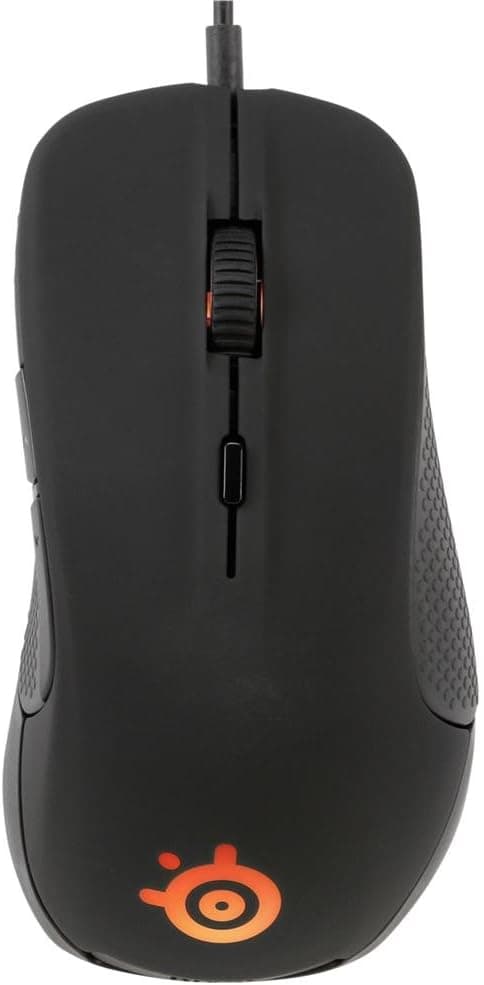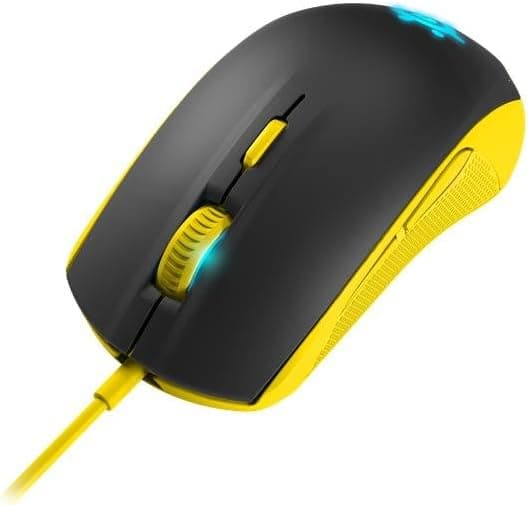
This article covers 【国内正規品】ゲーミングマウス SteelSeries Rival 100 Proton Yellow 62340, an entry-level wired optical mouse first released in 2015. It pairs a 4000 CPI optical sensor with 20G acceleration tolerance and switches rated for 30 million clicks.
On Amazon.co.jp it holds 4.1 out of 5 stars across 42 reviews (roughly 82% positive).
A near-decade-old mouse still on sale and still averaging four stars tells you most of what you need to know about its character.
Overview
The positioning of the SteelSeries Rival 100 Proton Yellow 62340 is unambiguous. It is not a rival to modern ultralight wireless mice; it is the mouse you buy when you want a safe floor for your first gaming mouse purchase.
Everything a gaming mouse needs is here — a dedicated optical sensor, CPI switching, six programmable buttons, a real switch lifespan — which puts it in a different class from a budget office mouse.
Equally clear is what is absent: no 50-gram shell, no 26K-class sensor, no wireless. Proton Yellow is exactly what it sounds like, a fluorescent yellow finish, and combined with 16.8 million color RGB it stands out on a desk.
If you are building an all-black setup, pick your color carefully.
| Item | Value |
|---|---|
| Sensor | Optical |
| Max CPI | 4000 |
| Max acceleration | 20G |
| Buttons | 6 (programmable) |
| Switch durability | 30 million clicks |
| Illumination | 16.8M color RGB |
| Connection | USB wired |
| Cable length | approx. 2 m |
| OS support | Windows 7 or later / macOS / Linux |
| Warranty | 1 year (domestic authorized product) |
In one line: modest sensor specs, ample durability and usability. The 4000 CPI figure looks low by today's numbers, but the settings people actually use are a separate matter — more on that below.
Compatibility Guide
Connection is USB wired only, and it is plug-and-play. Any PC with a USB port will generally run it without a driver install.
OS support spans Windows 7 and later, macOS, and Linux, and any USB 2.0 or faster port provides more than enough bandwidth.
Plugged into USB 3.x or USB4, the mouse still operates at USB 2.0 speeds — which is fine for a mouse.
The connector is Type-A, so a laptop or tablet with only Type-C ports needs an adapter or hub. A common failure here is hanging a mouse, keyboard, and external SSD off one unpowered hub: cursor jumps and dropouts follow.
If behavior is unstable, plug the mouse directly into the machine to isolate the cause.
The cable is about 2 meters, long enough for a tower sitting on the floor under most desks. Because it is a sleeved rather than a soft paracord-style cable, coil memory can create noticeable drag.
A mouse bungee or a simple cable clip lifts the cable and measurably improves how the mouse feels — a small spend with a large return on any wired mouse.
Changing illumination colors or saving CPI steps requires SteelSeries configuration software. The mouse works without it, but you will be stuck with the default CPI stages and lighting.
Factor that in if you cannot install software on a managed work PC.
Product Info
rmation
All prices below are as captured and will change. On Amazon.co.jp the listing showed ¥6,036 as captured on 2026-06-26 and ¥5,073 as captured on 2026-08-26.
Nearly a thousand yen of movement in two months is typical for peripherals at this tier, so always check the current price on the product page before buying.
One caution: a marketplace listing was recorded at $101.25.
For an entry-level wired mouse that is an order of magnitude out of line, and it most likely reflects a data mismatch or an unusual reseller listing. Do not use that figure in your decision.
Reviews stand at 42 with a 4.1 out of 5 average on Amazon.co.jp (captured 2026-06-26).
Forty-two reviews is not a large sample, but holding a 4.1 average years after launch is reasonable evidence that this is not a product plagued by early failures.
Warranty is one year of domestic coverage through Gate Inc. in Japan.
The box contains the mouse only — no spare skates, no weights.
Compared to the Alternatives
At similar prices you will find wired options like the Redragon M730 (10K DPI), the Razer Basilisk Essential (6400 DPI), and various ultra-budget models. On paper, 4000 CPI is clearly the lower number.
But at 1920×1080 or 2560×1440, most players settle somewhere between 400 and 1600 CPI, and very few run above 4000 day to day. For most buyers, the DPI gap is not a practical difference.
The real differences lie elsewhere: weight, sensor pedigree, and cable flexibility. Against 55-gram wireless models like the Redragon M916 or MAMBASNAKE R1, or a 53-gram flagship like the Logitech G PRO X Superlight 2c, the Rival 100 is a mouse you feel — both its mass and its cable.
If you play low-sensitivity FPS with big arm sweeps, that matters more than any spec sheet suggests.
Conversely, a button-heavy MMO mouse (think Logitech G600) or a model with interchangeable grips (CORSAIR Glaive Pro) is simply aiming at a different job. What the Rival 100 wins on is solid construction for the money and a brand with real support behind it.
If you want to avoid cheap-but-unknown, that is the reason to pick it.
How It Feels in Use
The shape is a compact right-handed ergonomic design. It suits smaller hands and claw or fingertip grips, staying stable even when your palm is not fully planted.
Larger hands using a palm grip may find the ring and little finger cramped for space. If your hand measures over roughly 19 cm from wrist crease to middle fingertip, try one in person if you can.
Switch durability is rated at 30 million clicks, above the 10-million figure common on office mice. Even a heavy user clicking thousands of times a day has years of headroom on paper.
Note that double-click chatter can arise from causes unrelated to click count, so raise it with support early if it appears within the warranty period.
Recommended Users
This suits newcomers to PC gaming who want to learn firsthand what separates a gaming mouse from a regular one. A 4000 CPI sensor and six programmable buttons are sufficient for entry-level FPS and MOBA play.
It is also the rational pick if you would rather put your budget into a monitor or headset.
It fits smaller hands and claw or fingertip grips well. Compact shells remain a limited category even today, so if this shape works for you, the value is above its price.
It also serves nicely as a no-fuss second mouse for a spare PC, a LAN setup, or a machine at a relative's house.
It does not suit competitive players chasing every millisecond, anyone who wants a cable-free desk, or left-handed users. The next section explains why.
Things to Consider
Before Buying
The biggest compromise is the wire. There is no wireless variant, so cable management is unavoidable.
If a tidy desk or cable snag is a concern, a wireless model will make you happier from day one. If you chose wired deliberately — no batteries, fewer variables — this is not a drawback at all.
Next, the sensor. It is an entry-level optical unit at 4000 CPI max and 20G acceleration.
Compared with today's flagships and their tens of thousands of DPI and fine lift-off distance tuning, your configuration latitude is clearly narrower. On thick or long-nap cloth pads, lift-off behavior may become noticeable.
The shape is strictly right-handed. Left-handed users, and anyone whose grip habits are built around ambidextrous shells, should look at symmetrical designs such as the Razer Viper line instead.
Finally, because this product has been on the market for years, distribution is thinning. Listings that are unusually cheap or unusually expensive may be parallel imports, used units, or an outright product mismatch.
Listing metadata (manufacturer, model number, color) is sometimes wrong, so before you buy, confirm from the product images and title that you are looking at a Rival 100, Proton Yellow, model 62340. If you want the domestic warranty, verify the seller is offering the authorized version.
Frequently Asked Questions
Q. Is 4000 CPI enough for FPS? A.
For most people, yes. Common settings at 1080p to 1440p sit around 400–1600 CPI, and few players need beyond 4000.
Finding the sensitivity that matches your turn arc matters far more than the ceiling.
Q. Do I need to install a driver? A.
No. It works as soon as you plug it in.
The SteelSeries configuration software is only needed to change the 16.8M color RGB or save CPI stages.
Q. Will it work on macOS or Linux? A.
Basic operation, yes — supported systems are listed as Windows 7 or later, macOS, and Linux. Software support for deeper customization varies, so check the product page for current details if that matters to you.
Q. I have large hands. Can I use it? A.
You can, but it may feel cramped. The shell leans small and favors claw or fingertip grips.
Large hands wanting a palm grip should consider a bigger model.
Q. What does the warranty cover? A.
Authorized domestic units carry a one-year product warranty through Gate Inc. Parallel imports and used units are handled differently, so check the seller's terms.
Q. Does a decade-old mouse still make sense? A.
Not if you want peak performance, but very much so if you want a guaranteed floor. A captured price in the ¥5,000–6,000 range plus a 4.1 average over 42 reviews is solid evidence for entry-level use.
Product Disclosure (Amazon)
- Manufacturer: SteelSeries
- ASIN: B015ZY07R6
- Note: This article covers a manufacturer-made product based on Amazon listing details.