Overview
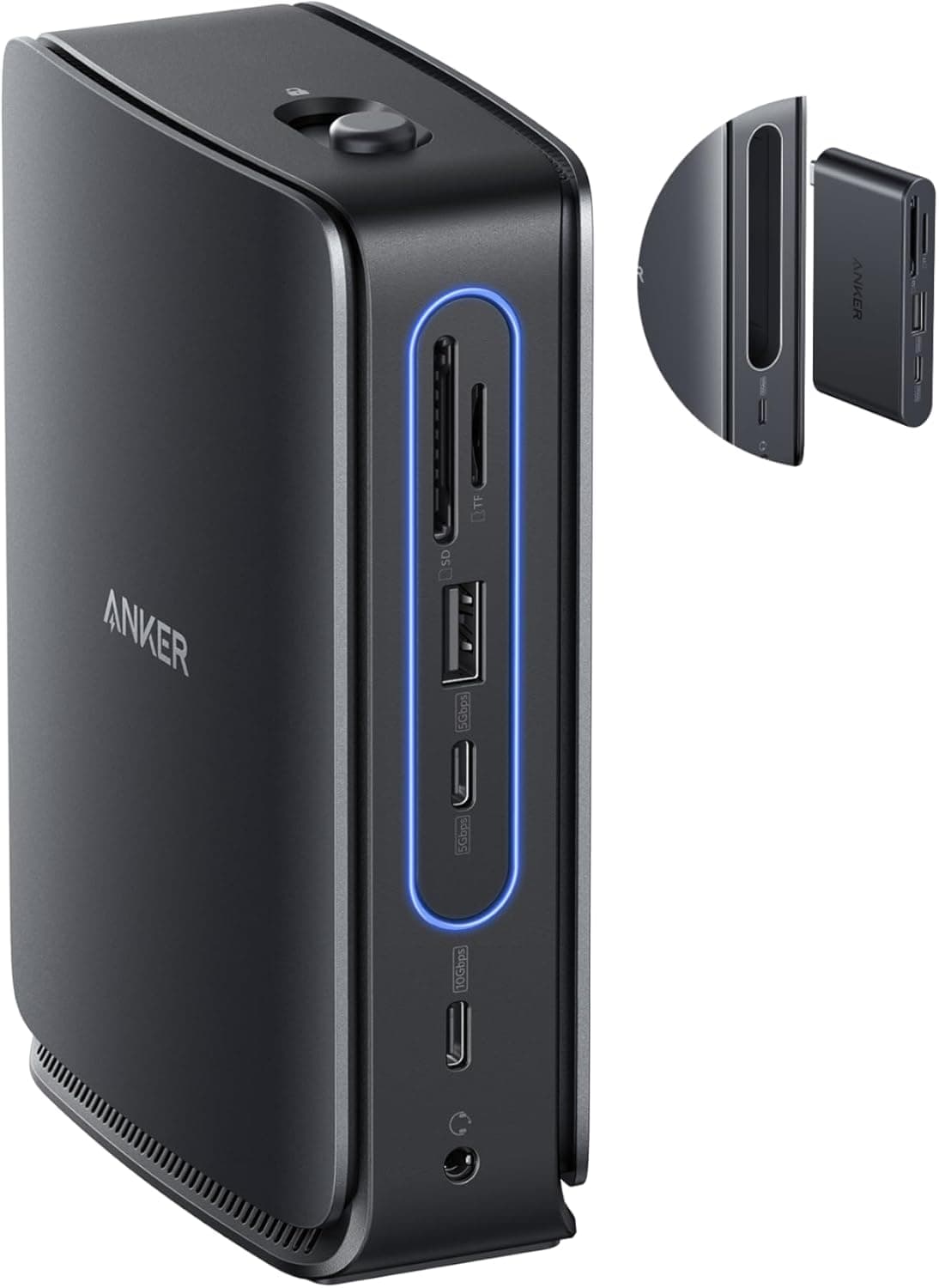
The Anker Nano Docking Station (13-in-1) puts a desktop dock and a portable USB-C hub in one chassis. The main unit offers 13 ports, up to three simultaneous 4K (3840×2160) displays, 100W pass-through charging, 10Gbps data transfer, and gigabit Ethernet.
On top of that, a 6-in-1 USB-C hub detaches from the body so you can take just the hub when you leave the desk.
The short verdict: this dock is for people who run two or three screens at a desk but travel light with a single laptop. If you never move your setup, you are paying for a detach mechanism you will not use.
On Amazon.co.Check the retailer's page for the latest user reviews.
Ports and What They Actually Do
Here is the published spec sheet. Note that these are per-item ceilings, not a promise that everything runs flat out at once.
| Item | Value |
|---|---|
| Total ports | 13 |
| USB-C | 2 |
| USB-A | 3 |
| HDMI | 2 |
| DisplayPort | 1 |
| Ethernet | 1 Gbps |
| Data transfer | Up to 10 Gbps |
| Max power delivery | 100 W |
| Max resolution | 4K (3840×2160) |
| Simultaneous displays | 3 (docked) |
| Dimensions | 140 × 40 × 95 mm |
| Color | Black |
Video comes from two HDMI ports plus one DisplayPort, for up to three screens. Add gigabit Ethernet, SD/microSD card slots, and a 3.5mm audio jack, and most of what a thin laptop dropped is back.
The 10Gbps data path sits in USB 3.2 Gen 2 territory, which matters if you move files off external SSDs daily — but that bandwidth is shared across the dock, so hammering an SSD, a card reader, and Ethernet at once means they split it.
The detachable 6-in-1 hub carries USB-C, USB-A, HDMI, and an SD card reader, and works standalone. Two limits to internalize: the hub alone drives only one display, and triple-display output plus Ethernet require the full dock.
You are not carrying 13 ports in your bag.
Compatibility Guide
One USB-C upstream cable connects everything. It works with USB-C laptops and tablets, including Thunderbolt 3/4 ports, across Windows, macOS, and ChromeOS.
Power input is USB-C PD up to 100W, passed through to the host.
The most common failure is on the laptop side: your USB-C port must support DisplayPort Alt Mode. Plenty of USB-C ports handle only charging and data.
Plug into one of those and USB and Ethernet work fine while the screens stay dark. Check your model's spec sheet for a port marked "USB-C (DisplayPort Alt Mode)" or "Thunderbolt" before buying.
Triple output also depends on your GPU and drivers, not just the dock. Base Apple Silicon M-series Macs are known to cap how many external displays they will drive.
If three screens is the whole reason you are buying, confirm your machine's display limit first — a dock cannot raise it.
On power: 100W is the input ceiling to the dock, not what reaches your laptop. Bus-powered drives and peripherals eat into it.
A 65W-class ultrabook has headroom; a workstation laptop that wants close to 100W may not keep up under full load.
At 140 × 40 × 95 mm, this is a desk-resident device. Five or six cables will sprout from it, so decide which way the port face points before you settle it in.
Product Info
Captured prices, all subject to sales and exchange rates — check the listing for current pricing:
- Amazon (captured 2026-06-01): ¥13,590
- Rakuten, Anker Direct store (captured 2026-08-17): ¥16,990
- eBay US (captured 2026-07-15): $75.25
That is a spread of over ¥3,000 for the same product depending on channel. Anker discounts often, so waiting for a major sale is a reasonable play if you are not in a hurry.
Overseas marketplaces may differ on plug type and warranty handling, so do not choose on price alone.
co.jp (captured 2026-06-01), roughly an 88% favorable score. Black is the only color.
Compared With Alternatives
Against similarly priced docks, the detachable hub is this product's one distinguishing feature. Port count and triple output are available elsewhere, including 14-in-1 units.
If the dock never leaves your desk, a cheaper fixed dock — or a Thunderbolt dock if display fidelity is the priority — is the more direct answer.
Thunderbolt docks, though, cost more and require a Thunderbolt port on the host. As a USB-C dock, this one also serves Thunderbolt-less Windows laptops and ChromeOS machines.
Read it as trading peak display headroom for breadth of compatibility and portability.
Best Use Cases
- Office workers and creatives running two or three displays. Two HDMI plus DisplayPort maps cleanly onto most existing monitor inputs.
- Thin-laptop owners with one or two USB-C ports. Three USB-A ports, Ethernet, SD/microSD, and a headphone jack all return at once.
- Anyone who needs wired networking. Gigabit Ethernet beats Wi-Fi for call stability and large transfers.
Before You Buy
If the detach mechanism does not appeal, skip this dock. For a permanently stationary setup, a simpler fixed dock at the same price has fewer moving contacts to wear out over years of use.
Do not read "13 ports" as 13 ports at full speed simultaneously. The 10Gbps pipe is shared, and every attached device subtracts from the 100W budget.
Spec sheets list per-item maximums, not a guaranteed total.
When three displays fail, the cause is usually the laptop. Check DisplayPort Alt Mode support, your GPU's display limit, and graphics driver version before contacting support.
Expect warmth. Handling 100W, video conversion, and 10Gbps transfers at once makes heat.
Give it airflow — do not bury it under a laptop or a stack of paper.
One note on listings. Retail product pages sometimes carry manufacturer, model, or accessory details that do not match the item shipped.
Here the manufacturer and seller data are consistently Anker, but verify from the photos and title that you are buying the 13-in-1 model with the detachable hub — Anker sells several docks under similar names with different port layouts.
FAQ
Q. Does it work with Thunderbolt laptops and Macs? A.
Yes. Thunderbolt 3/4 ports are backward compatible with USB-C docks.
You will not get Thunderbolt-class bandwidth, though — it behaves as a USB-C dock.
Q. Can it really drive three 4K displays? A.
The dock is specified for up to three simultaneous 4K outputs. How many actually appear depends on your GPU and port capabilities.
Refresh rates vary by configuration, so cross-check your machine's specs against the product page if high refresh at 4K matters.
Q. Will it charge my laptop by itself? A.
With 100W input support, a 65W-class ultrabook is comfortably covered. The dock and attached peripherals consume part of that, so less than 100W reaches the laptop, and some machines will still drain under heavy load.
Q. What do I get from the detached hub alone? A.
Six ports — USB-C, USB-A, HDMI, SD card reader and so on. One display output maximum, and no Ethernet, since that lives in the dock body.
Q. Can I use it with a desktop PC? A.
It will work given a USB-C port with DisplayPort Alt Mode, but the product targets laptops and tablets. Desktops already have ports, so the value is limited.
Product Disclosure (Amazon)
- Manufacturer: Anker
- Seller: AnkerDirect
- Fulfilled by: Amazon
- ASIN: B0FLD8KKN7
- Note: This article covers a manufacturer-made product based on Amazon listing details.