This article takes a closer look at aikeec ブラックホワイト 6キー ゲーミングキーボード USB Mini 6キー キーパッドメカニカルゲーミング PC キーボードプログラミングマクロソフトウェア付き OSU HID 標準キーボード(アップグレードチェリーシャフト&RGB LED) — from how to read its spec sheet to the things buyers only notice after the box is open.
Overview
The short version: this is a tool for people who want six keys carved out as dedicated buttons. It is not a replacement for a full keyboard; it lives next to one.
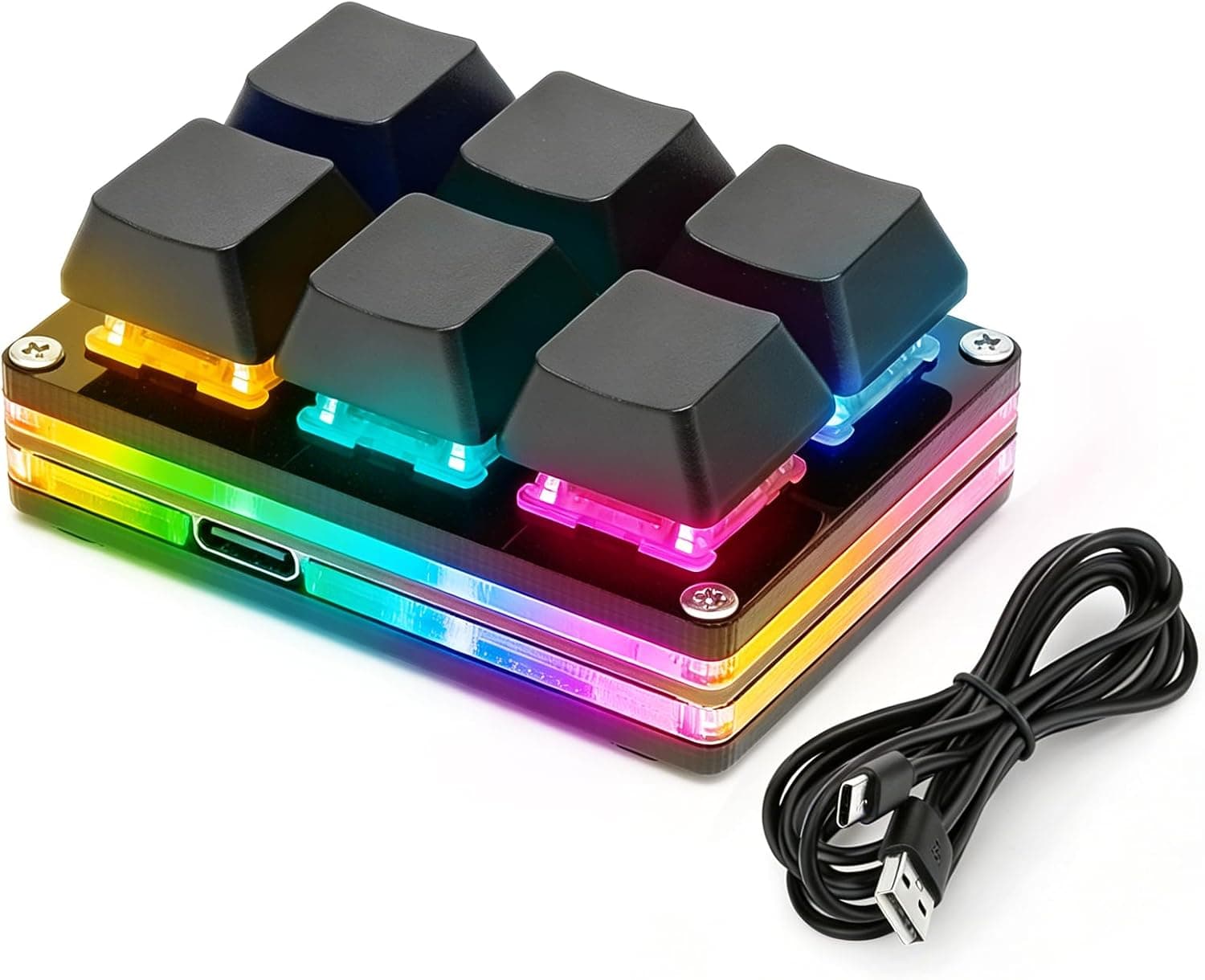
It pairs Cherry MX compatible mechanical switches with RGB lighting and onboard memory that stores your key assignments, and it connects over a single 1.5 m USB Mini B cable.
The intended uses are rhythm games such as OSU!, shortcut and macro triggers in video or photo editing, and any workflow where a handful of inputs deserve their own physical buttons.
Because it enumerates as a standard HID keyboard, keystrokes register the moment you plug it in. The bundled software is only needed when you want to change what each key sends.
For context, the Amazon rating captured on 22 June 2026 was 3.3 out of 5 stars from 5 reviews (roughly a 66% positive score).
With a sample that small, the honest reading is "not enough data yet" rather than a verdict either way.
Which Jobs It Actually Fits
| Use case | Fit | Why |
|---|---|---|
| OSU! and 2–4 key rhythm games | Excellent | Six keys is plenty; frees desk space |
| Editing shortcuts and macros | Excellent | Onboard memory keeps mappings across PCs |
| Numpad replacement | Limited | Six keys cannot cover digits 0–9 |
| Stream scene switching | Good | Works well through key-bind assignments |
| Everyday typing | No | Not a primary keyboard |
The row worth arguing about is the numpad one. With six keys you simply cannot place ten digits, so if data entry is the goal, a proper 17-key numpad will serve you better.
Compatibility Guide
Compatibility is refreshingly simple. The pad behaves as a standard HID keyboard, so Windows, Linux, macOS, Android and Raspberry Pi all recognise it without extra drivers.
There is no chipset, BIOS or power-draw question to worry about — one free USB port is the entire requirement.
The detail that trips people up is the connector: it is USB Mini B, not Micro USB and not USB-C. If the bundled 1.5 m cable is lost or damaged, a phone cable from the drawer will not substitute.
Keeping a spare Mini B cable on hand is sensible. The 1.5 m length is fine on a desk, but may not reach a floor-standing PC's rear ports; use a front port or a hub in that case.
Also note that the configuration software is documented for Windows. The pad itself works on macOS and Linux, but the practical workflow is to set your mappings on a Windows machine, write them to onboard memory, and then carry the pad anywhere.
Onboard storage is what makes that detour viable, which is why it matters more here than the spec line suggests.
Product Info
Key specifications: six keys, Cherry MX compatible mechanical switches, USB Mini B interface, a 1.5 m cable, multi-mode RGB backlighting, onboard memory, and Windows configuration software.
Supported platforms are listed as Windows, Linux, macOS, Android and Raspberry Pi.
Pricing has moved noticeably between captures. The listing showed ¥10,649 as captured on 22 June 2026 and ¥13,482 as captured on 26 August 2026.
Both figures are capture-time prices and will not match today's page. A swing of nearly 30% in two months means these numbers are a rough range, not a quote — check the current listing before deciding, and expect sale periods to move it again.
Bluntly, low-five-figure yen is not cheap for a six-key pad; the same budget reaches full 65% or TKL hot-swap boards. The case for buying this one is specific: you already own a main keyboard and want dedicated physical buttons beside it.
How It Compares
The six-key OSU! pad category has grown.
The usual cross-shops are eight-key SayoDevice-style pads and magnetic-switch models with Rapid Trigger and adjustable actuation. If you want competitive-grade response tuning, those are functionally ahead.
This aikeec pad instead offers a straightforward mechanical feel plus portable settings. That suits someone splitting time between rhythm games and editing shortcuts, and who enjoys the RGB.
It is not the endgame device for a player chasing leaderboard ranks.
Setup In Practice
Setup is short. Plug it in, confirm the default keys register, then open the Windows software, assign key codes or macros, and write them to the device.
From that point the mapping travels with the pad.
The RGB modes include always-on, press-reactive and slow colour cycling. The press-reactive mode is genuinely useful when practising rhythm games because you can see whether a press landed.
Dim or disable it if the pad sits in your stream frame.
Best Use Cases
- Rhythm game players — most charts use two to four keys, so six leaves headroom, and removing the full keyboard from centre desk frees mouse space.
- Editors who want shortcuts on physical keys — cut, export, layer toggles and similar high-frequency commands pay off quickly, and onboard memory means a laptop and a desktop share one mapping.
- Anyone needing a dedicated control strip — scene switching, canned text, mute toggles: fixed actions you want to hit without hunting.
- Small-desk setups — the footprint is six keys wide, so placement is flexible.
Before You Buy
Read the "Cherry MX compatible" wording carefully. The title's "upgraded Cherry shaft" phrasing and the spec line both describe compatibility, which most often means a Cherry MX style cross stem (so standard keycaps fit) rather than a guarantee of Cherry-manufactured switches.
If switch provenance matters to you, confirm it on the product page before ordering.
Weigh the review count. As captured on 22 June 2026 there were 5 reviews averaging 3.3 of 5 stars.
A single-digit sample cannot tell you anything reliable about defect rates or unit variance, and a 3.3 average often hides a split between praise and complaints.
Treat this as an unproven product, not an established staple.
Expect price volatility. ¥10,649 at one capture and ¥13,482 at another is a large swing; if you are not in a hurry, watching the listing costs nothing.
Do not count on hot-swap or expansion. Switch replacement is not documented, and six keys is six keys forever.
If you suspect you will want more, start with an eight-key or larger model.
It is the wrong buy as your only keyboard. Typing and WASD movement are out of scope. This is strictly a second device.
Finally, Amazon listings occasionally carry registration details that disagree with the actual product. Before ordering, cross-check the manufacturer, model and included accessories against the product images and title — especially the cable connector type (USB Mini B) and how the configuration software is obtained.
FAQ
Q. Do I need to install a driver? A.
No. It enumerates as a standard HID keyboard, so it types as soon as it is plugged in.
The software is only for remapping.
Q. Does it work on macOS or Linux? A.
Yes as an input device. Configuration is documented for Windows, so map it there, save to onboard memory, and carry it over.
Q. Can it replace a numpad? A.
Not fully — six keys cannot hold ten digits. Assigning a few frequently used numbers or operators works, but heavy data entry does not.
Q. Can I change the keycaps? A.
Likely yes if the stems are Cherry MX style, but the switch details are not spelled out, so verify the stem shape on the listing first.
Q. Can I replace the cable? A.
The device end is USB Mini B, so Micro USB and USB-C cables will not fit. Match the connector when buying a spare.
Product Disclosure (Amazon)
- Manufacturer: aikeec
- Seller: LIFE-I STORE
- Fulfilled by: LIFE-I STORE
- ASIN: B0GJRLG74F
- Note: This article covers a manufacturer-made product based on Amazon listing details.