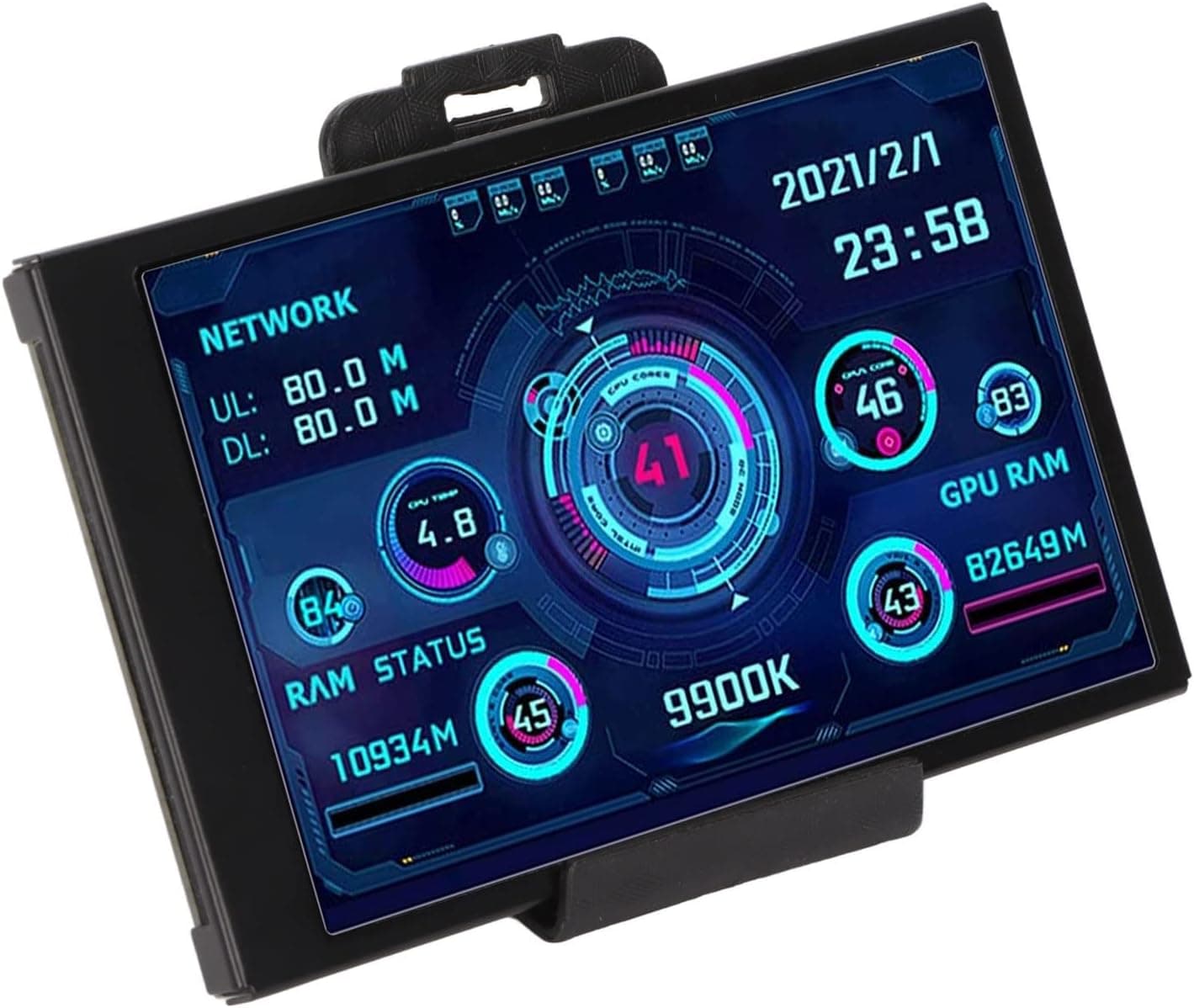
This 3.5-inch IPS sensor panel is a small secondary screen whose job is to show PC vitals — CPU temperature, RAM usage, storage capacity — continuously.
The short verdict: it is an auxiliary readout for people who want temperatures and load visible without giving up part of their main screen, not a general-purpose monitor for images or video. As captured on 28 June 2026, the listed price on Amazon.co.jp was ¥7,804 with a 4.0 out of 5 rating from 16 reviews.
Both figures move over time, so check the product page before buying.
Overview
The panel packs a 320×480 IPS screen into a 3.5-inch diagonal.
IPS matters here because these panels are often mounted at an angle — inside a case, or off to the side of a desk — and IPS keeps color and brightness stable off-axis. A single USB (Micro USB) cable carries both data and power.
Supported operating systems are Windows 10 and 11.
One point deserves emphasis: temperatures do not appear just because you plugged it in. Panels of this type display an image generated by sensor-panel software running on the PC — AIDA64's sensor panel mode being the best-known example.
The hardware is a display; the software is what reads the sensors. Buyers who miss this conclude the unit is dead on arrival when in fact nothing has been configured yet.
What you can show is likewise decided by the software. CPU temperature and load, memory usage, free storage, fan speeds, network throughput and a clock are typical.
Some readings — certain GPU or motherboard sensors — depend on your specific hardware, so do not assume any particular value is guaranteed.
Compatibility Guide
The stated requirements are minimal: a USB port and Windows 10/11. There are no socket, chipset or PSU constraints, no PCIe slot is consumed, and no GPU video output is used.
That last point is the clearest advantage over a small HDMI sub-monitor: you can add this to a system whose display outputs are already full.
Practical things to verify:
- A free USB port. For an in-case install, check whether a USB 2.0/3.0 internal header is available, or whether you will route the Micro USB cable out through the rear.
- Cable length. Fine on a desk; often short if you plan to route behind a full-tower side panel.
- Physical dimensions. 3.5 inches is the diagonal, not the outer size. If you intend to mount it in a bay or panel cutout, confirm actual width, height and mounting holes before ordering. This is the most common mistake with parts like this.
- Non-Windows systems. Windows 10/11 only. Do not plan on Linux, macOS or consoles.
The spec sheet lists a 16:9 aspect ratio, which does not match a 320×480 resolution (that is 2:3). This is very likely an error in the listing data.
If you plan to author your own background or layout, build it at the real 320×480 resolution rather than from a 16:9 template.
Setup Walkthrough
Connect via USB and confirm Windows detects the device.
Install whatever driver or utility the seller specifies (check the product page for what is supplied).
Install sensor software such as AIDA64 and set its sensor-panel output to match the panel resolution.
Choose your readouts and build the layout.
Enable auto-start so the panel populates when the PC boots.
Step 4 takes longer than people expect. A 3.5-inch panel holds a limited amount of information, and cramming in items shrinks the font until nothing is legible from your actual seating distance.
Start with three values — CPU temperature, CPU load, memory usage — verify readability from your chair, then add more.
How It Compares to the Alternatives
| Approach | Added cost | Always visible | Effort |
|---|---|---|---|
| USB sensor panel like this one | Modest | Yes | Software setup required |
| In-game software overlay | Free or low | Overlaps the game | Easy |
| A window on your main monitor | None | Occupies screen space | Easiest |
| Small HDMI sub-monitor | Usually higher | Yes | Consumes a video output |
The value proposition is narrow but real: a fixed physical surface for your numbers that costs you zero pixels on the main display. If you only need readings during games, an overlay is enough.
If you can spare a screen corner, a window is enough. Buy this when you specifically want the separate physical surface.
Product Info
Key specifications: 3.5-inch screen, 320×480 resolution, IPS panel, USB (Micro USB) interface, Windows 10/11 support.
The listing also states a 16:9 aspect ratio, which as noted conflicts with the resolution — work from the real resolution.
Price as captured on 28 June 2026 was ¥7,804 on Amazon.co.jp.
That is a point-in-time figure and will shift with sales and stock. The eBay marketplace entry has no single price, since it resolves to a search of individual listings.
The rating captured on 28 June 2026 was 4.0 out of 5 across 16 reviews.
Sixteen is a very small sample — a handful of new ratings can move the average noticeably. Read it as "not yet settled" rather than "proven good," and confirm the seller's return terms before ordering.
Best Use Cases
- Builders who want temperatures always in view — spot an abnormal rise without alt-tabbing away from what you are doing.
- People adding visual interest to a case or desk — it works as decoration as well as instrumentation.
- Streamers and recorders — moving readouts onto separate physical hardware keeps overlays off the captured feed.
- Systems with no spare video outputs — USB attachment sidesteps the GPU entirely.
Before You Buy
This is a display, not an instrument. The PC-side software does the measuring.
If you dislike installing and configuring extra background software, this is the wrong product. Some sensor tools also gate features behind a paid tier, so the real total may exceed the hardware price.
Keep expectations proportional to the size. 320×480 is fine for numbers and icons, not for stacked detailed graphs.
A 3.5-inch screen is also small for viewing from across a desk — place it close and low rather than far back.
There is no touch input.
Do not assume it works as a general second display. Panels of this class sometimes appear as an extended Windows display and sometimes only render through vendor software.
If you plan to park a browser or chat window on it, confirm that behavior on the listing first — and note that 320×480 is not a usable work area regardless.
Listing data on products like this is not always accurate. The stated 16:9 aspect ratio contradicts the stated resolution, and brand or model fields on low-cost panels can vary between pages.
Judge from the product images and title, and ask the seller if anything is unclear, rather than trusting the specification fields alone.
Measure before you plan a mount. "3.5 inch" does not guarantee a bay fits.
Diagonal size, outer dimensions and screw-hole placement are three separate facts; only the first is given here.
Who should skip it: anyone primarily on non-Windows systems; anyone unwilling to configure software; anyone wanting high resolution or touch; and anyone expecting a plug-and-play experience out of the box. A conventional small sub-monitor or a software overlay will serve those cases better.
FAQ
Q. Will CPU temperature appear as soon as I plug it in? A.
No. You need sensor-panel software (such as AIDA64's sensor panel mode) running on the PC.
The unit displays the image that software produces.
Q. Does it use up a GPU video output?
A. No. Data and power both arrive over USB, so your DisplayPort and HDMI outputs stay free.
Q. Can I use it as a normal second monitor for a browser? A.
That depends on the unit and its driver, so confirm on the listing before buying. Even when possible, 320×480 is too small to be a practical workspace.
Q. Does it work outside Windows?
A. Supported operating systems are listed as Windows 10 and 11. Do not count on macOS or Linux.
Q. Is leaving it on continuously a problem? A.
As with any LCD, showing an unchanging image for very long periods carries some risk of degradation. Including a moving element such as a clock, or blanking the panel when the PC sleeps, mitigates it.
Q. How should I read the price and rating quoted here? A.
They are point-in-time values from 28 June 2026 (¥7,804; 4.0 stars from 16 reviews).
With so few reviews the average is volatile, and prices change — verify both on the product page before ordering.