Overview
The Vikisda Microsoft Ergonomic Desktop Keyboard and Mouse Combo RJU-00001 is a wired set that pairs Microsoft's ergonomic keyboard, the Microsoft Ergonomic Desktop (model RJU-00001), with an ergonomically shaped mouse. The short verdict: if you type for long hours and worry about wrist angle or forearm twist, it is a strong candidate.
However, the Amazon.co.jp listing appears to be a parallel import, and both the layout description and the price need checking.
Before buying, confirm two things: that the layout is the one you want, and that the asking price is worth paying.
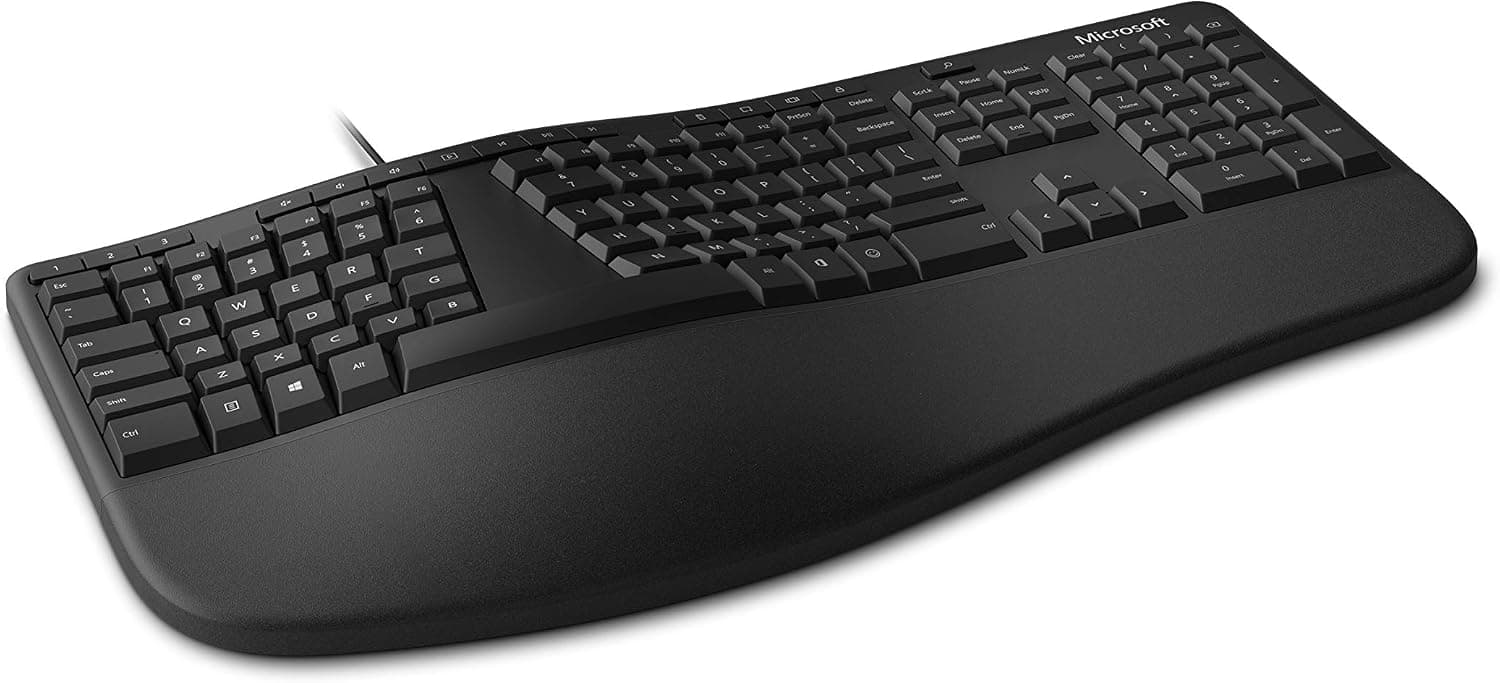
The keyboard carries on the Microsoft Natural line with a curved keybed, negative tilt, and an integrated palm rest. The keys are split into left and right halves set at an angle, so you can type without bending your wrists outward.
That is its defining feature. The mouse uses an optical sensor and an ergonomic shape that matches the keyboard's design.
Both connect over USB as plug-and-play devices, so they work on a Windows PC without installing drivers.
On Amazon.co.Check the retailer's page for the latest user reviews.
That is a high satisfaction level for an ergonomic product. Still, split keyboards vary a lot in how quickly people adapt, so a high rating does not guarantee it will suit you.
The sections on real-world use and pre-purchase cautions below cover where it divides opinion.
Compatibility Guide
Both the keyboard and the mouse connect via wired USB Type-A and draw power from USB, so no batteries are needed. No drivers are required either.
On recent laptops with only USB-C ports, however, you will need a USB-C to USB-A adapter or hub. The set uses two USB ports, so check that you have enough free ones.
| Item | This product | Common pitfall |
|---|---|---|
| Connection | USB Type-A (wired) | USB-C-only laptops need an adapter |
| Power | USB-powered, no batteries | No battery anxiety |
| Official OS support | Windows 7/8/10/11 | Mac and Linux limited to basic functions |
| Listed layout | Japanese QWERTY, 104 keys | Key count conflicts with a Japanese layout (see below) |
| Footprint | Curved with built-in palm rest | Wider and deeper than a typical keyboard |
Windows 7, 8, 10, and 11 are officially supported. On macOS and Linux, basic typing and pointing should work, but media keys and other extra functions may not.
On a Mac, the Windows key acts as Command and Alt acts as Option, so swapping modifier keys in System Settings reduces confusion. Treat this as a Windows-oriented product.
The layout deserves the most attention. The product data says Japanese QWERTY with 104 keys, but a full-size Japanese (JIS) keyboard usually has around 108 to 109 keys because of extra keys such as Henkan, Muhenkan, and Kana.
104 keys is the typical count for a full-size US (ANSI) layout. Since this is a parallel-import listing, there is a real chance you will receive a US layout.
Check the product photos: a tall, inverted-L Enter key means JIS, while a wide, single-row Enter key means US.
A US-layout unit can still be used on Japanese Windows. But unless you switch the keyboard layout to English (101/102 keys) in Windows settings, symbols such as @ and [ will not match the keycap legends.
There is also no Hankaku/Zenkaku key, so you toggle Japanese input with Alt + ` (backtick). If that bothers you, skip this listing unless you can confirm it is JIS.
Product Info
| Item | Detail |
|---|---|
| Connection | USB Type-A (wired) |
| Keyboard layout | Japanese QWERTY, 104 keys (as listed; see note above) |
| Mouse sensor | Optical |
| Batteries | None (USB-powered) |
| Keyboard features | Curved keybed, negative tilt, built-in palm rest |
The 104-key count suggests a full-size configuration that includes a number pad. That is handy for accounting and data entry, but it is also why the board is so wide.
The optical mouse needs no ball cleaning and works on ordinary desk surfaces. On glossy surfaces such as glass, optical tracking can be unstable, so having a mouse pad on hand is a good idea.
We cannot simply quote the price. When the data was captured in September 2026, the Amazon.co.jp listing was priced far above the typical range for a wired keyboard and mouse combo, apparently set by the import seller.
Microsoft scaled back its own-brand PC accessories business in 2023, so shrinking supply may also be pushing prices up. Meanwhile, eBay showed an extremely low listing, which is likely a single item, a used unit, or parts rather than the full set.
Prices change a lot, so check the latest price and the listing details (what is included, new or used) on the product page before you buy.
The package typically includes the keyboard, the mouse, fixed USB cables, and a quick-start guide. Microsoft's standard warranty is one year, but parallel imports may not qualify for manufacturer support in Japan.
Check the seller's warranty terms on the listing.
Real-World Use and the Learning Curve
Most people who switch to a split, curved keyboard type more slowly for the first few days to few weeks. The hardest adjustment is for anyone who habitually hits B, 6, or Y with the wrong hand.
On a split layout each key is fixed to one side, so self-taught finger habits stop working. On the other hand, people who already use proper home-row technique adapt quickly.
Negative tilt raises the front edge and lowers the back so your wrists do not bend upward. To get the benefit, set your chair and desk so your elbows sit at roughly a right angle.
If the desk is too high, your shoulders will rise even with negative tilt. Use the palm rest to rest your palms between bursts of typing, and let your hands float lightly while typing, which is generally advised to avoid pressing on the wrists.
Rather than using it for eight hours on day one, ease in, for example half a day for the first week. That makes it much less likely you will give up.
If going back to a flat keyboard starts to feel uncomfortable after you adapt, that is a good sign the set suits you.
Comparison with Alternatives
| Type | Example | Best for | Trade-off |
|---|---|---|---|
| Wired curved one-piece (this set) | Microsoft Ergonomic Desktop | Long sessions at a fixed desk | Wide, not portable, takes time to learn |
| Folding split | Samsers split folding keyboard | Using a split layout while traveling | Less wrist support from palm rest or tilt |
| Standard wireless combo | Slim sets such as ProtoArc | Cable-free, more desk space | Wrist angle same as a flat keyboard |
| Gaming combo | Logicool G213r + G703h | Responsiveness for games | Ergonomic wrist support is not the focus |
This set's strength is that it combines a curve, negative tilt, and a palm rest in one board, plus a matching mouse, for a fixed workstation. If portability or a clean, cable-free desk matters more, other types will satisfy you more.
Compare along two axes: how much you want to reduce wrist strain, and how much freedom you need in where you set up.
Best Use Cases
- Office workers with long typing sessions: The curved keybed and negative tilt keep the wrists at a natural angle and are designed to reduce typing fatigue.
The large palm rest gives your palms a place to rest between bursts. The full-size layout with a number pad also suits number-heavy work.
- People trying to prevent wrist discomfort or tendonitis: The Microsoft Natural line's design aims to reduce wrist strain.
It does not guarantee any therapeutic effect. If you already have pain, see a doctor first and treat this as one way to improve your workspace.
- Anyone who wants a matched keyboard and mouse in one purchase: The set shares a unified design and feel, so you do not have to choose ergonomic products separately.
Not ideal for: Gamers who want instant response and tactile feedback are better served by mechanical keyboards and gaming mice. It is also a poor fit if you want a wireless setup or need something portable for a laptop.
If you require a Japanese layout and cannot confirm it from the product photos, skipping this listing is the safer choice.
Setup Steps
On arrival, check the Enter key shape and the presence of conversion keys to tell whether the layout is JIS or US.
Plug the keyboard and mouse directly into USB-A ports (via an adapter on USB-C-only machines).
If it is a US layout, go to Time & Language, then Language & Region in Windows, and set the keyboard layout to English.
Type symbols such as @, [, and ] in Notepad to confirm they match the keycap legends.
Adjust chair and desk height so your elbows sit at roughly a right angle before you start.
Before You Buy
The layout description is inconsistent. The listed Japanese QWERTY with 104 keys does not add up for a Japanese layout; 104 is typical of a full-size US layout.
Receiving a different layout than expected is the most likely mistake with this listing. If you need a Japanese layout, confirm it through the product photos and by asking the seller before ordering.
Be careful with the listed prices. As of September 2026, the Amazon.co.jp price was far above the normal range for this product class, while eBay showed an unusually low listing.
The collected data also labeled one link Amazon US even though it pointed to the same Amazon.co.jp page.
Prices change frequently, so check the current price on the product page and compare alternatives before paying that amount.
Vikisda at the start of the title is not a Microsoft brand. Amazon's listing names Microsoft as the manufacturer and URUNEXUS as the seller and shipper.
The word seems to have been added by the seller, and listing details are not always accurate. Use the photos, title, and model number to confirm you are getting the genuine Microsoft RJU-00001.
Parallel imports may not be covered by the manufacturer's warranty in Japan, so review the seller's warranty terms too.
It takes up a lot of desk space. The curved, palm-rest design plus the number pad uses more space than a typical keyboard.
The mouse ends up farther from your body's center line, and some users feel strain in the right shoulder. If you use a keyboard tray, measure its width and depth first.
Plan for a learning period. Expect slower typing for the first few days to few weeks, so avoid switching right before a busy deadline.
The cables are fixed to the devices, so if one breaks you cannot replace just the cable.
FAQ
Q. Is it a Japanese layout? A.
The data says Japanese QWERTY, but 104 keys is the usual count for a US layout, and this is a parallel-import listing. Check the Enter key shape and conversion keys in the product photos.
Q. Does it work on a Mac? A.
Basic typing and pointing should work, but official support is Windows 7/8/10/11. Media keys may not work, and you will need to remap modifier keys.
Q. Does it need batteries or charging?
A. No. Both the keyboard and the mouse are wired and USB-powered.
Q. Will it cure tendonitis? A.
It is designed to reduce wrist strain, but it does not guarantee a therapeutic effect. If you have symptoms, follow your doctor's advice first.
Q. Can I use it for gaming? A.
Basic game controls work, but the split layout changes how the WASD area feels and there are no gaming features. If gaming is your main use, a gaming keyboard and mouse set will likely satisfy you more.
Product Disclosure (Amazon)
- Manufacturer: マイクロソフト
- Seller: URUNEXUS(ウルネクサス)Global Industrial & Lifestyle
- ASIN: B086QQN655
- Note: This article covers a manufacturer-made product based on Amazon listing details.