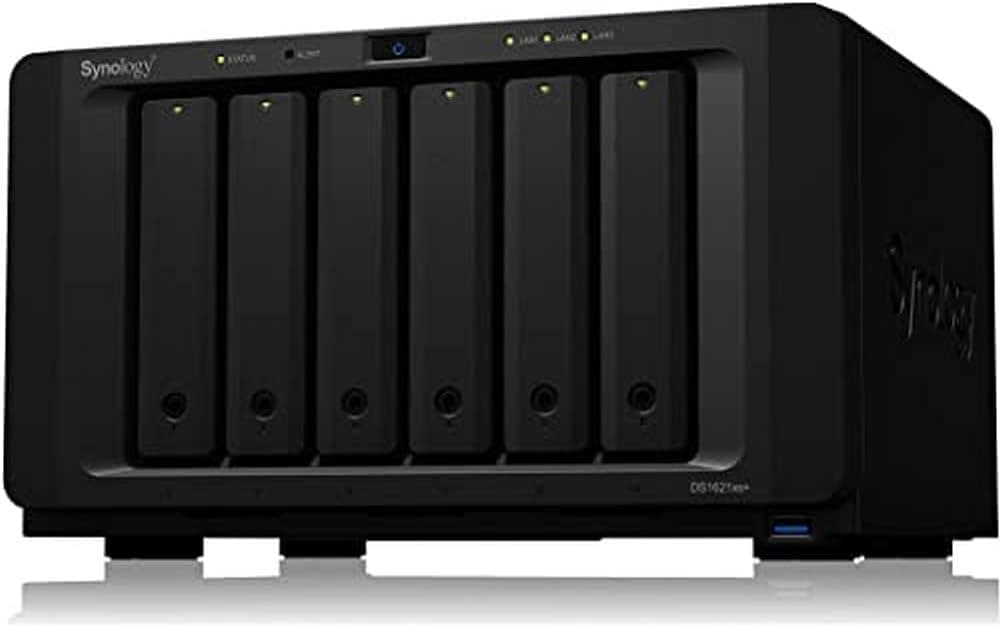
Overview
The Synology DS1621xs+ — 6-Bay NAS with Quad-Core CPU and 8GB RAM is a desktop NAS built around an Intel Xeon D-1527 (4 cores / 8 threads) with 8GB of DDR4 ECC memory, expandable to 32GB. It ships with a built-in 10GbE port, and two M.2 NVMe slots can be used for SSD caching.
It is aimed at businesses rather than homes: a small office's file server, a backup target, or a light virtualization host.
The short verdict: if several people read and write large files at the same time, and you plan to build out a 10GbE network around it, the DS1621xs+ is a strong candidate. If your main goal is streaming video or storing family photos, it is overkill.
It runs Synology DiskStation Manager (DSM) and supports virtual machines via Virtual Machine Manager (VMM). By adding two DX517 expansion units (5 bays each), you can grow it to 16 bays as your data grows.
Compatibility Guide
Most problems people hit with the DS1621xs+ come not from the unit itself but from the environment around it: connections that never reach full speed, or drives that turn out to be unsupported. Here are the main points to check.
| Item | DS1621xs+ spec | Common pitfall |
|---|---|---|
| Drives | 6x 3.5/2.5-inch SATA HDD/SSD | Drives not on the official compatibility list may trigger warnings or limited features |
| M.2 slots | 2x NVMe (cache) | Plan on them as cache, not as general data storage |
| Memory | 8GB DDR4 ECC (up to 32GB) | Avoid non-ECC or non-recommended modules |
| LAN | 10GbE x1, 1GbE x2 | Without 10GbE on both the switch and the client, you get 1GbE speeds |
| USB | USB 3.0 x3 (1 front, 2 rear) | Useful for external backup and data import |
| Size / weight | 166 x 282 x 243 mm / 5.3 kg | Weight excludes drives; six HDDs add significantly more |
Drive compatibility
Drive choice deserves the most attention. Synology's business models are designed around drives on its compatibility list.
Unlisted HDDs may produce warnings in DSM or have some features limited. Synology's policy here has shifted between DSM versions, so check the official compatibility list for the exact model and capacity you plan to buy.
Getting real 10GbE speed
The 10GbE port only helps if the whole path supports 10GbE. At a minimum you need a 10GbE switch (or a direct connection to the client), a 10GbE NIC in the client PC, and cabling rated for it (Cat6A or better is the usual guideline).
The two 1GbE ports support link aggregation (IEEE 802.3ad) for redundancy and more total bandwidth across multiple clients.
Note that it does not double the speed for a single PC.
What the M.2 cache is for
The M.2 NVMe slots are for SSD caching.
They help most with random access to small files, such as busy file shares or virtual machine disks. For large sequential video transfers, the difference can be small.
A read-write cache generally requires two SSDs.
Expansion units
The DX517 expansion unit is sold separately. Six internal bays plus two DX517 units give you 16 bays.
Plan shelf space and power, including UPS capacity, for the expansion units too.
Product Info
The DS1621xs+ was released in 2020 and sits above Synology's Plus series (such as the DS1621+). The Xeon CPU, ECC memory, and standard 10GbE mark it as a higher-tier model.
| Item | Value |
|---|---|
| CPU | Intel Xeon D-1527 (4C/8T) |
| Memory | 8GB DDR4 ECC (up to 32GB) |
| Drive bays | 6 (up to 16 with expansion) |
| Supported drives | 3.5/2.5-inch SATA HDD/SSD |
| M.2 slots | 2 (NVMe, cache) |
| LAN | 10GbE x1, 1GbE x2 |
| USB | USB 3.0 x3 (1 front, 2 rear) |
| Dimensions | 166 x 282 x 243 mm |
| Weight | 5.3 kg |
| Warranty | 5 years |
As of September 2026, Amazon.co.jp listed it at ¥283,434.
Prices change with sales and stock, so check the product page for the current price. That figure covers the diskless unit only.
Filling six bays with NAS-grade HDDs adds substantially to the cost, and so does buying a 10GbE switch and NICs if you don't already have them. Budget for the whole setup, not just the box.
Check the retailer's page for the latest user reviews. That is not a huge sample, but it is a consistently strong rating for a high-end business NAS.
It comes with a 5-year warranty, and units from Japan's authorized distributor include Japanese-language phone support. For hardware that holds company data, this support is part of what you pay for.
The box contains the NAS, a power cord, two RJ-45 Ethernet cables, a quick installation guide, and screws. No drives are included.
Best Use Cases
- IT administrators at small and mid-sized businesses: Consolidate file serving and backup for multiple teams on one unit. ECC memory and the 5-year warranty matter when downtime is costly. With VMM, you can run Windows Server or Linux VMs for testing and cut down on physical servers.
- Video and photo production teams: With a 10GbE switch, several workstations can share the same project files. The M.2 cache helps most with projects made of many small files.
- Organizations with unpredictable growth: Start with 6 bays and grow to 16 with DX517 units. It is a middle ground when you don't need a rackmount system yet but can't predict capacity a few years out.
Before You Buy
Not a good home media server
The Xeon D-1527 has no integrated GPU, so it is poorly suited to hardware transcoding in apps like Plex. A higher-tier CPU does not mean faster at everything.
Hard to justify without 10GbE
If your network is entirely 1GbE and will stay that way, most of the DS1621xs+'s advantages go unused. The same budget spent on more drive capacity or a second backup NAS would do more for your data's safety.
Limited freedom in drive choice
As noted above, you should plan on drives from the official compatibility list. That doesn't fit well with reusing spare HDDs or chasing the lowest cost per terabyte.
Placement and noise
The unit weighs 5.3 kg without drives, and with six 3.5-inch HDDs it gets heavy.
Six drives and fans running 24/7 can be noticeable in a quiet room, so plan on a server room or a shelf away from desks. A UPS is worth considering to protect against power loss during writes.
RAID is not a backup
RAID across six bays won't protect you from accidental deletion, ransomware, or failure of the unit itself. Budget for copies to external drives, another NAS, or the cloud.
About the product listing
The Amazon listing title mixes the model number with generic terms like quad-core CPU and 8GB memory, making it easy to confuse with the similarly named DS1621+. Check the images and title to confirm the model is DS1621xs+ and that it is the authorized distributor version.
FAQ
Q. How does the DS1621xs+ differ from the DS1621+? A.
The DS1621xs+ is the higher-tier model, with a Xeon CPU, ECC memory, and 10GbE built in. Choose it if you want 10GbE from day one and prioritize stability.
Q. Can I use any hard drive? A.
It supports 3.5/2.5-inch SATA HDDs and SSDs, but drives on Synology's official compatibility list are expected.
Unlisted drives may show warnings or limited features, so check before buying.
Q. Should I upgrade the memory? A.
The stock 8GB is often fine for file sharing. If you run several VMs or have many concurrent users, consider expanding up to 32GB.
You need DDR4 ECC modules.
Q. What does adding M.2 SSDs speed up? A.
They act as an SSD cache, mainly improving random access to small files and VM responsiveness. For large sequential transfers, network speed is usually the limit.
Q. What is the maximum number of bays?
A. Sixteen: the 6 internal bays plus two optional DX517 expansion units with 5 bays each.
Product Disclosure (Amazon)
- Manufacturer: Synology
- ASIN: B08HYRYLPS
- Note: This article covers a manufacturer-made product based on Amazon listing details.