Overview
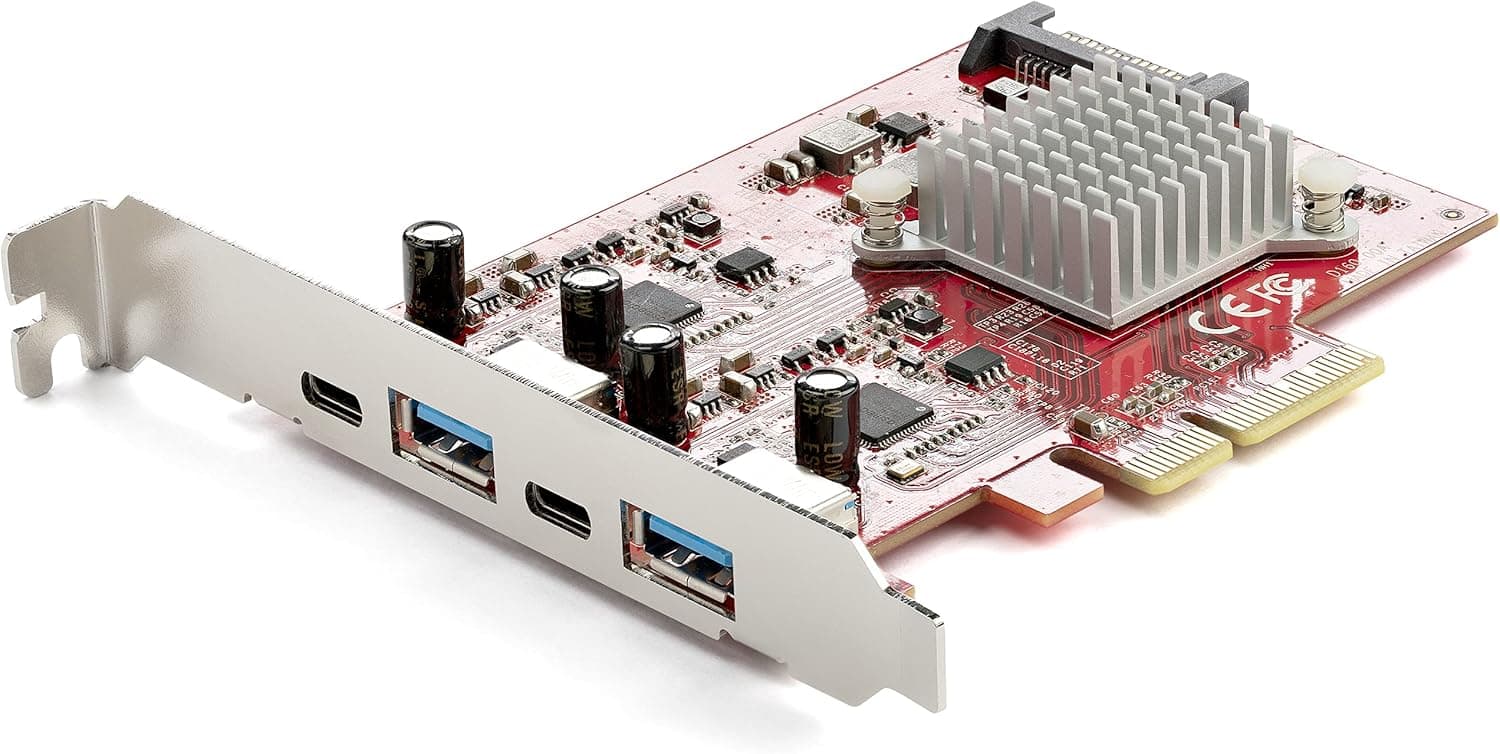
The StarTech.com PEXUSB312A2C2V — 4-port USB 3.2 Gen 2 PCIe expansion card adds four USB 3.2 Gen 2x1 (10Gbps) ports to a desktop PC: two USB Type-C and two USB Type-A.
It uses dual ASMedia ASM3142 controllers and supports UASP (USB Attached SCSI Protocol), so external SSDs and NVMe enclosures can run close to their full speed.
The short verdict: this card is worth it for two reasons. You get four 10Gbps ports including USB-C, and the load is split across two controllers.
If all you need is more ports for keyboards and printers, a cheaper 5Gbps multi-port card is enough. This one is a higher-priced, work-oriented product for people who run several 10Gbps storage devices or want USB-C on the back of their PC.
An auxiliary SATA power connector lets the USB-C ports supply 5V/3A (15W) and the USB-A ports 5V/0.9A (4.5W).
Bus-powered portable SSDs and hubs are less likely to run short on power than they are on motherboard ports.
Compatibility Guide
Slot: PCIe 3.0 x4 expected
A PCIe 3.0 x4 slot is recommended.
The card works in PCIe 2.0 x4, but performance drops.
PCIe 2.0 has roughly half the per-lane bandwidth of PCIe 3.0, so the gap grows when several ports are busy at once.
Since this card exists to deliver 10Gbps, treat a 3.0 slot as the baseline.
It is an x4 card, so it physically fits x16-length slots. However, secondary x16-length slots are often wired as x4, x2 or even x1 electrically.
Chipset slots also commonly share lanes with M.2 slots or SATA ports, so using one can disable or slow down the other.
Check your motherboard manual for each slot's lane count and what it shares with. The card will not fit a closed-end x1 slot.
Physical layout: GPU clearance
The slot directly under a graphics card is often covered by a 2-3 slot GPU cooler. Even if it looks free, the card may block GPU airflow, so check the actual slot spacing.
Case: full-profile only
The card ships with a full-profile bracket only and will not fit low-profile or slim cases. On Mini-ITX boards the single slot is normally taken by the GPU, so this card only makes sense there if you run on integrated graphics.
Power: SATA connector
Auxiliary power comes from a SATA power connector, so make sure your PSU has a spare SATA lead. Connect it whenever you rely on the 15W USB-C output.
Without it, port operation may become unstable.
OS and USB standards
The card supports Windows, Linux and macOS, and Windows 8 and later install the driver automatically. On macOS it only applies to Macs with PCIe slots.
It is backward compatible with USB 3.0 and USB 2.0 devices.
USB 3.2 Gen 2x2 (20Gbps) SSDs will run at 10Gbps.
Product Info
| Item | Detail |
|---|---|
| Controller | ASMedia ASM3142 (dual) |
| Ports | 2x USB-C, 2x USB-A |
| Max transfer rate | 10Gbps per port |
| UASP | Supported |
| Aux power | SATA power connector |
| Power output | USB-C 5V/3A (15W), USB-A 5V/0.9A (4.5W) |
| OS | Windows, Linux, macOS |
| Warranty | 2 years |
This is a mid-to-high-end USB expansion card aimed at IT professionals and power users. It fills the gap when your motherboard's USB ports fall short in number or speed.
It comes with a 2-year manufacturer warranty and free technical support.
The Amazon listing describes the interface as USB 3.0 Type A / Type C.
USB naming has changed several times, so labels vary, but the transfer spec for this card is 10Gbps per port (USB 3.2 Gen 2).
Do not mistake it for a 5Gbps product.
Check the retailer's page for the latest price.co.jp (June 1, 2026), ¥25,800 on Rakuten (Personal Tanomail, August 17, 2026) and $150.00 on eBay US (July 15, 2026).
Prices change with time and sales, so check the product pages for current prices. It sits at the pricier end of USB expansion cards.
Check the retailer's page for the latest user reviews. With that sample size, use it as a rough signal only.
Comparison with Alternatives
| Option | Best for | Trade-off |
|---|---|---|
| This card (10Gbps x4, 2C/2A) | Multiple fast SSDs, rear USB-C | Higher price, needs an x4 slot |
| 5Gbps multi-port card | Just more peripheral ports | External SSD speed is capped |
| New motherboard with more USB-C | Planning a rebuild anyway | Cost and effort |
The key question is whether you own devices that actually benefit from 10Gbps. Without external SSDs or NVMe enclosures, most of this card's advantage is wasted.
If transfer time directly costs you working time, such as moving video footage, the price premium pays off more easily. Other brands also make ASM3142-based cards, so compare USB-C port count, power output and aux power type.
Best Use Cases
- Creators and video editors using several external SSDs or NVMe enclosures. UASP plus 10Gbps is a big step up from USB 3.0 (5Gbps).
- Desktop users with no rear USB-C, or only one. Adding two USB-C ports at once is the main difference from cheaper cards that only add Type-A.
- Micro-ATX builds that are short on ports but have a free PCIe slot. One x4 slot gets you four 10Gbps ports.
- Power users running many devices at once, such as external HDDs, capture devices and VR headsets. Splitting the load across two controllers beats a single controller feeding many ports.
- Anyone who needs stable power for bus-powered devices, thanks to the SATA-backed 15W USB-C output.
Things to Consider
It will not fit low-profile cases. The bracket is full-profile only.
Check slot lanes and lane sharing. An x16-length slot may only be x1 or x2 electrically, or it may share bandwidth with an M.2 SSD.
If the card is detected but slow, or an M.2 drive disappears after installing it, this is usually why.
Not all four ports can hit 10Gbps at the same time. 10Gbps is a per-port maximum, and the whole card is limited by the PCIe 3.0 x4 link (about 32Gbps in theory).
Two fast SSDs copying at once is usually fine, but the card is not built to run every port at full speed nonstop.
Power output is 5V only. USB-C tops out at 5V/3A (15W), so it cannot charge laptops or fast-charge phones over USB PD.
Connect SATA power when using 15W.
Do not count on video output or Thunderbolt. DisplayPort Alt Mode is not listed in the specs, and Thunderbolt-only devices will not work.
Booting from these ports depends on your system. Whether you can boot from a USB port on an add-in card depends on your BIOS/UEFI.
Use a motherboard port for OS install media.
The listing data is inconsistent. Some price entries have a store label that does not match the linked country, and the interface field says USB 3.0.
When buying, confirm the product by its images and the model number PEXUSB312A2C2V.
FAQ
Q. Does it work in a PCIe 2.0 slot? A.
Yes, but performance drops. Per-lane bandwidth is about half of PCIe 3.0, so use PCIe 3.0 x4 to get full speed.
Q. Do I have to connect SATA power? A.
Yes, if you use the 15W USB-C output. Otherwise the ports may be unstable, so keeping it connected is recommended.
Q. Do I need drivers? A.
Windows 8 and later install them automatically. Linux and macOS are supported; on macOS only Macs with PCIe slots apply.
Q. Can I use it for a USB-C monitor or laptop charging? A.
No. Power is limited to 5V/3A and no video output is listed.
These ports are for data and powering bus-powered devices.
Q. Will a 20Gbps (Gen 2x2) SSD run faster?
A. It will run at 10Gbps (Gen 2x1). You need a Gen 2x2 card or motherboard for 20Gbps.
Product Disclosure (Amazon)
- Manufacturer: StarTech.com(スターテック)
- Seller: RADICAL (インボイス対応/適格事業者)
- ASIN: B099H4K4WZ
- Note: This article covers a manufacturer-made product based on Amazon listing details.