This article covers Ubiquiti Networks UniFiアクセスコントロールカード 128ビットAES 20枚パック UniFiアクセスソリューション用の安全なNFC, focusing on the real specs and the traps buyers hit after checkout.
Overview
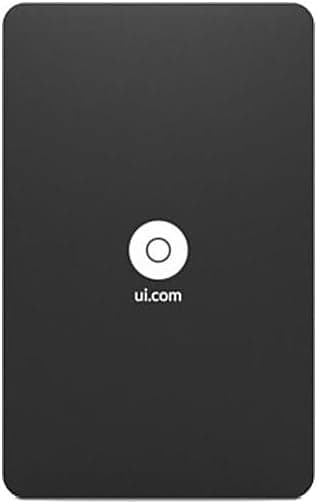
The Ubiquiti UniFi Access Control Card is an NFC smart card built exclusively for the UniFi Access ecosystem. It pairs AES-128 encryption with a proprietary security mechanism to block card cloning and credential readout.
Each pack contains 20 cards, which makes it a practical way to issue credentials to a whole small office at once.
The short verdict: this product is only for people who already run UniFi Access, or are about to deploy it. The cards do nothing on their own.
They become usable IDs only alongside a UniFi Access Hub and a reader. If that prerequisite is met, however, issuing and revoking credentials from one cloud console is a genuine day-to-day operational win.
The published specs are short: AES-128 encryption, 20 cards per pack, 5 g listed weight. Card thickness and material are not documented, so if you plan to punch a hole for a lanyard or badge reel, test on one card first.
Punching through the embedded antenna permanently kills the card.
Compatibility Guide
Compatibility is simple and narrow. These cards work only with UniFi Access systems, paired with hardware such as the UniFi Access Reader G2 and the UniFi Access Hub.
They communicate contactlessly over NFC and conform to ISO 14443 Type A. No battery, USB, or wired connection is needed on the card side.
The most common misconception is that a generic NFC reader or a phone should be able to enroll them. It cannot.
While the physical layer is standard ISO 14443 Type A, the key and authentication scheme stays inside UniFi Access, so third-party door controllers cannot register these cards. If you run another vendor's controller and just want cheap credentials, this is the wrong product.
A working door needs three things at minimum: a UniFi Access Hub to drive the strike, a reader at the door, and the cards themselves. You need hub and reader capacity per door, so budgeting from the card price alone will always undershoot.
If you are reusing an existing electric lock, confirm its drive voltage and whether it is fail-safe or fail-secure against the hub's output spec before installation. That decision is expensive to reverse.
Mounting matters too. Fixing a reader directly onto a metal door frame or panel reduces and destabilizes NFC read range.
Use a non-metallic spacer to create separation when mounting on metal.
Product Info
As captured on 28 August 2026, the listed price on Amazon.co.jp was ¥27,646.
Prices move often and this article will not, so check the product page for the current figure. Note that the entry recorded as "Amazon US" in our data shows the same yen price and the same ASIN, so treat it as the same domestic listing, not an overseas price.
Check the retailer's page for the latest user reviews. That sample size carries almost no statistical weight.
Read it as "no bad reports so far" rather than as proof of quality. Being a first-party credential, this is also a category with little room for a bad unit.
The pack contains the cards and little else; configuration happens in UniFi Access software, not on paper. Warranty follows Ubiquiti's accessory terms, but the support channel depends on where you buy, so check the seller's terms first.
In market terms these are first-party credentials for the UniFi ecosystem: easier to adopt than enterprise security-vendor cards, fully cloud-managed, and with no biometrics or multi-factor capability on the card itself.
Comparison With Alternatives
Cards are not the only UniFi Access credential.
| Credential | Best for | Weakness |
|---|---|---|
| This 20-card NFC pack | Permanent staff, long-term issue | Must be collected back on exit |
| NFC key fobs | Keyring users, field staff | Poor fit for printed photo IDs |
| Phone-based mobile credentials | Visitors, short-term users | Dead battery, device swaps |
In practice, mix them. Hand cards to permanent staff and issue temporary mobile credentials to visitors and short-term hires.
That split cuts both collection effort and the risk of forgotten revocations. A 20-card unit maps neatly onto the "issue once to the permanent team" use case.
Best Use Cases
- Small-business office managers — Ideal for a site of around 20 staff replacing a physical key logbook. If a departing employee never returns their card, revoking it in the console is enough. Not for companies already invested in another access control platform.
- Technical sole traders and studio operators — Good where a shared workspace or studio needs per-person entry logs. The audit trail is worth far more than managing key copies. Not worth it for a single door with a single user; the hub and reader investment will not pay off.
- System integrators — A clean first-party accessory to bundle with UniFi Access deployments, and a convenient stocking unit. Not suitable for mixed-vendor projects that need one shared card format.
Before You Buy
The cards alone do nothing. This is the biggest trap.
The listing sells cards only, so hub and reader costs stay invisible until later. Making one door actually operational costs several times the card price.
Price varies sharply by channel. ¥27,646 at capture time is not cheap for a 20-card credential pack.
Ubiquiti also sells direct through its own store, and domestic distributors exist. Compare before committing — for a non-urgent purchase, that comparison alone can change the total.
Do not confuse this with generic NFC. Third-party readers will not work.
Expecting interoperability with existing hardware is how you end up with 20 unusable cards you cannot return.
Decide your lost-card process first. Physical credentials get lost.
Define revocation steps, spare storage, and who approves reissue before deployment. Setting aside a few of the 20 cards as spares from day one is the practical move.
Do not trust listing metadata blindly. Amazon listings sometimes carry manufacturer, model, or contents data that conflicts with the actual item, and this listing ships from a third-party store.
Confirm from the product image and title that you are buying the 20-card UniFi Access Card pack before ordering.
Category labels may be off. Automated classification can file this product under an unrelated category.
It is an access control NFC card; read it on those terms.
FAQ
Q. Can my phone's NFC read these cards? A.
It may detect a card is present, but it cannot extract or clone the UniFi Access credential. That is what the AES-128 encryption prevents.
Q. Can I buy more cards later? A.
Yes — additional packs enroll into the same system. Keep a few spares aside so reissue is not blocked.
Q. Will they work with my existing third-party reader? A.
No. ISO 14443 Type A compliance does not help, because the key scheme is closed to UniFi Access.
Q. Can I print names or photos on the cards? A.
Surface printing is not documented in the specs. Heat and pressure from printing can damage the embedded antenna, so confirm with the seller before planning printed badges.
Q. Do the cards need batteries?
A. No. They are passive and powered inductively by the reader, so there is nothing to run flat.
Product Disclosure (Amazon)
- Manufacturer: Ubiquiti Networks
- Seller: KING TRADING SHOP
- Fulfilled by: KING TRADING SHOP
- ASIN: B098MJLGJ1
- Note: This article covers a manufacturer-made product based on Amazon listing details.