This article takes a detailed look at the Razer Blackwidow V3 Pro Green Switch ワイヤレスゲーミングキーボードメカニカルグリーン軸 Chroma RGB 英語配列 【日本正規代理店保証品】 RZ03-03530100-R3M1, covering both its specifications and how it actually behaves on a desk.
Overview
The Razer BlackWidow V3 Pro is Razer's flagship wireless mechanical keyboard. The short version: it suits people who want three things at once — a full-size layout they refuse to give up, clicky switches they actively enjoy, and no cable on the desk.
If even one of those does not apply to you, this board is either overkill or the wrong fit.
It uses Razer Green switches (clicky and tactile), with a distinct click partway through the keypress. Connectivity covers three modes: Razer HyperSpeed Wireless (2.4GHz), Bluetooth 5.0, and USB-C wired.
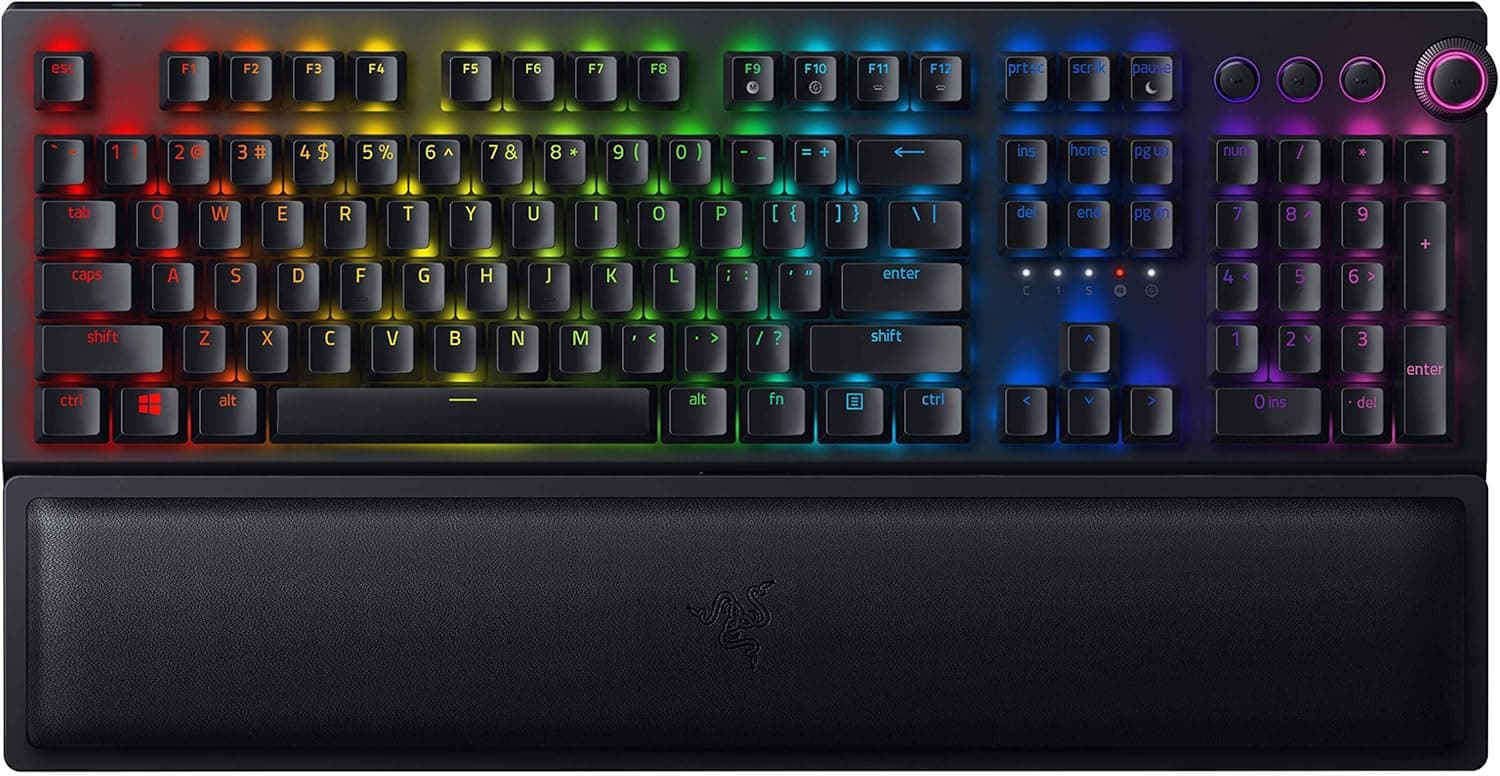
The layout is a full 104-key board plus dedicated media keys and a multi-function digital dial.
Amazon.co.jp shows 42 reviews averaging 4.1 out of 5 (82% positive, captured July 2026).
With only 42 reviews, the average moves more easily than on models with thousands, so treat it as directional. That said, a 4.1 average is the classic landing spot for a product that is well built but clearly not for everyone.
Connectivity & Compatibility
Keyboards rarely fail to work outright, but the ways people regret a purchase are predictable. Here is what the spec sheet actually implies.
| Item | Value | What it means in practice |
|---|---|---|
| Connectivity | HyperSpeed Wireless (2.4GHz) / Bluetooth 5.0 / USB-C | You must free up one USB-A port for the dongle |
| OS support | Windows 10 or later (limited macOS support) | Assume some Synapse features will not work on macOS |
| Dimensions | 450.7 x 157.9 x 42.3 mm | The wrist rest adds depth; tight on desks under 40cm deep |
| Weight | 1144.3 g | Desk-bound by design, not portable |
| Layout | Full-size (104 keys + media keys + dial) | It is a US English layout — the single biggest compatibility factor |
| Cable | Detachable USB-C to A, approx. 2m | USB-C-only laptops need an adapter |
Check the OS first. Support targets Windows 10 and later, and macOS coverage is partial.
If a Mac is your main machine and you want fine-grained Chroma RGB or macro control, decide up front whether you can live with that limit. Key remapping, macros, and lighting are all configured through Razer Synapse on Windows.
The 2.4GHz dongle is USB-A, so a thin laptop with only USB-C needs a hub or adapter.
The 2.4GHz band also shares space with Wi-Fi and wireless mice.
If the link feels unstable in a crowded RF environment, move the dongle from the back of the PC to a hub on the desk so it has a short, clear line to the keyboard.
Bluetooth 5.0 pairs with up to three devices and switches at the press of a button.
Bluetooth is generally the weaker option for latency compared with a 2.4GHz dongle, so the practical split is HyperSpeed for competitive games and Bluetooth for documents or tablet typing.
Physically, the 450.7mm width is only part of the footprint — the wrist rest extends the depth.
On a shallow desk, or one where keyboard and mouse are already fighting for width, this board will feel cramped. The 1144.3g weight reads as stability when parked, and as dead weight in a bag.
Product Info
Switches are Razer Green, keycaps are doubleshot ABS, and lighting is Razer Chroma RGB with 16.8 million colors.
Doubleshot ABS means the legends are molded in and will not wear off, but ABS itself develops a shine with use. That is material behavior rather than a defect, and it is the trade-off against boards shipping PBT caps.
The battery is rechargeable with undisclosed capacity, and no rated runtime is included in the data behind this article, so no figure is claimed here. Generally, running RGB at full brightness shortens wireless runtime considerably.
If long untethered sessions matter, plan on dimming or disabling the lighting, and confirm the official rating on the product page.
On pricing, the Amazon listing was ¥25,980 as captured on 12 July 2026, and the Japan listing for the same product was ¥29,800 as captured on 24 August 2026. That is nearly a ¥4,000 swing in about six weeks — a wide spread for a peripheral at this tier.
Sales move the street price either way, so check the current figure before buying.
Separately, a marketplace entry lists $69.99.
That is implausibly low for a new flagship wireless mechanical keyboard and most likely reflects a used unit, a parallel import, or a different configuration, so this article does not treat it as the product's real market price. If you consider an overseas marketplace listing, verify the included accessories and warranty individually.
The box includes the detachable USB-C to A cable (about 2m), the wireless dongle, a wrist rest, and documentation. Being a Japan-authorized-distributor warranty unit is the main practical difference from a grey-market import.
How It Compares
Wireless mechanical keyboards aim at very different buyers. Where this one sits:
- If you need full-size — this is the strongest case for it. Numpad, wireless, plus media keys and a dial is a short list of options. Heavy numeric entry or video scrubbing turns those extra keys into real speed.
- If space matters more — a 75%, 65%, or TKL custom board is the honest answer. A 450.7mm body simply gets in the way of wide FPS mouse swings.
- If quiet matters more — Green is designed to click. Choose a linear switch board, or a hot-swap board you can re-switch later.
- If deep customization matters more — QMK/VIA boards store keymaps in firmware. This one depends on Razer Synapse, which is friction if you avoid background software.
Best Use Cases
- You want the cable gone but will not drop full-size. Keeping the numpad, media keys, and volume dial while going wireless is the point of this product, and it fits a permanent desk setup best.
- You genuinely enjoy clicky, tactile typing. Green switches are polarizing, but for people who like them there is no quiet substitute.
- You switch between a desktop, laptop, and tablet. Hold three Bluetooth devices and drop back to 2.4GHz only for games.
- You already use a US English layout, or want to standardize on one. This is a US-layout board, so consistent symbol placement becomes an advantage rather than a hurdle.
- You value domestic warranty coverage. It ships as a Japan-authorized-distributor unit.
Things to Check Before Buying
The US English layout is the biggest trap. Coming from a Japanese layout, the positions of @, :, and _ all change, and there are no henkan/muhenkan keys.
You will remap IME toggling through Windows settings or a resident utility. It is learnable, but expect days to weeks of slower typing.
Do not swap your primary work keyboard for it the night before a deadline.
Assume the noise is louder than you imagine. Green switches click by design.
Shared offices, a room with family, late-night sessions, and streaming with an open mic are all situations where the sound becomes the problem. Do not buy on the assumption that mic noise suppression will handle it — decide first whether your environment tolerates clicky typing.
This alone is a common reason for returns.
1144.3g and 450.7mm rule out both portability and small desks. Wireless here does not mean travel-friendly.
The benefit is limited to removing a cable from the desk surface, and it is healthier to frame it that way.
Runtime depends heavily on your RGB settings. Full-brightness Chroma and lights-off operation are very different experiences.
If your plan is all-day wireless use with lighting blazing, expect disappointment, and keep the option of plugging in. USB-C mode charges while you type.
Factor in the Synapse dependency. Remaps, macros, and lighting all live in that software.
If you keep background apps to a minimum, sync settings across several PCs, or work mainly on macOS, that is ongoing friction.
Watch for mismatched listing data. One of the collected price entries was implausibly low for this product, and a price label did not match the store it pointed to.
Retail listings are often aggregated automatically, and data from a different product or configuration can slip in. Before buying, confirm with your own eyes that the product images, title, and the model number RZ03-03530100-R3M1 match what you intend to buy.
Release timing matters too. The BlackWidow V3 Pro launched in October 2020.
The core design is mature, but it predates the spread of hot-swap sockets and magnetic/rapid-trigger switches. If you want the newest input technology, this generation will feel dated.
FAQ
Q. How do I toggle Japanese input? A.
There are no henkan/muhenkan keys on a US layout. Most users assign IME toggling to something like Alt+` via Windows settings or a resident utility. If you want a Japanese-layout workflow, a different model is the faster path.
Q. Does typing feel different wired versus wireless? A.
The switches are identical, so the feel does not change. For responsiveness, HyperSpeed 2.4GHz is the strongest option and Bluetooth the weakest.
Use HyperSpeed or USB-C for competitive play.
Q. How long does the battery last? A.
No rated runtime is available in the data behind this article, so no number is claimed. What is certain is that RGB brightness changes it substantially — check the product page for the official figure.
Q. Can I use it on a Mac? A.
It will connect, but official support centers on Windows 10 and later, with partial macOS functionality. If Synapse customization matters, plan on Windows.
Q. Can I swap the switches? A.
Hot-swap is not listed in its specifications. If you want to change feel or sound later, buy a board that advertises hot-swap sockets.
Q. Do I need the wrist rest? A.
At 42.3mm tall the chassis is fairly thick, so the included rest helps your wrist angle.
It does add depth, though — measure your desk first.
Product Disclosure (Amazon)
- Manufacturer: Razer(レイザー)
- Seller: Amazon.co.jp
- Fulfilled by: Amazon.co.jp
- ASIN: B08L9CQG27
- Note: This article covers a manufacturer-made product based on Amazon listing details.