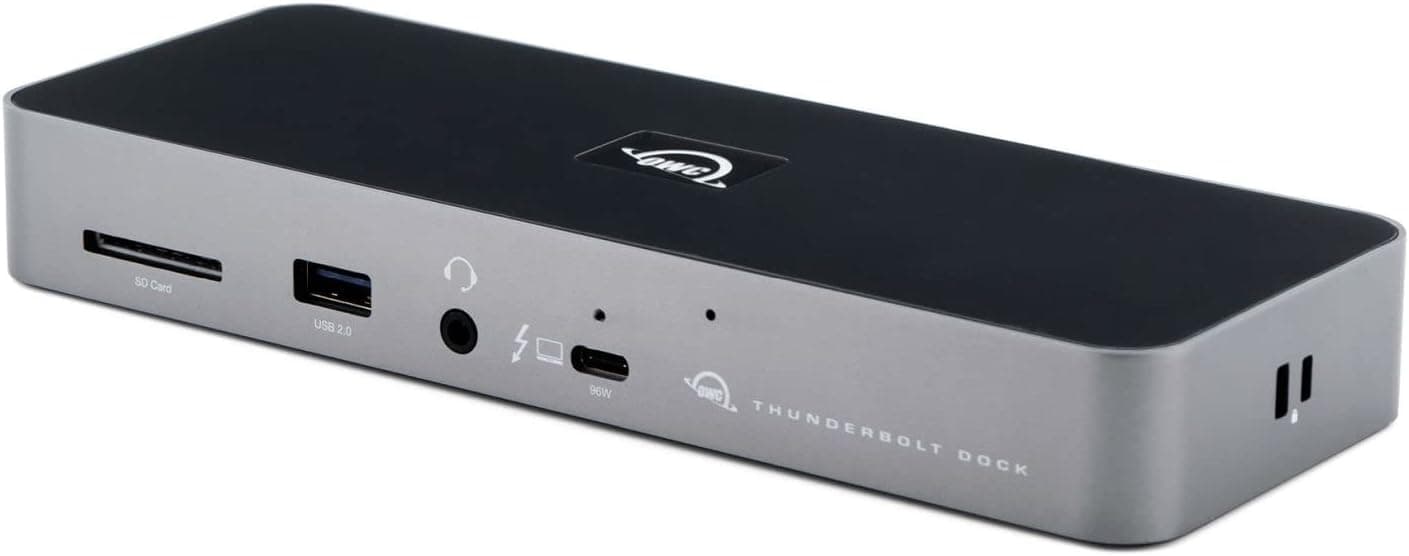
The OWC Thunderbolt Dock (Mac) is a Thunderbolt 4 docking station built to connect a single laptop to a full desk setup over one cable. This article works through the published specs and listing data to show where it fits and where you will have to compromise.
Overview
The short version: this dock suits people running a MacBook or a Windows laptop with a Thunderbolt 3 or Thunderbolt 4 port who want power, data and display consolidated into one connection. It does not suit people whose laptop has USB-C ports without Thunderbolt support, or anyone who expects to plug an HDMI cable straight into the dock.
Check your laptop's ports before anything else — that is the real decision point.
It is distributed in Japan by Amulet, the authorized OWC distributor, and ships with an Amulet-original Japanese quick-start guide. Imported docks often arrive with English-only documentation, so that matters if you would rather not fight the initial setup.
The chassis measures 23 x 8.9 x 2.5 cm in silver; at 2.5 cm tall it slides under a monitor stand or behind a keyboard easily.
For social proof: as captured in June 2026, the Amazon.co.jp listing showed 4.5 out of 5 stars from just 8 reviews (90% favorable).
Do not read that the way you would read a score backed by tens of thousands of reviews. Eight reviews tell you nobody has reported a disaster yet — they tell you nothing reliable about long-term durability or unit variance.
Compatibility Guide
The published spec lists Thunderbolt 4 as the host interface, with backward compatibility to Thunderbolt 3. Supported operating systems are macOS and Windows, and supported devices are Mac and Windows laptops that have a Thunderbolt 3/4 port.
| Your setup | Works? | Notes |
|---|---|---|
| Thunderbolt 4 laptop | Yes, full performance | Bandwidth and power as designed |
| Thunderbolt 3 laptop | Yes, backward compatible | Capped by your laptop's generation |
| USB-C only (no Thunderbolt) | Partially | Some functions, e.g. display output, may be limited |
| Only USB-A / HDMI ports | No | A Thunderbolt port is required |
The compatibility note states it plainly: a Thunderbolt 3/4 laptop is required, and USB-C-only machines may have limited functionality. The trap here is that USB-C is a connector shape, not a protocol.
Two identical-looking oval ports can behave completely differently. Look for the lightning-bolt Thunderbolt logo next to the port, or check your manufacturer's spec sheet.
One more Mac-specific trap: how many external displays you can drive through any Thunderbolt dock is limited by your Mac's own external-display support, not by the dock alone. A dock cannot exceed what the host machine allows.
If you are buying with a specific monitor count in mind, confirm your laptop's limit first.
Ports and How Video Works Here
The spec explicitly lists USB Type-A connectors on the dock, so legacy peripherals — wired keyboards, mice, flash drives, printers — plug in directly. Thunderbolt-era laptops have mostly dropped USB-A, so this saves a pile of dongles on your desk.
However, there is no dedicated HDMI or DisplayPort output on the unit. To attach an external monitor you either (1) connect a display that accepts Thunderbolt/USB-C input directly, or (2) add a Thunderbolt-to-HDMI/DisplayPort adapter.
If your monitor only has HDMI in, budget for that adapter and the extra cable it brings. The "one clean cable" fantasy tends to break right here.
Also note that the exact number, layout and per-port power figures of the USB-A and Thunderbolt ports are not part of the spec data referenced for this article. If port count is your deciding factor, verify the real numbers on the manufacturer or retailer spec page.
This article will not invent figures it cannot confirm.
Product Info
Here is what was verifiable at the time of writing. All prices are as captured on the dates shown and move with sales, currency and stock.
- Seller: Amulet (authorized OWC distributor in Japan)
- Color: Silver
- Dimensions: 23 x 8.9 x 2.5 cm
- Host interface: Thunderbolt 4 (backward compatible with Thunderbolt 3)
- Connector type: USB Type-A
- In the box: dock, AC adapter, Thunderbolt 4 cable, Amulet Japanese quick-start guide
- Reference prices: ¥41,000 as captured 9 June 2026 on Amazon, and ¥55,000 as captured 27 August 2026 on the same listing. On eBay US, $199.99 as captured 13 July 2026
That price history is itself useful. In roughly two and a half months the listed price moved from ¥41,000 to ¥55,000 — more than 1.3x.
In practice, when you buy can change what you pay by over ¥10,000. If you are not in a hurry, watch the price for a few weeks before committing.
Always confirm the current price on the product page; every figure above is a point-in-time capture.
The bundled Thunderbolt 4 cable is easy to overlook but worth money. Certified Thunderbolt 4 cables cost real money on their own, and substituting a visually identical generic USB-C cable is a classic cause of "it doesn't work" reports.
Use the included cable first.
Alternatives
Comparable Thunderbolt docks include models from CalDigit, Kensington and Anker. Broadly: pick a CalDigit TS-series unit if raw port count is the priority, a Kensington Thunderbolt dock if warranty length and corporate deployment matter, or an Anker Thunderbolt dock if you are pushing the price down.
The OWC Thunderbolt Dock sits in the balanced middle: a sufficient port set, a slim chassis, plus a local distributor and Japanese documentation. Video output is the sharpest differentiator — docks with a built-in HDMI port are simpler to live with, while this one assumes a Thunderbolt-centric setup.
The real choice is convenience of a direct HDMI jack versus a cleaner Thunderbolt-based chain. Competitor prices and port counts are not part of this article's source data, so check each product's own spec page rather than trusting a number here.
Best Use Cases
- Thunderbolt MacBook Pro / Air owners: sit down, plug in one cable, and charging plus every peripheral comes online at once. The USB-A ports mean you keep your existing wired keyboard and flash drives.
- Creators living on external storage: video editing and RAW workflows that move tens of gigabytes daily are exactly where Thunderbolt bandwidth is felt.
- People who hate visible cabling: the 2.5 cm-tall body hides under a monitor riser without drawing attention.
- Anyone who would rather not decode an English-only manual: the Japanese guide and local distributor support reduce the cost of things going wrong.
Things to Consider
1. A USB-C-only laptop will not get the full experience. This is the most common mistake.
Identical port shape does not mean Thunderbolt support. Verify your machine's spec first.
2. No HDMI or DisplayPort on the unit. If your monitor only takes HDMI, you need an adapter.
Budgeting only for the dock leaves that cost out.
3. The AC adapter is bulky. The dock is slim, but powering a laptop plus peripherals requires a substantial brick.
Check your bag before assuming this travels; treat it as a desk-bound product.
4. Only 8 reviews back the score. A 4.5 rating captured in June 2026 is fine, but eight samples is not a verdict.
You cannot infer failure rates from it — check the warranty and the retailer's support before buying.
5. The price swings hard. As noted, captures two and a half months apart showed ¥41,000 versus ¥55,000.
Assume you might be looking at a high point.
6. Watch the listing metadata. The Amazon listing records the manufacturer as Amulet, the Japanese distributor, rather than OWC, the actual maker.
That is normal for distributor-imported goods, but listing fields (manufacturer, model number, compatibility) do get mixed up across products. Confirm the item against the product images, the title, and the manufacturer's official spec sheet rather than trusting the listing fields alone.
FAQ
Q. Can I use it with a laptop that has USB-C but no Thunderbolt? A.
It may physically connect, but functionality is limited on non-Thunderbolt machines, including possible loss of display output. Plan on a Thunderbolt 3/4 host.
Q. Can I connect a monitor over HDMI? A.
Not directly — there is no HDMI port. Use a display with Thunderbolt/USB-C input, or add a Thunderbolt-to-HDMI adapter.
Q. Do I need to buy a Thunderbolt cable separately? A.
No, a Thunderbolt 4 cable is included. Generic USB-C cables can underperform, so start with the bundled one.
Q. Does it work the same on Windows as on Mac?
A. Both macOS and Windows are supported, provided the laptop has a Thunderbolt 3/4 port.
Q. What does it cost? A.
The Amazon listing showed ¥41,000 as captured 9 June 2026 and ¥55,000 as captured 27 August 2026. Because it fluctuates, check the product page for the current price.
Q. Is it portable? A.
The dock is slim at 23 x 8.9 x 2.5 cm, but the AC adapter is not.
It is better suited to a permanent desk than to daily commuting.
Product Disclosure (Amazon)
- Manufacturer: アミュレット
- Seller: アミュレット
- Fulfilled by: Amazon
- ASIN: B092M7CFZJ
- Note: This article covers a manufacturer-made product based on Amazon listing details.