Overview
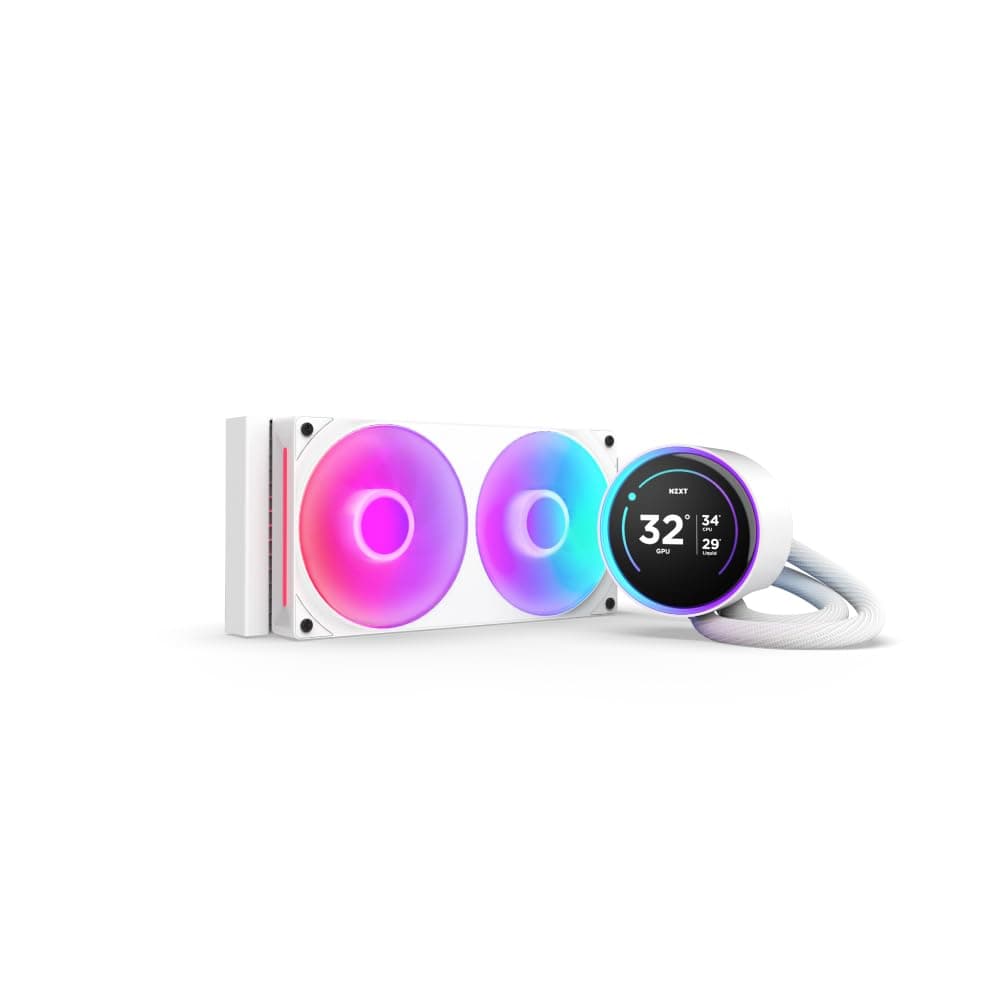
The NZXT Kraken Elite 240 — 240mm AIO CPU Liquid Cooler with Customizable LCD Display (model RL-KN24E-B1) is an all-in-one liquid cooler with a 240mm radiator and a 2.37-inch wide-angle LCD on the pump head.
The short version: you are not paying for cooling performance, you are paying for a screen in the middle of your case. If you value that screen, it is a satisfying product.
If you only care about temperatures, the same money buys better cooling elsewhere.
The LCD runs at 640x640 and 60Hz. It can show GIFs, still images, and system data such as CPU temperature and load through NZXT CAM.
The pump tops out at 2,800 RPM, there are two fans, and the rated noise level is 30.6 dBA.
On Amazon.co.jp it held 4.6 out of 5 stars from 57 reviews when captured in late September 2026.
That is a small sample, but a positive one.
This article focuses on what the spec sheet does not tell you: what the LCD can actually do, which cases and motherboards cause trouble, and who is likely to regret buying it.
What the LCD Can and Can't Do
The LCD is most of the reason to buy this cooler. It can show three kinds of content: your own GIFs or images, monitoring data such as CPU temperature, load, and liquid temperature, and widgets provided by NZXT CAM.
At 60Hz, GIF animation looks reasonably smooth.
The catch is that all display configuration goes through NZXT CAM, which is Windows software. If you mainly use macOS or Linux, or you avoid background utilities, you lose most of what makes this product special.
Live readouts also depend on the software feeding data to the display, so expect much less flexibility without CAM running.
Images may be cropped at the edges to fit the display shape, so artwork with the subject centered works best. How the pump head looks also depends on how it is mounted.
Before installing, check NZXT's documentation for how display rotation is handled in CAM.
Cooling and Noise
Cooling capacity mostly comes from radiator area and fan airflow, and the LCD has no effect on it. Treat this as a typical 240mm AIO in thermal terms. Core i5 / Ryzen 5 through Ryzen 7 class CPUs are comfortably within range.
For gaming-focused systems, Core i7 / Ryzen 9 parts are usually manageable too.
Sustained all-core loads on an unlocked Core i9 K-series chip with power limits removed are a different story. A 240mm radiator tends to hit the thermal ceiling there.
For long renders or encodes on that class of CPU, a 360mm cooler is the safer choice.
The 30.6 dBA figure is a rated value.
Real-world noise depends heavily on the fan and pump curves you set in CAM. The pump can spin up to 2,800 RPM, but it does not need to run at maximum all the time.
If pump noise bothers you, start by setting a lower pump curve. Rated power draw is 30W, which barely affects PSU sizing, though the listed recommended PSU is 650W.
Compatibility Guide
| Item | Detail | What to check |
|---|---|---|
| Sockets | Intel LGA1700 / LGA1200 / LGA115x, AMD AM5 / AM4 | For unlisted sockets (e.g., LGA1851), check NZXT's official support and mounting hardware |
| Radiator | 240mm (2x 120mm fans) | Whether your case supports a 240mm radiator at the front or top |
| Thickness | About 27mm radiator + 25mm fan = about 52mm | Clearance against RAM and VRM heatsinks in a top mount |
| Connectors | 4-pin PWM, internal USB 2.0 header | Whether you have a free USB 2.0 header |
| Recommended PSU | 650W | A whole-system guideline, not the cooler's draw |
The most common trap is running out of USB 2.0 headers. The LCD needs one internal USB 2.0 header on the motherboard.
Front-panel USB, ARGB controllers, and other devices often take those headers first. Mini-ITX and budget Micro-ATX boards may have only one.
If you are short, you will need an internal USB hub, so count your headers in the motherboard manual before buying.
Physical clearance matters too. The combined radiator and fan stack is about 52mm thick. In a top mount, it can collide with tall memory or the heatsinks along the top of the motherboard.
Always check your case's rated top radiator clearance. In a front mount, watch the clearance against long graphics cards.
Orientation follows a general AIO rule: the pump should not be the highest point in the loop. A top-mounted radiator satisfies this naturally.
A front mount with the tubes facing up can let air collect near the pump, which may cause noise or weaker cooling.
Product Info
Key specifications:
| Item | Value |
|---|---|
| Cooling type | AIO liquid |
| Radiator size | 240mm |
| Fan count | 2 |
| Max pump speed | 2,800 RPM |
| Noise level | 30.6 dBA |
| LCD resolution | 640x640 |
| LCD refresh rate | 60 Hz |
| Power draw | 30 W |
| Sockets | AM4 / AM5 / LGA115X / LGA1200 / LGA1700 |
Of these figures, radiator size and fan count determine cooling. Noise depends on your CAM settings.
The LCD resolution and refresh rate describe the feature that sets this cooler apart.
When captured in late September 2026, Amazon.co.jp listed it at ¥121,179.
That is far above the typical price range for a 240mm AIO. It may reflect a low-stock seller listing, so check the seller, the shipper, and warranty handling before you buy.
Prices change often with sales and stock levels, so confirm the current price on the product page.
NZXT offers a long manufacturer warranty in this category, reportedly 6 years for this model. Support channels can differ between officially distributed and grey-import units, so check the seller if the warranty matters to you.
Mounting hardware, fans, and cables are included; confirm the exact bundle on the product page.
Comparison by Type
| Option | Strength | Weakness | Best for |
|---|---|---|---|
| NZXT Kraken Elite 240 | High-res LCD and CAM integration | Ordinary cooling for the price | Buyers who value visuals and on-screen stats |
| 240mm AIO without a screen | Same cooling for less | Less visual identity | Buyers who want the AIO look without a display |
| Dual-tower air cooler | Cheap, fewer failure points, long life | Bulky; watch RAM clearance | Value-focused builders |
| 360mm AIO | Headroom for hot CPUs | Fewer compatible cases | Core i9 / Ryzen 9 users with heavy workloads |
The point of this table is that the Kraken Elite 240 does not win any row on cooling per dollar. The reasons to choose it are the LCD and CAM integration.
Builds that already use NZXT cases and fans also get the convenience of managing everything in one app.
Installation Tips
Pre-checks — Confirm a free USB 2.0 header, your case's radiator positions and clearance, and your socket.
Mounting hardware — Intel and AMD use different parts, so follow the correct page of the manual.
Radiator and fans — Top mounts usually exhaust and front mounts usually intake.
Double-check which way the fans blow. 4.
Pump head — Remove the protective film from the cold plate, a common AIO mistake. Tighten the screws gradually in a diagonal pattern.
- Wiring — Connect the 4-pin PWM and the internal USB 2.0 header.
Without USB, the LCD cannot be customized. 6.
NZXT CAM — Set the fan curve, pump speed, and LCD content. 7.
Load testing — Check CPU temperatures under games or benchmarks, then tune for the balance of noise and temperature you want.
Best For
- Showcase builders with glass-panel cases: Custom GIFs or live temperatures sit at the center of the build, adding personality even without heavy RGB.
- Gamers cooling Core i7 / Ryzen 7 class CPUs: This is well within a 240mm radiator's range, and CAM lets you tune for quiet operation.
- People who like watching temperatures: Seeing CPU temperature without switching windows is genuinely useful while tuning or benchmarking.
- NZXT ecosystem users: Everything is managed in CAM, so there is no extra software.
- Who should skip it: Value-focused buyers, macOS or Linux users, builders without a free USB 2.0 header, and anyone running an unlocked Core i9 at sustained all-core load.
Before You Buy
Check the price carefully. The ¥121,179 captured in late September 2026 is far above the market range for a 240mm AIO and may be a temporary seller price.
Check the seller, warranty terms, and return policy. If they do not satisfy you, wait or consider alternatives.
Watch for similarly named models. Other Kraken Elite 240 variants with RGB or v2 in the name are also sold, for example model RL-KR24E-B2.
This article covers model RL-KN24E-B1. Included fans and specifications may differ, so verify the product by its images, title, and model number.
Store listings sometimes contain errors.
The LCD's value depends on software. Display settings go through NZXT CAM on Windows.
If you avoid background apps or use another OS, you cannot use the feature that makes up most of the price.
AIOs have a finite lifespan. The coolant is sealed and cannot be topped up, and pump wear or slow coolant loss can reduce performance over the years.
This applies to all AIOs. Unlike an air cooler, you cannot keep it running indefinitely by swapping fans.
Keep cooling expectations realistic. It feels premium, but cooling is typical for a 240mm unit.
For hot CPUs under long all-core loads, a 360mm cooler is safer.
FAQ
Q. Does it work without the USB 2.0 header? A.
Cooling relies on the PWM connection, but LCD customization and CAM control need the internal USB 2.0 header, so treat it as required.
Q. Can I use it with an AM5 Ryzen CPU?
A. Yes. AM5 is on the supported socket list, and it mounts with the included AMD hardware.
Q. Will it be quieter than my air cooler? A.
Coming from a stock or small air cooler, you will likely notice a quieter system. Compared with a large dual-tower air cooler, the difference is small, and pump noise may make it a matter of taste.
Q. Can I put my own images on the LCD? A.
Yes, through NZXT CAM. Edges may be cropped by the display shape, so centered artwork works best.
Q. Should I buy it at the current price? A.
The captured price was far above the class average. Unless the LCD matters a lot to you, wait for prices to settle or compare alternatives first.