Overview
In this Synology RX418 — 4-Bay NAS Expansion Unit Overview, we look at Synology's 4-bay expansion unit built for its 1U RackStation line. The short answer: if you already run a supported RackStation (RS1219+, RS818(RP)+, RS815(RP)+, RS816 or RS815) and simply need more capacity without replacing the NAS, the Synology RX418 is the safest way to get it.
If you do not own a supported model, or you are hoping to make storage faster, this is not the product for you.
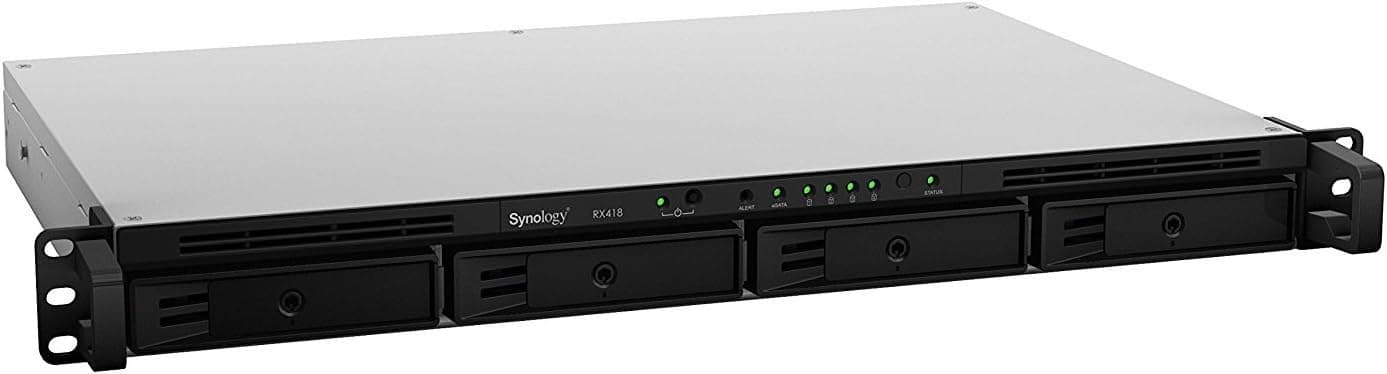
The RX418 is not a NAS on its own. It has no CPU or operating system; it is an enclosure for drives.
You connect it to the RackStation with the included expansion cable, and the drives show up in DiskStation Manager (DSM) alongside the internal ones. No extra software is needed, and creating storage pools, expanding RAID, or using the unit as a backup target all happens inside DSM.
The chassis is a 1U rackmount design that holds four 3.5-inch or 2.5-inch SATA HDDs/SSDs, and weighs about 4.28 kg without drives.
It is aimed at businesses and at home users with a rack and a lot of data.
Compatibility Guide
Supported NAS models
According to the listing data, the supported models are:
- RS1219+
- RS818+ / RS818RP+
- RS815+ / RS815RP+
- RS816
- RS815
Other RackStation models and the desktop DS series are listed as not compatible. Synology defines, per NAS model, which expansion units are supported and how many can be attached.
Similar names can differ in support depending on the plus suffix or the RP (redundant power) variant, so check your exact model against Synology's official compatibility information before buying.
Connection and speed expectations
Each bay uses SATA III (6Gbps), but the link to the main NAS is a single expansion cable. All four drives share that one path.
For four HDDs used as bulk storage this is rarely a problem, but if you fill the unit with SSDs and expect the same performance as the internal bays, the shared link becomes the bottleneck. Think of the RX418 as a way to add capacity, not speed.
Drive compatibility
The unit accepts 3.5-inch and 2.5-inch SATA HDDs/SSDs.
Synology publishes a drive compatibility list for each NAS model, and drives that are not on it may trigger warnings or limit support. Choose the drives for the RX418 from the compatibility list of the RackStation it will be attached to.
Rack installation
As a 1U unit it fits into a single free slot in an existing rack. Depth and rail options depend on your rack, so compare the dimensions on the product page with the usable depth of your rack before ordering.
The expansion cable has limited length, so plan to place the RX418 directly above or below the RackStation.
Product Info
| Item | Details |
|---|---|
| Drive bays | 4 |
| Compatible drives | 3.5-inch / 2.5-inch SATA HDD/SSD |
| Interface | SATA III (6Gbps) |
| Weight | approx. 4.28 kg |
| Supported models | RS1219+, RS818(RP)+, RS815(RP)+, RS816, RS815 |
The Synology RX418 was released around 2018 and has stayed on sale for a long time. No drives are included, so you must buy HDDs or SSDs separately.
It comes with a standard 3-year warranty, and the box includes the expansion cable, power cable and a quick installation guide.
On Amazon.co.Check the retailer's page for the latest price.
Prices change with time and seller, so check the product page for the current price before buying.Check the retailer's page for the latest user reviews.
Paying that much for an empty enclosure may feel steep. The fair comparison, though, is not a generic external case but the cost of upgrading to a NAS with more bays plus the effort of migrating data.
Keeping your existing settings, shared folders, permissions and backup tasks intact while adding capacity is where a first-party expansion unit earns its price.
Using It Well: Storage Pool Design
There are two main ways to use the RX418's drives in DSM. One is to build an independent storage pool from the four drives in the RX418.
The other is to add those drives to an existing storage pool on the main NAS and grow that pool.
The second option is convenient, but a pool spanning the NAS and the expansion unit has a weakness. If the RX418 loses power or its cable is disconnected, the whole pool may become unavailable, including data that would have been safe on the main unit alone.
If in doubt, make the RX418 its own pool. For example, keep working data on the main NAS and use the RX418 for archives, Hyper Backup destinations or surveillance recordings.
That way, a failure stays on one side. If you really need one large volume, protect both units with a UPS and secure the cable firmly.
Best Use Cases
The RX418 suits these users best:
- Owners of a supported RackStation running out of space: If you use an RS1219+ or RS818+, you can add four bays without replacing the NAS, and your management workflow stays the same.
- Users who want a local backup target: Set up the RX418 as a separate pool and point Hyper Backup at it to keep copies apart from the primary volume.
- Users who want a tidy rack: One 1U unit is cleaner than several external drives hanging off the NAS.
- Users building an archive tier with large HDDs: Because the link is shared, the unit is best matched with workloads that value capacity over speed.
It is not a good fit for:
- Owners of unsupported NAS models, including DS series desktop units.
- Anyone planning an all-SSD build to gain speed.
- Owners of an aging RackStation who already worry about its performance or support period. Replacing the NAS may make more sense than investing in an expansion unit.
Before You Buy
Check compatibility first. The RX418 only works when attached to a supported RackStation; it cannot be used as general-purpose external storage.
Confirm your exact model on the rear label or in DSM.
Do not expect a speed boost. Four drives share one link to the NAS, so volumes on the RX418 are unlikely to match internal bay performance.
Keep frequently accessed data on the main unit and use the RX418 for archives and backups.
Be careful with spanning pools. As explained above, pools that include the expansion unit are exposed to its power and cable failures.
Think about the blast radius before extending an existing pool.
**Budget for drives. Four NAS-grade drives can easily cost as much as the enclosure or more.
Mind noise and heat. 1U equipment relies on small fans and tends to be loud.
If your rack sits near living space, decide on the location before buying.
It is not an off-site backup. The RX418 shares the rack and power with the NAS, so fire, lightning or theft would affect both.
Keep important data in a physically separate place as well, such as an external drive or cloud storage.
Check the seller. On Amazon the seller and shipper are listed as nextDREAM, not Amazon itself.
Warranty handling and returns may depend on the seller, so review the terms on the product page. Listing details can also contain errors, so confirm from the photos and title that the item is the RX418.
FAQ
Q. Can I connect it to a DS series desktop NAS? A.
Not according to the listing data. The RX418 is for RackStations, and the supported models are RS1219+, RS818(RP)+, RS815(RP)+, RS816 and RS815.
Desktop models use a different line of expansion units; check their compatibility table.
Q. Are drives included? A.
No. You need to supply 3.5-inch or 2.5-inch SATA HDDs/SSDs, ideally from the drive compatibility list of your RackStation.
Q. Will drives in the RX418 run as fast as internal drives? A.
Each bay is SATA III (6Gbps), but all four share a single expansion cable to the NAS, so do not expect internal-bay performance.
Q. Can I simply grow my existing volume? A.
DSM allows it, but a pool spanning the NAS and the RX418 can become unavailable if the RX418 loses power or its cable is disconnected. For safety, use the RX418 as an independent storage pool.
Q. Does an all-SSD setup make sense? A.
It is physically supported, but the shared link limits SSD speed and the cost may not pay off. Putting SSDs in the main unit and large HDDs in the RX418 is usually more balanced.
Product Disclosure (Amazon)
- Manufacturer: Synology
- Seller: nextDREAM
- Fulfilled by: nextDREAM
- ASIN: B078W4JTBR
- Note: This article covers a manufacturer-made product based on Amazon listing details.