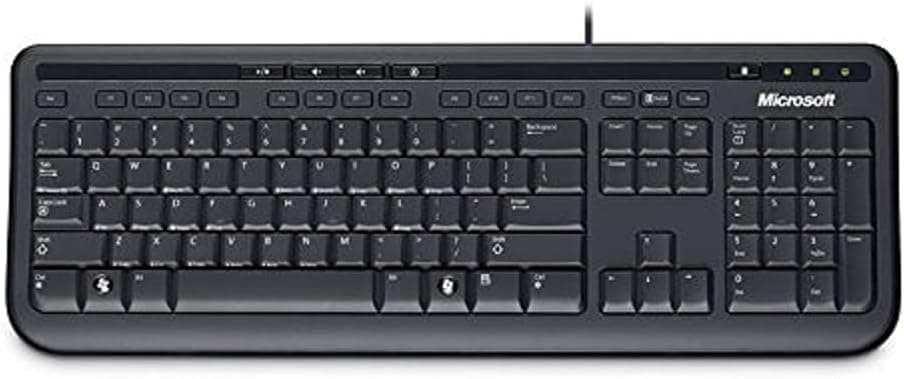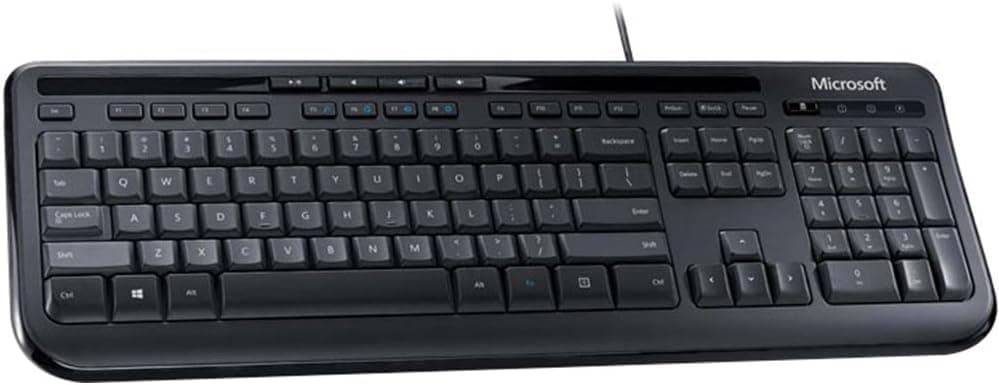
Microsoft Wired Keyboard 600 (Black) by Microsoft [並行輸入品] is a keyboard that does exactly one thing: plug it in and type. This article digs into what the 78-key layout really means, how far the spill-resistant design actually goes, and the specific risks of buying it as a parallel import.
Overview
The Microsoft Wired Keyboard 600 (model ANB-00001) is a long-running USB wired keyboard from Microsoft. The verdict up front: it suits people who want nothing beyond reliable text entry.
It is not a gaming keyboard and not an enthusiast typing device. For shared office PCs, data-entry terminals, or a family desktop, where durability and zero setup matter more than feel, it still makes sense.
As captured on 2026-09-15, the Amazon.co.Check the retailer's page for the latest user reviews.
For a product more than a decade old, that volume signals a design that has not accumulated a pile of early-failure complaints.
The spec sheet is deliberately plain: 78 keys, USB-A wired connection, QWERTY layout, roughly 1.5 m cable, black chassis, and spill-resistant construction.
Compatibility Guide
It supports Windows 7 and later, working as plug-and-play through any USB-A port with no driver installation. That matters in managed corporate environments where users cannot install software at all.
Mac and Linux will handle basic typing, but some media or system keys may not respond as expected. On macOS the Command and Option positions map to the Windows Alt and Windows keys, so remap modifiers in System Settings if the muscle memory bothers you.
This is common to all Windows-layout keyboards, not a flaw specific to this model.
Three physical caveats. First, USB-A only: USB-C-only laptops and tablets need a hub or adapter.
Second, the roughly 1.5 m cable can be tight if your tower sits on the floor and you use rear ports.
Third, as a parallel import this is very likely a non-JIS 78-key layout, so symbol key positions and Japanese input toggling may differ from domestic models. Confirm the legends in the product photos before ordering.
| Environment | Verdict | Notes |
|---|---|---|
| Windows desktop | Ideal | Plug into USB-A, no drivers |
| Windows laptop | Good | Zero latency as an external keyboard |
| Mac | Conditional | Some keys may not work; remap modifiers |
| Linux | Conditional | Typing fine; hotkeys distro-dependent |
| USB-C only device | Adapter needed | Requires hub or USB-C adapter |
In short, Windows plus USB-A is the frictionless combination. Everything else works with compromises.
Product Info
The specifications are 78 keys, USB-A wired, QWERTY, about 1.5 m of cable, black finish, and spill resistance.
Spill resistance means internal channels route liquid away from the circuitry. It is not waterproofing: if you spill, unplug immediately, flip the board over, and let it dry fully.
Treat it as "likely survivable if you act fast", not "immune".
Pricing deserves a warning. The listing data attached to this article shows ¥25,001 captured on 2026-09-15, which is far outside the normal range for an entry-level wired keyboard.
This product class typically sells for a few thousand yen, so that figure most likely reflects a listing error, scarcity pricing, or data pulled from a different item. This article therefore does not use that number as a reason to buy. Prices move often, so check the current price on the product page and judge it against comparable keyboards yourself.
Both the seller and shipper are an import specialist (MIDORI TRADING), and the ASIN is B001OAR26K. As a parallel import, it may fall outside Microsoft's domestic warranty, meaning support responsibility sits with the retailer rather than the manufacturer.
Competitor Comparison
Its weakness is equally clear: membrane feel, no hot-swap, no RGB, no macros.
If typing feel or quiet operation matters, look at the Corsair Skiff 100 Quiet RGB or the silent-switch iRocks K85R RGB instead. If a Japanese JIS layout is non-negotiable, a board like the EPOMAKER TH108 JIS is the honest answer.
The decision is cheap-and-certain versus feel-and-layout-fit.
Real-World Feel
It is not silent, but it is not loud either. The membrane action sinks slightly with no crisp click.
All-day writers will find it unexciting; anyone sitting close to colleagues will find it far easier to live with than clicky mechanical switches.
The wired connection quietly pays off day to day: nothing to pair, nothing to charge, no dropped keystrokes after sleep. If wireless has been a low-level annoyance for you, that predictability is the selling point.
Best Use Cases
- Anyone avoiding setup overhead: Driver-free operation makes it easy for IT staff to deploy many units identically.
- Remote workers docking a laptop: No pairing issues, no battery management, no latency.
- Shared or reception terminals: Where you do not want expensive hardware handled by strangers, this class is the correct choice.
Before You Buy
Check the price yourself. The ¥25,001 figure in the source data is implausible for this product class.
Parallel-import prices swing with stock levels, and listing data itself is sometimes wrong. If the page shows a few thousand yen, that is reasonable; if it shows five figures, you are paying for scarcity, not value.
Check the layout. A 78-key import layout likely differs from JIS on symbol keys and Japanese input switching.
If JIS is required, buy a keyboard that explicitly advertises it.
Check the warranty. With an import retailer as both seller and shipper, Microsoft's domestic support may not apply.
For bulk deployment, ask who handles failures before ordering.
Distrust the listing metadata. Manufacturer, model number, and price fields occasionally get crossed with another product.
Verify the images, title, and model number (ANB-00001) match before checkout.
Do not over-trust spill resistance. It has no waterproof rating.
After a large spill, unplug, invert, and dry thoroughly; continuing to use it powered is the real danger.
Who Should Skip It
- Gamers needing guaranteed rollover, rapid trigger, or high polling rates
- Anyone who cares about typing feel, or wants swappable keycaps and switches
- Users who require a JIS layout for Japanese input
- Anyone wanting RGB lighting or macro programming
FAQ
Q. Do I need to install drivers?
A. No. On Windows 7 or later it is recognised as soon as you plug it into a USB-A port.
Q. Does it work on a Mac? A.
Basic typing works, but some keys may not. Modifier positions follow Windows convention, so remap them in macOS if needed.
Q. Is it a Japanese JIS layout? A.
As a parallel import it is most likely a non-JIS 78-key layout. Check the key legends in the product photos before buying.
Q. What if I spill a drink on it? A.
Small spills are channelled away from the electronics, but it is not waterproof. Unplug immediately, turn it upside down, and let it dry.
Q. Can I game on it? A.
It works, but there is no rollover guarantee or competitive-grade responsiveness. For gaming, look at rapid-trigger boards instead.
Q. How well is it reviewed?
A.co.jp as captured on 2026-09-15 — stable for a long-selling product.
Product Disclosure (Amazon)
- Manufacturer: マイクロソフト
- Seller: MIDORI TRADING (輸入品専門店)
- ASIN: B001OAR26K
- Note: This article covers a manufacturer-made product based on Amazon listing details.