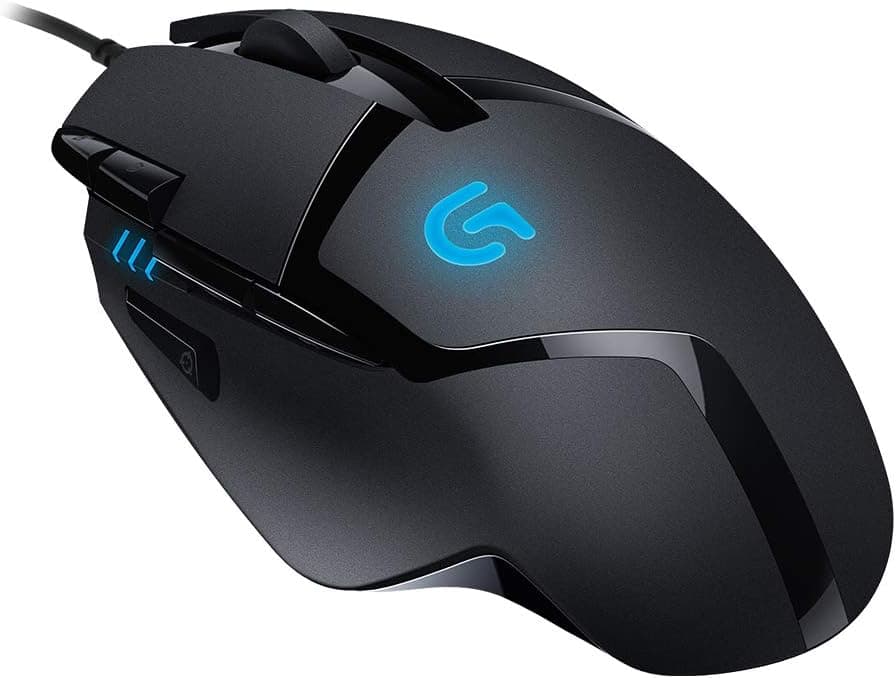
The Logicool G ゲーミングマウス G402 有線ゲーミングマウス USB 接続 FPS ゲーム向け 4段階DPI切り替え 8個プログラムボタンブラック PC windows mac 国内正規品 【 ファイナルファンタジー XIV 推奨モデル 】 — sold internationally as the Logitech G402 Hyperion Fury — launched in 2014 and is still on shelves more than a decade later. As of June 2026 it carries 2,956 Amazon.co.jp reviews at 4.4 out of 5 stars (roughly 88% positive), which is unusual longevity in a category that refreshes every year.
Overview
The core idea of this mouse is simple: put a sensor that does not break down under fast movement into a sub-¥5,000 wired body. That sensor is the Fusion Engine hybrid unit, pairing an optical sensor with an accelerometer so that the accelerometer covers the very-high-speed swipes where optical sensors traditionally struggle.
DPI runs from 250 to 4,000 across four on-the-fly steps, all eight buttons are programmable, the body weighs 108 g, and the connection is plain USB wired.
It suits low-sensitivity FPS players who move their whole arm, and anyone who simply does not want to manage a battery. Conversely, hands accustomed to the 50–70 g ultralight mice of the 2020s will find 108 g clearly heavy.
That is the trade you accept for the price.
As the product title notes, this is the domestic-market official version, and it is listed as a recommended model for Final Fantasy XIV. Mapping MMO macros and job actions across the eight buttons is just as practical a use case as FPS play.
Compatibility Guide
The official OS list reads Windows Vista / 7 / 8 — an artifact of the 2014 release date. On Windows 10 and Windows 11 the mouse is recognized by the stock driver, with pointer movement and button input working with no installation.
You only need the Logitech G HUB software if you want to change DPI steps or remap buttons.
| Environment | Status | Notes |
|---|---|---|
| Windows 10 / 11 | Works | Stock driver; full features via G HUB |
| Windows Vista / 7 / 8 | Officially listed | Original release-era support |
| macOS | Not officially supported | Basic pointer function works |
| USB port | USB-A required | USB-C-only laptops need an adapter |
Although the title mentions "mac," macOS is not listed as an officially supported platform for Logitech G HUB. On a Mac, expect clicks and pointer movement to work, but plan around not being able to change DPI stages or remap buttons.
If macOS is your main environment, there is little reason to pick this model.
One physical note: this is a USB-A wired device, so thin laptops with only USB-C ports need an adapter or hub. The cable is conventional rubber sheathing rather than braided, so if you dislike cable drag, consider pairing it with a mouse bungee.
With wired mice, how the cable behaves usually matters more to day-to-day feel than the sensor does.
Product Info
The Amazon.co.jp price was ¥4,564 at capture on 5 June 2026 and again on 27 August 2026. Prices move frequently and drop further during sales, so always check the current figure on the product page before buying.
The eBay entry is a search link only, with no fixed price listed.
| Spec | Value |
|---|---|
| Sensor type | Fusion Engine hybrid (optical + accelerometer) |
| DPI range | 250–4,000 DPI (4 steps) |
| Buttons | 8 (programmable) |
| Weight | 108 g |
| Connection | USB wired |
The number worth pausing on is the DPI ceiling. Next to current flagships advertising 20,000 or 30,000 DPI, 4,000 looks an order of magnitude smaller.
In practice, most FPS players settle somewhere between 400 and 1,600 DPI, and 4,000 only becomes a limit for high-sensitivity play at 4K or above. The gap on the spec sheet is not the gap you feel.
The review record — 2,956 reviews at 4.4 stars as of June 2026 — reflects years of continuous sales.
An old product can be cheap simply because it is being cleared out; the G402 is the other kind, where both the review volume and the score hold up.
Product Disclosure (Amazon)
- Manufacturer: Logicool G(ロジクール G)
- Seller: Amazon.co.jp
- Fulfilled by: Amazon.co.jp
- ASIN: B00MCIIX1G
- Note: This article covers a manufacturer-made product based on Amazon listing details.
Compared With the Alternatives
Against similarly-purposed modern mice, the G402's position is clear.
| Axis | G402 | Recent ultralight wireless |
|---|---|---|
| Weight | 108 g | Typically 50–70 g |
| Connection | USB wired | 2.4 GHz wireless |
| Battery | None needed | Charging and level checks |
| Max DPI | 4,000 | 20,000–30,000+ |
| Price | ~¥4,500 (at capture) | From roughly ¥10,000 |
It loses on weight and DPI ceiling. It wins on price, on the operational simplicity of never thinking about a battery, and on shape — a design refined over a decade, predictable in the hand and hard for a first-time buyer to get wrong.
The decision rule: if you already use an ultralight mouse and are happy, there is no reason to switch. But if you are still on the bundled office mouse and want to try what a gaming mouse actually does, or you want a spare, few options in this price bracket are harder to regret.
In Practice
108 g reads as heavy on paper, but with a palm or claw grip that mass translates into stability. With a fingertip grip, or high-sensitivity play driven by small wrist motions, the same mass comes back as fatigue.
This is a product whose reviews split along grip style.
The four DPI steps switch instantly from a top-deck button. You can drop to the 250 DPI end while lining up a sniper shot and jump back to the 4,000 end for close quarters, all on one mouse.
It does take a deliberate finger movement, so it needs practice before it is usable under pressure. Configuring just two steps at first and expanding once the motion is automatic is the realistic approach.
The eight programmable buttons take per-profile assignments in G HUB — hotbar actions in an MMO such as Final Fantasy XIV, weapon swaps or push-to-talk in an FPS.
Best Use Cases
In 2026 this mouse is still an easy recommendation for:
- First-time gaming mouse buyers — under ¥5,000 at capture, you get the fundamentals (DPI switching, button remapping) and a basis for judging what you actually need next.
- Deliberate wired users — no charging, no battery checks, nothing to die mid-session.
- Low-sensitivity, arm-aiming FPS players — exactly what the Fusion Engine targets, for people who hate cursor spin-out on fast swipes.
- MMO players who want buttons — eight programmable inputs pay off in action-heavy titles like Final Fantasy XIV.
- Anyone wanting a backup — a cheap, reliable spare so a dead main mouse never stops a session.
Before You Buy
Weight first. At 108 g this is firmly heavy by 2020s standards, where 50–70 g is the norm.
Coming from an ultralight, it will feel like a different class of object. Accept that as part of the price trade-off going in.
No RGB. The G402 does not light up. If you want your mouse to match a lit keyboard and pad, it is out at this line.
Understand the release year. This is a 2014 design — the 4,000 DPI ceiling, the polling rate, the switch generation all reflect that era.
On paper it loses to current models. It keeps selling because it is sufficient, not because it is equivalent.
Buy it as cheap and sufficient, not cheap and cutting-edge.
Hand size matters. The shell is on the large side and tends not to suit small hands or fingertip grips.
Holding one in a store first is the safest check.
Do not make macOS the primary target. As covered above, it is outside official support and customization should not be expected.
The word "mac" in the listing title is not a promise of full functionality.
About the listing data. Amazon product pages sometimes carry manufacturer, model, or OS-support fields that disagree with the physical product — and on a long-lived product like this one, an OS field frozen at the original release is the classic case.
Before buying, confirm from the product images and title that you are looking at the G402 and at the domestic official version. Likewise, treat the captured ¥4,564 (June and August 2026) as likely stale and read the live price on the page.
FAQ
Q. Does it work on Windows 11? A.
Yes. The stock driver recognizes it, and pointer movement and clicks work with no installation.
Install Logitech G HUB only if you want to change DPI stages or remap buttons. The official list stopping at Windows 8 simply reflects the 2014 release.
Q. Is 4,000 DPI enough? A.
For most people, yes. Common FPS settings land around 400–1,600 DPI, and few players run 4,000 day to day.
The ceiling only bites for high-sensitivity play at 4K or higher.
Q. Can I use it on a Mac? A.
Basic pointer movement and clicking work, but macOS is not officially supported. Do not count on DPI switching or button remapping.
If a Mac is your main machine, look elsewhere.
Q. Is 108 g too heavy? A.
It depends on grip. Palm and claw grips turn the mass into stability, which pairs well with low-sensitivity arm aiming.
Fingertip grips and fine high-sensitivity wrist work will feel the fatigue. Coming from an ultralight, expect to notice it.
Q. Does it have RGB lighting?
A. No. Choose another model if lighting matters to you.
Q. Is a 2014 product still safe to buy? A.
It depends on your use case. It will not match current ultralight wireless flagships on performance.
But 2,956 reviews at 4.4 stars as of June 2026 reflect a long service record.
As an entry model, a spare, or a deliberate wired choice, it remains a rational pick.