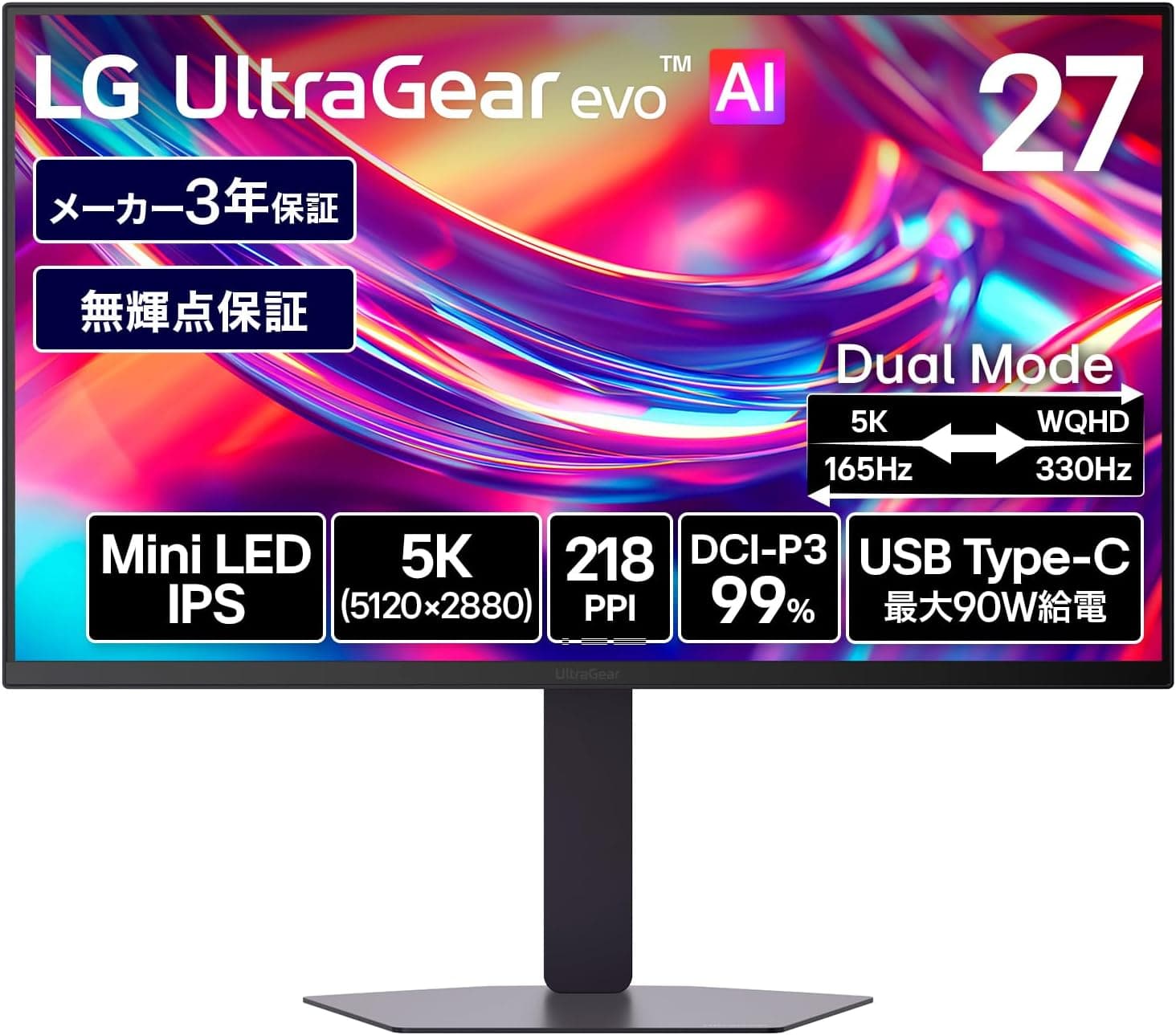
This article covers LG モニター ディスプレイ LG UltraGear evo AI 27GM950B-B 27インチ 5K(5120×2880) — how to read its spec sheet, and the traps people hit after buying.
Overview
This is a 27-inch IPS gaming monitor that packs 5120×2880 (5K) into the panel and pairs it with a Hyper MiniLED backlight. The short verdict: it is built for people who need creative work and competitive gaming from one screen.
If you only do one of those, it is clearly more monitor than you need. The centerpiece is VESA Dual Mode, which swaps between 5K at 165Hz and WQHD (2560×1440) at 330Hz.
At 27 inches, 5120×2880 works out to roughly 218ppi. The same 27-inch size gives about 163ppi at 4K (3840×2160) and about 109ppi at WQHD, so this panel is a clear step finer than 4K.
Text is far too small at 100%, so plan on OS scaling of around 200%. Put another way, at 200% you get a WQHD-sized workspace where only the text and edges become dramatically smoother.
| Item | Value |
|---|---|
| Panel | IPS / Hyper MiniLED backlight |
| Resolution | 5120×2880 (5K) |
| Refresh rate | 165Hz in 5K mode / 330Hz in WQHD mode |
| Response time | 1ms (GTG) |
| Color gamut | DCI-P3 99% (typ.) |
| HDR | VESA DisplayHDR 1000 / 1250 cd/m² peak |
| Surface | Matte (non-glare) |
| Video inputs | DisplayPort 2.1 ×1 / HDMI 2.1 ×1 / USB-C (PD 90W) ×1 |
| USB | USB 3.0 downstream ×2 |
The easiest thing to misread here: 165Hz and 330Hz are mutually exclusive. Choose 5K and you get 165Hz; choose 330Hz and you get WQHD.
You switch from the monitor's own menu. It is not 330Hz at 5K.
What Actually Happens When You Switch Modes
The dual-mode design works well because the math lines up. 2560×1440 is exactly half of 5120×2880 in both axes.
In WQHD mode each logical pixel maps to a 2×2 block of physical pixels — a clean integer ratio — so you avoid the fuzzy text and stair-stepped diagonals you normally get when dropping below native resolution. That is the decisive difference from picking an arbitrary non-native resolution on a fixed panel.
That said, 330Hz is a display ceiling, not a frame rate promise. Hitting 330fps at WQHD realistically means lighter competitive titles; heavy games will leave the panel waiting.
On the 5K side, 5120×2880 is about 14.7 million pixels — roughly 1.8× the 8.3 million of 4K — so treat 165Hz at 5K as a ceiling you will rarely saturate.
HDR compounds this. Enabling 5K, high refresh and HDR all at once puts real pressure on both the GPU and the cable.
In practice most owners settle into a split: 5K for work and single-player games, WQHD for competitive play, HDR only for video content.
Compatibility Guide
The supplied compatibility data lists one DisplayPort 2.1 input, one HDMI 2.1 input, and one USB-C (PD 90W) input, and states plainly that full-bandwidth 5K at 165Hz requires a DisplayPort 2.1 graphics card.
That is the biggest compatibility hurdle on this monitor.
Check your GPU's output spec first. DisplayPort 2.1 outputs are limited to relatively recent generations, and cards sold in the same period can top out at DisplayPort 1.4a.
A 1.4a card will usually still produce an image using DSC, but the maximum refresh rate available at 5K may be lower.
Exactly what you can reach depends on the combination, so confirm against both your GPU vendor's spec page and the monitor's product page.
Cables matter more than people expect. DisplayPort 2.1's high-bandwidth modes assume a certified cable; reusing an old one shows up as no signal, flicker, or a missing high-refresh option.
Use a cable rated for 48Gbps on the HDMI 2.1 side as well.
The box is described as including a power cable, a DisplayPort cable and a USB-C cable, but bundle contents vary by region and batch, so verify before buying.
USB-C carries 90W Power Delivery, letting one cable handle video, charging and the USB hub. Note that 90W is a ceiling: gaming laptops that draw more than 100W can still lose battery under load.
How much resolution and refresh you can push over USB-C (DP Alt Mode) also depends on lane allocation, so confirm the limit if a single-cable 5K/165Hz setup is the goal.
For mounting, the stand offers height, tilt and pivot adjustment, and the panel supports VESA 100×100mm. Physical dimensions and weight are not in the data provided, so check the product page against your arm's load rating before committing.
There are two USB 3.0 downstream ports on the back.
KVM support is not documented in the data either — verify it if you plan to share the display between two PCs.
Product Info
As captured on 25 August 2026, the Amazon listing price was ¥179,801. This is a category where sales, exchange rates and successor models move the number, so always check the current price before ordering.
The eBay side only returned "See listing" with no figure, so the grey-import market cannot be judged from this data.
User ratings, captured 12 July 2026, stood at 4.4 out of 5 (88% positive) from 92 reviews.
Solid on paper, but 92 is a small sample. At this price it is worth actually reading the 1- and 2-star reviews — dead pixels, DOA units, mode-switching quirks, firmware issues — before deciding.
LG lists a standard three-year warranty with a registration-based extension program; terms shift by region and retailer, so read the offer at purchase. In market terms, a 27-inch 5K Hyper MiniLED panel doing 165/330Hz has few direct rivals, and a just-under-¥200,000 price puts it head to head with premium 4K/240Hz models.
How It Compares
| Option | Strengths | Weaknesses |
|---|---|---|
| This monitor (5K165 / WQHD330) | ~218ppi plus 330Hz in one unit; integer-ratio mode switching | Demanding GPU requirement; high price |
| 27-inch 4K@240Hz | Lighter GPU load, far more models to choose from | ~163ppi; dropping to WQHD is not an integer ratio |
| 27-inch WQHD@360Hz class | Highest frame rates, cheapest | Cramped and coarse for desktop work |
| 27-inch OLED | Unmatched blacks and response | Burn-in caution; full-screen brightness in bright rooms |
The deciding question is how many pixels your work actually needs. If you do photo, video or layout work where 100% view accuracy matters, 218ppi earns its keep.
If not, 4K@240Hz is easier to drive and easier to buy.
On panel technology, Hyper MiniLED wins on sustained full-screen brightness and burn-in resistance, while OLED wins on black level and per-pixel control. The matte (non-glare) coating here suppresses reflections from lights and windows, which suits a bright room.
Who It's For
The best fit is someone who edits photos or video on a large desktop by day and plays competitive shooters at night. Being able to switch between a 5K workspace and a 330Hz mode — without the mode change costing sharpness — is still a rare combination.
DCI-P3 99% coverage and DisplayHDR 1000 (1250 cd/m² peak) put it in range for both color work and HDR content.
On the creative side, the step up from 4K to 218ppi shows most in workflows that bounce between detail checks and full previews. On the gaming side, RPGs and open-world titles benefit from the sheer information density of 5K.
It is a poor fit if you do not yet own a DisplayPort 2.1 GPU, if you play nothing but competitive titles, or if your desk is too shallow to sit at a distance where the extra density is even visible.
Before You Buy
Start with a data problem. The Amazon listing recorded the manufacturer as "サムスン(SAMSUNG)" for this product.
This is an LG UltraGear monitor, so that entry is simply wrong. The ASIN in the listing metadata (B0DX7LVY1F) also does not match the ASIN of the page the price was captured from (B0H3Q1C8TP).
Listing metadata does get mixed up, so confirm the product by image, model number and title before ordering. Leaving an incorrect manufacturer in an article does more harm than removing it, so that disclosure block has been dropped from this piece.
Second, the GPU requirement again. A DisplayPort 1.4a card will usually still light up a monitor advertised as DisplayPort 2.1 — which is exactly why the shortfall is easy to miss.
You find out later, when 165Hz simply is not in the refresh list at 5K. Check the output spec first.
MiniLED has its own quirks. Small bright objects on dark backgrounds — stars, subtitles in a dark scene — can show a faint halo, known as blooming.
The number of local dimming zones is not in the data here, so how noticeable it gets cannot be stated with confidence. If dark-room movie watching is your main use, check a dark scene in person or consider OLED.
High density brings scaling issues too. 218ppi assumes OS scaling.
On Windows, older applications without high-DPI support can look blurry or break their layouts. If your job depends on legacy software, verify its DPI behavior first.
Finally: the 92-review sample is small, the 1ms GTG figure is a rated number that depends on overdrive settings (which can introduce overshoot), hardware calibration may require separate software and a colorimeter, and the price quoted here is a snapshot from the capture date.
FAQ
Q. What do I need to run 5K at 165Hz? A.
The compatibility data states that full-bandwidth 5K/165Hz requires a DisplayPort 2.1 graphics card.
Pair it with a cable certified for DisplayPort 2.1's high-bandwidth modes.
Q. Does image quality suffer in WQHD 330Hz mode? A.
2560×1440 is exactly half of 5120×2880, so each logical pixel maps to a 2×2 block of physical pixels. That integer ratio avoids the softness you normally get from a non-native resolution.
Q. Can I run a laptop over a single USB-C cable? A.
Yes — USB-C supports 90W Power Delivery, combining video and charging. Machines that draw over 100W may still discharge under load, and the resolution/refresh ceiling over USB-C should be confirmed on the product page.
Q. This or a 27-inch 4K@240Hz? A.
Choose this one if 100% view accuracy matters to your work; choose 4K@240Hz if GPU load and price matter more. 4K at 27 inches is about 163ppi, so this panel is noticeably finer.
Q. The Amazon page lists Samsung as the maker — is it a different product? A.
That is a listing error. This is an LG UltraGear monitor.
The ASINs also disagreed between sources, so confirm by image, model number and title before ordering.
Q. Is HDR usable in a bright room? A.
With 1250 cd/m² peak brightness, DisplayHDR 1000 certification and a matte finish, visibility in bright rooms is well covered. For deep blacks in a dark room, OLED still has the structural advantage.