This article looks at the j5create 4-in-1 ピンク USB-C - 4ポート Type-A & Type-C ハブ (エコフレンドリー) 10Gbps USB-A x 2 & 10Gbps USB-C x 2 (model JCH342ER), the j5create 4-in-1 Pink USB-C Hub, and gives you what you need to decide before buying.
Overview
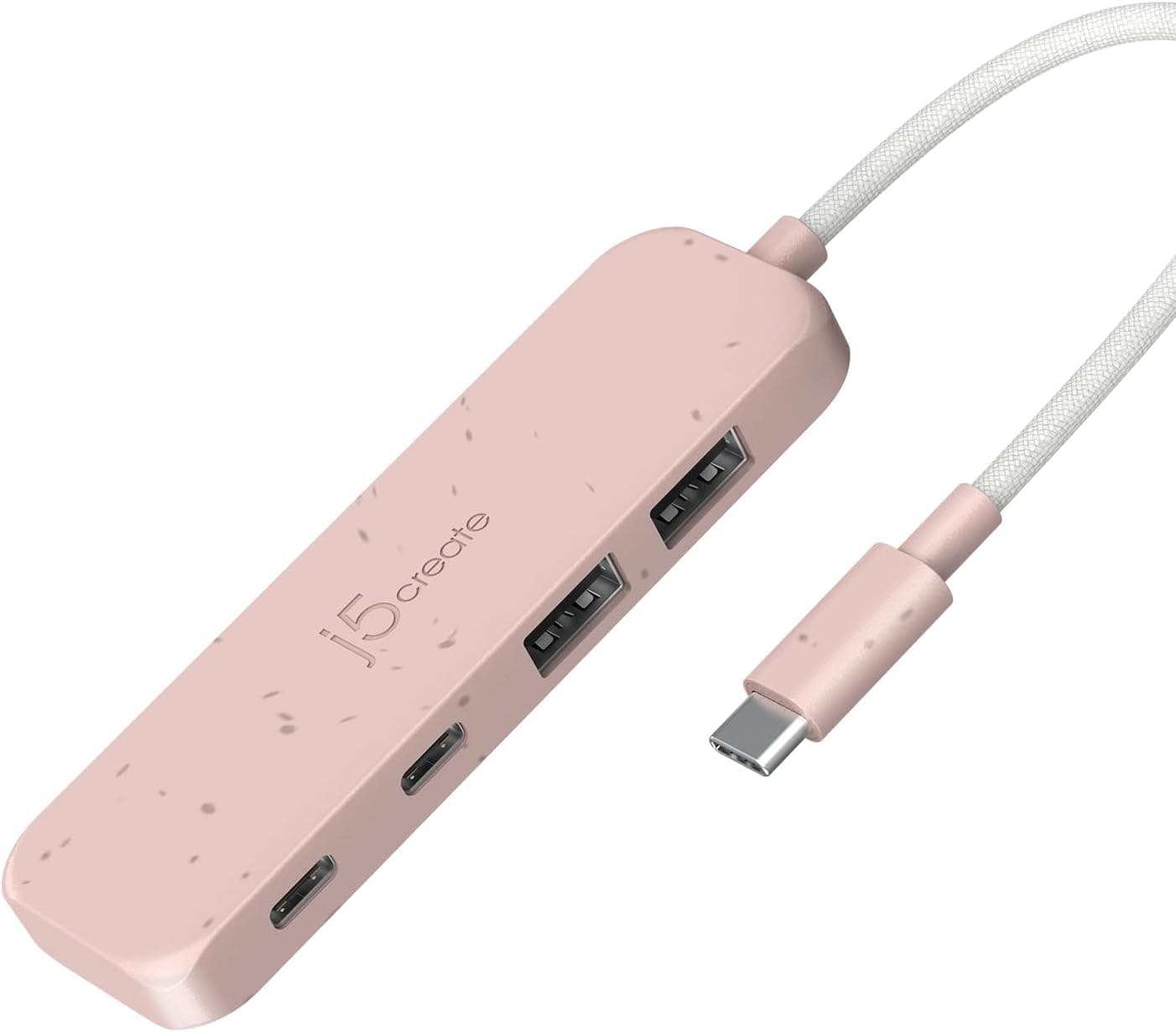
The short version: this is a data-only hub that adds two USB-A and two USB-C ports to a laptop or tablet that has nothing but USB-C. All four ports are rated for 10Gbps.
There is no HDMI, no SD card reader, and no Power Delivery pass-through for charging through the hub. It trades extra features for four ports on the same fast standard, which suits people who use external SSDs and flash drives a lot.
The body comes in Earth Rose (pink) and uses recycled materials. No drivers are needed; you plug it in and it works.
Typical hosts are the MacBook Pro, MacBook Air, Mac mini, and USB-C iPads. 10Gbps is roughly 20 times faster than USB 2.0 (480Mbps), which matters when you move large video or photo folders.
On Amazon.co.Check the retailer's page for the latest user reviews.
That is a small sample, so read the compatibility notes and caveats below rather than deciding on the rating alone.
Compatibility Guide
The host connection is USB-C. The downstream side has two USB-A (10Gbps) and two USB-C (10Gbps) ports.
Supported operating systems are listed as Windows, macOS, iPadOS, and Android, with no driver installation required.
Three points trip people up.
1. Whether you get 10Gbps depends on your computer's port. If the USB-C port on your computer is USB 3.2 Gen 1 (5Gbps) or USB 2.0, the hub runs at that speed.
Plenty of tablets and phones have a USB-C connector that only runs at USB 2.0 speed.
If you want the full 10Gbps, check that your port is USB 3.2 Gen 2 or better, or Thunderbolt / USB4.
2. All four ports work at once, but they share one 10Gbps link. There is a single connection back to the computer, so copying from two SSDs at the same time lowers the speed of each.
Mice and keyboards barely use any bandwidth, but do not read the spec as 10Gbps per port.
3. Power comes only from your computer. With no PD pass-through and no listed power input, every connected device draws from the host's USB-C port.
Several bus-powered 2.5-inch HDDs or power-hungry SSDs may drop out.
If you run many power-hungry devices, a self-powered hub with an AC adapter is the safer choice.
| Device | Fit | Notes |
|---|---|---|
| USB-C external SSD | Excellent | Full speed on a 10Gbps host |
| USB-A flash drive or card reader | Excellent | No adapter needed |
| Mouse, keyboard, wireless dongle | Good | Uses almost no bandwidth |
| Bus-powered 2.5-inch HDD | Fair | Depends on available power; avoid several at once |
| External monitor | No | No HDMI; no video output is listed for the USB-C ports |
| Charging the host | No | No PD pass-through |
Product Info
| Item | Detail |
|---|---|
| Model | JCH342ER |
| Ports | USB-A x2, USB-C x2 (4 total) |
| Max transfer rate | 10Gbps (all ports) |
| Host interface | USB-C |
| Color | Earth Rose (pink) |
| Material | Recycled materials |
| Driver | Not required (plug and play) |
| PD pass-through | Not supported |
Prices here are from the date they were captured. On Amazon.co.jp the hub was ¥9,690 on June 7, 2026 and ¥9,908 on August 27, 2026.
Prices change with sales and stock, so check the product page for the current price before you buy.
The hub came out around late 2023. The warranty is said to be the manufacturer's standard two years, but please verify it.
The package contains only the hub itself; no extra cables or adapters are included.
At this price you can also find multiport hubs with HDMI and card readers. This one gives those up and puts all four ports at 10Gbps instead.
Think of it as a way to add fast USB ports, not a do-everything dock. Pink PC accessories are rare, so the color is also a real reason some buyers choose it.
Comparison with Alternatives
The main question is whether you need video output and charging.
- If you want HDMI and power too: a 7-in-1 hub such as the Anker 343 USB-C Hub can handle an external monitor and charging through one cable.
- If you like a soft color but also want HDMI and SD: the Satechi OntheGo 5-in-1 USB-C Hub in Blush has 4K@60Hz HDMI and an SD card reader.
- If you only need more USB-A: a hub with four USB-A ports, such as the Lenovo USB-C to 4 USB-A Hub, is worth a look. Without USB-C devices, the two USB-C ports on this hub would go unused.
- If power is a concern: an AC-powered hub like the atolla 11-Port Powered USB 3.0 Hub is better for several HDDs.
This hub is strongest when you have a mix of USB-C and USB-A devices and want both to be fast. A USB-C SSD plus USB-A flash drives and card readers is a common setup, and this hub fits it well.
Best Use Cases
- MacBook users with only USB-C ports who still own USB-A gear. Connect flash drives, printers, and mice without carrying adapters.
- People who move photos and video on external SSDs. On a 10Gbps host, transfers are far faster than through a USB 2.0 hub.
- Mac mini users tired of reaching for the ports. Bring ports up onto the desk.
- Anyone building a pink desk setup. Earth Rose accessories are hard to find.
- Buyers who prefer products made with recycled materials.
Things to Check Before Buying
You cannot charge through it. With no PD pass-through, a computer with only one USB-C port loses its charging port while the hub is plugged in.
On machines with few USB-C ports, such as the MacBook Air, check whether you have MagSafe or a second port. Missing this is the most common mistake.
No external monitor. There is no HDMI port, and no video output is listed for the USB-C ports.
If you plan to connect a monitor, choose a hub with HDMI.
All ports at 10Gbps does not mean 10Gbps each at the same time. They share the upstream 10Gbps, so copying between two SSDs is slower than using one alone.
Phones and budget tablets may not benefit. If the device's USB-C port only runs at USB 2.0 speed, the 10Gbps rating makes little difference.
It will still work, but check your device's port first if speed is the reason you are buying.
Check the seller. At capture time, the Amazon listing showed j5create as the manufacturer, with Masuda Vintage as the seller and shipper.
Warranty handling (said to be two years, but verify) and returns can depend on the seller, so review the seller details and return terms before ordering. Listings sometimes carry details from another product, so confirm from the photos and title that you are getting the pink four-port JCH342ER.
**The review count is small. An average of 4.3 is decent, but unit variation or compatibility reports can get lost in a sample that size.
FAQ
Q. Can I charge my MacBook while it is connected to the hub? A.
No. There is no PD pass-through, so charge through another port or MagSafe.
Q. Do all four ports get 10Gbps at the same time? A.
No. The hub connects to the computer over a single 10Gbps link, so 10Gbps is the combined limit.
Q. Does it work with an iPad? A.
iPadOS is listed as supported, so it works with USB-C iPads. Speed depends on the iPad's port, and some models will not reach 10Gbps.
Q. Can I connect an external monitor?
A. There is no HDMI port and no video output is listed. Use a hub with HDMI for a monitor.
Q. Do I need drivers?
A. No. It is recognized automatically on Windows and macOS.
Product Disclosure (Amazon)
- Manufacturer: j5create
- Seller: Masuda Vintage
- Fulfilled by: Masuda Vintage
- ASIN: B0CJRNFDVB
- Note: This article covers a manufacturer-made product based on Amazon listing details.