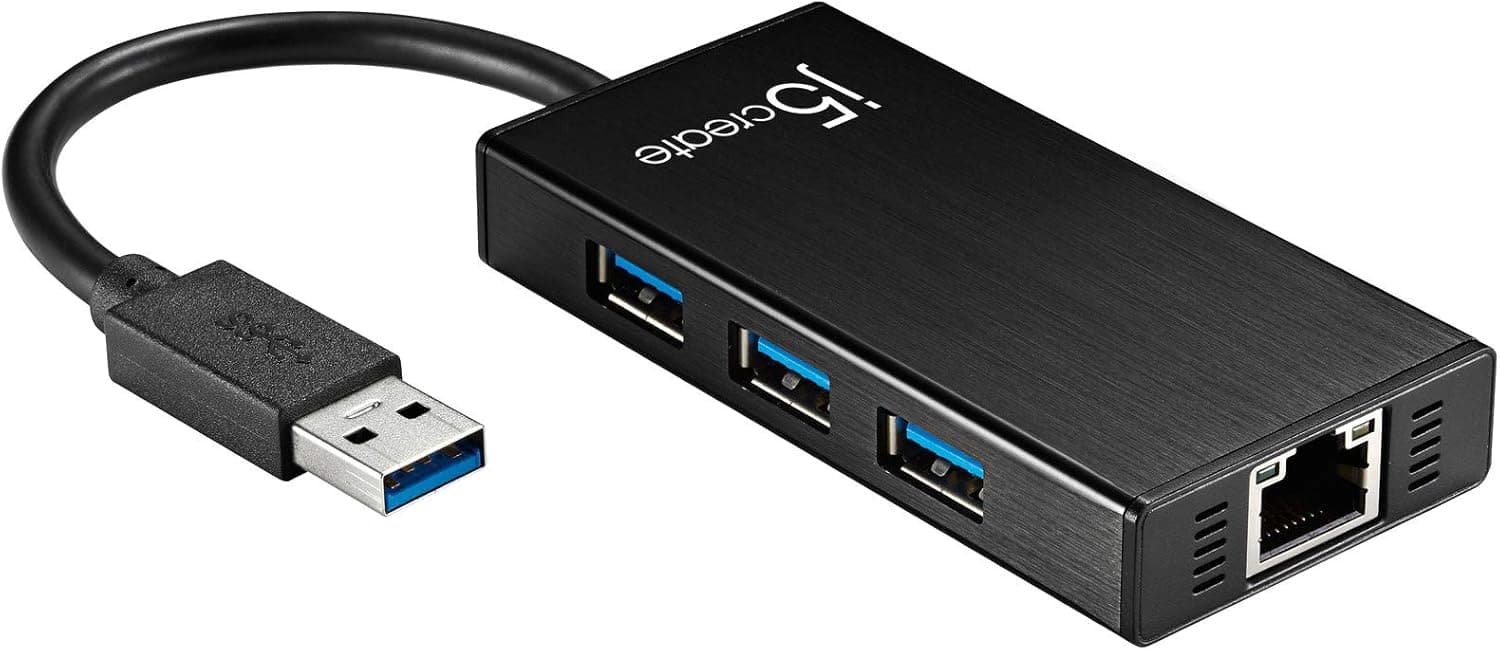
The j5create JUH470-EJ is a mini-dock style accessory that combines three USB 3.0 ports with a Gigabit Ethernet adapter.
This article goes beyond the spec sheet to cover bandwidth sharing, power limits, and who should not buy it.
Overview
The JUH470-EJ offers three USB 3.0 (5Gbps) Type-A ports plus a 10/100/1000Mbps RJ-45 Gigabit Ethernet port.
The short version: this is not a desktop docking station. It shines as portable gear for getting a thin laptop without an Ethernet jack onto a wired network while travelling or working away from the office.
The aluminum housing weighs just 60g, small enough to live permanently in a bag. The metal body is not only cosmetic — it helps dissipate heat from the USB and Ethernet controllers.
It runs on bus power out of the box, so no adapter is needed for light use. For power-hungry peripherals, an optional 5V/2A AC adapter enables self-powered operation.
Note the word optional: the adapter is sold separately, which is covered in the cautions below.
As of the June 2026 capture, the listing showed 4.8 out of 5 stars (96% positive), but only 6 total reviews.
A 4.8 from six reviewers carries far less statistical weight than a 4.8 from thousands.
Compatibility Guide
The requirement list is short: the host needs a USB 3.0 Type-A port.
It is backward compatible with USB 2.0, but on a USB 2.0 host everything is capped at USB 2.0 speeds, including the Ethernet side — which defeats most of the reason to buy this hub.
Supported operating systems are Windows 7 or later and macOS X 10.6 or later.
Windows installs the driver automatically, while macOS requires manual driver installation. This is the most common setup snag: if the Ethernet adapter never appears, check the driver installation first and then whether the OS security settings are blocking the driver from loading.
For current macOS versions, confirm support on the manufacturer's product page.
One physical detail people miss: laptops with only USB-C ports. The host connector here is USB Type-A, so recent MacBooks and USB-C-only ultrabooks cannot connect directly.
A C-to-A adapter works, but it adds another connector to fail and another item to carry. If USB-C is your main port, a native USB-C hub is the cleaner answer.
| What to check | Requirement | If unmet |
|---|---|---|
| Host port | USB 3.0 Type-A | USB 2.0 caps everything near 480Mbps |
| Connector shape | Direct Type-A | USB-C machines need an adapter |
| OS | Windows 7+ / macOS X 10.6+ | Not recognized, no Ethernet |
| Mac driver | Manual install | Ethernet adapter never appears |
| Peripheral power draw | Within bus power | Needs the optional 5V/2A adapter |
In short: plugging into the USB-A port of a Windows laptop just works. Every step away from that adds something to verify.
How the Bandwidth Is Shared
The biggest misconception about combo hubs is speed. The 5Gbps figure is the ceiling of the single link back to the host, and all four downstream paths — three USB ports and the Ethernet controller — share it.
Each port does not get its own 5Gbps.
In practice, Gigabit Ethernet tops out at 1Gbps in theory, so even a saturated network link leaves headroom for USB. Trouble appears when you hammer multiple fast devices at once — writing a large file to an external SSD while copying from another drive and pushing a big transfer over the network.
Expect less than direct-attach speed in that scenario.
For mice, keyboards, flash drives, and webcams, bandwidth is never the limiting factor. For the classic remote-work case — a stable wired connection during video calls — this configuration is more than adequate.
Product Info
Key specs: three USB 3.0 Type-A ports at 5Gbps, 10/100/1000Mbps Gigabit Ethernet, 60g aluminum housing, bus-powered or self-powered via an optional 5V/2A AC adapter, and support for Windows 7 or later and macOS X 10.6 or later.
It carries a 2-year warranty with phone, email, and chat support. Only the hub itself is in the box — no AC adapter.
Pricing deserves caution. The captured values differ sharply: ¥4,164 as of 8 June 2026, and ¥1,330 as of 27 August 2026. That spread on the same listing suggests either heavy sale fluctuation or a capture that picked up a different offer.
Articles do not update themselves, so check the live product page for the current price before buying.
The review score at the 8 June 2026 capture was 4.8 out of 5 (96% positive) from 6 reviews.
With a sample that small, reading the individual review text — which machine, how long in use — tells you more than the average.
How It Compares
Several aluminum hubs share this exact 3-port USB 3.0 plus Gigabit Ethernet layout.
When specs match, the deciding factors are (1) Type-A or Type-C on the host side, (2) whether self-powered operation is supported, and (3) whether there is a real warranty and support channel. The JUH470-EJ lands on Type-A, self-power capable, 2-year warranty with regional support — which is where it separates from the cheapest unbranded options.
If instead you want a permanent desk hub feeding many always-connected devices, a 7-port self-powered hub with a bundled AC adapter is the better tool. A stationary hub with power headroom and a travel-focused hub are aiming at different places, and trying to make one device do both usually satisfies neither.
Best Use Cases
- Thin laptops with no Ethernet jack that still need a wired link. Video-call stability, corporate network requirements, and bulk file transfers are all cases where Wi-Fi is not good enough.
- Travellers and remote workers. At 60g, the aluminum body adds about as much weight as a cable, and hotel wired Ethernet becomes usable again.
- Machines with only one or two USB-A ports where a mouse, keyboard, and flash drive all need to be connected at once.
- Buyers who value warranty and support. The 2-year warranty and regional support channels are often absent from similarly priced unbranded hubs.
Cautions Before Buying
The AC adapter is sold separately. This trips up the most people: "supports self-power" is not the same as "includes a power supply." If you plan to attach bus-powered external HDDs, portable SSDs, or phones you want to charge, budget for a 5V/2A adapter.
Insufficient power shows up as devices that fail to appear or drop mid-transfer, and the root cause is easy to misdiagnose.
No PD pass-through charging. This is a USB 3.0 Type-A hub, so it cannot charge the host laptop, and there is no HDMI or DisplayPort video output.
If you want one cable for power, display, and peripherals, buy a USB-C dock instead.
USB-C-only laptops cannot connect directly. An adapter works, but it introduces another point of failure and another item to carry.
Check your machine's port shape first.
macOS requires a manual driver install. If you expect plug-and-play Ethernet, budget some setup time, including approving the driver in the OS security settings.
Only 6 reviews. The 96% positive rate looks good, but the sample is too small to reveal unit variation or compatibility quirks with specific machines.
Do not judge long-term durability on the average score alone.
Watch for listing inconsistencies. The captured prices differ widely (¥4,164 vs ¥1,330), and one price entry is labelled "Amazon US" while quoting Japanese yen.
Retail listing metadata does contain errors, so open the product page and confirm the images, title, and model number (JUH470-EJ) match before ordering. Several vendors sell near-identical 3-port aluminum hubs with Gigabit Ethernet, so checking the model number is worthwhile.
FAQ
Q. Will three external SSDs all run at full speed? A.
They will work, but not at full speed. The 5Gbps ceiling belongs to the single uplink and is shared with the Ethernet controller.
This hub is not meant for hammering several fast drives simultaneously.
Q. Do I need the AC adapter? A.
Not for mice, keyboards, or flash drives. You do need the optional 5V/2A adapter for bus-powered external HDDs, portable SSDs, or anything you intend to charge.
Q. Can it charge my laptop?
A. No. There is no PD pass-through and no video output. For a single-cable setup, you need a USB-C dock.
Q. Does it work on a Mac out of the box? A.
macOS X 10.6 and later are supported, but the driver must be installed manually, and USB-C-only Macs need an adapter.
Confirm current OS support on the manufacturer's product page.
Q. Will the Ethernet really hit 1Gbps? A.
The port is rated 10/100/1000Mbps. Real throughput depends on your ISP plan, router, cable category, and host PC.
On a USB 2.0 host, gigabit-class speed is not achievable.
Q. Can I use it as a permanent desktop hub? A.
You can, but it is not the ideal tool. For many always-connected devices, a multi-port self-powered hub with a bundled AC adapter is more stable.
Product Disclosure (Amazon)
- Manufacturer: j5create
- Seller: j5create Direct
- Fulfilled by: Amazon
- ASIN: B085VLPH2S
- Note: This article covers a manufacturer-made product based on Amazon listing details.