This article covers the j5create USB-C 6-in-1 Cube Plus (JCD361-EJ), sold in Japan as the 「2025年10月新登場 最新規格 VGP2026 受賞」USB-C 6in1 Cube Plus HDMI 4K144Hz対応 高速USB3.2 Gen1×4 PD100W充電対応 JCD361-EJ.
Here we refer to it as the JCD361-EJ — Compact 6-in-1 USB-C Hub with 4K 144Hz HDMI and 100W PD.
Overview
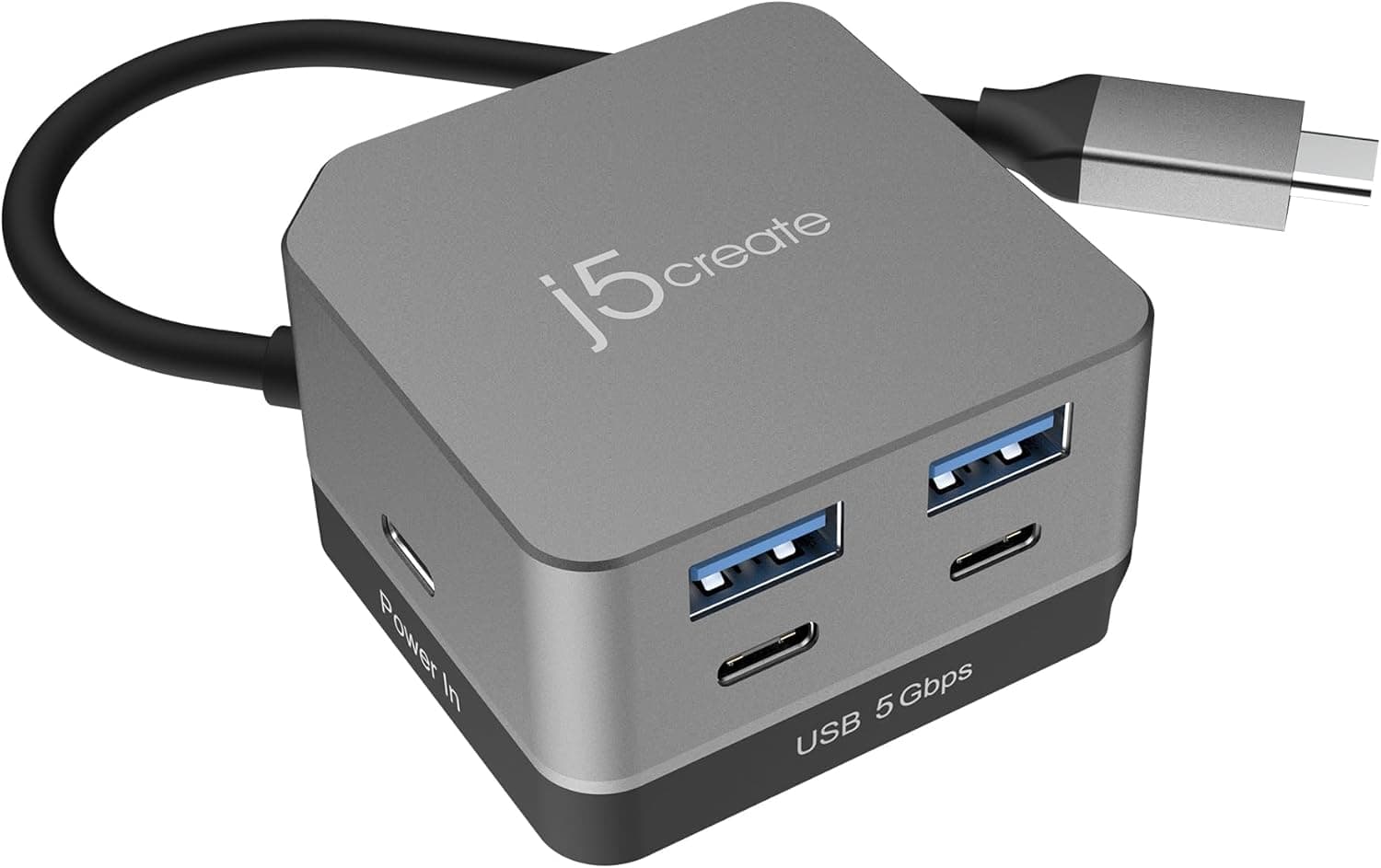
The j5create JCD361-EJ Cube Plus is a cube-shaped hub that turns one USB-C port into six functions. You get one HDMI output, four USB 3.2 Gen1 ports (two Type-A and two Type-C), and one PD pass-through charging input.
Its standout feature is 4K@144Hz over HDMI. Many compact hubs stop at 4K@60Hz or even 4K@30Hz, so this is a real difference.
The short answer: this hub is a good fit if you have a laptop that can output 4K@144Hz, a 4K 144Hz monitor, and you want something small to carry around. It is a poor fit if you need wired Ethernet or an SD card reader, or if your laptop's USB-C port does not support DisplayPort Alt Mode.
Getting 4K@144Hz also depends on more than the hub itself, so read the next section before buying.
The body measures about 53.2×31.15×53.2mm and weighs about 70.5g.
The 20cm cable tucks into the base, so the hub fits easily into a bag pocket. The housing is aluminum and plastic.
What It Takes to Get 4K 144Hz
The spec sheet lists the HDMI output as 4K@144Hz (DisplayPort 1.4 / DSC).
Uncompressed 4K@144Hz needs more bandwidth than DisplayPort 1.4 can carry, so DSC (Display Stream Compression) is part of the picture.
| What to check | What it needs (rule of thumb) |
|---|---|
| Host USB-C port | Video output via DisplayPort Alt Mode |
| Host GPU and driver | DisplayPort 1.4 with DSC over USB-C |
| Monitor | An HDMI input that accepts 4K@144Hz (HDMI 2.1-class inputs are the usual guide) |
| HDMI cable | Rated for 4K@144Hz bandwidth (Ultra High Speed labeling is a good guide) |
| OS setting | Refresh rate set to 144Hz by hand in display settings |
If any link in the chain falls short, the display will usually drop to something like 4K@60Hz. That does not mean the hub is faulty.
If 144Hz is missing from the list, check your monitor's HDMI input spec and your cable first. Then check your laptop maker's spec sheet for what its USB-C port can output.
Many thin laptops limit USB-C video to 4K@60Hz.
Compatibility Guide
The host must support DisplayPort Alt Mode. A USB-C port that only handles data and charging will not output video.
The listing names MacBook Pro/Air, Surface Book, Windows PCs, Chromebooks, iPad Pro, Pixel, XPS, Galaxy, and iPhone 15 and later. Still, USB-C capabilities vary by generation and model within the same product line.
Don't assume your device works because its family is on the list; check your exact model's specs.
The hub supports Windows, macOS, and ChromeOS and works as plug-and-play with no drivers. On macOS, each Mac model has its own limits on external display count and refresh rate.
Check your Mac's specs to see whether 4K@144Hz is possible.
A note on iPhone: the standard iPhone 15 and 15 Plus are generally described as having USB 2-class data speeds over USB-C. Video output and charging will work, but the hub's USB 3.2 Gen1 ports won't reach 5Gbps.
These phones are not a good match for fast external SSD transfers.
How power delivery works: the PD input accepts up to 100W, and the hub passes up to 85W to the host. The difference powers the hub itself.
To give a power-hungry laptop the full 85W, a 100W PD charger and cable are the rule of thumb. A 65W-class charger will work, but the host receives less, and charging may not keep up under heavy load.
Physical fit: the 20cm cable is fixed to the body. It is meant for placing the hub right beside the laptop, so it won't reach the back of a desk.
And because the cube is about 53mm on each side, it can crowd neighboring ports if other cables sit right next to the laptop's USB-C port.
Product Info
| Item | Value |
|---|---|
| HDMI output | 4K@144Hz (DisplayPort 1.4 / DSC) |
| USB ports | USB 3.2 Gen1 Type-A×2, Type-C×2 (4 total) |
| Max data speed | 5Gbps (USB 3.2 Gen1) |
| Pass-through charging | 100W input / up to 85W output |
| Dimensions | approx. 53.2×31.15×53.2mm |
| Cable | 20cm, attached, stowable |
| Weight | approx. 70.5g |
| Supported OS | Windows, macOS, ChromeOS |
| Material | Aluminum + plastic |
According to the listing, the JCD361-EJ launched in October 2025 and won a VGP2026 award. It is also listed with a two-year warranty and Japanese-language support by phone, email, and AI chat.
The box contains only the hub, and the USB-C cable is permanently attached.
Check the retailer's page for the latest price. These are snapshot prices that change with sales and stock, so check the product page for the current price.Check the retailer's page for the latest user reviews.
How It Differs from Other USB-C Hubs
Compared with other hubs at a similar price, the JCD361-EJ makes clear trade-offs:
- Video comes first. 4K@144Hz HDMI is rare at this price. A 4K@60Hz hub can't use the full refresh rate of a high-refresh monitor.
- USB port count comes second. You get four USB ports, but no Ethernet, no SD/microSD reader, and no 3.5mm audio jack. Photographers who offload camera cards, or anyone who needs wired LAN in meeting rooms, will be better served by a 7-in-1 or 8-in-1 hub that has those ports.
- The cube form factor. It is thicker than flat stick-style hubs, but it takes up less desk space, and the stowable cable doesn't tangle in a bag.
In short, this hub is built for people who won't compromise on video and don't need LAN or SD. If your needs are different, there is little reason to choose it.
Best Use Cases
- Owners of a 4K 144Hz monitor who want high-refresh output from a laptop. The hub makes the most sense paired with a gaming laptop or a recent laptop with DSC-capable output.
- Mobile workers who want a one-cable setup on the road. At about 70.5g with a stowable cable, it quickly connects a monitor, mouse, and keyboard in a hotel or coworking space.
- Users of laptops with few USB-C ports who need to charge and connect peripherals at the same time. With PD pass-through, you only need one charger and one hub.
- People with several USB-C peripherals. Two downstream Type-C ports mean USB-C keyboards and SSDs connect without adapters.
Before You Buy
The four USB ports share 5Gbps. Each port is USB 3.2 Gen1 (5Gbps), and traffic back to the host fits within that same bandwidth.
Copying to two external SSDs at once will slow both down. If you mostly connect light devices like a mouse and keyboard, this won't matter.
Treat the downstream Type-C ports as data-only. The spec sheet lists HDMI as the only video output and does not say the Type-C ports can drive a second monitor.
This is not a dual-monitor hub.
100W is the input figure; the laptop gets up to 85W. If you run a high-draw gaming laptop through this hub's pass-through alone, expecting 100W charging, the battery may slowly drain under load.
For power-hungry laptops, plugging the original power adapter in directly is more reliable.
The cable cannot be replaced. It is built into the body, so if it breaks, the whole hub stops working.
The stowable design helps portability, but avoid repeatedly bending the cable at its root. Keep your proof of purchase in case you need the warranty (listed as two years).
Without the full 4K 144Hz chain, you're overpaying. If your host or monitor tops out at 4K@60Hz, you are paying extra for 144Hz you can't use.
In that case, a 4K@60Hz hub with LAN and an SD reader will likely serve you better.
A note on the listing data: in our collected price data, the Amazon Japan page was labeled Amazon US. The price was in yen and fit the product, so we don't believe it points to a different product.
Still, stores list several similarly named j5create products, so confirm that the model number JCD361-EJ and the product photos match before you buy.
FAQ
Q. Will it always show 4K 144Hz once connected? A.
No. Your host's USB-C port needs DisplayPort Alt Mode and DSC, your monitor's HDMI input must accept 4K@144Hz, and the cable must be rated for it.
Even then, you have to select 144Hz in your OS display settings.
Q. What wattage charger should I use? A.
A 100W PD charger is the rule of thumb if you want the full 85W to reach the host. Lower-power laptops and tablets work fine with smaller chargers, but less power reaches the host.
Q. Does it work without a charger? A.
Yes, it can run on power from the host. But connecting several power-hungry devices, such as external hard drives, may cause instability.
In that case, plug a charger into the PD input.
Q. Can a Type-C port drive a second monitor? A.
The spec sheet lists only the single HDMI port as a video output. Treat the Type-C ports as USB 3.2 Gen1 data ports, and look at other products if you need dual monitors.
Q. Does it work with an iPhone? A.
The listing names iPhone 15 and later. However, the standard iPhone 15 and 15 Plus are generally described as USB 2-class for data, so the USB ports won't reach 5Gbps.
Product Disclosure (Amazon)
- Manufacturer: j5create
- Seller: j5create Direct
- Fulfilled by: Amazon
- ASIN: B0FX4GBT65
- Note: This article covers a manufacturer-made product based on Amazon listing details.