This article covers the GuliKit electromagnetic (Hall-effect) joystick modules for the Steam Deck, sold as a 2-pack, from the perspective of someone actually doing the swap. Two questions decide whether you should buy: will you solder, and is your drift really caused by the sticks?
Overview
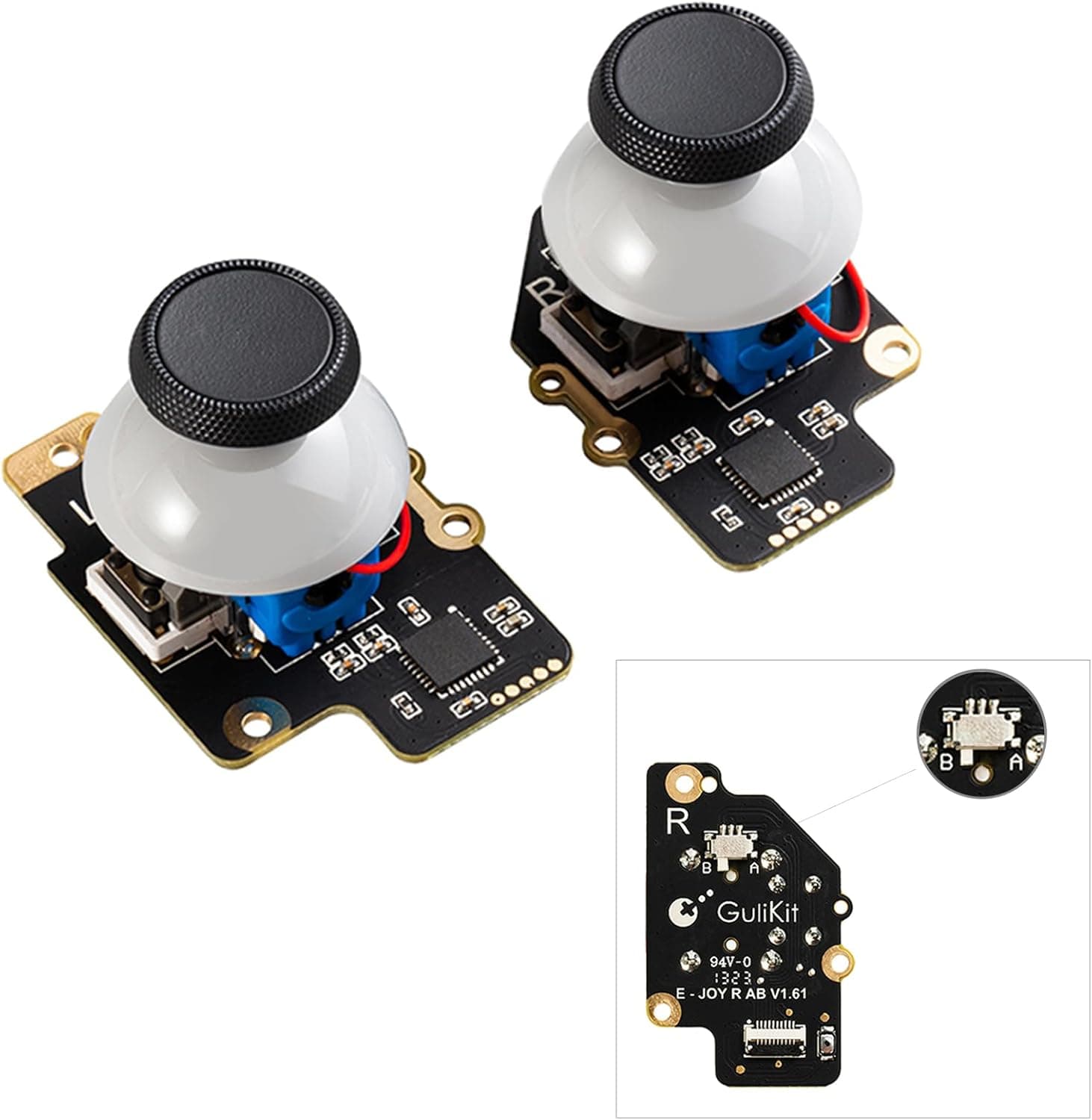
The GuliKit module is a full replacement for the Steam Deck's analog sticks. Conventional sticks read position by dragging a contact across a carbon resistive track; that track wears down with use, which is what eventually produces drift, creep and off-center neutral.
This module reads the position of a magnet without contact, so the wear mechanism simply does not exist.
The short version: it suits people who want to repair a drifting Steam Deck themselves and are comfortable opening the device. If you are nervous about disassembly or do not own a soldering iron, it is not an unqualified recommendation — the reasons are below.
The box contains two modules, so you can do both sticks at once. Drift usually shows up on one side first, but the other side has seen the same hours of abuse and will follow.
Calibration needs no extra software: you press a small switch on the module's board.
As captured on 6 June 2026, the Amazon.co.Check the retailer's page for the latest user reviews.
For a repair part, a review count above 500 says a lot about how widely shared the Steam Deck drift problem is.
Compatibility Guide
| Item | Detail |
|---|---|
| Device | Steam Deck |
| Sensor | Hall-effect |
| Included | 2 joystick modules (left and right) |
| Design | Patented electromagnetic design |
| Extra work | Soldering required for touch sensing |
This is Steam Deck only. Joy-Cons, AYANEO, ONEXPLAYER, GPD handhelds and Xbox or PlayStation pads use different boards and connectors, so it will not fit.
Trying to force a Hall-effect module into a device it was not cut for damages boards and ribbon cables. There is no workaround here.
The real decision point is touch sensing. The stock Steam Deck stick caps are capacitive, letting the system detect a resting thumb and use it as a trigger for gyro aiming.
To keep that, you must solder the touch wire from the cap to the pad on the module. Skip the soldering and movement plus click (L3 / R3) still work perfectly — only touch detection goes dead.
If you run gyro as "active only while touching the stick," you cannot avoid the iron.
Calibration after installation is mandatory. Enter the controller calibration screen in Steam OS, press the small switch on the module board, and the center point is learned automatically.
Do not touch the sticks during this. If you hold a stick off-center while it learns, that tilted position becomes neutral and the brand-new module will appear to drift.
A fair share of "it didn't fix my drift" reports are this procedural mistake, not a faulty part.
On disassembly itself: you need a Torx driver for the back cover, and the internal ribbon connectors must be unlatched before the cable is pulled. Yanking them is the single most common first-timer failure.
Assume tools — precision drivers, a plastic pry tool, tweezers — are not included and gather them in advance.
Product Info
Prices move with stock and sales, so check the listing for the current figure. That works out to roughly ¥5,600 per stick, which is clearly cheaper than sending the unit in for service or replacing the whole controller board.
The spec sheet comes down to four points: Hall-effect sensing, two modules per pack, Steam Deck exclusivity, and a patented electromagnetic design. It launched around 2022 and has stayed in circulation since.
Warranty terms are not clearly published, so if warranty coverage matters to you, confirm the seller's policy before buying.
Positioning is unusual: entry-to-mid pricing with upper-tier durability. It does not cost more than official-equivalent parts, yet it structurally removes the main cause of failure.
If you plan to keep the Deck for years, it is the more rational buy.
Comparison With Alternatives
The most direct comparison is an official-equivalent potentiometer module. It can be cheaper, but the same technology wears the same way, so the replacement will drift eventually too.
That fixes today's drift; it does not answer "never again."
The other comparison is a Hall-effect module from a maker such as eXtremeRate. Durability logic is similar and pricing is in the same range.
GuliKit's practical differences are the calibration switch mounted directly on the board, which keeps the procedure simple, and the standard 2-pack that assumes a full left-and-right swap. The flip side: if you only want to fix one side, you are paying for a spare (worth keeping, but still a spare).
A third option is avoidance — dock the Deck and use an external controller. Reasonable if most of your play is at a desk, useless if you actually carry the thing around.
Installation Outline
Power the Deck down fully; run the battery low if you can.
Remove the back cover screws, keeping them sorted since lengths differ by position.
Disconnect the battery connector to cut power.
Unlatch and release the stick module cable, then remove the old module.
Fit the GuliKit module, soldering the cap's touch wire if you want touch sensing.
Boot while still partially assembled and run calibration to confirm the center.
Reassemble fully once everything checks out.
Skipping step 6 means a second full teardown if anything is wrong. Do the dry-run test.
Best Use Cases
People who repair their own hardware. If you own Torx drivers and tweezers and have handled ribbon cables before, the job is not difficult.
If you can solder, you keep touch sensing too.
Long-term Steam Deck owners. Preemptive replacement makes sense even without symptoms — especially for heavy daily players, who will reach the payoff fastest.
Buyers of a used Steam Deck. With unknown usage history, remaining stick life is unknowable.
Swapping as part of an initial refurb removes that uncertainty.
Things to Consider
Touch sensing requires soldering. You need an iron, flux and thin solder, working on small pads.
Learning to solder for the first time inside your own Steam Deck is a bad plan. If you know you never use the touch feature, deliberately skipping it is a legitimate choice.
A calibration mistake looks exactly like a defect. Touching a stick during the routine, or cutting power midway, misplaces the center.
Read the procedure first and work calmly.
Your drift may not be the stick. Dust ingress, Steam OS deadzone settings, or a specific game's input configuration can all produce the same symptom.
Clean with compressed air, review controller settings, and reproduce the issue in a second game before you open anything.
Nothing but the Steam Deck. Shape and electrical spec are device-specific.
Buying with reuse elsewhere in mind guarantees a wasted purchase.
Check warranty handling. This is a third-party part, and how disassembly is treated depends on where and when you bought the Deck.
If the unit is still under warranty, talking to official support first may be the cheaper path. GuliKit's own coverage also varies by seller.
Listing data can disagree with itself. In the data referenced here, the entry labelled as an overseas price pointed to the same Japanese listing with the same yen figure.
On products shown through multiple sales channels, currency and seller labels do not always match reality. Before buying, confirm from the product images and title that you are looking at the Steam Deck 2-pack rather than trusting the listed metadata alone.
FAQ
Q. What still works if I do not solder? A.
Directional input and stick click (L3 / R3) work normally. Only capacitive touch detection is lost.
If you do not use touch-linked gyro, you will barely notice.
Q. Will drift really never come back? A.
The wear mechanism is gone by design. You may still need to recalibrate, and dust can still cause physical roughness.
"No wear-induced drift" is not the same as "zero maintenance forever."
Q. Can I replace only one side? A.
Yes, though feel may differ slightly between sticks and the remaining stock unit will develop the same fault later. Since you get two, swapping both at once is less total work.
Q. How long does the job take? A.
It depends heavily on your teardown experience. First-timers should set aside unhurried time including tool prep and reading the procedure.
This is not a job to rush.
Q. Does it work with the Steam Deck OLED? A.
The stated compatible device is the Steam Deck. Internal construction can differ between revisions, so verify the listed compatibility for your exact model before ordering rather than assuming.
Q. What happens to my warranty? A.
The part itself does not change Valve's coverage, but how disassembly is treated depends on your seller and region. If your unit is still in warranty, contact official support first.