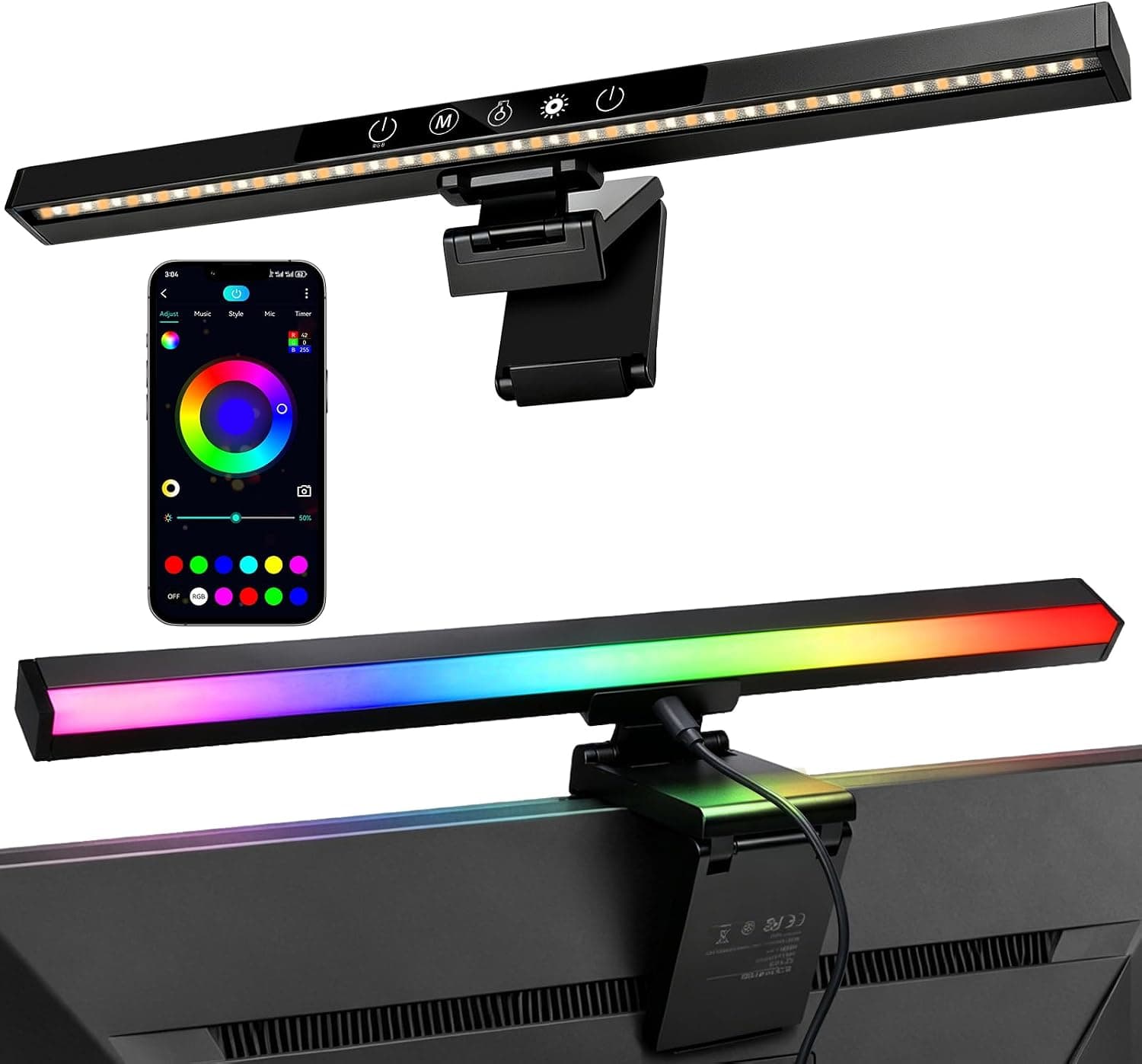
This article covers E-SHEEP モニターライト 42cm RGB バックライト 1600万色 — what the numbers actually mean in daily use, which monitors it fits, and the pitfalls buyers only notice after installation.
Overview
The E-SHEEP Monitor Light 42cm combines two things in one bar: an RGB bias light that washes the wall behind your screen, and a front-facing eye-care lamp that lights your hands and keyboard. The short verdict: it suits anyone running a flat 24-27 inch monitor who wants desk ambiance and task lighting from a single device.
It is a poor match for 34-inch-and-wider ultrawides, thick-backed panels, and color-critical work.
The rear RGB offers over 16 million colors and 40+ lighting modes, with music sync and smartphone app control. The front lamp adjusts steplessly from 3000K to 6000K with a CRI above 95.
The two sections are controlled independently, so you can leave the back on a calm static color while running the front lamp bright and neutral for work.
The practical value of the rear light is eliminating the state where your screen is the only bright object in a dark room. The smaller the luminance gap between screen and background, the less strain from constant adaptation.
The 16-million-color spec matters less for party effects than for matching the exact shade of your wall so the glow looks natural rather than tinted.
Compatibility Guide
The bar clips onto the back of the panel and fits thicknesses up to roughly 2cm. This is the real gating requirement.
Monitors with integrated stands, built-in power supplies, or sculpted gaming shrouds often exceed 2cm at the thickest point. Curved panels are listed as compatible, but a strong curve reduces clip contact to nearly a point, and the bar can creep forward over time.
Measure the thickest part of your monitor's back before ordering.
Width matching matters just as much. A 16:9 24-inch panel is about 53cm wide and a 27-inch about 60cm, so a 42cm bar covers roughly 70-80% of the screen width — the sweet spot for both bias lighting and task lighting.
| Monitor | Approx. panel width | How a 42cm bar fits |
|---|---|---|
| 24in (16:9) | ~53cm | ~80% of the width; near-ideal match |
| 27in (16:9) | ~60cm | ~70%; light concentrates centrally but stays balanced |
| 32in (16:9) | ~71cm | ~60%; edges stay dark |
| 34in (21:9) | ~80cm | ~50%; only the center reads as lit |
| 49in (32:9) | ~120cm | ~33%; too short to work as a bias light |
Above 27 inches you get a bright center with dark flanks. For ultrawides, two bars or a longer model is the honest answer.
The front lamp is a different story: 42cm covers the keyboard and mouse area regardless of screen size, so it still works as task lighting.
Power comes over USB 5V using the bundled USB-A to microUSB cable — no drivers needed. Which port you choose changes the behavior.
Draw from your monitor's USB hub and the bar follows the monitor's power state, though some monitors cut hub power in standby. Draw from the PC and it may stay lit through sleep, depending on your power settings.
Decide whether you want power linkage or independent control before routing the cable.
The app connects over Bluetooth for color, mode, and brightness control, which helps if the bar sits somewhere you cannot easily reach behind the monitor. Note that the source data does not specify whether music sync uses a built-in microphone or device audio; if sync accuracy matters to you, confirm the method on the product page.
If you use a monitor arm, check that the VESA plate and post do not sit where the clip needs to seat. Arms add bulk exactly at the center of the panel back, which is the hardest case for any clip-on bar.
Product Info
rmation
The bar measures 42cm wide, 1.7cm tall, and 3cm deep, weighing 356g — light enough that it will not tip a normally balanced monitor forward.
The front lamp covers 3000K-6000K with CRI >95; the rear section offers 40+ modes and 16 million+ colors. Power is USB 5V, and supported panel thickness is about 2cm.
The product dates to roughly 2024.
As captured on 20 September 2026, Amazon.co.jp listed it at ¥7,999.
Prices move often and sale pricing varies, so check the listing for the current figure. Note that the "global" price record points to the same Japanese listing at the same ¥7,999 rather than a US storefront, so no overseas retail price can be confirmed from this data; the eBay entry is only a search link with no fixed price.
Overseas buyers should price it locally rather than relying on the figure here.
Reviews stood at 5.0 out of 5 from 15 ratings as captured on 19 September 2026.
A perfect average from 15 ratings is not comparable to a product with thousands, and slow-developing issues — clip grip loosening, microUSB contact wear — have had little chance to surface at that sample size.
Warranty is 1.5 years handled directly by the manufacturer. The box contains the light bar, a USB-A to microUSB cable, and a manual.
How It Compares
Monitor lights split into two families. One focuses purely on front task lighting, trading RGB for better dimming and beam control.
The other, like this one, pairs rear RGB with a front lamp. Doing both at around the ¥8,000 mark is where the E-SHEEP sits.
Premium models differ in three areas: smart-home integration (Wi-Fi models answer to voice assistants and automation, while this one relies on Bluetooth app control), color temperature ceiling (6000K here versus roughly 6500K elsewhere, which matters for neutral daylight white), and mounting options (some offer weighted rests or adapters for thicker panels).
Flip that around and the case is clear: on a flat 24-27 inch monitor, with no need for automation or strict color management, the extra money buys little you would notice.
Best Use Cases
- Gamers building an immersive desk — rear RGB and music sync add atmosphere, while the front lamp handles long sessions. Best on flat 24-27 inch panels.
- Late-night users — the real benefit is removing the dark-room contrast gap. The maker cites asymmetric beam design to limit screen glare plus blue-light reduction, and the CRI >95 front lamp is pleasant for reading. A timer handles auto shut-off.
- Streamers and creators — 40+ dynamic effects and music sync give the on-camera background some life, and the app switches modes without reaching behind the screen.
- Anyone short on desk space — at 3cm deep it occupies the top edge of the monitor, consuming zero desk surface.
It is a poor fit for DMX-based lighting setups, monitor-arm rigs where the clip has nowhere to seat, and 34-inch-plus ultrawides needing even backlighting.
Before You Buy
The 2cm limit is the real compatibility spec. Do not trust "fits most monitors" — measure the thickest point of your panel's back.
Even when the clip physically closes, a panel it cannot grip flat will let the bar creep forward within weeks.
Treat 42cm as a 27-inch-and-under dimension. From 32 inches up, the flanks stay dark and the bias effect loses its evenness.
Product photos are shot on well-matched monitors, so your result will differ.
The 6000K ceiling matters for some work. Color evaluation generally assumes a daylight-leaning ambient around 6500K.
This lamp tops out at 6000K, so treat it as ambiance and task lighting, not a reference light source.
The microUSB connector deserves care. It is a port that degrades with repeated insertion.
Route the cable so there is no sideways strain and leave it connected once set. With a 1.5-year warranty, verify everything works early.
Read the rating with its sample size. 5.0 from 15 ratings as of 19 September 2026 means "not yet tested widely," not "universally approved."
Check the listing details themselves. This is a monitor accessory, not a monitor, and store category tags sometimes misclassify it.
Listing metadata occasionally carries data from a different product entirely. Before ordering, confirm from the images, title, and dimensions (42cm wide, up to ~2cm panel thickness) that the listing matches what you expect.
FAQ
Q. Can I use it with a monitor arm? A.
Only if the VESA plate and post leave a flat area under 2cm thick where the clip can seat. Check that first; if nothing is left, a freestanding desk lamp is the practical alternative.
Q. Will it work with a PS5 or Nintendo Switch? A.
It lights up from any USB-A port supplying 5V, but console ports vary in output and standby behavior. A USB wall adapter or PC port is more reliable.
App control pairs with the bar over Bluetooth, so the console needs no support.
Q. Does it genuinely reduce eye strain? A.
The clearest benefit is removing the dark-room contrast gap between screen and wall. Asymmetric beam design and blue-light reduction are manufacturer claims.
Lighting alone will not fix fatigue — pair it with sensible screen brightness and breaks.
Q. Can I leave it on? How much power does it draw? A.
Wattage is not listed in the provided specs, so no exact figure can be stated. USB 5V bars in this class generally draw only a few watts.
Use the timer for auto shut-off, or power it from the monitor's hub so it follows the display.
Q. Does it fit curved monitors? A.
The maker says yes, but the clip is designed for flat surfaces, and tighter curves reduce contact. Gentle curvature around 1800R is realistic; the ~2cm thickness limit still applies.
Check the return policy before committing.