This article covers the DUCKY ゲーミングキーボード One 2 SF RGB Cherry Speed 銀軸(英語配列) ピュア ホワイト dk-one2-rgb-sf-pw-silver [USB] — a 65% board whose combination of Cherry MX Silver switches, double-shot PBT caps and a detachable USB-C cable still gets sought out by name years after release. Below, the specs are translated into what they actually feel like, plus the pitfalls buyers discover after the box is open.
Overview
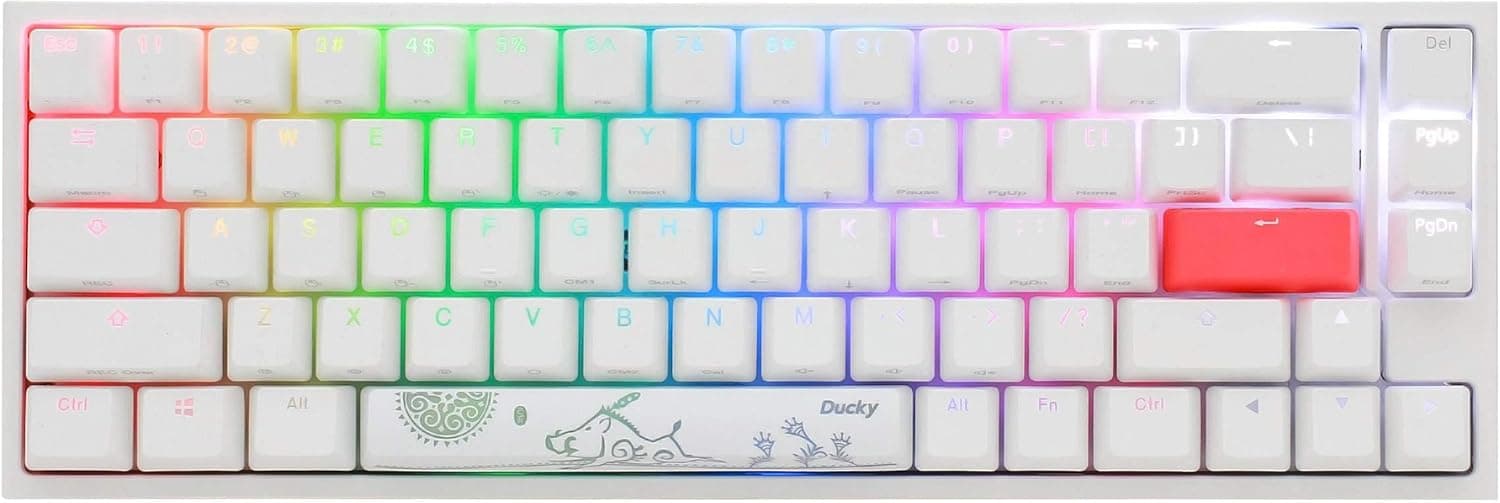
The Ducky One 2 SF RGB is a 65% mechanical keyboard — narrower than a tenkeyless design while keeping dedicated arrow keys. It measures 325 x 108 x 40 mm and weighs roughly 650 g.
That is over 3 cm narrower than a typical TKL and more than 10 cm narrower than a full-size board. Those 3 cm are not about tidiness; they become mouse-swing area, which matters if you play at low sensitivity.
The switch is the Cherry MX Silver (Speed Silver): linear, around 45 g actuation force, a 1.2 mm actuation point and 3.4 mm total travel per Cherry's published figures.
That is 0.8 mm shallower than a standard MX Red.
Inputs register earlier, but so do accidental presses when you rest your fingers on the keys. Whether you like that trait essentially decides your verdict on this board.
Keycaps are double-shot PBT, so the legends are moulded rather than printed and cannot wear off. The pure white chassis looks excellent next to white peripherals, though white plastics can yellow with age.
On Amazon.co.jp the board holds a 4.2 out of 5 average across 31 reviews — roughly 84% positive — a stable score, but from a small sample.
Compatibility Guide
Connection is a single detachable USB-C cable; there is no wireless mode. Windows, macOS and Linux all work with no driver install, because configuration is handled by onboard hardware.
That suits anyone who cannot install software on a work machine, and frustrates anyone who wants a GUI for macros.
| Item | Value | Why it matters |
|---|---|---|
| Layout | 65% (US ANSI) | Symbol positions and IME switching must be relearned from JIS |
| Switch | Cherry MX Silver (Speed) | 1.2 mm actuation — fast, but easy to trigger by accident |
| Keycaps | Double-shot PBT | Resists shine and legend wear |
| Backlight | RGB (3528 SMD LED) | Diffuses softly against the white case |
| Polling rate | 1000 Hz | Not the latency bottleneck |
| Connection | USB-C (detachable) | Easy cable swaps; no wireless option |
| Dimensions | 325 x 108 x 40 mm | 108 mm depth fits small trays and stands |
| Weight | ~650 g | Heavy enough to stay put during frantic play |
The real compatibility trap is the layout, not the OS. US ANSI means no 変換, 無変換 or 半角/全角 keys.
On Windows you switch IME with a shortcut such as Alt+` or change the system keyboard layout to English — and that change applies system-wide, so pairing this board with a JIS laptop keyboard will leave one of the two with misplaced symbols. If you plan to use it alongside a Japanese laptop, that is the biggest practical risk.
The 65% layout also has no dedicated F1–F12 row. BIOS entry is fine because Delete is a dedicated key, but Fn-layer function keys are a poor match for CAD or video-editing shortcut workflows.
Product Info
Ducky is a Taiwanese keyboard maker, and the One 2 SF is an older design that survives on execution: a case with almost no flex, stable stabilisers, and a well-thought-out Fn layer.
Prices below are capture-time values and will move. The Amazon global listing showed ¥24,171 as captured on 1 June 2026, and Amazon.co.jp showed ¥22,697 as captured on 27 August 2026 — roughly ¥1,500 of movement in under three months.
Stock is largely parallel-import at this point, so always check the product page for the current price. The eBay entry is a search link with no fixed price.
In the box: the detachable USB-C cable, a keycap puller, and bonus keycaps — some batches include a random "Year of" zodiac spacebar. Which design you get is luck, so do not buy for a specific one.
Ducky products normally carry a one-year manufacturer warranty, but parallel imports may not qualify for domestic distributor support; confirm the seller's terms first.
Versus the Alternatives
The usual rival in the "small, white, fast linear" bracket is the Razer Huntsman Mini. That board is 60% and has no dedicated arrow keys.
If you write or use spreadsheets at all, the One 2 SF's 65% layout with real arrows plus Page Up/Down is noticeably less tiring day to day. If the board is purely for gaming and desk space is sacred, 60% wins.
If you want 65% with wireless or hot-swap, look at boards like the EPOMAKER TH65. The One 2 SF is wired-only and not hot-swappable — switches are soldered.
You cannot rescue a bad switch choice by swapping it later, which matters more than any price gap if you are the type who likes to tune a board over time. And if you want an adjustable actuation point, you want optical or Hall-effect instead: 1.2 mm here is fixed.
What It Feels Like
Silver switches read as "shallow" before they read as "fast". Coming from Reds, expect more typos for the first few days, especially if you rest your fingers on the keys.
Most people adapt within a week — but because the switches are soldered, there is no fallback if you do not.
They are linear, not silenced. There is no click, but bottom-out is clearly audible.
The 650 g weight keeps the sound solid rather than hollow, so the tone is good — yet it will absolutely reach a conference-call microphone. For genuinely quiet environments, look at silent switches or a capacitive board instead.
Per-key 3528 SMD LEDs light the board, and the white case diffuses them pleasantly. But the PBT legends are not shine-through, so the characters do not glow in the dark.
If your reason for wanting RGB is readability at night, this is not the board.
Best Use Cases
- Low-sensitivity FPS and TPS players — 325 mm of width is 3 cm less than a TKL, and all of it becomes mouse room. The 650 g mass stays planted.
- Programmers and writers already fluent in US ANSI — dedicated arrows plus Delete, Page Up and Page Down mean no Fn gymnastics during long edits.
- People who cannot install software — no driver needed; settings live on the board itself.
- White-desk builders — the pure white chassis coordinates cleanly with white mice and monitors.
- Anyone tired of legends wearing off — double-shot PBT will not fade.
Before You Buy
1. You cannot change the switches. No hot-swap; switches are soldered.
If 1.2 mm does not suit you, there is no recovery path.
First-time mechanical buyers who do not yet know their preferred switch should start with a hot-swappable board.
2. Do not underestimate the JIS-to-ANSI move. Symbol positions differ substantially, and there is no IME toggle key.
The OS-level layout change is system-wide, so a JIS laptop keyboard on the same machine will end up mismatched. Choosing ANSI purely because it looks cleaner is a common regret.
3. It is not quiet. No click, but audible bottom-out. Silence-first environments should look elsewhere.
4. No dedicated F-row. Fn combos slow down CAD, editing and any workflow that leans on F1–F12 — including quick-saving with F5 mid-game.
5. White yellows. Keep the board out of direct sunlight to slow it down.
6. Parallel-import supply means unstable pricing and warranty. The figures above are capture-time only and moved about ¥1,500 between June and August 2026.
Sellers and fulfilment partners on the listing are often importers, and domestic warranty coverage varies per seller. Check warranty and return terms before ordering.
7. Treat listing metadata with suspicion. Amazon product pages sometimes carry manufacturer, model or OS details that do not match the actual item.
Verify the dk-one2-rgb-sf-pw-silver model code and a "Silver / Speed / 銀軸" marking in the images and title yourself — the One 2 SF ships in many switch and colour variants, and the wrong page ships you the wrong switch.
FAQ
Q. Silver or Red? A.
Silver (1.2 mm) if gaming speed is the priority; Red (2.0 mm) if you type a lot and want fewer accidental inputs.
If the board must do both, Red is the safer bet.
Q. How do I switch Japanese IME? A.
There is no 半角/全角 key. Use a shortcut such as Alt+`, or set the system keyboard layout to English and assign a toggle. The setting applies to the whole PC.
Q. Can I swap switches later?
A. No. The board is not hot-swappable; switches are soldered to the PCB.
Q. Is there a wireless mode?
A. No — wired USB-C only. The cable is detachable, so you can change its length or colour freely.
Q. Does it work on a Mac? A.
Yes, driverless on Windows, macOS and Linux. Legends follow Windows conventions, so mentally remap Command and Option.
Q. What does it cost now? A.
Capture-time values ranged from ¥22,697 to ¥24,171 (June–August 2026), but parallel-import pricing moves often. Check the listing for the current figure.
Product Disclosure (Amazon)
- Manufacturer: Ducky
- Seller: 【輸入雑貨】ドラゴンビレッジ
- Fulfilled by: 【輸入雑貨】ドラゴンビレッジ
- ASIN: B088HFKYQQ
- Note: This article covers a manufacturer-made product based on Amazon listing details.