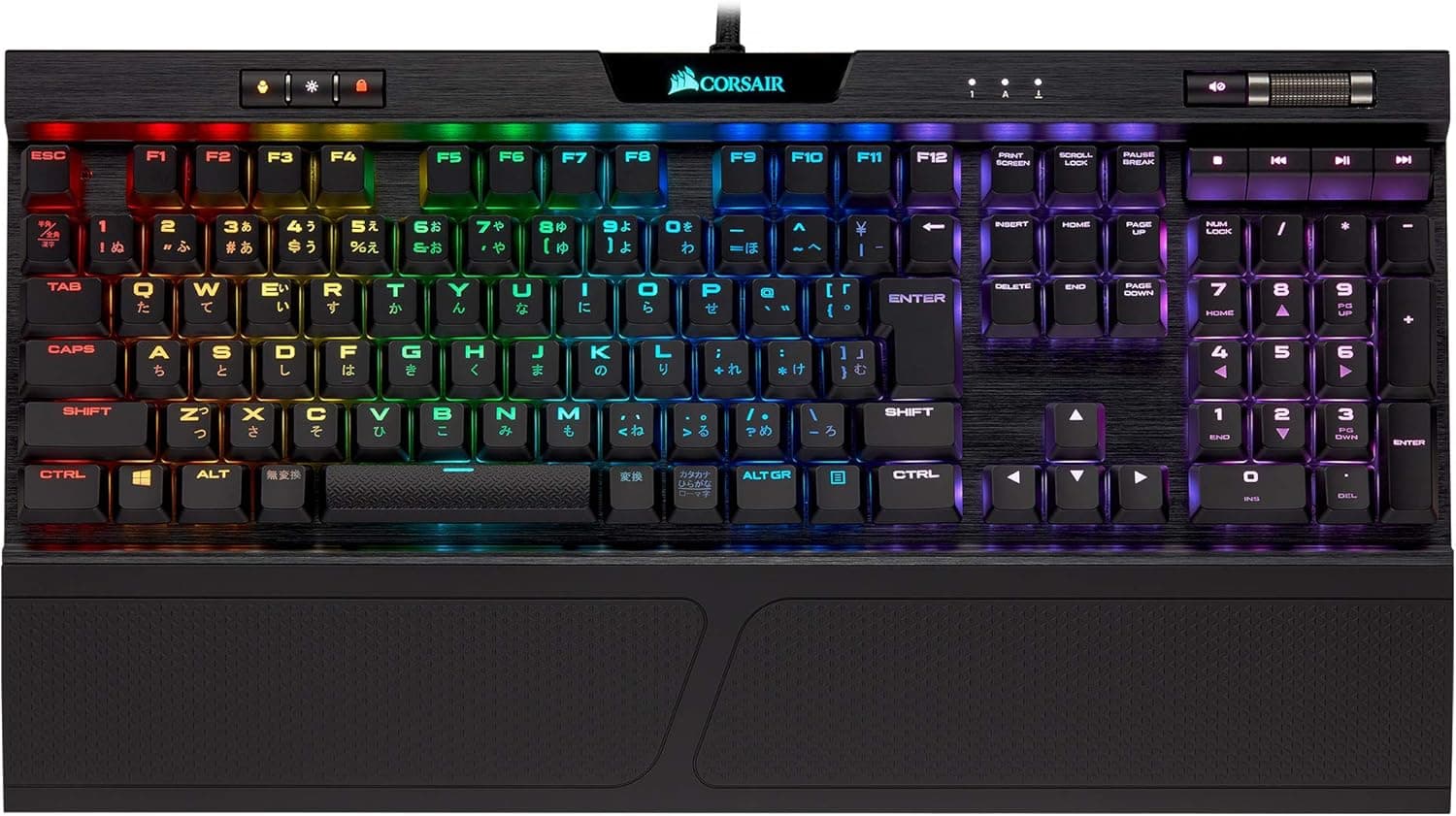
The Corsair K70 RGB MK.2 LOW PROFILE RAPIDFIRE Cherry MX Low Profile Speed Japanese Gaming Keyboard KB454 CH-9109018-JP is a full-size wired gaming keyboard built around Cherry MX Low Profile Speed switches.
This article works through the published specifications and the actual listing data to explain who it fits and where you have to compromise.
Overview
The short version: this board is for people willing to trade key travel for speed. Every switch is a Cherry MX Low Profile Speed — shorter overall travel and a shallower actuation point than a standard mechanical switch — which pays off in FPS and MOBA play where the same keys are hit repeatedly in quick succession.
If you mainly write long documents and want a deep, deliberate keystroke, this is likely the wrong board from the start.
The chassis uses an aluminum frame with per-key RGB backlighting configured through Corsair's iCUE software. The listed 8 MB of onboard memory lets you store profiles on the board itself, so settings travel with the keyboard between machines.
Polling runs at 1000 Hz, and full N-key rollover with 100% anti-ghosting covers simultaneous input on the spec sheet.
Amazon.co.jp lists a rating of 4.3 out of 5 across 84 reviews (captured 18 June 2026, roughly 86% positive).
That is a small sample. Compared with keyboards carrying tens of thousands of ratings, an average built on 84 reviews moves easily on a handful of extreme opinions, so don't buy on the star rating alone.
What the Low Profile Speed switch actually feels like
Three words: shallow, light, not quiet. The low-profile housing shortens total travel, and the Speed variant puts actuation high in the stroke, so input registers before you feel committed to the press.
Commonly cited figures are around 1 mm actuation and a little over 3 mm total travel, but check Corsair's and Cherry's product pages for exact numbers.
Two practical consequences follow. First, accidental input: if you rest your fingers on the home row while thinking, you will trigger keys.
Second, fatigue — with less distance before bottom-out, the impact returns to your fingers faster, which matters if you type hard. Plan on using the bundled palm rest rather than treating it as optional.
These are linear switches, so there is no click, but the shallow housing makes bottom-out sound hard rather than muted. Low profile does not mean silent.
If you game on voice chat, microphone placement matters.
Connectivity & Compatibility
Connection is wired USB-A only — no wireless, no Bluetooth. Supported operating systems are Windows 10 and later, including Windows 11.
macOS handles basic typing, but iCUE lighting and macro features are restricted, so a Mac user ends up with an ordinary Japanese-layout keyboard.
The easily missed requirement is port count. Because the board carries a USB 2.0 passthrough port, powering both the keyboard and the passthrough occupies two USB-A ports on the host.
Laptops with only USB-C, or mini-ITX builds with crowded rear I/O, need a hub or adapter planned in advance. Note also that the passthrough is USB 2.0 — an external SSD plugged in there will be throttled.
Treat it as a home for a mouse cable or a wireless dongle.
On desk footprint: this is a full-size 108-key Japanese (JIS) board, not a tenkeyless. Low profile refers to height, not width.
Low-sensitivity FPS players hoping to free up mouse space will not get what they expect. The real benefits of the reduced height are a more natural wrist angle and less vertical hand movement across the keys.
iCUE runs in the background. Lighting sync and complex macros require it, but once profiles are written to onboard memory, core behavior survives without the software running.
Players who want fewer background processes during competitive sessions can save profiles to the board and close iCUE.
Product Info
Key specifications: Cherry MX Low Profile Speed (RGB) switches, 108-key Japanese (JIS) layout, wired USB-A connection, per-key RGB backlighting, 8 MB onboard memory, N-key rollover, 100% anti-ghosting, one USB 2.0 passthrough port, and a 1000 Hz polling rate.
In the box are an FPS/MOBA keycap set, a palm rest, and a keycap puller. It launched in late 2018 and is not a current-generation model.
Pricing needs care. Captured values swing hard: Amazon.co.jp showed ¥52,973 as of 18 June 2026 and ¥14,982 as of 26 August 2026 — more than a threefold gap on the same ASIN.
That pattern is typical of an aging product with thin stock: when official supply dries up, reseller prices spike; when inventory returns, prices fall back. There is no single meaningful "street price" here.
Check the live listing yourself before buying, and treat a figure like ¥52,973 as a scarcity price rather than a normal one.
Reviews stand at 4.3 out of 5 from 84 ratings (captured 18 June 2026).
An eBay search link also exists, but per-listing prices vary and there is no guarantee of getting the Japanese JIS variant. The trailing JP in model number CH-9109018-JP identifies the Japanese-layout SKU — verify it if you buy through import channels.
Competitors
The comparison set is the Logitech G915 family (low profile, wireless), Razer's slim models, and optical-switch boards such as the SteelSeries Apex 9 TKL. Against the G915 this board is clearly behind on wireless, though wired operation removes battery management entirely.
Against the Apex 9 TKL, which lets you set actuation depth in software, this board's fixed actuation is a real weakness: if the stroke feels too shallow, there is no software fix.
What it still does uncommonly well is combine an aluminum frame, a full-size JIS layout, USB passthrough, and 8 MB of onboard memory in a low-profile body. Boards that are low profile, Japanese layout, and full size with a numpad remain rare.
If you need all three, the model's age is a reasonable thing to overlook.
Before You Buy
First, if the typing feel doesn't suit you, there is no remedy short of a return. The switches are not hot-swappable, so you cannot move to heavier or deeper switches later.
If you have never used a low-profile linear switch, try one in a store before committing — satisfaction with this board comes down almost entirely to that.
Second, keycap compatibility. The board uses low-profile-specific keycaps, so standard MX-compatible sets will not fit.
Anyone hoping to swap in shine-through custom caps has essentially no options. Treat lighting, not keycaps, as the customization path.
Third, the price volatility described above. Buying in a hurry at a spike is an expensive mistake.
Also be aware that Amazon listing metadata — manufacturer, model number, compatibility — sometimes contains errors. Confirm the product images, title, and the CH-9109018-JP model number match before ordering.
Fourth, its age. The stated warranty is two years, but how that is honored depends on the seller and import route.
Marketplace or parallel-import units may fall outside domestic support, so check whether the seller is an authorized distributor.
Fifth, the people it does not suit: heavy long-form typists, anyone prioritizing quiet operation, anyone who wants a wireless desk, Mac-primary users, and anyone who enjoys modifying keyboards. If one of those describes you strongly, look elsewhere.
Best Use Cases
This suits competitive FPS and MOBA players who will take input speed over tactile satisfaction. The shallow actuation genuinely helps during rapid repeat presses and strafe reversals.
It also suits anyone who requires a Japanese JIS layout, with the 半角/全角, 無変換, and 変換 keys in their proper positions — if an ANSI layout is acceptable, your options widen considerably, so settle that question first.
It also fits existing Corsair owners. Managing lighting for mouse, headset, and fans through a single iCUE install saves real effort.
If your peripherals are from mixed brands and you resist adding background software, that advantage disappears.
Finally, it suits people who use a numpad daily. Low-profile mechanical boards skew toward tenkeyless and 65% designs, so a full-size low-profile option is genuinely hard to find — a clear differentiator if spreadsheets or numeric entry are part of your day.
FAQ
Q. Is it quiet? A.
The linear switches have no click, but this is not a silenced design; bottom-out sounds hard. If quiet operation is the priority, look at a board with dedicated silent switches.
Q. Does it work on macOS? A.
Basic typing works, but iCUE lighting and macro configuration are restricted. A Mac-primary user loses most of the board's advantages.
Q. Can I fit custom keycaps? A.
No. The low-profile keycap form factor is incompatible with standard MX sets, leaving effectively no aftermarket choice beyond the bundled FPS/MOBA caps.
Q. How many USB ports do I need?
A. Two USB-A ports if you intend to use the passthrough. Plan a hub in advance if your ports are full.
Q. Why do prices look so different? A.
Stock is unstable on an older model. The same listing captured ¥14,982 on 26 August 2026 and ¥52,973 on 18 June 2026.
Always check the current price.
Q. Can actuation depth be adjusted? A.
No. It is fixed in the physical switch with no software adjustment.
If you need adjustable actuation, choose an optical or magnetic switch board.
Product Disclosure (Amazon)
- Manufacturer: CORSAIR
- ASIN: B07JP7MC3K
- Note: This article covers a manufacturer-made product based on Amazon listing details.



![CH-9119014-NA [メカニカルゲーミングキーボード K70 RGB TKL CHAMPION 英語 CHERRY MX SPEED]](/_next/image?url=https%3A%2F%2Fm.media-amazon.com%2Fimages%2FI%2F61Z%2BCMdG9tL._AC_SL1200_.jpg&w=1920&q=75)