Overview
The CalDigit TS3 Plus — High-Port-Count Thunderbolt 3 Docking Station is a desk-bound dock that uses a single Thunderbolt 3 cable to handle laptop charging, external displays, data transfer and wired networking. The short verdict: it is still a strong choice if you own a Thunderbolt 3/4 laptop and want to turn it into a full desktop setup with one cable.
It is the wrong choice if your laptop only has plain (non-Thunderbolt) USB-C, or if you need two external displays on a base Apple Silicon (M1/M2/M3) Mac.
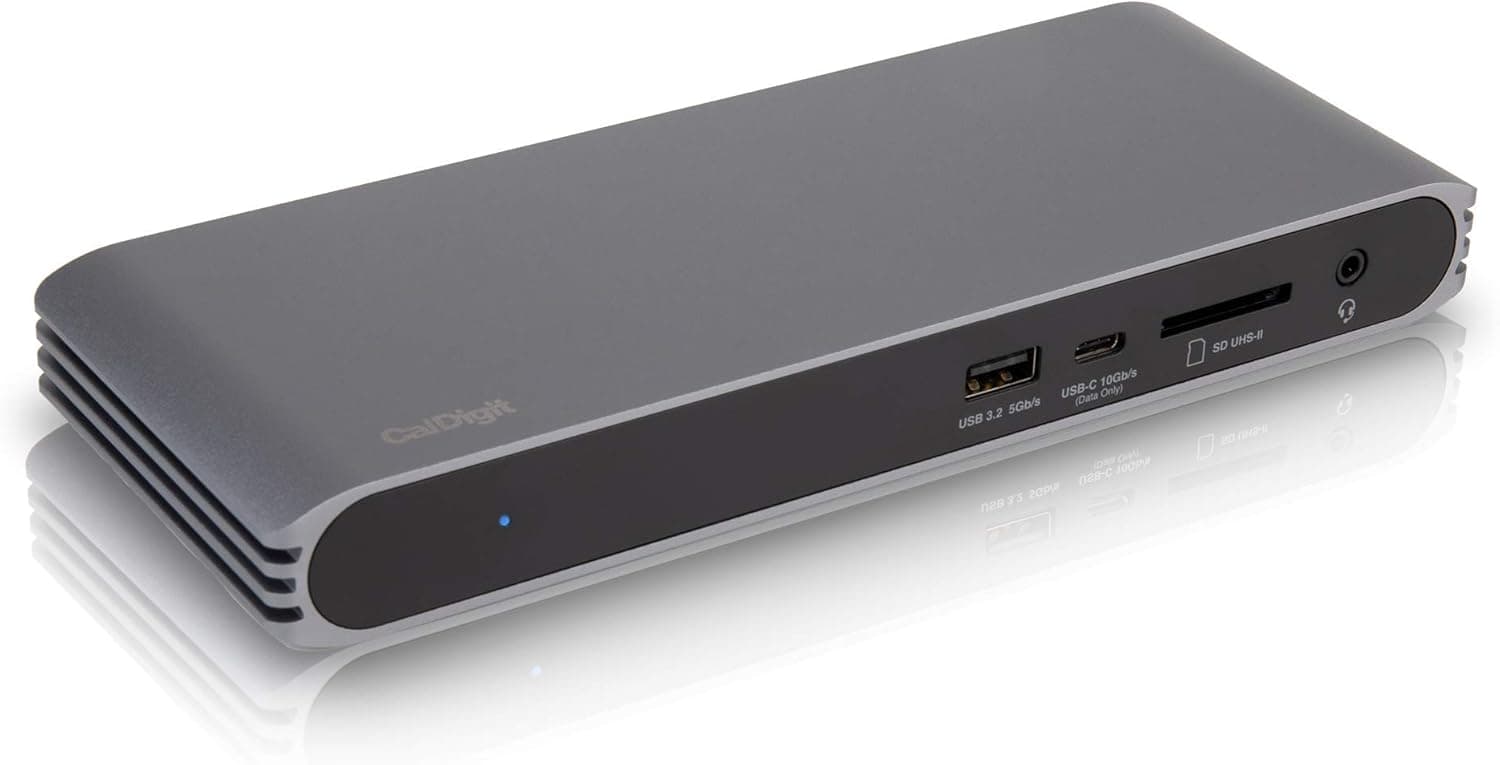
The CalDigit TS3 Plus packs 15 ports into a fanless, all-aluminum chassis, so it runs silently and dissipates heat through the whole enclosure. It charges the host laptop at up to 87W and drives either two 4K displays at 60Hz or a single 5K display at 60Hz.
On Amazon.co.Check the retailer's page for the latest user reviews.
It is not a flashy product, but it has stayed a long seller thanks to its port selection and stable operation. This article focuses on what a spec sheet does not tell you: whether it will actually work with your machine, and where you have to compromise.
Port Layout and Practical Use
| Port | Count | Spec | Typical use |
|---|---|---|---|
| Thunderbolt 3 | 2 | 40Gbps (one is the host link) | Host connection, daisy-chaining Thunderbolt devices, video out |
| DisplayPort | 1 | 1.2 | First external display |
| USB-A | 5 | USB 3.1 Gen1 (5Gbps) | Keyboard, mouse, webcam, printer, external HDD |
| USB-C | 2 | 1× Gen1 5Gbps, 1× Gen2 10Gbps (data only) | USB-C peripherals, external SSD |
| Ethernet | 1 | Gigabit (RJ45) | Stable wired networking |
| SD card | 1 | UHS-II SD 4.0 (up to 312MB/s) | Offloading camera footage |
| Audio | 3 | S/PDIF optical out, 3.5mm stereo in/out | Speakers, headsets, microphones |
The dock's strength is quantity and variety. Five USB-A ports let you connect a keyboard, mouse, webcam, USB DAC and external hard drive without adding another hub.
Separate optical output and 3.5mm in/out jacks are a quiet but real benefit for anyone running audio gear at their desk.
Speed is where you compromise. Every USB-A port is 5Gbps Gen1, and only one USB-C port runs at 10Gbps — and that port is data only, with no video output.
If you use a fast external NVMe SSD, plan to connect it to that 10Gbps USB-C port or to the downstream Thunderbolt 3 port. Also remember that everything shares a single 40Gbps Thunderbolt 3 link to the host, so running two high-resolution displays and fast storage at the same time will not give you the sum of each device's standalone speed.
Compatibility Guide
Your computer needs Thunderbolt 3 or 4
The TS3 Plus requires a Thunderbolt 3 or Thunderbolt 4 port. A USB-C port that looks identical but lacks Thunderbolt will not work.
This is the most common mistake, so check your laptop's spec sheet for Thunderbolt 3 or Thunderbolt 4, or look for the lightning-bolt icon next to the port. USB4 ports are often compatible with Thunderbolt 3 devices, but support varies by model, so confirm Thunderbolt 3 device support with your PC maker before buying.
External display limits on Apple Silicon Macs
Apple Silicon Macs with the base M1, M2 or M3 chip (such as the MacBook Air and base 13-inch MacBook Pro) are limited to one external display. This is a limitation of the chip, and no dock can fix it.
MacBook Pro models with M1 Pro/Max or higher-tier chips support multiple external displays, though results can depend on how displays are connected, so check which chip your Mac uses. If you need two or more screens on a base-chip Mac, a DisplayLink dock is the usual alternative (it requires a driver and is not ideal for fast-moving content).
Windows PCs
Some Windows laptops share similar limits on display count or charging. Outdated Thunderbolt controller firmware or drivers can also cause unstable detection.
If the dock behaves oddly, first check your PC maker's support page for Thunderbolt updates.
Connecting displays
For dual 4K@60Hz, the usual setup is one display on the DisplayPort 1.2 output and one on the downstream Thunderbolt 3 port (USB-C video).
There is no HDMI port, so HDMI-only monitors need an adapter. When converting DisplayPort to HDMI, DVI or VGA, use an active adapter, and make sure it supports 4K@60Hz if you need that.
Single 5K@60Hz output assumes a Thunderbolt-connected display that supports 5K.
Power and cable length
Host charging tops out at 87W. That is usually enough for 13- to 14-inch laptops, but high-performance laptops that ship with 100W-plus chargers may slowly drain their battery under sustained heavy load.
The dock runs from its own AC adapter, so leave room on your desk for the power cabling. The included Thunderbolt 3 cable is 0.7m; if you want a longer cable at full 40Gbps, passive cables are length-limited, so an active Thunderbolt cable is the safer pick.
Product Info
The TS3 Plus has been on the market for years and is still widely available. It sits in the upper-mid price tier for Thunderbolt docks and is well regarded for its port count and stability compared with similarly priced Thunderbolt 3 docks.
It ships with a roughly 0.7m Thunderbolt 3 cable.
The warranty is stated as two years, but terms can vary by sales channel, so check the retailer's listing when you buy.
Pricing varies by date and store. On Amazon.co.jp it was ¥25,200 as captured in June 2026 and ¥29,991 as captured in August 2026.
An eBay US listing showed $295.00 as captured in July 2026, though condition and shipping differ by listing.
Prices move with sales and stock, so check the product page for the current price before buying.
The Amazon.co.
Praise tends to focus on the port count and fanless design, and low ratings for docks like this often trace back to compatibility issues such as an unsupported host or display-count limits. Whether you meet the requirements below makes a big difference to how satisfied you will be.
Competitor Comparison
| Option | Type | Best for |
|---|---|---|
| CalDigit TS3 Plus | Thunderbolt 3, AC powered, 87W charging | Desk users who want many ports plus charging |
| CalDigit Thunderbolt 3 mini Dock | Thunderbolt 3, bus powered, dual HDMI 2.0 | Travelers who mainly need extra display outputs |
| USB-C hubs (e.g. Anker 565) | USB-C with a 10Gbps data port | Laptops without Thunderbolt |
| DisplayLink docks | USB plus a dedicated driver | Base Apple Silicon Macs needing multiple screens |
CalDigit's own mini Dock is a compact bus-powered unit: easier to carry, but it cannot match the TS3 Plus for charging or port count. USB-C hubs work with non-Thunderbolt laptops, but their bandwidth is capped by USB.
The reason to pick the TS3 Plus is simple: a desk setup where charging, Ethernet, SD and lots of USB-A all come through one cable.
Who Should Buy
The TS3 Plus is a strong fit for anyone running a MacBook Pro (2016 or later) or a Thunderbolt 3 MacBook Air as a desk machine at home or at work. Plug in one cable and you get power, monitor, keyboard and wired network at once.
The UHS-II SD slot (up to 312MB/s) also speeds up offloading for photographers and videographers.
It also suits Thunderbolt 4 Windows laptop owners who are short on USB-A ports. Five USB-A ports let you run external drives, printers and keyboards at the same time without adapters.
Because it is fanless and silent, it works well for people who record, stream or work in a quiet bedroom.
If dual displays are essential, confirm first that your computer is not a base-chip Apple Silicon Mac and that your Windows laptop has no multi-display restriction.
Before You Buy
Plain USB-C will not work. This is the biggest pitfall.
The typical failure is buying it because the laptop has USB-C, only to find it is not Thunderbolt and the dock is not recognized. Always confirm your port is Thunderbolt 3/4.
Base M1/M2/M3 Macs get one screen. Even though the dock supports dual 4K, the Mac limits you to one external display.
If two screens are your main goal, this dock will not deliver that on those Macs.
All USB-A ports are 5Gbps. That is fine for peripherals but will bottleneck fast external SSDs.
Use the 10Gbps USB-C port or the Thunderbolt 3 port for speed-sensitive devices, and note that the 10Gbps USB-C port is data only and cannot output video.
No HDMI port. If your monitor only has HDMI input, budget for an adapter and allow for compatibility quirks.
87W may not be enough. Gaming laptops and large creator laptops under heavy load may out-draw the dock, so treat its power delivery as supplementary on those machines.
It is not a new design. As a Thunderbolt 3-era dock, it trails newer Thunderbolt 4 and USB4 docks in USB speed and downstream Thunderbolt port count.
It is still more than capable for connecting lots of existing peripherals, but compare alternatives if you want the latest standards.
Prices swing widely. As noted above, Amazon.co.jp alone showed ¥25,200 and ¥29,991 at different capture dates.
If you are not in a hurry, watching the price for a while can pay off.
FAQ
Q. Does it work with a non-Thunderbolt USB-C laptop? A.
No. It requires a Thunderbolt 3 or Thunderbolt 4 port.
For USB-C-only laptops, choose a USB-C hub or dock instead.
Q. Can an M1 MacBook Air drive two monitors through it? A.
Not by default; it is limited to one external display. That is a Mac-side limit the dock cannot bypass.
MacBook Pro models with M1 Pro/Max or higher-tier chips support multiple displays.
Q. Can I connect an HDMI monitor? A.
There is no HDMI port, so you need an adapter from DisplayPort or from the USB-C Thunderbolt 3 port. For DisplayPort conversion, use an active adapter and confirm it supports 4K@60Hz if needed.
Q. Is it silent when left powered on? A.
Yes. The fanless aluminum chassis has no fan noise.
Heat is shed through the enclosure, so give it some open space rather than burying it under other gear.
Q. Will it fully power a 16-inch MacBook Pro? A.
With a maximum of 87W, it handles normal work, but it delivers less than Apple's own charger, so the battery may drain during sustained heavy tasks. For long exports, consider plugging in the original charger as well.
Product Disclosure (Amazon)
- Manufacturer: CalDigit
- ASIN: B07GWDK66G
- Note: This article covers a manufacturer-made product based on Amazon listing details.