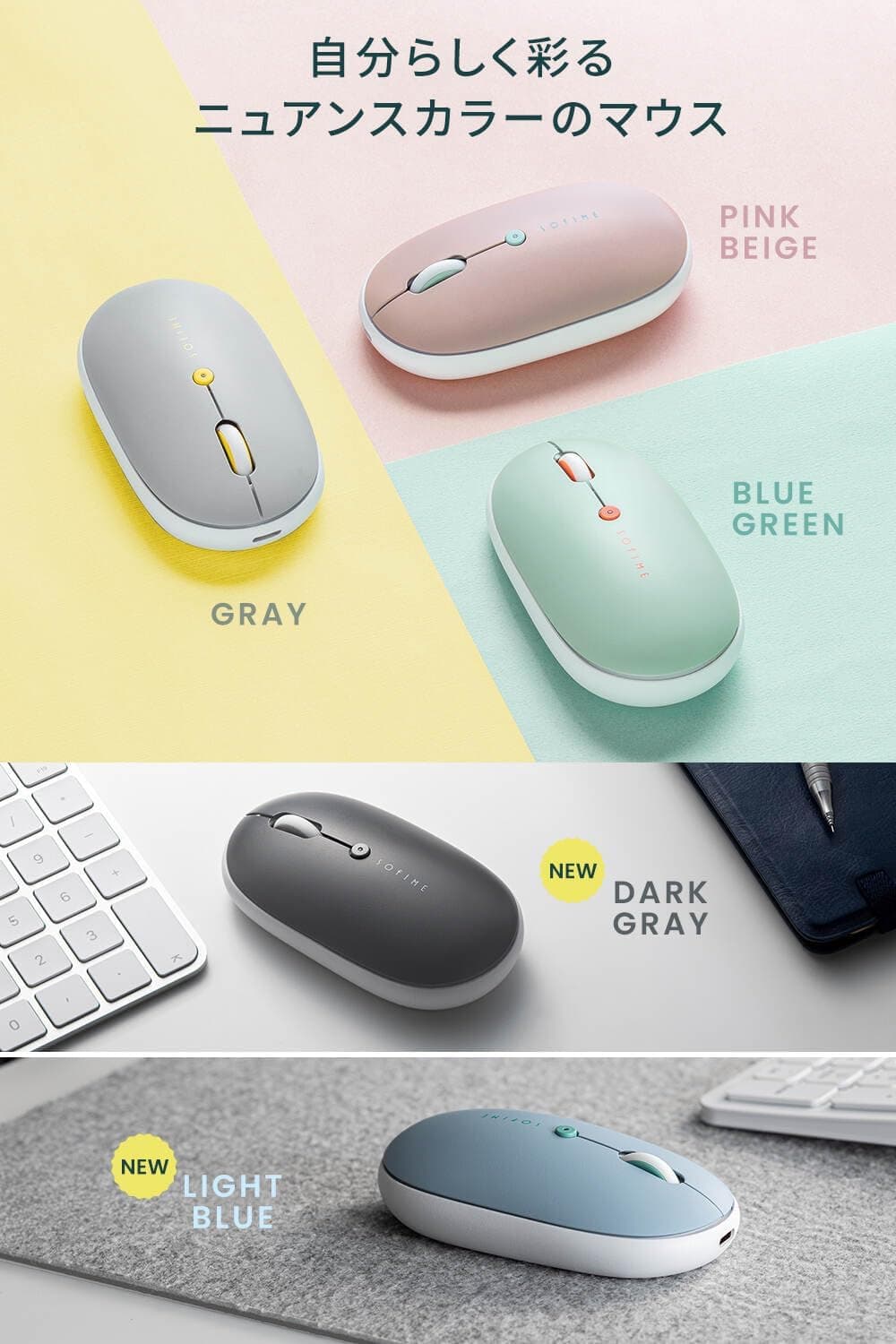
This article looks at the Sanwa Direct 400-MABT178LB Bluetooth mouse, including the things worth knowing before you buy. It combines a slim body, silent switches, three-device multi-pairing, and USB Type-C charging.
Overview
The 400-MABT178LB is a slim Bluetooth mouse from Sanwa Direct. In short, it suits people looking for a portable secondary mouse they can use in quiet places — not gamers or precision-work users.
It uses a symmetrical body in a soft light blue finish, so either hand works. Connection is Bluetooth only, meaning no USB receiver occupies a port on a laptop.
Instead of AA batteries, it has a built-in lithium-ion cell charged over USB Type-C, and it can be used while charging, so a flat battery does not stop your work.
The silent treatment covers the left/right clicks and the wheel button. The sensor is a blue LED optical unit with three DPI steps: 800, 1200, and 1600.
There are three buttons in total — left, right, and wheel — with no side buttons for back/forward.
Reading the Key Specs
| Item | Value | What it means in practice |
|---|---|---|
| Connection | Bluetooth wireless | No dongle; uses zero USB ports |
| Multi-pairing | 3 devices | Switch PC / tablet / spare via a bottom button |
| DPI steps | 800 / 1200 / 1600 | 1200 for 1080p, 1600 for higher resolutions |
| Buttons | 3 (left, right, wheel) | No side buttons, no shortcut assignment |
| Silent | Left/right click, wheel button | Wheel scroll feel itself is not silenced |
| Sensor | Blue LED optical | Fine on cloth or wood; assume glass will not work |
| Charging | USB Type-C (usable while charging) | No AA batteries to stock |
| Battery | Built-in lithium-ion | Not user-replaceable |
Three DPI steps may look modest on paper, but 1600 DPI is plenty to cross a 24-inch 1080p display comfortably. Higher DPI mainly matters for gaming.
Arguably the more useful option here is 800 DPI, which helps with fine spreadsheet or photo-retouching adjustments.
The three-button count defines this product's character. You cannot map "back" or "copy" to a thumb button as you would on a multi-button mouse.
That is the trade-off for a simple, thin, light body.
Compatibility Guide
Supported operating systems are Windows, macOS, Chrome OS, Android, and iOS, with no special driver installation required. You pair it from the OS Bluetooth settings screen, which makes it easy to adopt on managed work machines where installing software is restricted.
Being Bluetooth-only is a prerequisite, though. A desktop PC without built-in Bluetooth needs a separate adapter.
Likewise, in the BIOS/UEFI screen or during an OS install, Bluetooth is usually not active, so assume the mouse will not work there. Keep a wired mouse around for troubleshooting.
Multi-pairing covers three devices, switched with a button on the underside. That means lifting and flipping the mouse each time you switch.
If you swap devices many times an hour, a top-mounted switch would be more comfortable; for a morning-PC, evening-tablet routine it hardly matters.
The blue LED optical sensor tracks reliably on matte cloth, wood, and paper. On clear glass or highly reflective mirror-finish desks, tracking tends to become unstable, so plan on a mousepad.
This is true of optical sensors generally, not just this model.
Product Info
rmation
Check the retailer's page for the latest price. Both are point-in-time figures that move with sales and stock.
Check the product page for the current price before buying.
The roughly ¥300 swing between those two captures shows how routinely peripherals in this bracket fluctuate. If you are not in a hurry, there is room to wait for a dip.
For a device that is simultaneously Bluetooth, rechargeable, silent, and multi-pairing, the roughly ¥2,000 level is inexpensive.
Check the retailer's page for the latest user reviews. 136 is not a tiny sample, but it is far from the thousands a long-running staple accumulates, so a handful of low scores can pull the average down.
A 4.1 reads as honest for this price class: satisfying for the money, not universally adored.
Both the seller and the shipper are Sanwa Supply's own Sanwa Direct store, so this is a direct-from-manufacturer listing. The model number 400-MABT178LB matches Sanwa Direct's own numbering scheme, and there is no mismatch between the listing's manufacturer data and the product covered here.
Product Disclosure (Amazon)
- Manufacturer: サンワダイレクト
- Seller: サンワサプライ直営【サンワダイレクト】14時までの注文は国内から当日出荷≪土日も出荷中≫
- ASIN: B0H31XCSSH
- Note: This article covers a manufacturer-made product based on Amazon listing details.
What Actually Matters in Daily Use
Three things decide satisfaction in this class more than any spec sheet: how quiet "silent" really is, how the thin shape fits your grip, and how fast it wakes.
On noise, understand that the silencing covers the left/right clicks and the wheel button press. The click becomes a low, muted thunk rather than nothing at all.
If you expect true silence you will be disappointed. Still, compared with a normal clicky switch, it is far less likely to intrude in a quiet office or on a video call.
The tactile ratcheting sound of the scroll wheel itself should not be assumed to be silenced.
A slim body trades palm-grip comfort for portability. A fingertip or claw grip works fine, but if you have larger hands and like to wrap your whole palm around a mouse, this will feel insubstantial.
It makes more sense as a mobile companion alongside a full-size desk mouse than as your only pointing device for eight-hour days.
As with Bluetooth mice generally, it sleeps after a period of inactivity and takes a brief moment to wake. Bluetooth tends to lag a receiver-based connection here; that is the protocol, not a defect.
If you take your hand off the mouse frequently, those small pauses add up.
How It Compares
The same roughly ¥2,000 bracket is full of receiver-based wireless mice. Receiver models such as Logitech's M325C or M510 win on connection stability and instant wake, but they occupy a USB port and become useless if the dongle is lost.
On a laptop with only two ports, "no dongle needed" alone can justify choosing Bluetooth.
Against ergonomic models, a slim mouse cannot provide the relaxed wrist angle a vertical or contoured shape does. For eight hours of gripping, ergonomic designs cause less fatigue.
But bulky ergonomic mice are awkward to pack. The choice splits cleanly along "stationary and long" versus "portable and intermittent."
Comparing it with a gaming mouse is comparing different categories. Gaming models bring tens of thousands of DPI, many programmable buttons, and low-latency proprietary wireless, at completely different price, weight, and noise points.
If you plan to game, rule this one out.
Things to Check Before Buying
The battery cannot be replaced. The lithium-ion cell is built in, so when it degrades, that is the end of the product's life.
An AA-powered mouse can be revived with a fresh cell years later; a rechargeable one cannot. That is the clear trade-off against battery-powered models — though you do escape managing spare batteries.
There are no side buttons. With only three buttons, you cannot map browser back or app shortcuts.
Coming from a multi-button mouse, the absence feels bigger than expected. If you use thumb shortcuts daily, buy a multi-button model instead.
Bluetooth is a prerequisite. A desktop PC without built-in Bluetooth will not work out of the box, and the mouse is unusable in BIOS or during a clean OS install.
It is a poor choice as your only desktop mouse.
"Silent" is not "silent." Click noise drops clearly but does not reach zero.
If you are picturing a late-night bedroom where nobody must be woken, adjust expectations.
Prices move quickly. Two captures recorded ¥2,280 and ¥1,980.
Treat any figure here as a reference point and confirm on the product page.
Verify the listing details yourself. Amazon listings occasionally mix in metadata, colors, or model numbers from other products.
This article covers the light blue 400-MABT178LB, and the series may have other color variants. Before ordering, confirm the model number and color in the product images and title match what you want.
Best Use Cases
Slim enough to pack, no dongle to carry, and clicks quiet enough not to bother neighbors — all three apply at once.
It also suits people moving between a PC and a tablet. Holding three pairings means no re-pairing each time — a work PC, a home PC, and a tablet fit neatly.
For people in frequent video calls, keeping clicks off the microphone is a practical win; mics pick up more click and key noise than you would expect.
And it fits anyone tired of managing AA batteries, since it charges from the same USB-C cable as a phone or laptop.
It is a poor fit for gamers, for people who depend on thumb-button shortcuts, for all-day desk users, and for anyone whose only machine is a desktop without Bluetooth.
FAQ
Q. Can left-handed users use it? A.
Yes — the shape is symmetrical. With no side buttons there is little to be reversed anyway, and you can swap the button assignments in OS settings.
Q. Can I use it while charging? A.
Yes. It works with the USB-C cable attached, so a flat battery need not interrupt your work.
While plugged in, though, handling is effectively that of a wired mouse.
Q. Does it include a USB receiver?
A. No — it is Bluetooth-only. A PC without Bluetooth needs a separate adapter.
Q. Which DPI should I use? A.
Choose from 800, 1200, or 1600. Try 1200 for a single 1080p display, 1600 for higher resolutions or multiple monitors, and 800 for detailed editing work.
Q. Do I need a mousepad?
A. It tracks fine directly on cloth or wood desks. On glass or mirror-finish surfaces, use a pad.
Q. How well is it reviewed?
A. That is a modest sample, so read recent reviews too.