The Sanwa Direct 400-MABT178DGY packs the essentials of a travel mouse — slim body, rechargeable battery, silent switches, and three-device Bluetooth pairing — into an entry-level price. This article works through the published specs and Amazon rating data to show what it does well and what you have to accept.
Overview
The 400-MABT178DGY is a low-profile, symmetrical Bluetooth mouse that charges over USB Type-C. Both main buttons and the wheel button use silent switches, and a single button cycles between up to three paired devices.
Think of it as a "one mouse is enough" design for people moving between a laptop, a tablet, and a phone.
The sensor is blue-LED optical with three DPI steps: 800, 1200, and 1600. At 1600 DPI you can cross a Full HD laptop screen in roughly one or two wrist movements — plenty for documents and browsing, but noticeably short if you drive a 4K desktop or want fast, precise aiming in games.
That single number tells you the product is tuned for productivity, not play.
That is slightly above average for a budget Bluetooth mouse but far from perfect, and the gap is most likely the usual complaints about click feel and wheel quality that follow cheap silent mice.
Compatibility Guide
This mouse connects over the standard Bluetooth HID profile, so no USB receiver is involved. Windows, macOS, iPadOS, and Android all accept it without special drivers.
The flip side matters: it cannot work with a machine that has no Bluetooth radio, and it will not operate in BIOS or pre-boot environments the way a 2.4GHz receiver mouse usually does.
If you plan to use it on a desktop, confirm your motherboard has Bluetooth or budget for a USB adapter.
Multi-pairing covers three devices, switched from a button on the mouse itself, so you never re-pair from the OS side. In practice it helps to assign fixed roles — slot 1 for the work laptop, slot 2 for the home PC, slot 3 for the tablet.
Expect a few seconds of reconnection when you switch. This is device switching, not cursor-flow across screens like Logitech's Flow; setting that expectation correctly avoids disappointment.
Charging is USB Type-C, and the mouse keeps working wirelessly while plugged in, so a flat battery never stops your work outright. But the cell is built in — there is no swapping in a fresh AA when it dies.
If you store it for a long stretch, switch it off and top it up every six months or so.
A blue-LED optical sensor tracks reliably on wood, laminate, and most fabrics, but glass and mirrored surfaces are out of scope. On a glass desk, plan on a mousepad.
That limitation applies to optical mice generally, not just this model.
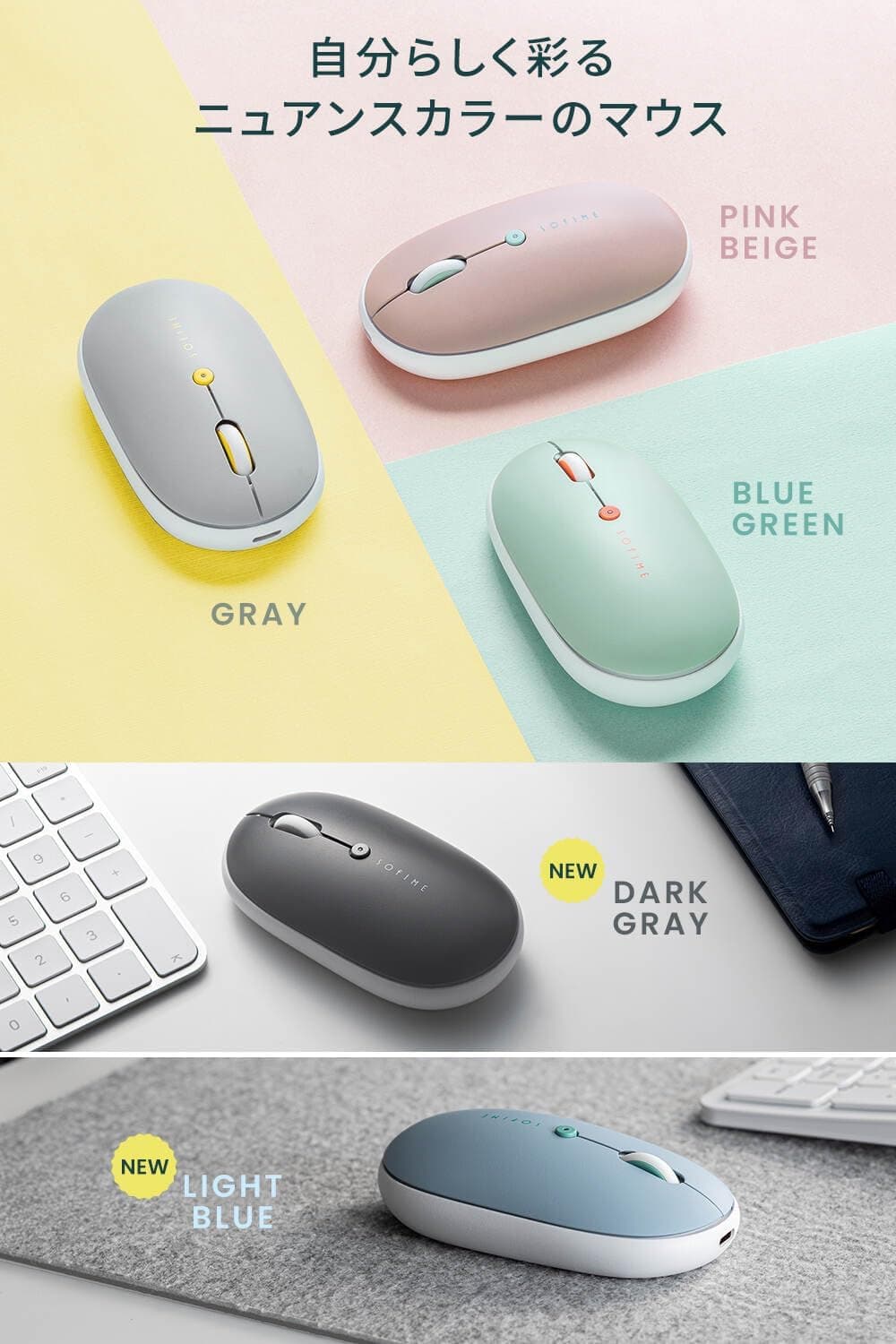
Physically, the slim shell is the real compatibility story. It slides into a 13-inch laptop sleeve or a flat gadget pouch without a fight.
The trade-off is grip: this is a fingertip or light claw mouse, not something you rest a whole palm on.
Product Info
The published specifications:
| Item | Value |
|---|---|
| Connection | Bluetooth (no receiver) |
| Paired devices | Up to 3 |
| Sensor | Blue LED optical |
| DPI steps | 800 / 1200 / 1600 |
| Charging port | USB Type-C |
| Battery | Built-in rechargeable |
| Silent switches | Left, right, wheel button |
| Shape | Symmetrical |
On pricing: the Amazon.co.jp listing showed ¥2,280 as captured on 2026-06-05 and ¥1,980 as captured on 2026-08-27.
A ¥300 swing in two months is normal for this class of accessory, which is exactly why these figures are timestamps rather than facts — check the live product page before you buy. Overseas marketplace listings exist, but there is little reason to import a product that sells domestically for around ¥2,000.
The item is sold and shipped by Sanwa Supply's own Sanwa Direct store. For a sub-¥2,500 accessory, having a first-party seller handle defective units is a genuine advantage over no-name alternatives; check the listing for exact warranty terms.
The box contains a USB Type-C charging cable, and no consumable batteries are needed.
This is the dark gray variant. The series comes in other colors, and each color carries a different model number, so match the full suffix when comparing stock or reviews.
How It Compares
The ¥2,000 wireless mouse segment is crowded.
- Connection type. Bluetooth-only means no dongle to lose and no USB port consumed, but also no BIOS-level use and no support on Bluetooth-less machines. If you need a mouse for recovery work or server boxes, choose a receiver-based or hybrid model.
- Power source. AA-powered mice run for months but weigh more; rechargeables are thinner and lighter but need topping up. This one is squarely in the mobile-first camp.
- Shape. A slim symmetrical body wins on portability and left-handed use, but an ergonomic, taller mouse is kinder to your wrist over an eight-hour desk day.
In short, this model optimizes for light, quiet, and multi-device. If you sit at one desk all day, the same money buys a shape that suits you better.
Best Use Cases
Three pairing slots cover a work PC, a home PC, and a tablet from one mouse, and the flat body disappears into a bag. Because it charges over Type-C, your phone charger and cable already cover it.
Second is anyone working where noise matters — open offices, libraries, cafés, or a home desk after the family is asleep. Silent switches also help if you dislike hearing clicks come through your microphone during video calls.
Third, left-handed users. The symmetrical shell has none of the right-hand-only carving of ergonomic mice, and the narrow body suits smaller hands too.
For tasks, it targets documents, spreadsheets, browsing, email, and meetings. Within that range, a 1600 DPI ceiling is not a limitation.
Things to Check Before Buying
It is not a gaming mouse. A 1600 DPI ceiling, no extra side buttons, no onboard profiles, and no published polling rate add up to a productivity device.
Bluetooth also trails dedicated 2.4GHz wireless on both latency and stability.
Buy a purpose-built mouse for games.
Silent is not silent. Quiet switches cut click noise sharply but do not remove it, and wheel rotation plus the mouse sliding on the desk still make sound.
Silent switches also tend to feel mushy; if you value a crisp tactile click, the whole silent category may disappoint you.
Slim does not suit every hand. Less palm support means more finger and wrist fatigue over a long day, and larger hands (roughly 19cm+) will have fingers hanging off the back.
Treat it as the travel mouse and keep a full-size one at your main desk.
The battery is not user-replaceable. Lithium cells degrade, so runtime shortens over the years.
At this price, treat it as a consumable rather than a decade-long purchase.
Reconnection takes a moment. After sleep or a device switch, the cursor may take a few seconds to come alive.
If you want instant response, that pause will annoy you.
Verify the listing details yourself. Amazon pages often merge color variants and successor models, which can mix manufacturer fields, model numbers, and reviews from a different variant.
The data referenced here was consistent — Sanwa Direct as both maker and seller — but confirm the product image and the model number (400-MABT178DGY) in the title before ordering, since each color uses a different part number.
What to Test After It Arrives
A 4.1 average is the classic "no serious flaw, no universal satisfaction" score.
- Scroll wheel feel and step precision (budget wheels are often coarse or too loose)
- Click resistance, which silent switches soften — tolerable or not is personal
- Tracking on your actual desk surface (glass will not work, as noted)
- How many seconds a device switch really takes
Run through all four on the exact desk and devices you plan to use.
FAQ
Q. Does it include a USB receiver? A.
No. It is Bluetooth-only, so the host device needs its own Bluetooth radio.
Check this before using it with a desktop PC.
Q. Can I use it while charging? A.
Yes. It stays wireless while the Type-C cable is connected, so a low battery does not stop your work.
Q. How many devices, and is switching a hassle? A.
Three, switched from a button on the mouse. No OS-side re-pairing is needed, but allow a few seconds for reconnection.
Q. How high does the DPI go? A.
Three steps: 800, 1200, and 1600. Fine up to typical high-res laptops; short for large 4K desktops or gaming.
Q. Will it work on a glass desk?
A. No. The blue-LED optical sensor needs an opaque surface, so use a mousepad.
Q. Is it usable left-handed?
A. Yes, the shape is symmetrical. Swap the buttons in your OS mouse settings.
Q. Can I replace the battery?
A. No. The cell is built in, so a worn battery means replacing the mouse.
Product Disclosure (Amazon)
- Manufacturer: サンワダイレクト
- Seller: サンワサプライ直営【サンワダイレクト】14時までの注文は国内から当日出荷≪土日も出荷中≫
- ASIN: B0H31X7D96
- Note: This article covers a manufacturer-made product based on Amazon listing details.