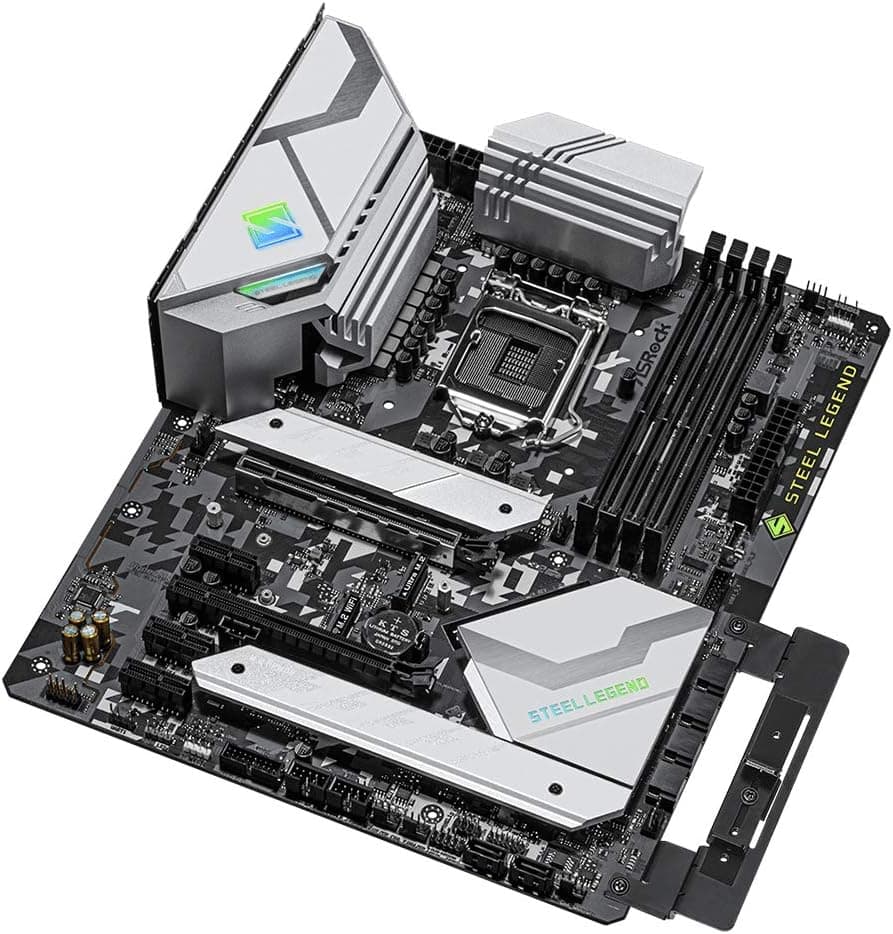
This article covers ASRock Intel 第10・11世代CPU(LGA1200)対応 Z590 チップセット搭載 ATXマザーボード 【国内正規代理店品】 Z590 Steel Legend.
Overview
The ASRock Z590 Steel Legend is an ATX motherboard built around Intel's Z590 chipset, supporting both 10th-gen (Comet Lake) and 11th-gen (Rocket Lake) Core processors. It sits in the mid-range segment, offering a solid balance of features and price without cutting too many corners. Key highlights include a 14-phase Dr.MOS power delivery system, four DDR4 memory slots with overclocking support up to 4800MHz+ (with 11th-gen CPUs), and PCIe Gen4 connectivity when paired with a Rocket Lake processor. The board also packs 2.5GbE LAN and Nahimic Audio for a better gaming experience. Visually, the Steel Legend series adopts a military-inspired black-and-white theme with RGB LED headers, making it a great fit for builders who want a clean, light-colored build.
Compatibility Guide
The Z590 Steel Legend uses the LGA1200 socket, compatible with Intel 10th-gen (Comet Lake) and 11th-gen (Rocket Lake) CPUs. Memory support is limited to DDR4 — there is no DDR5 support here. When using an 11th-gen CPU, one M.2 slot and the primary PCIe x16 slot run at Gen4 speeds; with a 10th-gen CPU, all slots are limited to Gen3. Form factor is standard ATX, so it fits in most mid-tower cases. Power connectors include a 24-pin main, one 8-pin CPU, and one 4-pin CPU auxiliary. Storage options are generous: six SATA3 ports and up to three M.2 slots (two Gen3 x4 + one Gen4 x4 with 11th-gen CPU).
Product Info
Released in early 2021, the ASRock Z590 Steel Legend is a mid-range motherboard that doesn't break the bank but still delivers overclocking support and PCIe Gen4 readiness. It's positioned as a value-oriented Z590 option, sitting below premium models like the Z590 Taichi but above entry-level Z590 boards. Key specs include the Intel Z590 chipset, ATX form factor, four DDR4 DIMM slots (up to 128GB), two PCIe x16 slots (x16 and x4 electrical), up to three M.2 slots, front USB 3.2 Gen2x2 Type-C, and Realtek ALC897 7.1ch HD Audio with Nahimic software.
Best Use Cases
First, this board is ideal for budget-conscious builders who want Z590 features without paying a premium. If you plan to use an 11th-gen CPU now or later for PCIe Gen4 SSDs and GPUs, this is a solid foundation. Second, it's a great choice for white-themed PC builds. The white PCB and silver heatsinks make it easy to coordinate with other white components, creating a cohesive aesthetic that stands out. On the flip side, this board is not for you if you need DDR5 memory support or want to use Intel 12th-gen or newer CPUs — those require an LGA1700 socket board entirely. Also, if you need multiple full-bandwidth PCIe x16 slots for multi-GPU setups, look at higher-end Z590 or HEDT platforms. ## Alternatives
Direct competitors include the MSI Z590-A PRO and the GIGABYTE Z590 UD AC. The MSI board is cheaper but has a weaker power delivery system (fewer phases), making the ASRock a better choice for overclocking. The GIGABYTE board includes built-in Wi-Fi, which the ASRock lacks — if wireless connectivity is essential, you'll need to add a separate Wi-Fi card or choose the GIGABYTE option.
Things to Consider
Remember that PCIe Gen4 only works with 11th-gen CPUs. If you pair this board with a 10th-gen chip, you lose Gen4 support entirely. Plan your CPU choice accordingly if you want future-proofing for fast SSDs or GPUs. Also, only one M.2 slot runs at Gen4 speeds (with 11th-gen CPU); the other two are Gen3. Make sure to install your primary Gen4 SSD in the correct slot to get full performance. Finally, this board does not support DDR5 memory. If you're building a new system today and want DDR5, consider a Z690 or Z790 board instead. ## FAQ Q: Can I use an Intel 12th-gen (Alder Lake) CPU with this motherboard? A: No. The LGA1200 socket only supports 10th and 11th-gen CPUs. 12th-gen and newer require an LGA1700 socket motherboard. Q: Which slots support PCIe Gen4? A: With an 11th-gen CPU installed, the primary PCIe x16 slot (PCIe1) and one M.2 slot (M2_1) run at Gen4 speeds. All other slots are Gen3. Q: Does this motherboard have built-in Wi-Fi? A: No, it does not. You can add a Wi-Fi module via the M.2 Key E slot if needed.
Product Disclosure (Amazon)
- Manufacturer: ASRock
- ASIN: B08VH76S16
- Note: This article covers a manufacturer-made product based on Amazon listing details.