A practical look at Thermalright Peerless Assassin 120 デジタルブラックCPUクーラー (sold in Japan under that name; the Peerless Assassin 120 Digital Black), including the parts that trip people up during the build.
Overview
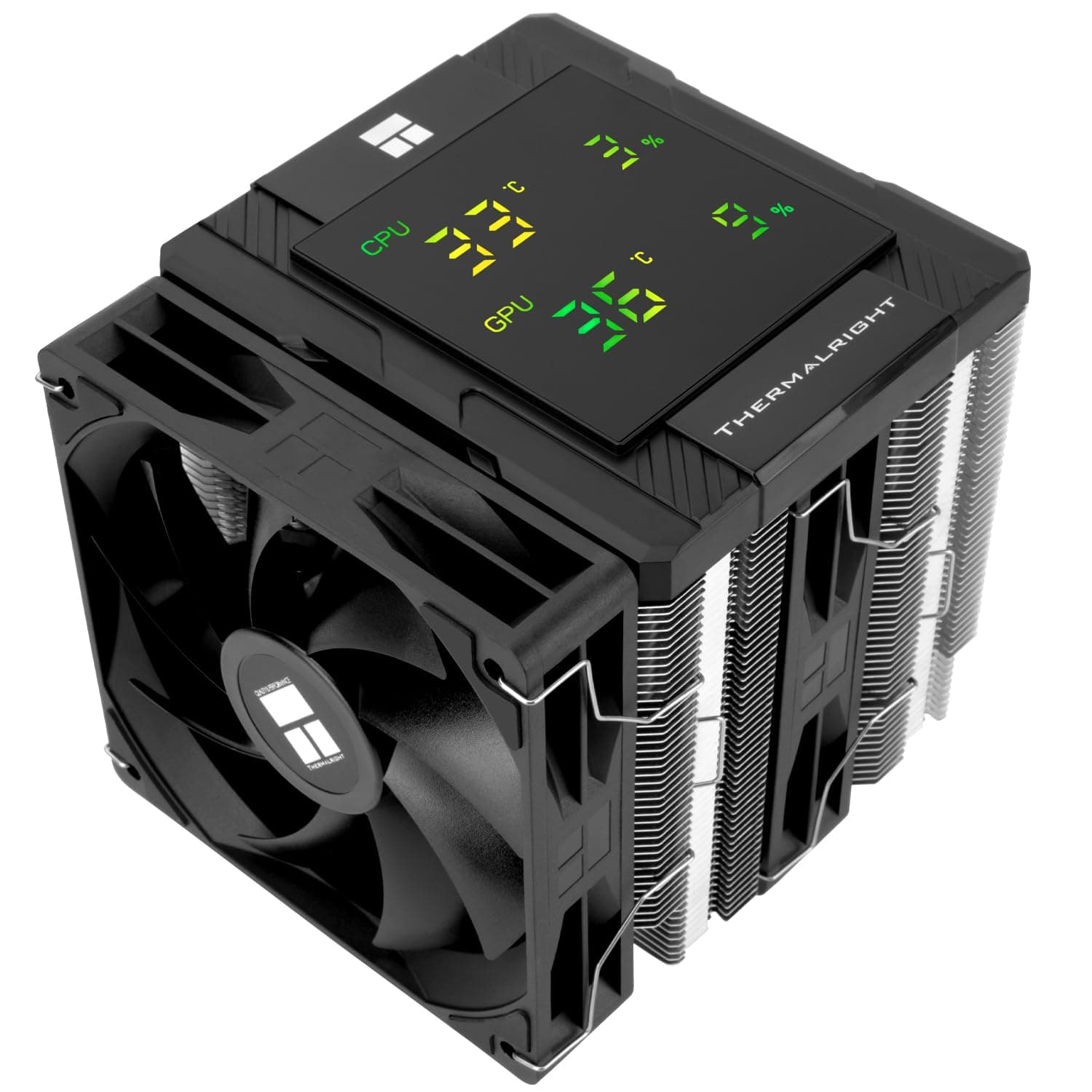
The Peerless Assassin 120 Digital Black pairs a proven dual-tower, dual-fan air cooling stack with a magnetically detachable digital display panel. The short version: it suits builders with a windowed case who want CPU temperature as a number, without opening monitoring software.
The cooling hardware itself follows the same design logic as the company's other 120mm dual-tower coolers, so if the readout does not appeal to you, the non-digital version is the more rational purchase.
The heatsink uses six 6mm copper heat pipes splitting heat across two fin towers, with two 120×120×28mm fans mounted between and outside them. Rated figures are 1850 RPM ±10%, 88.89 CFM airflow, 2.21 mmH2O static pressure, and ≤25.6 dB(A) noise.
Overall dimensions are 138×125×162mm, and socket support spans Intel LGA1851/1700/1200/115X and AMD AM5/AM4.
One easily missed detail: the fans are 28mm thick, not the usual 25mm. That extra depth buys airflow and pressure, letting the fans move the same air at lower RPM — but it also matters if you ever plan to swap in third-party fans.
Compatibility Guide
| Check | Value | What it means in practice |
|---|---|---|
| CPU socket | Intel LGA1851 / 1700 / 1200 / 1150 / 1151 / 1155 / 1156, AMD AM5 / AM4 | Spans both current platforms, so it survives a CPU upgrade |
| Height | 162mm | Aim for a case rated 165mm or more of cooler clearance |
| Width / depth | 138×125mm | Overhang toward the DIMM slots makes tall RAM a real risk |
| Power / signal | 2× 4-pin PWM fans, 1× 9-pin internal USB 2.0 for the display | You need one free internal USB 2.0 header |
That last row is where most builds stall. The fans are plain 4-pin PWM and plug into the CPU_FAN header, but the digital panel consumes a 9-pin internal USB 2.0 header.
Many recent boards ship with only one or two, and they compete with AIO pump control, ARGB controllers, front-panel USB 2.0 ports, and add-in cards.
Count your headers, and count what is already plugged in, before ordering.
On AMD systems you reuse the backplate that came with the motherboard — none is included. If you previously ran an AIO and removed the stock retention, track that part down first.
Memory clearance follows the usual dual-tower rule: a large heatspreader in the first DIMM slot can foul the front fan. Your options are raising that fan a few millimetres, choosing low-profile modules, or rethinking the slot layout.
Since no maximum RAM height is published, low-profile memory is the safe bet.
Don't stop at the 162mm figure either. Side-panel fan mounts and cable bulges quietly eat clearance, so a case advertised at 165mm may have less in reality.
Product Info
| Item | Value |
|---|---|
| Overall dimensions | 138×125×162mm |
| Fan size | 120×120×28mm ×2 |
| Fan speed | 1850 RPM ±10% |
| Airflow | 88.89 CFM |
| Static pressure | 2.21 mmH2O |
| Noise | ≤25.6 dB(A) |
| Heat pipes | 6 (6mm copper) |
| Bearing | S-FDB |
| Sockets | Intel LGA1851/1700/1200/115X, AMD AM5/AM4 |
As captured on 2026-09-22, Amazon.co.jp listed it at ¥7,789 (prices move, especially during sales).
A dual-tower, dual-fan cooler with a display panel at that level is the core of the pitch. The entry recorded as an overseas listing points at the same Japanese price, so check your local store separately for regional pricing.
The cooler is described as a early-2025 release. The box includes Intel and AMD mounting hardware, fan clips, thermal compound, the display module with its cable, and a manual.
Warranty is typically one to two years by maker policy, but the point of contact varies by retailer and region — read the listing's warranty note before buying. The panel is configured through Thermalright's software to show CPU temperature, load, and similar metrics.
Reading the Cooling Numbers
Spec sheets can't settle thermals on their own, but the configuration says something. Six 6mm pipes plus a dual-tower stack sits in the upper half of the 120mm air-cooling class and has headroom for mid-to-high-end CPUs at stock.
The 88.89 CFM rating assumes a push-pull pair, and 2.21 mmH2O is the pressure needed to drive that air through dense fins.
What air cooling cannot match is a liquid loop's thermal mass when a CPU spikes hard for a few seconds — modern boost behaviour makes AIOs look better on peak temperature charts. Under sustained load, and in long-term reliability with no pump to fail, air holds its own.
It's a usage question, not a correctness one.
Noise and Owner Ratings
The ≤25.6 dB(A) figure is the manufacturer's rating at full 1850 RPM; ordinary desktop work runs far below that.
With two fans, flattening the fan curve so both spin slowly beats letting them ramp hard — the same heat gets moved with less perceived noise. S-FDB bearings are the long-life type, which suits always-on machines.
Owner ratings sit at 4.4 out of 5, roughly an 88% positive rate — but across only 18 reviews as of 2026-09-22.
That sample is too small to say anything statistical about unit variance or DOA rates. Read it as "no loud complaints yet" and base your decision on specs and fit.
Installation Pitfalls
- Paste volume — a rice-to-pea-sized dot in the centre is enough; excess squeezes out around the socket.
- Tightening order — work diagonally in small increments, or contact pressure ends up uneven and costs you several degrees.
- Clip the fans on last — mounting the tower first leaves room for a screwdriver.
- Install RAM first — you may not reach the DIMM latches afterwards.
- Route the display cable away from the fan blades; internal USB 2.0 headers usually sit along the bottom board edge.
How It Compares
Realistic alternatives are (1) the non-display dual-tower from the same maker, (2) a cheaper single-tower air cooler, and (3) a 240mm AIO. Option 1 gives the same cooling stack for less if the readout doesn't matter to you.
Option 2 frees up width and RAM clearance at the cost of fin area and headroom. Option 3 demands a case with top or front radiator support and a willingness to live with a pump.
For sustained full-load high-end CPUs, take the AIO; for a quiet, low-maintenance daily machine, this cooler and its non-digital sibling are the straightforward picks.
Best Use Cases
- Builders who want data, not just lighting — the panel puts CPU temperature in view during games and fullscreen work without an overlay.
- Mid-to-high-end CPUs cooled quietly — Core i5/i7 and Ryzen 5/7 at stock leave headroom, with no pump in the loop.
- Cross-generation reuse — covering Intel LGA1851/1700/1200/115X plus AM5/AM4 means it likely survives your next CPU swap.
- First-time builders on a budget who still care about looks — installation difficulty is average for a dual tower, and you get a lot of hardware for the money.
Before You Buy
Without a free internal USB 2.0 header, half the reason to choose this model disappears.
The fans run independently on PWM, so cooling still works — but at that point the non-digital version was the better buy. Check your board's header count and what already occupies them.
Splitter adapters exist, but compatibility is not guaranteed.
It is not the right cooler for running Core i9 / Ryzen 9 flat out or for aggressive overclocking. It will physically mount, but sustained high-power settings call for a 240mm-class AIO.
With a power limit applied, even a top-tier CPU is workable here.
Treat 162mm height and 138mm width as numbers to verify against your case, not to assume. A case rated under 165mm, or a build with no room above the DIMM slots, turns into a problem you can't undo after purchase.
The AMD backplate requirement catches experienced builders who have swapped retention hardware before.
Don't plan on replacing the fans. The 28mm thickness is non-standard, so 25mm units change how the clips seat and how the towers clear each other.
Finally, cross-check the listing against the product images and title. Listing metadata — maker, model, seller — does get mixed up, and this product's own data shows a domestic price and an overseas store label carrying the same figure.
Prices are point-in-time and move with sales and exchange rates; if a figure looks off by an order of magnitude for the product class, ignore it and check the current price on the product page.
FAQ
Q. My board has no free internal USB 2.0 header.
Can I still use it? A.
Yes, as a cooler. The fans are independent 4-pin PWM, so thermal performance is unaffected — but the display won't work, in which case the non-digital model makes more sense.
Splitters may work but aren't guaranteed.
Q. Is it enough for a Core i9 or Ryzen 9?
A. It mounts fine and is usable at stock or with a power limit.
For sustained full load or overclocking, choose a 240mm or larger AIO.
Q. Is a backplate included?
A. Not for AMD — you reuse the motherboard's original backplate.
Intel mounting hardware is included in the box; check the listing for the full accessory list.
Q. Will 162mm fit my case?
A. Look for 165mm or more of rated CPU cooler clearance.
Matching the number exactly risks contact with side-panel protrusions or cables.
Q. Is thermal paste included, and do I need to reapply?
A. Compound is supplied and is fine for the initial install.
Reapply only if temperatures clearly climb after a few years.
Q. What can the display show?
A. CPU temperature, load percentage and similar metrics, selected in Thermalright's software.
Available readouts vary by software version, so check the product page and the utility's documentation.
Product Disclosure (Amazon)
- Manufacturer: THERMALRIGHT(サーマルライト)
- Seller: Amazon US
- Fulfilled by: Amazon US
- ASIN: B0DQ5TH4LY
- Note: This article covers a manufacturer-made product based on Amazon listing details.
![Cooler Master ML 360 Atmos II VRM Fan White ウォーターブロック部にVRM冷却ファン搭載 360mm水冷CPUクーラー [CLM-MLX-D36M-A25SZ-VW]](/_next/image?url=https%3A%2F%2Fm.media-amazon.com%2Fimages%2FI%2F71wVQ8lCdXL._SL1500_.jpg&w=1920&q=75)