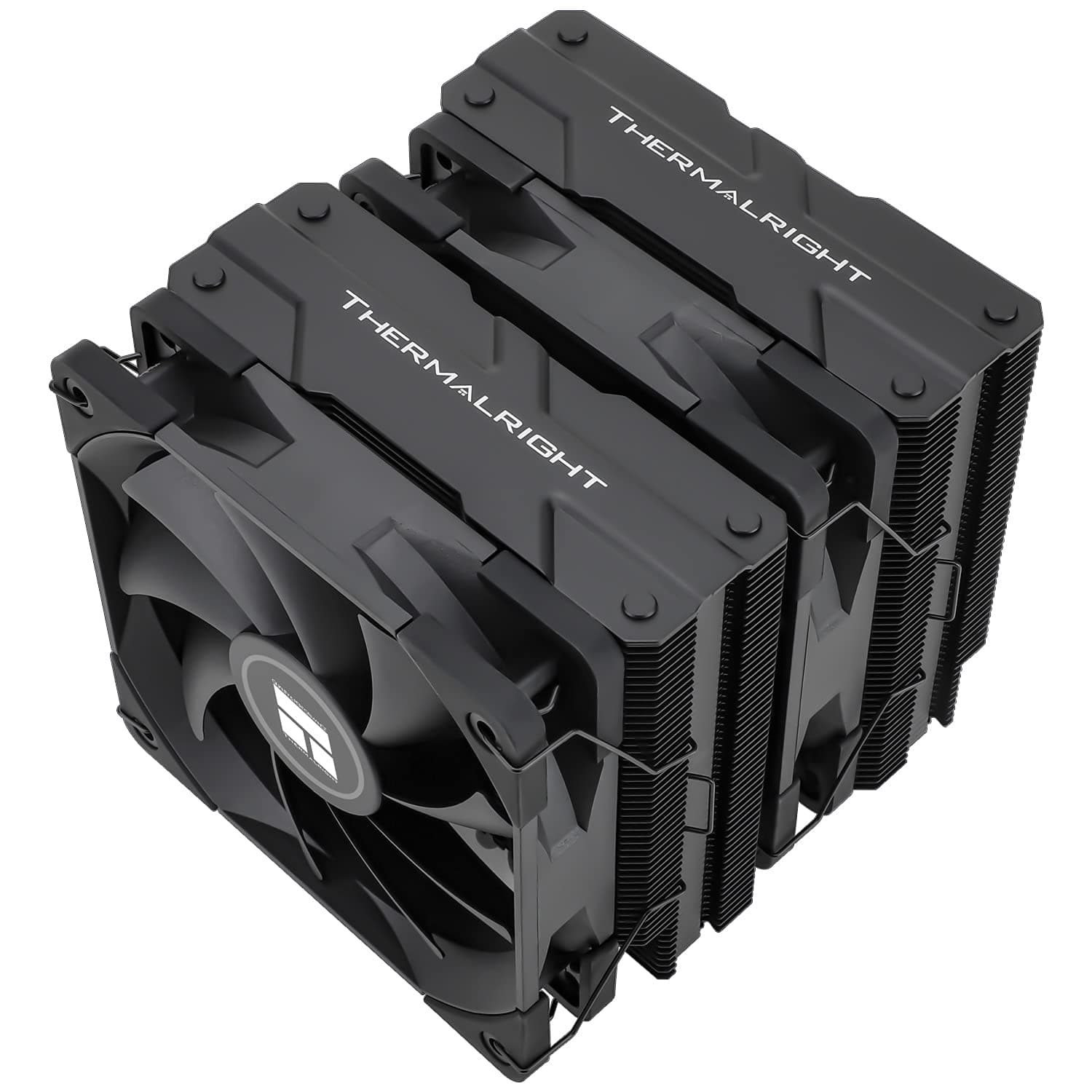
This article covers Thermalright PA120 ブラック CPU エアクーラー デュアルタワー AGHP Technology 6ヒートパイプ TL-C12B PWMファン付き空冷 Intel 1151 — fit, noise, installation, and the cases where you should buy something else.
Overview
The short version: this is the reference point for sub-¥10,000 dual-tower air cooling, and the default pick if you want a Ryzen 7 or Core i7 class chip cooled quietly at stock. Six 6mm heat pipes and two 120mm PWM fans cover a rated 245W TDP, and the 157mm height clears most mid-tower cases.
It sits one step below flagship air coolers at a fraction of the price.
On Amazon.co.jp it held 4.8 stars from 354 reviews as captured on 2026-09-17 — a 96% positive rate.
Few air coolers keep 4.8 across a sample that size, which tells you this is not a cheap-but-inconsistent product.
What actually disqualifies it for buyers is almost never cooling capacity; it is case clearance and memory height.
The fins and fans are all black and do not light up. Whether that reads as plain or as welcome restraint is the main thing that splits opinion on this cooler.
| Use case | Fit | Why |
|---|---|---|
| Mid-tower with Ryzen 7 / Core i7 | Excellent | 245W headroom; quiet even with fans turned down |
| Stock Core i9 / Ryzen 9 | Good | Cools fine, but fans spin up. 140mm class is quieter |
| Mini-ITX or slim cases | No | 157mm simply will not fit |
| Sustained loads past 250W / OC | No | An AIO or larger air cooler is the cleaner answer |
| RGB-focused builds | No | No lighting at all |
Compatibility Guide
Listed socket support spans Intel LGA1150 / 1151 / 1155 / 1156 / 1200 / 1700 / 1851 / 2011 / 2066 plus AMD AM4 / AM5. The product name says Intel 1151, but that is just one supported socket that stuck in the title — it works on mainstream LGA1700 boards and on the newer LGA1851 too.
Writing it off as an old 1151-only part is a misread.
Three physical gates matter, in this order.
1. The 157mm height. If your case lists exactly 157mm of CPU cooler clearance, panel ribs and cable bulk can still make contact.
Aim for a case rated 160mm or more. Published clearance figures are design values, and a few millimetres of variance is normal.
2. Memory interference. Dual towers overhang the DIMM slots.
The offset asymmetric layout reduces the overhang on the first slot, but if you run tall heat spreaders, plan on raising the front fan a few millimetres on its clips — which adds to total height and fights gate 1. Low-profile memory is the most reliable fix.
3. Motherboard hardware. Large VRM heatsinks and tall I/O covers on premium boards can interfere, as with any dual tower.
Check those heights before you commit.
The fans are 4-pin PWM, 12V, 0.2A max each.
Roughly 0.4A combined sits well inside a typical CPU_FAN header, so the bundled splitter is fine.
Note that a splitter usually reports RPM from only one fan, so a stalled second fan goes unnoticed. Running CPU_FAN and CPU_OPT separately with a matched curve avoids that.
The cooler itself draws about 0.2A per fan on 12V, so it plays no part in PSU sizing. Size the power supply around the CPU and GPU.
Product Details
The listed price was ¥8,046 on Amazon.co.jp as captured on 2026-09-17.
Pricing in this segment moves with sales and exchange rates, so check the product page for the current figure. The marketplace entry points to a search rather than a fixed listing, so no figure is quoted from it here.
Key specs: dual-tower air cooling, 245W rated TDP, six 6mm heat pipes, two 120 x 120 x 25mm TL-C12B fans at 1550 RPM ±10%, 66.17 CFM airflow, 1.53 mmH2O static pressure, 25.6 dBA or lower, S-FDB bearings, 157mm overall height.
It launched in late 2022 with a standard one-year warranty. The box includes Intel and AMD mounting kits, thermal compound, fan clips and a PWM splitter, so nothing else is needed for a same-day build.
Treat the bundled paste as a single application — if you expect to remount, buy a tube alongside it.
Noise and Real-World Feel
A 1550 RPM ceiling is modest for a 120mm fan. The design trades top-end RPM for fin area, which is why it never gets shrill even at full speed.
The flip side is that it will not brute-force a thermal spike by ramping hard.
Static pressure of 1.53 mmH2O is typical for pushing air through dense fin stacks — which also means it is sensitive to dust buildup.
Clear the fins every six to twelve months. The usual cause of an air cooler getting worse over time is dust, not wear.
Vendor dBA ratings use different measurement conditions, so do not compare this number directly against another brand's. What you actually hear depends on case material, intake configuration and room noise floor.
Setting a BIOS curve that holds 40-50% at idle and ramps past roughly 70°C is where this cooler's quietness pays off.
How It Compares
Within Thermalright's own range, the Peerless Assassin 140 SE (158mm, 28mm-thick fans) is the step up, holding lower RPM across more surface area — worth it if you have the clearance and want maximum quiet. If 157mm will not fit, the 110mm Peerless Assassin 90 SE is the realistic fallback.
For 65W-125W chips where a single tower suffices, the Assassin Spirit 120 EVO costs and occupies less.
From other brands, the Cooler Master Hyper 622 HALO is the direct rival — also six pipes and dual tower, and available in lit configurations if you want a dual tower that glows.
Against established flagships like the Noctua NH-D15 or be quiet! Dark Rock Pro 4, this cooler competes on the same six-pipe dual-tower terms at roughly half the price or less.
On cooling per yen it clearly wins. What the price gap buys elsewhere is fan quality, mounting hardware refinement and warranty length — a question of where you spend, not of the premium coolers being overpriced.
If you genuinely run past 245W continuously, a 360mm AIO is the more natural answer, with the bonus of dumping heat straight out of the case.
Installation Notes
Order of operations matters here.
- Fit the backplate and standoffs before the board goes into the case.
Many case cutouts are too small to reach them afterwards. 2.
Apply paste — a centre dot works, though large HEDT heat spreaders spread more evenly from several dots. 3.
Mount the heatsink with the front fan removed, tightening the centre screws diagonally in small increments. A long precision screwdriver helps, since you work through a gap in the fins.
Clip the fan on last, choosing its height against the memory.
Connect via the splitter and confirm in BIOS that both fans spin.
It is a heavy cooler. If you plan to transport the finished PC, lay it flat or remove the cooler — a vertical impact puts bending load on the motherboard.
Who It's For
- Budget-focused builders: ideal when the money should go to CPU and GPU while a Ryzen 7 or Core i7 still gets properly cooled. Cooling per yen is among the best available in air.
- Quiet-build users: the low 1550 RPM ceiling plus PWM control makes it effectively unnoticeable at idle. The more you tune the fan curve, the better it gets.
- Multi-generation upgraders: mounting hardware spans LGA1150 through LGA1851 and AM4 / AM5, so it likely survives your next platform change.
- First-time cooler swappers: the process is conventional and well documented. Just verify your case's maximum CPU cooler height first.
Before You Buy
157mm means measure, not assume. A case rated 158mm or 160mm can still foul on panel ribs or cable bulk.
Leave about 5mm of margin. A dual tower that does not fit is also an awkward thing to package up and return.
Tall memory is a design decision, not an afterthought. If you already own thick RGB heat spreaders, expect to raise the front fan — which adds height and compounds a tight clearance limit.
Do not let Intel 1151 in the product name mislead you. Real support extends to LGA1851 and AM5.
That said, listed socket data is inconsistent across sources: the spec sheet shows AM4 / AM5 and LGA2011, while the compatibility data lists only Intel sockets. If you are targeting HEDT platforms like LGA2011 or LGA2066, confirm your exact socket against the manufacturer's own list before ordering.
Listing metadata is sometimes wrong. On this product the international price field carried a yen figure rather than a local one, and brand, model number and ASIN fields can also carry mistakes.
If you buy from outside Japan, verify currency and shipping on your regional page — and in all cases confirm from the product images and title that you are looking at the right item.
245W is a rating, not a guarantee. Case airflow, intake temperature and your CPU power limits all change how much heat actually gets moved.
In cases with weak front intake, the case becomes the bottleneck before the cooler does.
No lighting, one-year warranty. If you want synchronised RGB or longer coverage, spend up.
And treat the price here as a 2026-09-17 reference point only, since it moves frequently.
FAQ
Q. Will it handle a Core i9 or Ryzen 9? A.
At stock, most configurations fall inside the 245W rating, so yes — but the fans will work for it. For long all-core loads where quiet also matters, a 140mm class cooler or a 360mm AIO suits better.
Q. Can both fans share one header? A.
Yes. At 0.2A maximum each, the pair stays within a typical CPU_FAN header, and the splitter is included.
Only one fan's RPM will be reported.
Q. Do I need to buy thermal paste? A.
No, compound is included and covers the first install. Buy a tube separately if you expect to remount more than once.
Q. Does it fit LGA1851 boards out of the box? A.
It is listed as compatible, but bundled mounting kits can vary by batch — check the accessories list on the product page before ordering.
Q. Can I run it with only one fan? A.
Yes. A front-fan-only setup eases both memory interference and total height at the cost of some cooling capacity — a reasonable choice for lower-heat CPUs.