This article covers the SbocKeeb 75%キーボードガスケットマウント 吸音パッド付き 82キー コンパクト 有線 RGB メカニカル ゲーミングキーボード ホットスワップソケット Mac — a 75% wired board whose appeal is simple: gasket mount, hot-swap sockets and PBT keycaps in a finished product at a low-teens price in yen. Below is what actually works, and what you have to accept.
Overview
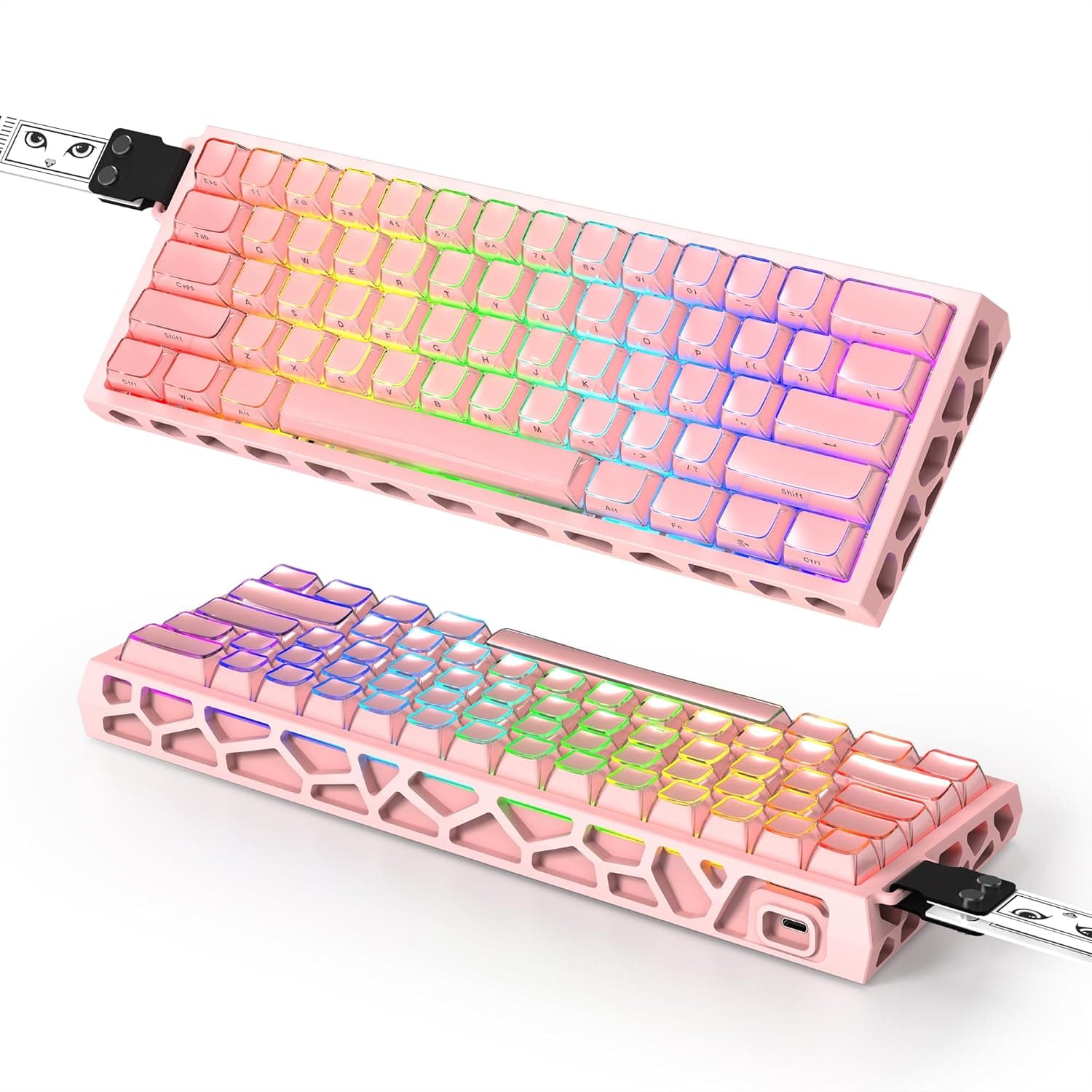
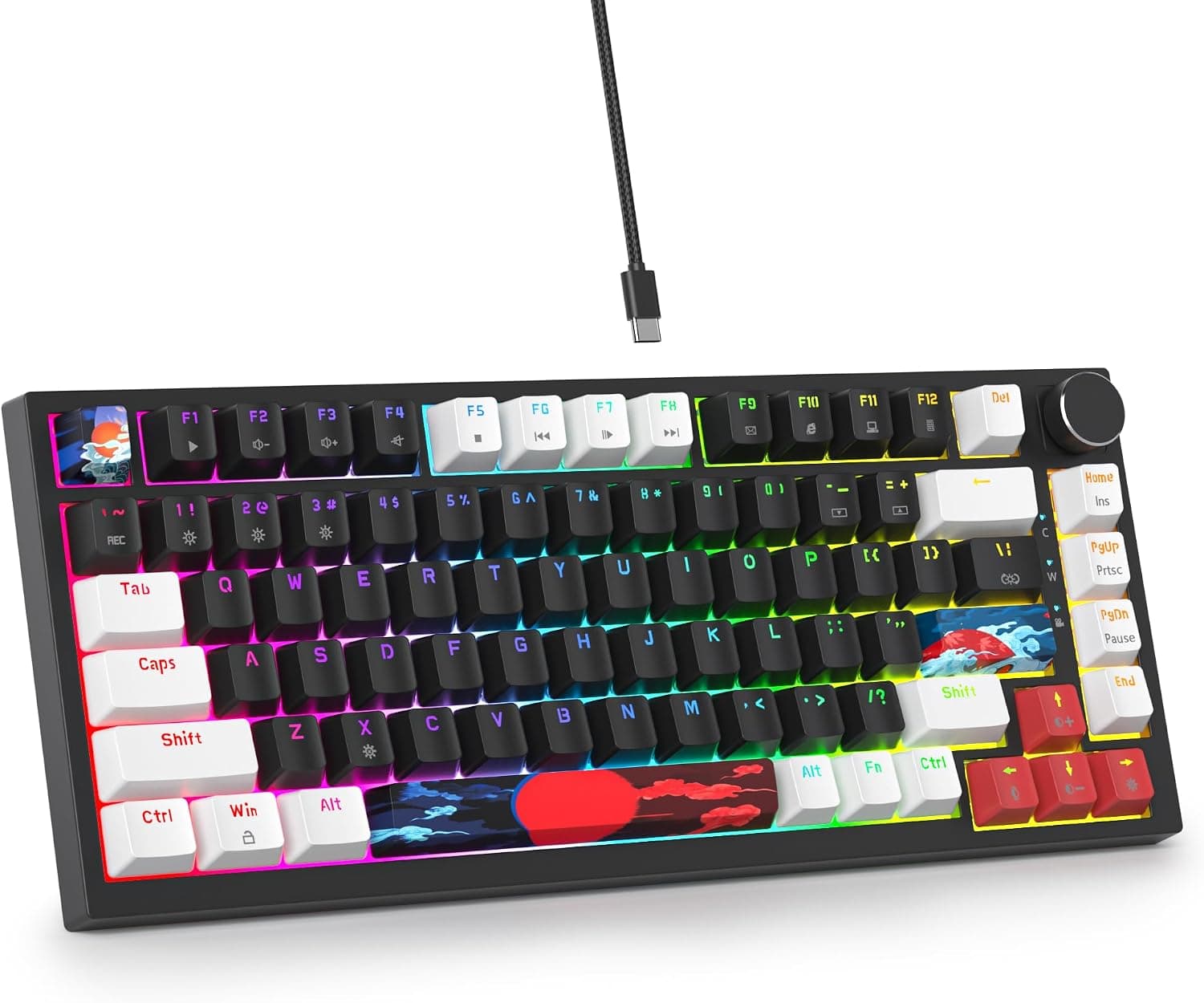
The SbocKeeb V400 is a compact 82-key, 75% wired mechanical keyboard. It uses a gasket mount structure with built-in sound-dampening foam, aimed at a softer typing feel and a lower-pitched sound than a typical tray-mounted budget board.
Hot-swap sockets let you change switches without soldering.
PBT keycaps resist the shine that ABS develops over time, and full-key anti-ghosting means simultaneous presses register reliably in FPS and MOBA titles. A rotary volume knob adds media control without spending extra keys.
As of the 19 July 2026 capture, the Amazon.co.jp listing showed 153 reviews at 4.6 out of 5 stars (92% favourable).
That is a strong score for a lesser-known brand at this price, but 153 reviews is a modest sample — read it as encouraging rather than statistically settled.
Compatibility Guide
Connectivity is USB-A wired only, and the cable is fixed rather than detachable. You cannot swap in a coiled cable, and a damaged cable means repair or replacement rather than a quick fix.
The upside is no wireless latency and no battery to manage. On machines that only offer USB-C — recent thin laptops and Macs — you will need a hub or dock with a USB-A port, so check your ports before ordering.
Both Windows and macOS are supported for typing, but the dedicated customization software assumes Windows. On macOS you can plug in and type immediately; for detailed remapping you will typically configure on a Windows machine first, or fall back to an OS-level utility such as Karabiner-Elements (behaviour varies by setup).
The layout is US ANSI with 82 keys. Anyone moving from a Japanese JIS layout will hit different symbol positions, a different Enter key shape, and a different IME toggle.
Budget some adjustment time — that is the real first hurdle, not the hardware.
Sockets accept 3-pin and 5-pin MX-compatible switches, covering Cherry MX, Gateron, Kailh and most common options. Low-profile switches (Kailh Choc) and Topre-style capacitive switches will not fit.
For keycaps, note that 75% layouts often use a 1.75U right Shift and 1U keys around the arrow cluster — verify any aftermarket set includes those sizes.
| Item | Spec | Common pitfall |
|---|---|---|
| Connection | USB-A wired, fixed cable | Needs a hub on USB-C-only machines |
| Layout | 75% / 82 keys, US ANSI | Adjustment from JIS layout |
| Switches | 3-pin / 5-pin MX compatible | No low-profile or capacitive |
| Software | Windows-oriented | Limited remapping on macOS |
| Mount | Gasket + dampening foam | Too soft for stiff-feel fans |
Nearly every compatibility question reduces to ports, layout and switch standard. Clear those three and the board works as-is out of the box.
Product Info
Key specs: 75% (82-key) layout, USB-A wired, PBT keycaps, 3-pin/5-pin MX hot-swap sockets, gasket mount with dampening foam, full-key anti-ghosting, RGB backlighting with software customization, Windows and macOS support. The box includes the keyboard, USB cable, keycap puller, switch puller and a manual — having both pullers included is genuinely useful on a hot-swap board.
On pricing: the Amazon.co.jp listing was ¥12,986 as captured on 19 August 2026, and a separate capture on 18 July 2026 showed ¥13,123.
Both are prices at the time of capture and move with sales and coupons — a few hundred yen of drift inside a single month shows how volatile this bracket is, so check the product page for the current figure. The eBay entry is a search link only, with no specific amount captured.
Compared With Alternatives
In the same 75% class, the Keychron V1 and Keychron Q1 Pro offer QMK/VIA firmware-level remapping, which stores your layout on the board and behaves identically on any OS. If that portability matters, those are the stronger choice; this board leans on Windows-oriented software instead.
If you want wireless tri-mode or a screen-equipped knob, boards like the ZORNHER ZH870 or EPOMAKER X Aula EA75 MAX compete on features. The SbocKeeb sits deliberately outside that race — it buys the typing-feel fundamentals cheaply and skips the extras.
Best Use Cases
- Mechanical keyboard newcomers: solderless switch swapping makes this an easy first custom-style board. One extra pack of switches is enough to feel the difference.
- People who want quieter typing: the gasket mount plus foam tends to cut the high-pitched clack of cheap tray-mount boards. It is not silent, though — for call-friendly quiet you still want silent switches.
- Space-constrained gamers: 75% is narrower than TKL, which matters most for low-sensitivity players who sweep the mouse widely. Full-key anti-ghosting covers fast FPS and MOBA input.
- Anyone curious about US ANSI: an inexpensive way to try the layout, and the switches remain reusable elsewhere if it does not stick.
It is a poor fit if you need a numpad daily, require wireless, or want deep remapping on macOS.
Things to Consider
The biggest compromise is the wired-only, fixed cable. A fully cable-free desk is off the table, and cable damage is not user-fixable.
Second, "Mac" in the product name means it types on a Mac, not that every feature is configurable there. Onboard shortcuts handle RGB effects and volume, but detailed settings expect a Windows PC.
The keycap printing method is not confirmed in the source data, so if long-term legend wear matters to you, check the listing for whether it is dye-sublimated or laser-etched. PBT resists shine well, but legend durability depends on the printing method, not the plastic.
Also note a listing inconsistency: one captured price entry is labelled "Amazon US" while the link points to Amazon Japan and the currency is yen. This looks like a data-labelling issue rather than a product problem, but you may see the same mismatch.
More generally, listing metadata (manufacturer, model, compatibility) is sometimes wrong on marketplaces — confirm the product from the images and title before buying.
Finally, gasket mounting is not universally better. The soft bottom-out reads as "mushy" to people who prefer a firm, direct feel.
If you know you like stiff boards, skip this category rather than this product.
FAQ
Q: Can I install Cherry MX switches directly? A: Yes — 3-pin and 5-pin MX-compatible switches work, including Cherry MX, Gateron and Kailh.
Low-profile and capacitive switches do not fit.
Q: Does it work with a Mac? A: Typing works over USB.
Customization software is Windows-oriented, so remapping on macOS is limited. With US ANSI, Command and Option sit where the Windows and Alt keys are.
Q: How does the gasket mount feel? A: Softer at bottom-out with a slightly muted rebound versus top- or tray-mount designs.
With the foam, the sound is lower-pitched — commonly described as creamy or thocky.
Q: Can I use aftermarket keycap sets? A: Generally yes, since it uses MX cross-stem caps, but 75% layouts often need a 1.75U right Shift and 1U keys near the arrows.
Check the set's contents first.
Q: What does it cost? A: ¥12,986 as captured 19 August 2026, and ¥13,123 as captured 18 July 2026.
Prices shift with sales — check the listing for the current figure.
Product Disclosure (Amazon)
- Manufacturer: SbocKeeb
- Seller: ゆみゆき
- Fulfilled by: ゆみゆき
- ASIN: B0D81DCMLL
- Note: This article covers a manufacturer-made product based on Amazon listing details.