This article takes a closer look at the Razer キーボード BlackWidow Lite Mercury White メカニカルキーボード静音オレンジ軸テンキーレス英語US配列 【日本正規代理店保証品】 RZ03-02640700-R3M1, going beyond the spec sheet into how it actually behaves on a desk. Short version: this is a well-finished but dated tenkeyless board for people who care about two things — a tactile switch that stays quiet, and a white desk setup.
Overview
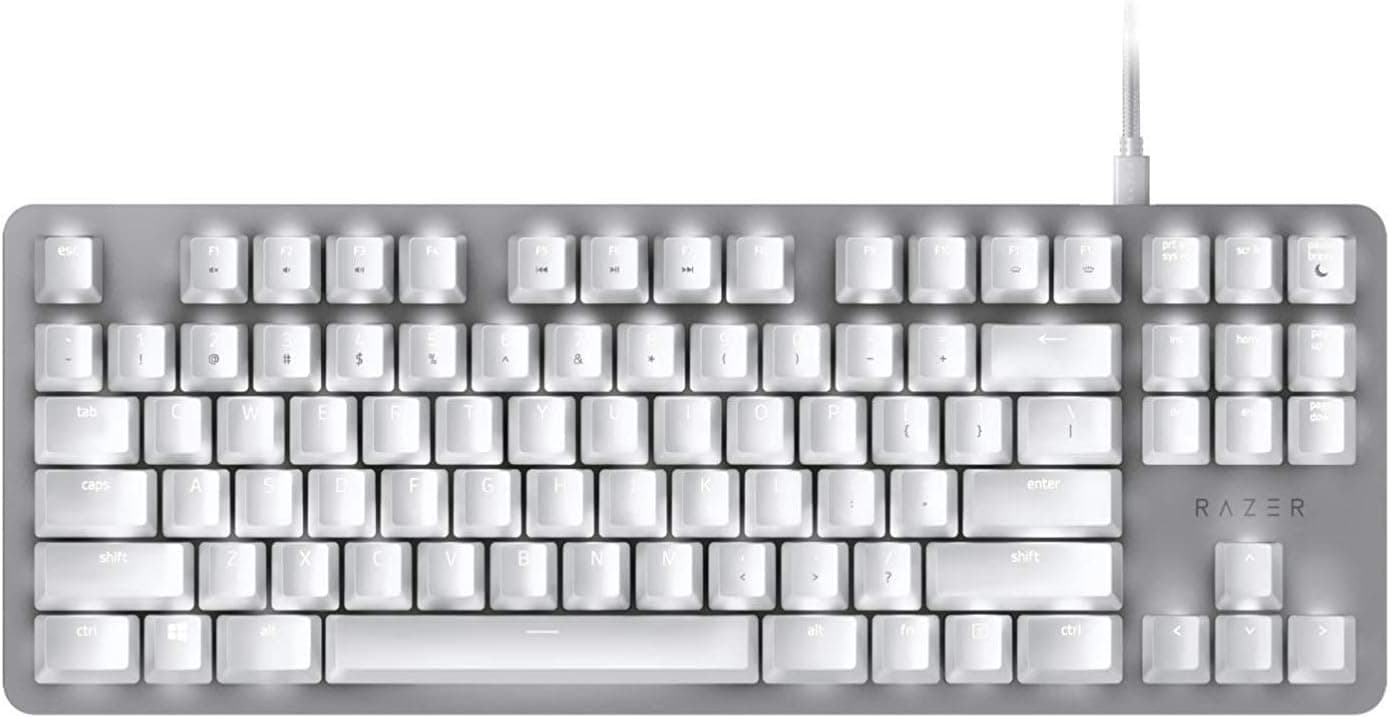
The Razer BlackWidow Lite Mercury White pairs an 87-key tenkeyless (TKL) layout with Razer Orange tactile, silent switches. It drops RGB in favor of white per-key LED backlighting and uses a detachable USB-C to USB-A cable, which keeps the look restrained enough for an office desk despite the gaming badge.
The body measures 361 x 133 x 35 mm and weighs roughly 880 g — normal size for a TKL, but that weight matters in practice: the board stays put during aggressive mouse movement.
The target audience is clear. Late-night gaming, a shared room, or typing during calls — anyone who wants mechanical feel without clicky noise.
Conversely, if you want optical switches, rapid trigger, hot-swap sockets, or wireless, this generation of hardware is not for you.
Compatibility Guide
Connectivity is wired USB only — no dongle, no Bluetooth. Windows, macOS, and Linux all work with no extra driver for basic typing.
Remapping keys and tuning backlight brightness, however, requires Razer Synapse 3, which is a Windows-centric application. On macOS or Linux, treat it as "fully functional as a keyboard, effectively non-configurable." Profiles save onboard, so configuring on a Windows machine and then moving the board elsewhere is a workable strategy.
| Check | Detail | Practical note |
|---|---|---|
| Connection | Wired USB (detachable USB-C to USB-A) | Needs a USB-A port; USB-C-only laptops need an adapter |
| Layout | Tenkeyless, 87 keys, US ANSI | Switching from JIS requires relearning |
| Rollover | 10-key rollover | Enough for typical FPS and fighting-game input |
| Footprint | 361 x 133 x 35 mm / ~880 g | Confirm at least 133 mm of tray depth |
| Software | Razer Synapse 3 | Windows-first; limited on macOS/Linux |
The most common stumbling block is the layout. This is US ANSI, so symbol positions differ from a Japanese board and there are no kana or conversion keys at all.
If you use a Japanese IME on Windows, toggling input modes moves to US-layout shortcuts, and you must tell the OS the keyboard is English or the symbols will not match the legends. Verify this immediately after plugging in — "the symbols are in the wrong place" complaints almost always trace back to this setting.
The cable is the second item. Detachability is genuinely useful for travel and for replacing a damaged cable, but the host end is USB-A.
Pair it with a USB-C-only laptop or mini PC and you will need a hub or adapter.
Product Info
Published specifications, all of which sit comfortably in normal TKL territory:
- Switch: Razer Orange (tactile, silent)
- Layout: Tenkeyless, 87 keys
- Rollover: 10-key rollover
- Backlight: White LED, per-key
- Cable: Detachable USB-C to USB-A
- Dimensions: 361 x 133 x 35 mm
- Weight: approx. 880 g
- Keystroke lifespan: 80 million
- OS support: Windows, macOS, Linux
An 80-million-keystroke rating works out to more than 20 years even for a heavy user hitting 10,000 keystrokes a day. In reality, keycap legends and cable connectors wear out long before the switches do, so read that figure as "the switches are not the thing to worry about." Per-key white LEDs are similarly pragmatic: no lighting effects, but they do the actual job of making keys readable in a dark room.
Review data from Amazon.co.jp shows 4.4 out of 5 stars across 1,372 reviews (captured 2026-07-05), which works out to an 88% favorable score.
A 4.4 average over more than a thousand samples points to a mature product with few unit-to-unit surprises.
On price: the Amazon US entry read ¥25,980 as captured on 2026-07-05, and the Amazon Japan entry read ¥22,000 as captured on 2026-08-26. Both are capture-time values and move with sales and stock.
This is an aging limited-color model, and thinning supply can push listings above what it originally sold for. Check the current price on the product page before buying and compare it against current-generation boards in the same bracket.
The eBay entry is a search link only, with no specific price captured.
How It Compares
The TKL and compact space offers very different options. If you want to tinker, Keychron Q1 Pro or Keychron V1 give you hot-swap sockets and QMK, letting you fit whatever silent switch you prefer later.
The BlackWidow Lite has soldered switches and clearly loses on that axis. What it offers instead is a finished product that is quiet out of the box with zero assembly.
If wireless matters, something like the EPOMAKER X Aula EA75 MAX with 2.4GHz and Bluetooth is the alternative; this board is wired-only, which removes latency worries but guarantees one more cable.
Within Razer's current lineup, the Ornata V3 TKL is mecha-membrane and feels entirely different — if you want a real tactile bump, the BlackWidow Lite is the one.
What Matters In Daily Use
Razer Orange is tactile but silent: you feel a clear bump partway down with no click. Silent here means there is no click mechanism — it does not mean the bottom-out thud disappears. Fitting the bundled O-rings under the keycaps noticeably cuts that thud, so if you are buying this for quiet operation, consider O-ring installation a required step rather than an option.
The trade-off is a slightly shortened travel, which some people dislike.
At 880 g and 35 mm tall, the board sits your wrists at a fairly steep angle without support. For long typing sessions, a separate wrist rest changes fatigue noticeably.
Best Use Cases
- Gamers and remote workers who must keep noise down at night or in shared spaces. Tactile feel without clicks, plus O-rings, gets close to membrane-level quiet.
- Anyone building a white-themed desk. Mercury White matches white cases, arms, and monitors, and single-color white LEDs blend in rather than fighting the palette.
- Programmers and writers on US ANSI. Symbol placement suits coding, and the tenkeyless footprint keeps the mouse closer for long sessions.
- People who do not want to configure anything. No hot-swap, no rapid trigger — but nothing to set up either. If fewer moving parts is a feature to you, the age is not a problem.
Things To Check Before Buying
The US ANSI layout is the biggest trap. Coming from a Japanese layout, you must relearn symbol positions and IME toggling.
If you type long documents for a living, the transition cost is real and not trivial. Buying this purely because "tenkeyless saves space" while ignoring the layout is the most reliable way to regret the purchase.
Calibrate your expectations of the word "silent." The click mechanism is gone; bottom-out and stabilizer noise are not.
This is not silent-in-a-quiet-meeting-room territory. With the O-rings fitted it reaches "not distracting." If you need something closer to truly inaudible, look at silent linear switches in a gasket-mounted, foam-filled case instead.
The feature omissions are deliberate and dated: no hot-swap, no wireless, no RGB, no rapid trigger. That was normal for its era, but today's market at the same price includes boards with all of it.
Given capture-time prices of ¥22,000–¥25,980, compare against current models in that budget before committing. The reason to choose this board is the Mercury White design and quiet tactile feel, not the feature list.
It is a poor fit for number-heavy work. Accounting, inventory, and data entry all suffer without a numpad.
Adding a separate keypad works, but a full-size board would have been cheaper from the start.
Watch the listing metadata. Amazon product pages occasionally carry manufacturer, model, or accessory details that do not match the physical item.
The data referenced here is consistent — ASIN B07WRHPFYK, manufacturer Razer — but confirm three things visually from the images and title before ordering: Mercury White, tenkeyless, and US layout. Black and alternate-layout BlackWidow Lite variants are sold under the same name, and picking the wrong variation is an easy mistake.
FAQ
Q. Is it genuinely quiet? Will neighbors hear it? A.
There is no click, but bottom-out noise remains. With the bundled O-rings fitted, typing noise drops clearly and will not carry to an adjacent room under normal conditions.
It is not silent, so temper expectations if someone is sleeping right beside you.
Q. Can I type Japanese on it? A.
Yes. IMEs on Windows and macOS work fine.
There are no conversion or half/full-width keys, so mode switching uses US-layout shortcuts. Set the OS keyboard type to English or the symbols will not match the legends.
Q. Can I swap the switches later? A.
No. The board is not hot-swappable; switches are soldered.
If switch swapping matters, choose a hot-swap board instead.
Q. Does everything work on macOS? A.
It works fully as a keyboard, but Razer Synapse 3 is Windows-oriented, so remapping and lighting control effectively require Windows. Configure on a Windows machine, save onboard, then move it.
Q. Will it fit my keyboard tray? A.
It is 361 x 133 x 35 mm. Measure for 133 mm of depth plus room for a wrist rest.
At roughly 880 g it will not slide around.
Q. Is it still worth buying today? A.
Yes, if silent tactile switches and the Mercury White look are what you want. If you need wireless, hot-swap, or rapid trigger, a newer board at the same budget will satisfy you more.
Product Disclosure (Amazon)
- Manufacturer: Razer(レイザー)
- ASIN: B07WRHPFYK
- Note: This article covers a manufacturer-made product based on Amazon listing details.