Overview
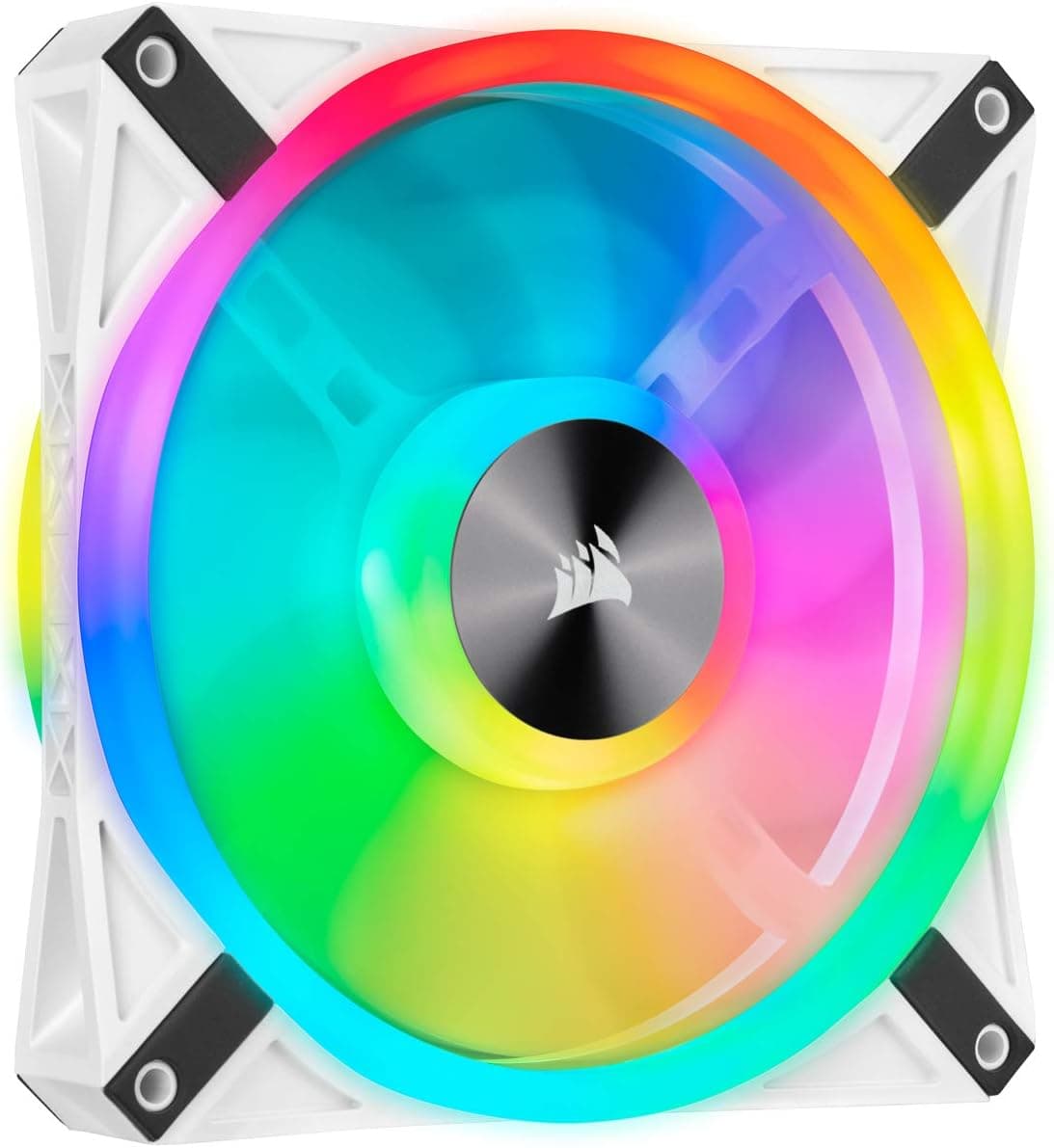
The Corsair QL140 RGB Single is a single-fan pack containing one 140mm x 25mm RGB case fan from CORSAIR's QL series. The short verdict: it is best for people who already own a CORSAIR RGB controller (such as a Lighting Node CORE or Commander PRO) and want to add or replace one 140mm fan.
If you have no controller, buying this fan alone will not give you control over its lighting.
The QL series is all about lighting. Each fan carries 34 LEDs placed on both the front and back, so the light is visible from the intake side and the exhaust side and wraps around through the blades.
Whether it sits behind a front glass panel or at the rear as exhaust, a lit face points toward you.
The listed specs are a 1,250 RPM maximum speed, a 20 dBA noise level, 12V rating, and 1.25W power draw.
It uses a hydraulic bearing and has rubber anti-vibration pads on all four corners to reduce vibration passed into the case. On Amazon.co.Check the retailer's page for the latest user reviews.
It sits in the mid-range of RGB fans. It is not a fan you choose for cooling numbers alone; it makes the most sense when the goal is to unify your case lighting under CORSAIR iCUE.
How the QL Series Fits in CORSAIR's Lineup
CORSAIR's fan series each have a different focus. Here is a rough guide so the fan matches your expectations.
| Series | Main focus | Difference from QL |
|---|---|---|
| QL (this product) | Lighting on both faces | Larger lit area; looks good facing either way |
| LL | Dual light loops | Different lighting style; similarly lighting-focused |
| AF | Airflow | Prioritizes airflow over lighting; RGB and non-RGB models exist |
| ML | Magnetic levitation bearing | Different bearing; leans toward cooling and durability |
| iCUE LINK generation (QX / RX etc.) | Single-cable daisy chaining | Separate connection system; cannot be mixed with legacy fans like QL |
QL is one of the most lighting-focused options. If cooling comes first at the same budget, AF or ML can make more sense, and for a fresh build the iCUE LINK generation is also worth a look.
QL is most compelling when you are adding a matching fan to a system already built around legacy CORSAIR RGB fans such as QL or LL.
Compatibility Guide
Mounting size
The QL140 RGB Single measures 140mm x 140mm x 25mm and uses the standard 140mm hole spacing (about 124.5mm).
It fits any case position listed as 140mm-compatible (front, top, bottom) and 280mm or 420mm class AIO radiators.
It will not fit positions that only support 120mm fans. Rear exhaust mounts are often 120mm-only, so check the position first.
Top-mounted 140mm fans can also collide with tall VRM heatsinks or memory. If you stack a radiator and fan at the top, add the radiator thickness to the fan's 25mm.
Fan power (speed control)
The data for this article lists a 3-pin power connector. However, QL series fans are commonly described as using a 4-pin PWM cable, so check the actual unit or its packaging.
A 4-pin fan can physically plug into a 3-pin header, in which case speed is controlled by voltage.
Connect it to a SYS_FAN (CHA_FAN) header on the motherboard, or to a CORSAIR Commander-series controller so speed and lighting can be managed together in iCUE.
Lighting (RGB)
This is where most mistakes happen. The QL series uses a CORSAIR-proprietary RGB connector, which in principle cannot plug directly into a standard 5V ARGB (3-pin) or 12V RGB (4-pin) motherboard header.
To light it, you need a CORSAIR RGB controller such as the Lighting Node CORE, Lighting Node PRO, or Commander PRO.
It also cannot connect to an iCUE LINK System Hub. iCUE LINK is a separate standard that chains fans with dedicated cables and is not compatible with legacy fans like QL.
Even within CORSAIR, products from different generations cannot always be mixed.
Mixing with other brands
You cannot control other brands' ARGB fans on the same CORSAIR controller. Integration with motherboard vendors' lighting software varies by setup, so it is safest to plan on managing the lighting entirely in iCUE.
Product Info
| Item | Value |
|---|---|
| Size | 140mm x 140mm x 25mm |
| Max speed | 1,250 RPM |
| Noise level | 20 dBA |
| Rated voltage / power | 12V / 1.25W |
| Bearing | Hydraulic |
| LEDs | 34 per fan |
| Anti-vibration | Rubber pads on four corners |
| Warranty | 2 years |
It was released around 2019.Check the retailer's page for the latest price.co.jp (captured May 26, 2026) and $29.99 on an eBay US listing (captured May 31, 2026).
Both are snapshot prices that change with sales and stock, so check the product page before buying. On eBay, condition and included items vary by seller.
For a single 140mm fan, this is not cheap. Since higher-airflow fans can be had for less, most of the price pays for the lighting design and iCUE integration.
If you need two or more new fans, compare against multi-packs that bundle a controller (pack contents vary by time and retailer).
At 1.25W per fan, adding several fans will almost never require a bigger power supply. The warranty is two years.
Installation Steps
- Check free controller ports. A Lighting Node CORE has RGB ports for six fans.
If yours is full, you will need another controller or a replacement. 2.
Choose orientation and mount. Use the arrows on the frame (airflow and rotation) to set intake or exhaust.
With LEDs on both faces, you do not have to compromise orientation for looks. 3.
Connect the power cable to a motherboard fan header or a Commander-series controller. 4.
Connect the RGB cable to the controller. 5.
Configure iCUE. Register the fan type (QL) and fan count on the controller channel; getting this wrong causes misaligned or partial lighting.
Finally, set a fan curve (temperature vs. speed).
Best Use Cases
- Expanding an existing CORSAIR RGB setup: Ideal if you already use QL fans or a compatible controller and want to add or replace one fan. The single pack lets you buy exactly what you need.
- Gamers who want quiet RGB: The listed noise level is 20 dBA. Good for unifying case lighting in iCUE while keeping in-game noise down.
- Show-off builds with glass panels: LEDs on both faces stay visible whether the fan is a front intake or rear exhaust.
- First-time RGB fan builders: Mounting uses standard screws and iCUE is intuitive, as long as you understand a separate controller is required.
Things to Consider
No RGB controller is included. The single pack contains only the fan.
Without a Lighting Node CORE, Commander PRO, or similar, you must buy one separately. Because it will not plug straight into an ARGB header, the most common mistake is a fan that never lights up.
Verify the connector against the listing. The source data lists a 3-pin power connector, while the QL series is commonly described as 4-pin PWM.
Since this affects speed control, confirm with the product images or packaging before buying. Listing details are sometimes wrong, so also confirm from the images and title that it is the exact product you want.
Not the best pick if cooling is your top priority. The QL series favors lighting, and its 1,250 RPM maximum is modest.
For radiators or as the main fan for hot components, the airflow-focused AF series or a pressure-focused fan may suit better. Check CORSAIR's product page for rated airflow and static pressure.
Read 20 dBA as a conditional figure. Noise depends on test conditions, and wind noise is clearly audible near full speed.
For a quiet build, set a fan curve in iCUE or the BIOS that keeps everyday speeds low.
Two cables per fan. Power and RGB are separate cables, so cable management gets crowded as you add fans.
Plan routing ahead in cases with little space behind the motherboard tray.
Depends on iCUE software. Advanced lighting assumes iCUE running in the background, which is a drawback if you avoid resident utilities.
And again, it will not work with iCUE LINK hubs.
**How to read the review count.
Two-year warranty. If long-term reliability is a concern, consider a retailer's extended warranty.
FAQ
Q. Can I light it from my motherboard's ARGB header? A.
In principle, no. The QL series uses a CORSAIR-proprietary RGB connector and needs a CORSAIR controller such as the Lighting Node CORE.
Q. Can I mix it with QL140 fans I bought earlier? A.
Generally yes. QL fans can share the same controller and be managed together in iCUE; just register the correct fan type and count.
Q. Will it fit a 120mm fan position?
A. No. It needs a 140mm-compatible position or a 280mm or 420mm class radiator.
Q. Is it really quiet? A.
The listed noise level is 20 dBA, which is quiet at low to mid speeds. It gets louder near full speed, so a fan curve that limits speed is recommended.
Q. Can it connect to an iCUE LINK System Hub? A.
No. iCUE LINK is a separate connection standard that is not compatible with legacy fans like QL.
Product Disclosure (Amazon)
- Manufacturer: CORSAIR
- Seller: Amazon.co.jp
- Fulfilled by: Amazon.co.jp
- ASIN: B07Z9TD372
- Note: This article covers a manufacturer-made product based on Amazon listing details.


