This article covers the Keychron Q2 Knob Version wired custom mechanical keyboard — specs, real-world usability, and who should not buy it.
Overview
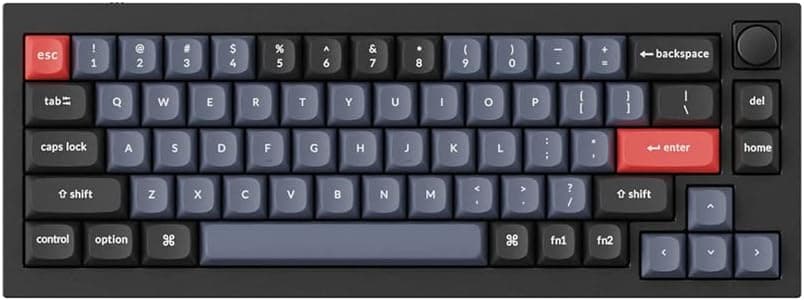
The Keychron Q2 Knob Version is a 65% (68-key) wired mechanical keyboard built around a full aluminum case. The short verdict: this is a custom keyboard you can buy pre-assembled, aimed at people who want to tune switches and typing sound themselves.
It is a poor fit for anyone who wants a light desk setup or wireless connectivity.
The defining trait is mass. The case is CNC-machined 6063 aluminum, and the board weighs roughly 1560g without the cable.
Typical plastic-case 65% boards land around 600–800g, so this is close to double. That weight suppresses case flex while typing and keeps the board from sliding under heavy keystrokes.
Dimensions are 327 x 121 x 33 mm — narrower than a tenkeyless and shallow enough not to crowd your mouse.
As the name implies, a rotary encoder sits in the top-right corner. It ships mapped to volume, but QMK/VIA lets you reassign it to browser tab switching, video scrubbing, zoom level, or per-layer functions.
The knob is not just a convenience feature; it earns its keep once you pair it with layers.
Compatibility Guide
Connection is wired USB-C only. No Bluetooth, no 2.4GHz dongle.
That is the first fork in the road: if you plan to share the board with a tablet or phone wirelessly, this product cannot meet that requirement.
Supported operating systems are Windows, macOS, and Linux. A physical slide switch on the side toggles between Windows and macOS layouts, swapping Alt/Win and Option/Command automatically.
Extra macOS keycaps (Option, Command) are included so the legends match too. On Linux the board enumerates as a standard USB HID device and needs no driver, though you may need to add udev rules to give VIA device access.
VIA runs in a Chromium-based browser (Chrome, Edge) over WebUSB. Safari and Firefox do not implement WebUSB, so even Mac users need a Chromium browser on hand for configuration sessions.
This is a common stumbling block. Firmware flashing itself uses QMK Toolbox, but remapping keys, building macros, and changing RGB are all handled in VIA without touching firmware.
The PCB is hot-swappable and accepts Cherry MX-compatible 3-pin and 5-pin switches. Most mainstream linear, tactile, and clicky switches drop in, but optical switches (Razer Optical, Gateron Optical) and low-profile switches are physically incompatible.
"Any mechanical switch fits" is not true here. Stock keycaps are OEM-profile PBT doubleshot and can be replaced with common Cherry-stem sets — but note that 65% layouts use a 1.75u right Shift and a non-standard bottom row, so verify that any keycap set you buy includes 65%-compatible kits.
People usually discover this after ordering.
Lighting uses south-facing LEDs, which structurally avoids the keycap interference that north-facing boards can have with Cherry-profile caps. That widens your keycap options.
Product Info
| Item | Value |
|---|---|
| Layout | 65% (68 keys) |
| Connection | Wired USB-C |
| Switch | Gateron G Pro Red (linear) |
| Hot-swappable | Yes (Cherry MX-compatible 3/5-pin) |
| Keycaps | OEM profile, PBT doubleshot |
| Backlight | RGB (south-facing LEDs) |
| Rotary encoder | Included (Knob version) |
| Case material | Full aluminum (6063) |
| Dimensions | 327 x 121 x 33 mm |
| Weight | Approx. 1560g (without cable) |
| OS support | Windows / macOS / Linux |
| Firmware | QMK / VIA |
Price on Amazon.co.jp was ¥33,990 as captured on 2026-08-27, and the same listing also recorded ¥33,990 on 2026-06-01 — so it held steady across that window.
Sales, currency shifts, and stock levels still move it, so check the live product page before buying. Listings on overseas marketplaces sometimes show figures wildly detached from the domestic price; those usually reflect resale or shipping-inclusive pricing and should not be used as a reference point.
Check the retailer's page for the latest user reviews. That is broadly positive, but 14 is a small sample and should not be treated as a statistically meaningful score.
Reading what individual reviews actually complain about is more useful than the average.
In the box: USB-C cable, keycap puller, switch puller, replacement macOS keycaps, and a hex wrench. Shipping pullers by default signals that this board is designed to be opened and modified.
Typing Feel and the Knob
The double-gasket mount sandwiches the plate and PCB in gasket material rather than screwing them directly to the case. That softens the hard bottom-out and metallic ping common to milled aluminum cases, producing a lower, more controlled sound.
The 1560g mass itself also damps resonance.
The stock Gateron G Pro Red is a light, smooth linear with no tactile bump. It is easy to live with for typing-heavy work but can feel vague if you want feedback under your fingertip.
In that case a tactile switch is the obvious next step — and because the board is hot-swappable, you buy switches, not a new keyboard. That ability to change direction later is the Q2's real advantage over sealed pre-built boards.
The knob accepts functions on both rotation and press. The best setup is per-layer: volume on layer 1, tab switching on layer 2, app-specific control on layer 3.
Locking it to a single function makes the knob version's price premium hard to justify.
Competitive Comparison
Hot-swap boards around 65% are a crowded field, and the Q2 differentiates on case mass. If portability matters, a plastic-case 75% board with wireless support is the more rational buy.
If the board will live on one desk for years while you swap switches and keycaps into it, the rigidity pays off.
If you are choosing by typing feel, a capacitive Japanese-made board is a fundamentally different proposition: it delivers one finished feel consistently for years, whereas the Q2 asks you to define the feel yourself. Neither is superior — pick based on whether you enjoy the tinkering.
For gaming where response and low height come first, a 60% optical board fits the goal better.
Best Use Cases
- Custom keyboard beginners — hot-swap sockets and an included switch puller mean no soldering. Buying a few switch types and swapping them is the cheapest way to learn what you actually like before committing to a kit build.
- Desk-space-conscious users — at 327mm wide it frees a lot of mouse room versus a full-size board, while keeping arrow keys and Page Up/Down, so it demands less compromise than a 60%.
- Power users who want to design their own layout — QMK/VIA layers, macros, and knob assignments pay off most in repetitive work like coding, video editing, or CAD.
- People switching between Windows and macOS — the physical layout toggle and bundled Mac keycaps remove the need for two keyboards.
Things to Consider
Wired only. No Bluetooth, no 2.4GHz.
If you want a cable-free desk or shared use with a tablet, this board is out. Look at Keychron's K-series instead.
Missing this detail is the single most common way to end up with an unused keyboard.
1560g is not a carry weight. Putting it in a bag with a laptop is not realistic.
The mass assumes a permanent desk position — where it is purely an advantage.
No F-row and no numpad. Function keys require the Fn layer.
If you lean on F1–F12 daily (spreadsheets, certain games, debugger shortcuts), expect a real speed hit until the muscle memory forms. If numeric entry is central to your job, budget for a separate numpad or buy a full-size board instead.
Keycap sets must cover 65%. As noted, the right Shift and bottom row differ from standard.
A full-size-oriented set will leave keys unfilled. Check the kit compatibility chart before ordering.
Switches must be Cherry MX-compatible 3-pin or 5-pin. Optical and low-profile switches will not fit.
Verify the listing before you buy. Prices quoted here are point-in-time captures and this article is not updated.
Non-Amazon channels can show figures far off the domestic price. Amazon listings also occasionally carry manufacturer, model, or spec metadata belonging to a different product.
Before ordering, confirm from the product images and title that all three of "Q2", "Knob version", and "wired" match — a knobless version and a barebone version (no switches or keycaps) both exist, and grabbing the wrong configuration is an easy mistake.
RGB is more useful as layer feedback than as decoration. With south-facing LEDs and opaque PBT caps, legends do not glow through in the dark.
Buying it for the lighting look will disappoint.
FAQ
Q. What differs from the knobless version? A.
The top-right key position is replaced by a rotary encoder, with rotation and press both assignable in QMK/VIA. If you only ever use it for volume, the price difference is worth questioning.
Q. Can it run wirelessly?
A. No. Wired USB-C only.
Q. Does VIA require installing software? A.
No — it runs in a Chromium-based browser. Safari and Firefox will not work due to lack of WebUSB.
QMK Toolbox is only needed for actual firmware flashing.
Q. Can I make it quieter? A.
Swapping in silent linear switches is the easiest route. The double-gasket mount and 1560g case already suppress resonance, but bottom-out noise depends on the switch itself.
For office use, plan on silent switches from the start.
Q. Is a Japanese (JIS) layout available? A.
This unit is a 68-key 65% layout; confirm the exact layout on the product page before ordering, especially if kana legends or conversion keys matter to you.
Q.
A. Read what the negative reviews actually cite — DOA units versus dislike of the layout are very different signals.
Product Disclosure (Amazon)
- Manufacturer: Keychron
- Seller: SUPERKOPEK
- Fulfilled by: SUPERKOPEK
- ASIN: B0B4PWFH5S
- Note: This article covers a manufacturer-made product based on Amazon listing details.