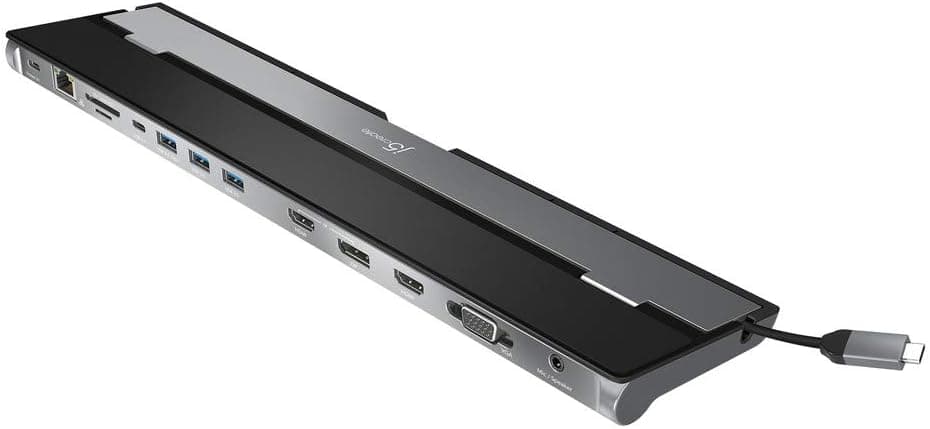
This article covers j5create USB C 13in1 ドッキングステーション USB C 4K HDMI 4K DPトリプルディスプレイ USB Ax 3 5Gbps PD100W DisplayPort HDMI VGA LAN SD.
Overview
The j5create JCD543-EJ is a full-featured 13-in-1 USB-C docking station designed to expand a single USB-C port on your laptop into a complete workstation. Its standout feature is Power Delivery 3.0 passthrough charging at up to 100W, allowing you to charge your laptop while simultaneously driving up to three external displays. The dock offers two HDMI ports, one DisplayPort, and one VGA port, supporting a maximum resolution of 4K (3840×2160) at 30Hz across all three screens. Additional ports include three USB 3.0 Type-A (one with 2.4A fast charging), one USB Type-C 3.1, gigabit Ethernet, SD/MicroSD card slots, and a headset jack. It works with Windows 10/11 and macOS Ventura and later (including Apple Silicon M1/M2/M3/M4 series), though macOS requires a driver download from the manufacturer.
The dock features a laptop-stand design that sits under your notebook, promoting heat dissipation and cable management. The integrated cable can be stored neatly, and the unit can be positioned from either side of your laptop for flexible desk layouts.
Connectivity & Compatibility
- Host Connection: USB Type-C (USB 3.1 Gen1, DisplayPort Alt Mode)
- Supported OS: Windows 10/11, macOS 10.13+ (Ventura, M1/M2/M3/M4 Pro/Max). Note: macOS requires driver installation from j5create's website.
- Compatible Devices: Any laptop with a USB-C port that supports DisplayPort Alt Mode and USB PD charging (e.g., MacBook Pro/Air, Surface Book, Windows ultrabooks).
- Limitation: Dual-monitor output is not supported under macOS 10.13.x. Check your OS version before purchasing.
Product Info
Released around 2020, the JCD543-EJ is priced at approximately ¥9,980 on Japanese online retailers. It comes with a 2-year manufacturer warranty and domestic support (phone, email, chat). The package includes the dock and a USB-C cable only; a PD charger is sold separately. Market positioning is mid-range: it offers 13 ports and 100W PD charging at a sub-¥10,000 price point, delivering excellent value for users who need extensive connectivity without breaking the bank.
Best Use Cases
- MacBook Users: Ideal for MacBook Pro/Air owners (especially M1/M2/M3/M4 series). A single USB-C cable handles charging, external monitors, wired networking, and USB peripherals, keeping your desk tidy. Be aware that macOS requires a driver download.
- Remote Workers / Home Office: Triple-monitor support boosts productivity, and the gigabit Ethernet port ensures stable network connections for video conferencing and large file transfers.
- Content Creators / Video Editors: Useful for connecting multiple 4K monitors for editing workflows. However, note that HDMI/DisplayPort outputs are limited to 30Hz; if you need 60Hz, consider a different dock.
- Not Recommended For: Gamers requiring high refresh rates (60Hz+) on external monitors, or users who need Thunderbolt 4 speeds (40Gbps) — this dock's USB 3.1 Gen1 (5Gbps) bandwidth may be insufficient.
Product Disclosure (Amazon)
- Manufacturer: j5create
- ASIN: B085VVJ9C1
- Note: This article covers a manufacturer-made product based on Amazon listing details.