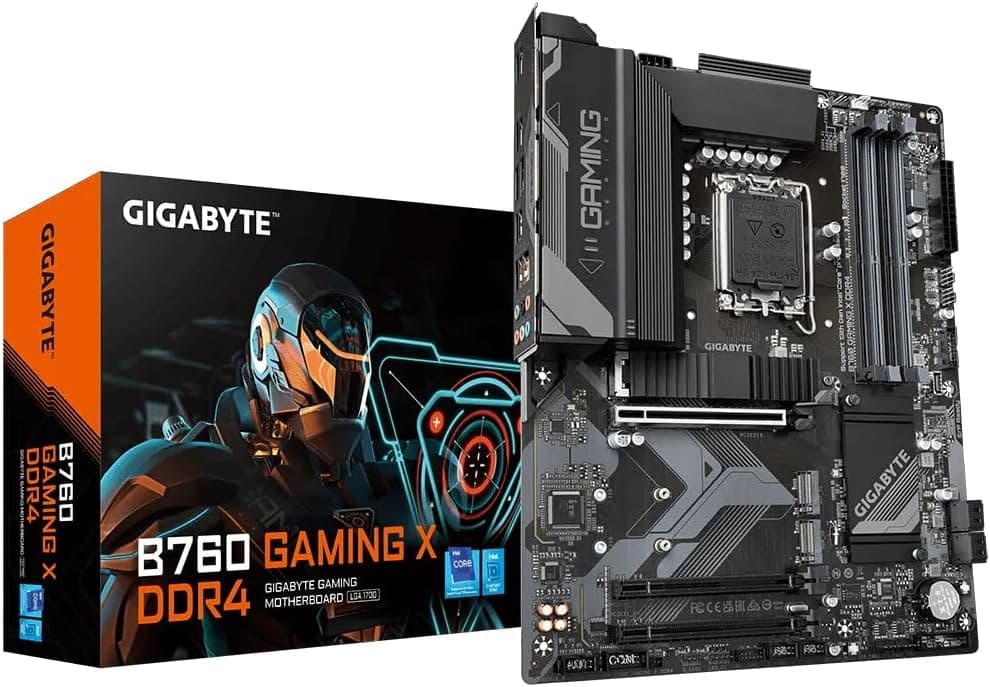
This article covers Gigabyte B760 GAMING X DDR4。.
Overview
The Gigabyte B760 GAMING X DDR4 is an ATX motherboard built around Intel’s B760 chipset, supporting 12th, 13th, and 14th Gen Core processors. By sticking with DDR4, it delivers a modern platform at a significantly lower build cost compared to DDR5 alternatives. An 8+1+1 phase digital VRM provides stable power for mid-range CPUs like the Core i5-13400 or even i7-13700 non-K, making this board a solid foundation for a budget-conscious gaming PC. Three PCIe 4.0 x4 M.2 slots allow you to install multiple high-speed NVMe SSDs, while the onboard 2.5GbE LAN and front-panel USB-C 10Gb/s port cover modern connectivity needs. All of this comes in a familiar ATX layout, ensuring broad chassis compatibility and easy cable management.
Compatibility Guide
Socket LGA1700 means the board works with Intel Core i5-12400 through i9-14900K processors, both with and without integrated graphics. Memory support is limited to DDR4 – four DIMM slots with dual-channel operation and XMP profiles for overclocking up to typical 3200MT/s kits. Form factor is standard ATX (305×244 mm), fitting most mid-tower and full-tower cases. The primary PCIe x16 slot runs at PCIe 4.0, and there are two PCIe 3.0 x1 slots for expansion cards. Storage options include three M.2 PCIe 4.0 x4 slots and four SATA III 6Gbps ports, allowing a mix of blazing-fast SSDs and bulk HDDs. The power connectors are a 24-pin ATX main and an 8-pin CPU EPS, which is sufficient for most builds. A quality 650W PSU is recommended for a typical i5 + mid-range GPU setup.
Product Info
Released in early 2023, the Gigabyte B760 GAMING X DDR4 sits firmly in the mid-range tier. The B760 chipset lacks CPU overclocking (multiplier unlock) but provides all the essential I/O and expansion that most users need. The 8+1+1 VRM stays cool even under sustained load, and the Q-Flash Plus feature allows BIOS updates without a CPU or memory installed – a huge convenience for first-time builders. The board carries a standard 3-year manufacturer warranty.
Best Use Cases
Budget Gaming Builds: Pair this board with a Core i5-13400F and an RTX 4060 or RX 7600 for a high-frame-rate 1080p/1440p gaming rig. DDR4 memory keeps the overall cost low, and the three M.2 slots leave room for a game library SSD. Entry-Level Content Creation: Video editing and light 3D design benefit from the fast M.2 storage and 2.5GbE networking. The lack of CPU overclocking is not a drawback for productivity tasks, where stability matters more. * Home Server or Secondary PC: With a low-power i3-13100, this board becomes an efficient file server or lightweight virtualization host. The Q-Flash Plus is especially useful for headless server setups where you need to update the BIOS without disassembly. ## Alternatives
ASUS TUF GAMING B760-PLUS WIFI D4 is a direct competitor that includes integrated Wi-Fi 6 and Bluetooth. It costs slightly more but offers wireless connectivity out of the box. If you don’t need Wi-Fi, the Gigabyte B760 GAMING X DDR4 provides better storage expansion with three M.2 slots (vs. two on the ASUS) and a more straightforward feature set. MSI MAG B760 TOMAHAWK WIFI DDR4 is another alternative with Wi-Fi and a slightly higher price. It targets users who want a premium VRM and a metal-reinforced PCIe slot. However, for pure price-to-feature ratio, the Gigabyte board often comes out ahead, especially when you can reuse DDR4 memory from an older build.
Things to Consider
This board does not support PCIe 5.0 for graphics or SSDs. While current GPUs and NVMe drives don’t saturate PCIe 4.0, future components may benefit from the extra bandwidth. If you plan to keep the system for 4+ years and want PCIe 5.0 readiness, a Z790 board might be a better investment. Overclocking is limited to memory XMP only; CPU multiplier adjustments are not possible on B760. Enthusiasts who want to overclock a “K” series CPU should step up to a Z790 chipset. For the vast majority of users who run at stock or use Auto-OC features, this is not a problem. Be aware that the board lacks an integrated I/O shield. The shield is separate and must be snapped into the case before installation – a minor inconvenience but worth noting. Additionally, there is no onboard Wi-Fi or Bluetooth, so if wireless connectivity is required, you’ll need to add a PCIe or USB adapter.
Product Disclosure (Amazon)
- Manufacturer: GIGABYTE
- Seller: 輸入本舗T-market
- Fulfilled by: 輸入本舗T-market
- ASIN: B0BPYTR6J5
- Note: This article covers a manufacturer-made product based on Amazon listing details.