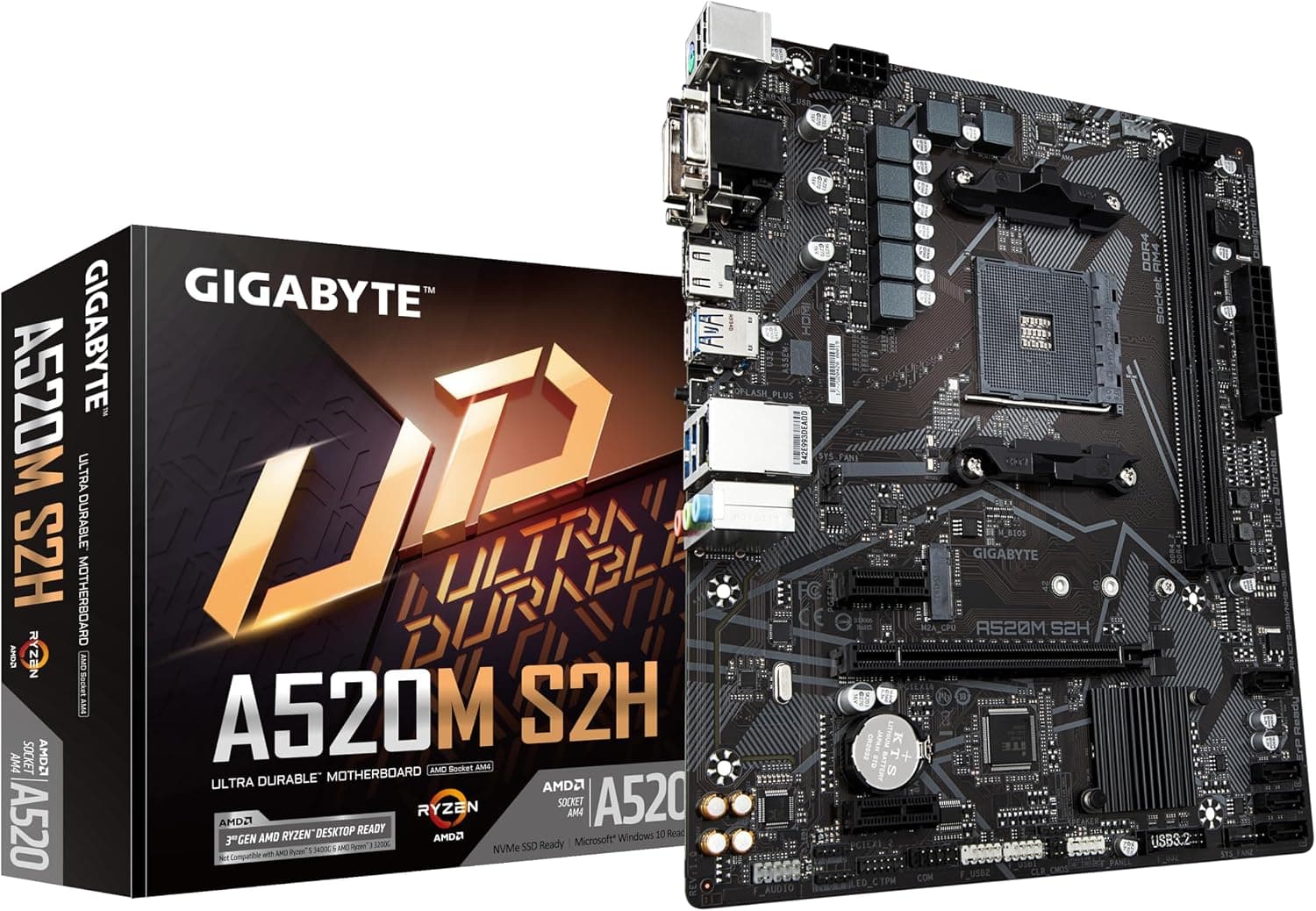
This article covers Gigabyte AMD A520 S2H AM4 Micro ATX.
Overview
The Gigabyte AMD A520 S2H is a Micro ATX motherboard built around the budget-friendly AMD A520 chipset, designed for Socket AM4 processors. It supports Ryzen 5000, 5000 G, 4000 G, and 3000 series CPUs, making it a versatile choice for entry-level and mid-range builds. Key features include DDR4 dual-channel memory (2 DIMM slots, up to 64 GB), a single M.2 PCIe 3.0 x4 slot, and four SATA 6 Gb/s ports. This board offers a surprisingly solid feature set for its price point. The digital 4+3 phase VRM with low RDS(on) MOSFETs delivers stable power to CPUs up to eight cores. Q-Flash Plus technology allows BIOS updates without a CPU or memory installed — a huge convenience for users who want to drop in a newer Ryzen 5000 series chip without worrying about compatibility. Onboard video outputs include HDMI, DVI-D, and D-sub, covering most APU display needs. Positioned firmly in the entry-level segment, the A520 S2H is ideal for office PCs, home servers, and budget gaming rigs where every dollar counts. It skips PCIe 4.0 support and higher-end connectivity, but delivers everything a mainstream builder actually needs at a price that leaves room for a better CPU or GPU.
Compatibility Guide
Socket AM4 is the only option, supporting Ryzen 3000 through 5000 series (including G-series APUs). Memory must be DDR4 with speeds up to 3200 MHz officially supported, though faster modules may run via overclocking. Two DIMM slots mean you should plan capacity carefully — a 2×16 GB kit is the practical maximum for most users. The Micro ATX form factor (244×244 mm) fits in most M-ATX and ATX cases. A single PCIe 3.0 x16 slot handles the GPU, with two PCIe 3.0 x1 slots for expansion cards. Storage interface includes one M.2 PCIe 3.0 x4 slot (NVMe) and four SATA ports. Power delivery uses a standard 24-pin main connector and an 8-pin CPU power connector; a 450–550 W PSU is adequate for a Ryzen 5 + mid-range GPU build, but we recommend 650 W for future GPU upgrades. Notable omission: no PCIe 4.0 support. If you already own a PCIe 4.0 SSD or plan to buy a high-end GPU in that generation, consider the B550 chipset instead. USB connectivity is USB 3.2 Gen 1 (5 Gbps) on both rear I/O and front header; there is no USB Type-C port on the rear.
Product Info
Released in late 2020, the A520 S2H is an entry-tier motherboard with a target price around ¥10,000–¥20,000 (currently ¥15,980 on). Gigabyte backs it with a standard 3-year warranty. The A520 chipset lacks PCIe 4.0 lanes, but for the price it offers reliable operation, Q-Flash Plus, Smart Fan 5 with hybrid fan headers, and RGB FUSION 2.0 for addressable LED strips. Market positioning: the best option for builders on a tight budget who want AM4 compatibility without unnecessary extras. It competes directly with other A520 boards from ASUS and ASRock, but stands out with its Q-Flash Plus feature — a rarity at this price level.
Best Use Cases
- First-time PC builder on a strict budget Pair the A520 S2H with a Ryzen 5 5600 or Ryzen 7 5700G APU for a powerful no-GPU system. The board provides all essential ports and Q-Flash Plus eliminates the fear of BIOS incompatibility. Not for you if you need PCIe 4.0 or multiple M.2 slots from the start. 2. Home or office workstation (word processing, spreadsheets, web browsing) The board’s low power draw and passive chipset cooling make it ideal for silent, always-on machines. Combine with a Ryzen 3 or 5 APU for a snappy experience. Avoid if you plan to run CPU-heavy workloads like rendering or simulation — the VRM is not designed for sustained full load on 8+ core CPUs. 3. Budget gaming PC with a discrete GPU Use a Ryzen 5 5600X or Ryzen 7 5700X with an RTX 3060 / RX 6600 class card for solid 1080p gaming. The PCIe 3.0 lane won’t hold back these GPUs. Not suitable if you later want to upgrade to an RTX 4070 or faster — consider B550 for future-proofing. 4. Light file server or NAS With four SATA ports and one M.2 slot, it can handle a moderate storage array. The board’s reliability and low cost make it a viable option. However, true hardware RAID requires a B550 or X570 board; software RAID (Windows Storage Spaces or ZFS) works fine here.
Things to Consider
The lack of PCIe 4.0 is the single biggest compromise on the A520 S2H. If you already own a PCIe 4.0 SSD or plan to buy a high-end GPU in the near future, spending extra on a B550 board will save you from upgrading later. The two DIMM slots also limit memory expansion — you cannot add more sticks without replacing existing ones. VRM performance is adequate for 6-core and 8-core Ryzen processors under normal loads, but pushing a Ryzen 9 5900X to 100% for hours may cause thermal throttling. Additionally, there is no built-in Wi-Fi or Bluetooth; you’ll need to use a USB adapter or a PCIe card. The M.2 slot shares bandwidth with SATA ports — populating SATA3 2/3 can disable one SATA port. ## FAQ
Q: Can I use Ryzen 5 5600X wit
Product Disclosure (Amazon)
- Manufacturer: GIGABYTE
- ASIN: B08G8VHHF4
- Note: This article covers a manufacturer-made product based on Amazon listing details.