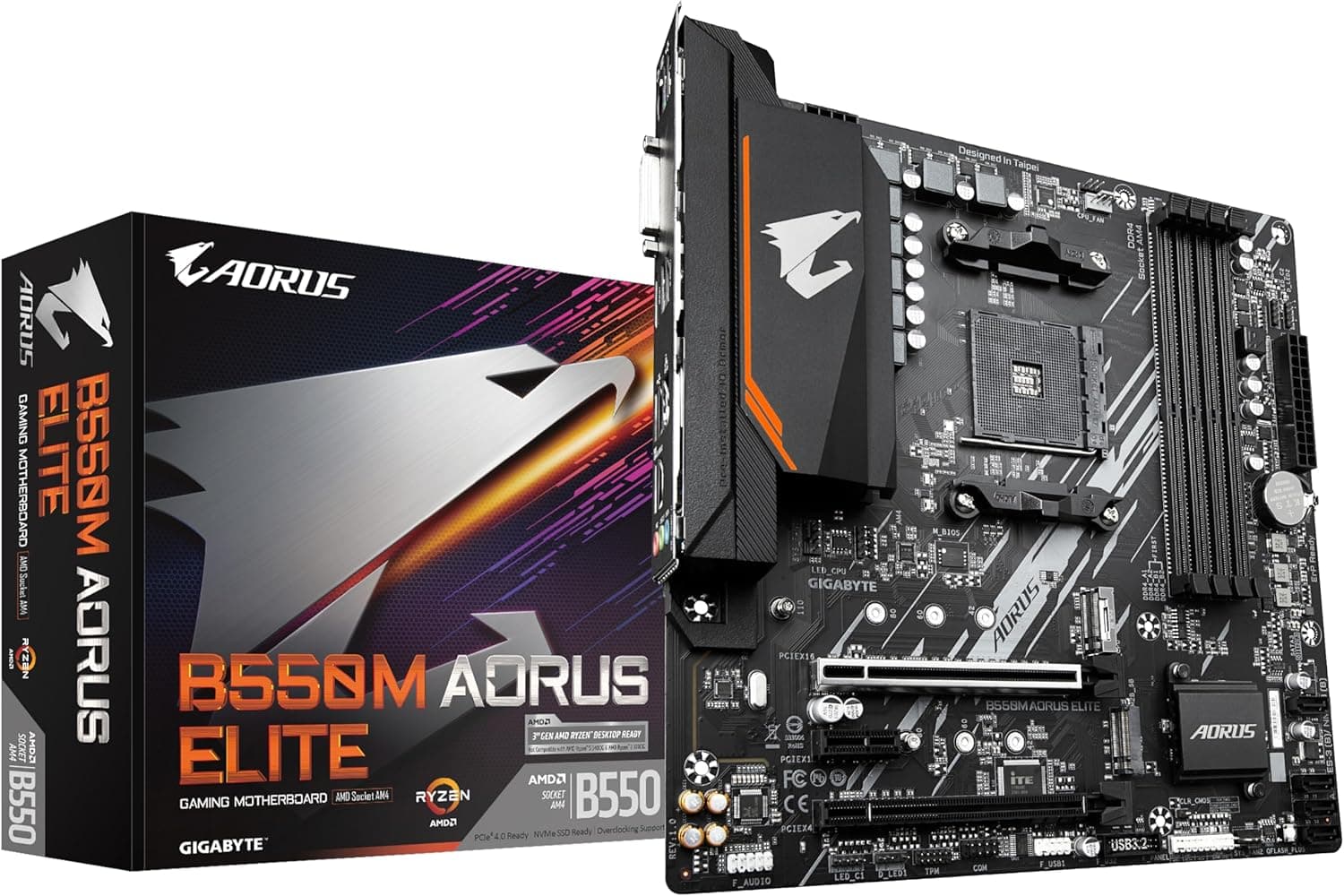
This article covers Gigabyte B550M AORUS ELITE マザーボード.
Overview
The Gigabyte B550M AORUS ELITE is a MicroATX motherboard built on the AMD B550 chipset, offering a balanced mix of features for mid-range gaming and productivity builds. It supports Socket AM4 processors, including Ryzen 5000 series and previous Ryzen generations, and packs a 5+3 phase digital VRM for stable power delivery under load. Memory support extends to DDR4-4733 (OC) across four DIMM slots, with a maximum capacity of 128 GB. The board includes one PCIe 4.0 x16 slot for modern graphics cards, along with dual M.2 slots — one of which runs at PCIe 4.0 speeds for ultra-fast NVMe SSDs. SATA connectivity is also generous with six 6Gb/s ports. Networking is handled by a GIGABYTE 8118 gaming-grade Gigabit LAN controller, while the audio subsystem uses high-quality capacitors and a noise isolation design for cleaner sound. RGB FUSION 2.0 support allows addressable LED control, making it easy to customize the look of your build.
Compatibility Guide
CPU socket is AM4, compatible with AMD Ryzen 5000 (Vermeer), 4000 G-series (Renoir), and 3000 series (Matisse) processors. APUs like the Ryzen 7 5700G work without issue. The board uses standard DDR4 DIMMs — ECC and non-ECC unbuffered modules are supported, with a maximum capacity of 128 GB across four slots. Overclocking is supported up to 4733 MHz. Form factor is MicroATX (244×244 mm), fitting most MicroATX cases and many ATX cases. The primary PCIe x16 slot runs at PCIe 4.0 x16, while the secondary x16 slot runs at PCIe 3.0 x4 via the chipset. Dual GPU setups are possible but SLI/CrossFire are not supported. Storage includes six SATA 6Gb/s ports and two M.2 slots: one PCIe 4.0 x4 (CPU-direct) and one PCIe 3.0 x4/SATA shared (chipset). Note that using the second M.2 slot in SATA mode may disable one SATA port. Power connectors are standard 24-pin ATX and 8-pin ATX 12V. Recommended PSU wattage is around 550W for a Ryzen 5 + mid-range GPU build, or 650W for a Ryzen 7 + higher-end GPU.
Product Info
Released in June 2020, the Gigabyte B550M AORUS ELITE is positioned as an entry-to-mid-range motherboard. It offers PCIe 4.0 support, a solid VRM design, and dual M.2 slots at a very competitive price point, making it a great value for budget-conscious builders. Key specs include AMD B550 chipset, AM4 socket, DDR4-4733 (OC) memory support, one PCIe 4.0 x16 slot, one PCIe 3.0 x16 slot, two M.2 slots (1× PCIe 4.0, 1× PCIe 3.0), six SATA 6Gb/s ports, GIGABYTE 8118 gaming LAN, and high-quality audio capacitors. The VRM uses 5+3 phases with low RDS(on) MOSFETs, capable of handling Ryzen 5 and Ryzen 7 CPUs without issue. Although it launched several years ago, the board remains a solid choice for new AM4 builds, especially when sourced new or used at a budget-friendly price.
Best Use Cases
- Budget 1080p/1440p Gaming PC Pair with a Ryzen 5 5600X or Ryzen 7 5700X and a mid-range GPU like RTX 3060 Ti or RTX 4070. The PCIe 4.0 M.2 slot ensures fast game loading, and the overall platform provides excellent price-to-performance. 2. Compact MicroATX Build The MicroATX form factor allows for smaller cases while retaining good expansion. This board’s dual M.2 slots and six SATA ports give plenty of storage room without sacrificing size. 3. Budget-Conscious Upgrade or Used Part Build AM4 boards are widely available on the used market. This model supports Ryzen 3000 and 5000 series, making it ideal for building a low-cost PC with second-hand CPU and RAM. 4. Light Creative Work (Photo/Video Editing) With support for fast PCIe 4.0 SSDs and up to 128 GB of DDR4 memory, this board can handle light video editing and photo processing tasks when paired with a capable CPU and GPU.
Things to Consider
Only one PCIe x16 slot runs at full PCIe 4.0 x16; the second slot operates at PCIe 3.0 x4. This limits dual-GPU performance and prevents SLI/CrossFire setups. If you plan to run multiple graphics cards, consider a different board. The M.2 PCIe 4.0 slot is only available for one drive; the second M.2 slot is limited to PCIe 3.0. Also, using the second M.2 slot in SATA mode may disable one of the six SATA ports — check the manual before building. Video output is via HDMI 2.0b (up to 4K/60Hz) and DVI-D. There is no DisplayPort, which may be a limitation for some APU-based multi-monitor configurations. Because the board is from 2020, you may need to update the BIOS to support Ryzen 5000 series CPUs. The Q-Flash Plus feature allows BIOS updates without a CPU or memory, making this straightforward. ## FAQ
Q: Does this board support Ryzen 7 5800X3D? A: Yes, with BIOS version F14 or later. The 5+3 phase VRM can handle the 5800X3D, but ensure adequate case airflow to keep VRM temperatures in check during heavy loads. Q-Flash Plus allows BIOS update without CPU. Q: Can I use two PCIe 4.0 NVMe SSDs? A: No. Only the M2A_CPU slot supports PCIe 4.0. The M2B_SB slot is limited to PCIe 3.0 x4. For best performance, install your primary O
Product Disclosure (Amazon)
- Manufacturer: GIGABYTE
- Seller: ミスクショップ
- Fulfilled by: ミスクショップ
- ASIN: B08BN8VD23
- Note: This article covers a manufacturer-made product based on Amazon listing details.

![Crucial [Micron製] DDR4 デスク用メモリー 16GB ECC (2133MT](/_next/image?url=https%3A%2F%2Fm.media-amazon.com%2Fimages%2FI%2F51sQ9cnO5eL._AC_SL1000_.jpg&w=1920&q=75)