This article covers GIGABYTE H610M S2H (H610.
Overview
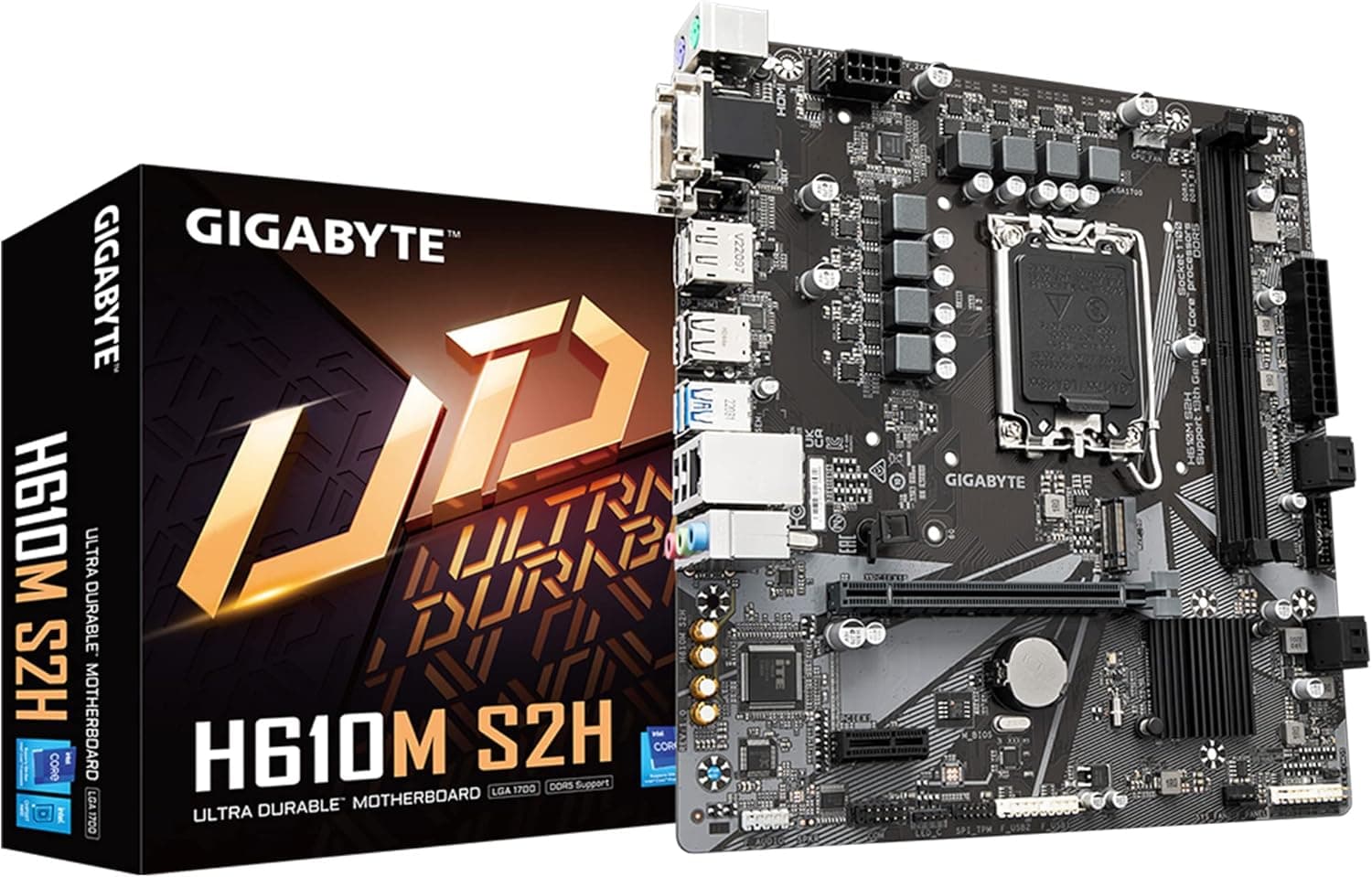
The GIGABYTE H610M S2H is a Micro ATX motherboard built around the Intel H610 chipset, supporting LGA 1700 processors (12th and 13th Gen Core). It brings DDR5 memory support to the entry-level segment, a feature traditionally reserved for higher-end chipsets. With a single PCIe 4.0 x16 slot, one M.2 slot (PCIe 3.0 x4), and four SATA ports, this board covers the basics for a budget build. Its 6+1+1 hybrid digital VRM design is surprisingly robust for a budget H610 board, ensuring stable power delivery for Core i3 and i5 CPUs. The Realtek GbE LAN and 8-channel HD audio complete the package. This board is a sensible choice if you want to build a low-cost DDR5 system without unnecessary frills, but you must accept limited expansion options.
Compatibility Guide
CPU socket: LGA 1700. Compatible with Intel Core i9/i7/i5/i3 (12th Gen Alder Lake, 13th Gen Raptor Lake) and Pentium/Celeron. Memory: 2x DDR5 DIMM slots, non-ECC unbuffered, dual-channel, max 64GB. Form factor: Micro ATX (244×244 mm). Expansion slots: 1x PCIe 4.0 x16 (from CPU), 1x PCIe 3.0 x1 (from chipset). Storage: 1x M.2 slot (PCIe 3.0 x4 NVMe), 4x SATA 6Gb/s ports. Rear I/O: 1x HDMI 2.0, 1x D-Sub (VGA), 4x USB 3.2 Gen1, 2x USB 2.0, 1x RJ-45 GbE LAN, 3x audio jacks. Power: 24-pin ATX main + 8-pin EPS12V. A 500W PSU is adequate for most configurations with a Core i5 and a mid-range GPU.
Product Info
Released in early 2023, the GIGABYTE H610M S2H is a pure entry-level offering. Its street price hovers around $100–110 USD (approximately ¥15,000–23,000 in Japan). The warranty is 3 years from the manufacturer. Market positioning: the cheapest DDR5 LGA 1700 motherboard you can buy. It sacrifices nearly all expansion to hit that price, but delivers the core features: a current-gen CPU socket, DDR5 memory, and a PCIe 4.0 graphics slot.
Best Use Cases
- Budget DDR5 gaming PC: Pair it with a Core i3-12100F or i5-12400F, a single 16GB DDR5 stick (or 2x8GB), and a budget GPU like the GeForce RTX 3050 or Radeon RX 6600. This setup delivers solid 1080p gaming at a low total cost. Upgrade path: you can drop in a faster 13th-gen CPU later. - Office or home server: The board’s four SATA ports allow you to attach multiple HDDs for a NAS or media server. The compact Micro ATX size fits in small cases. The lack of Wi-Fi means you’ll need a wired connection or a USB dongle. - Learning platform or secondary PC: If you want to get hands-on with building a PC without spending much, this motherboard is a great foundation. You can reuse components later. Not ideal for those who want to overclock or use high-speed NVMe drives. - Who should avoid it: Gamers aiming for PCIe 4.0 NVMe speeds, users needing multiple M.2 slots, or anyone planning to run a high-core-count CPU (i7/i9) under sustained load. The VRM and limited features will frustrate power users. ## Alternatives
Direct competitors include the ASUS Prime H610M-A D4 (DDR4, cheaper) and the MSI PRO H610M-G DDR5 (similar DDR5 feature set). The ASUS board is more affordable if you already have DDR4 memory, but you forfeit the future-proofing of DDR5. The MSI board offers a similar layout but sometimes includes a second M.2 slot (check the specific variant). The GIGABYTE H610M S2H stands out with its solid VRM and reliable Realtek LAN, but it has only one M.2 slot – so if that’s a dealbreaker, look at the MSI PRO H610M-G DDR5.
Things to Consider
The biggest limitation is the single M.2 slot, which is also only PCIe 3.0 x4. If you install a fast PCIe 4.0 NVMe drive, it will run at half speed. There is no USB 3.2 Gen2 (10 Gbps) or USB-C port on the rear I/O. The board does not support memory overclocking (XMP/EXPO), so high-speed DDR5 kits will run at JEDEC default speeds (typically DDR5-4800). Also, the lack of a BIOS Flashback button means you need a compatible 12th-gen CPU to update the BIOS for 13th-gen processors. Finally, the H610 chipset does not support PCIe 4.0 for the M.2 slot or the second PCIe slot – only the primary x16 slot is PCIe 4.0. ## FAQ Q: Can I use a Core i9-13900K with this board? A: Technically yes, but the weak VRM (6+1+1 phases) will throttle under heavy load. It’s not recommended. Stick to Core i5 or lower for reliable operation. Q: Does the board support XMP for DDR5 memory? A: No, H610 does not support memory overclocking. Your DDR5 kit will run at its base JEDEC speed (usually DDR5-4800). If you want XMP/EXPO, step up to a B660 or B760 board. Q: Is there any way to add Wi-Fi? A: No M.2 Key E slot is provided. You can use a USB Wi-Fi adapter or a PCIe Wi-Fi card in the x1 slot (if not occupied).
Product Disclosure (Amazon)
- Manufacturer: GIGABYTE
- Seller: 輸入SHOP|AGARU 本店
- Fulfilled by: 輸入SHOP|AGARU 本店
- ASIN: B0BZQ416QM
- Note: This article covers a manufacturer-made product based on Amazon listing details.