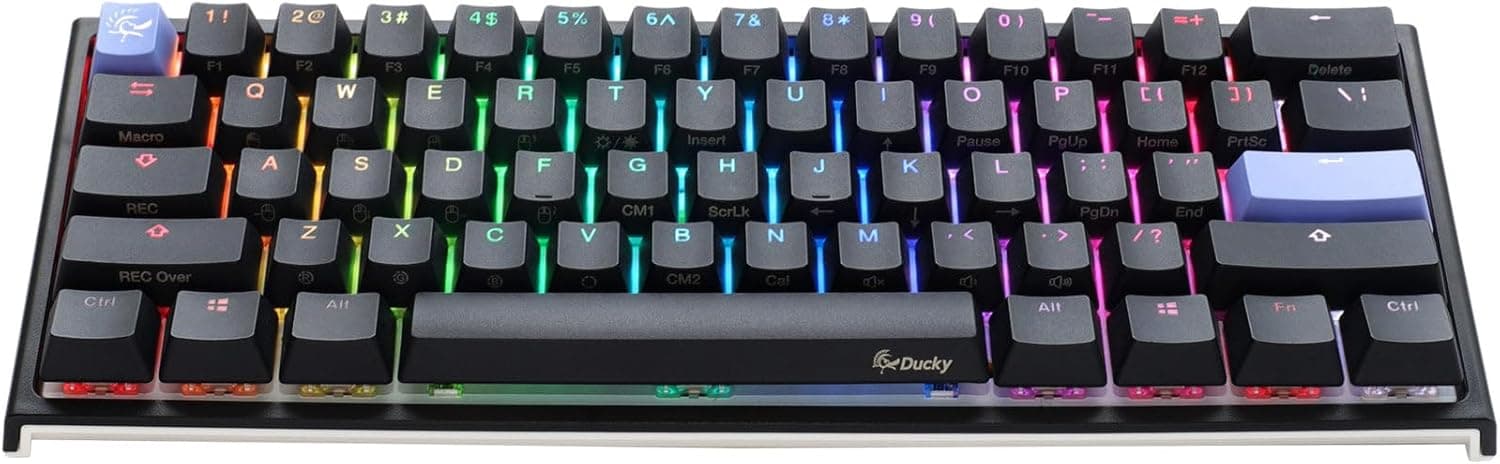
This article takes a hard look at the Ducky One 3 Mini Cosmic Blue 60% Hotswap RGB ダブルショット PBT Quack メカニカルキーボード (チェリーMXレッド) — not just the spec sheet, but what the 60% layout actually costs you and how far its hot-swap support really goes.
Overview
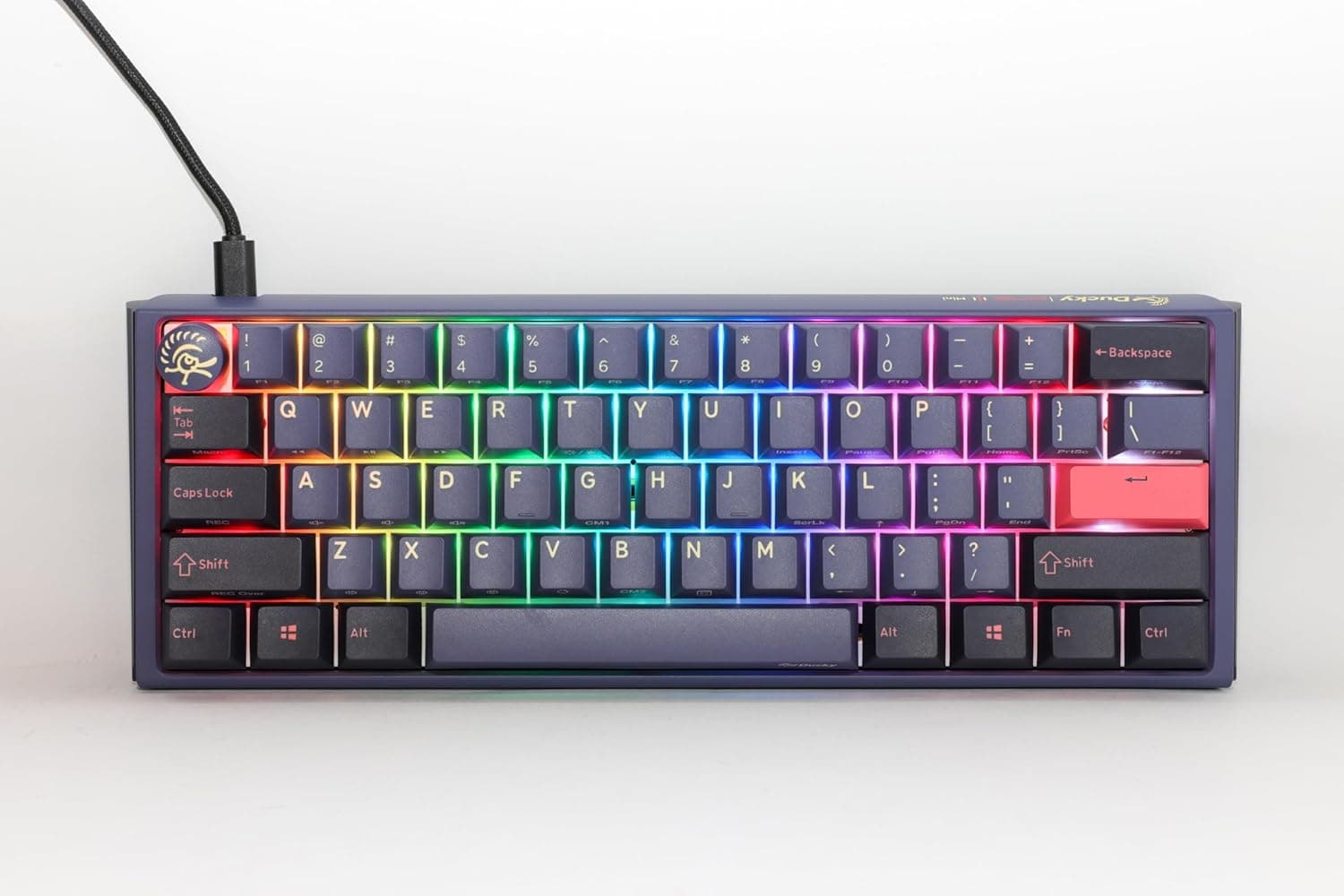
The Ducky One 3 Mini Cosmic Blue is the 60% model in Taiwanese brand Ducky's One 3 lineup. It drops the numpad, the function row, and the arrow cluster entirely, leaving the smallest practical footprint for gamers who swing the mouse wide and for anyone who wants a clean desk.
It launched in early 2023 and has become a reference point for "a compact board that is already finished out of the box."
Four things define it: Cherry MX Red (linear) switches, Kailh Yellow hot-swap sockets, double-shot PBT keycaps, and a detachable braided USB-C cable. A Q-bounce pad and EVA foam handle sound dampening from the factory, so this is not a board you buy expecting to mod it into silence — much of that work is already done.
The verdict up front: if you can live with a 60% layout, this is a very well-executed keyboard. If you can't, no switch or RGB feature will rescue it.
The deciding factor is the layout, not the internals.
What a 60% Layout Actually Removes
The spec sheet never lists what is missing, and that is where first-time 60% buyers get caught. Gone as physical keys: F1–F12, a dedicated Esc, the arrow cluster, Home/End/PgUp/PgDn, Delete, Insert, PrintScreen, and the numpad.
All of them move to Fn combinations.
| Task | On a 60% | How quickly you adapt |
|---|---|---|
| Esc / F5 mid-game | Fn + number row | Awkward in some titles |
| Arrow keys while editing text | Fn layer | Most adapt in 1–2 weeks |
| Numeric entry in spreadsheets | Number row only | A separate numpad is realistic |
| PgUp / PgDn in a browser | Fn layer | Mouse covers it |
| Screenshots | Fn layer or OS tool | Depends on your setup |
Gaming and general browsing adapt fine. Heavy numeric entry, CAD or video editing with many F-key shortcuts, and spreadsheet work that leans on arrow keys do not — the Fn layer becomes constant friction.
That is not something practice fixes; check it against your actual workload before buying.
Compatibility Guide
It connects over a single USB-C cable and works with Windows, macOS, and Linux. Typing is plug-and-play with no driver install, and it is recognized in BIOS/UEFI and OS installers, so it is safe as your only keyboard.
Macros and remapping go through Ducky's own configuration method rather than a third-party tool.
The detachable braided cable matters for practical compatibility too: a damaged cable is a cable replacement, not a dead keyboard, and you can pick your own length and routing. Pull the cable and the board packs flat next to a laptop.
The hot-swap sockets are Kailh Yellow. Hot-swap does not mean "anything fits." Standard MX-compatible 3-pin and 5-pin mechanical switches drop in; low-profile, optical, and magnetic (Hall effect) switches do not — physically or electrically.
You cannot convert this board to rapid trigger by swapping in magnetic switches.
Keycaps carry a 60%-specific catch. The MX stem is standard, so aftermarket sets work, but bottom-row widths around the right Shift and spacebar often differ from full-size sets.
Choose a set that explicitly states 60% compatibility, and confirm it on the product page before ordering.
Product Info
Pricing as captured on 26 August 2026 on Amazon was ¥25,925. An overseas marketplace listing showed $132.00 as captured on 2 August 2026.
Both are point-in-time figures that move with sales and exchange rates — always check the current price on the listing. That places it in the upper-middle tier for a finished hot-swap 60%: above barebones builds, below flagship customs.
The review data deserves care. As captured on 28 June 2026, the rating was 3.6 out of 5 stars across just 9 reviews.
A 3.6 is not a strong number, but with only nine ratings, one or two poor scores swing the average hard.
Do not weigh it like a rating built on thousands of reviews. The honest reading is that there is not enough review data to decide with — judge this board on its specs and your use case instead.
The spec essentials: Cherry MX Red linear switches, Kailh Yellow hot-swap sockets, double-shot PBT keycaps, RGB backlighting, wired USB-C connectivity, and a detachable braided cable. Double-shot PBT means the legends are molded in two colors rather than printed, so they never wear off, and PBT resists the shine that ABS develops.
Over a multi-year lifespan that alone separates it from cheap ABS-capped boards.
In the box: USB-C cable, keycap puller, switch puller, and manual, with a one-year manufacturer warranty. The included switch puller is quietly important — you can try hot-swapping without buying anything extra.
Product Disclosure (Amazon)
- Manufacturer: Ducky
- Seller: TCSKIYOHARA
- Fulfilled by: TCSKIYOHARA
- ASIN: B0BTDL6KSV
- Note: This article covers a manufacturer-made product based on Amazon listing details.
How It Compares
The usual cross-shops at this budget are 75% wireless QMK boards like the Keychron Q1 Pro, 65% barebones kits such as the Glorious GMMK 2, and multi-mode boards with control knobs from brands like EPOMAKER. The split is clear.
Ducky's strength is completeness. Sound dampening, PBT caps, and hot-swap are all present from day one, with no follow-up purchases required.
The trade-offs are equally clear: it is wired only, so anyone who needs wireless should stop here. And if you want deep, open firmware-level keymap control of the QMK/VIA kind, Ducky's in-house approach may feel limiting.
Against a barebones kit, this is the board where you cannot choose the switches or caps but the thing is finished the day it arrives. Want the build process itself?
Go barebones. Want a tool that works immediately?
One 3 Mini. And if the 60% compromise worries you at all, a 65% or 75% board keeps physical arrow keys — worth considering first.
Best Use Cases
- FPS players who prioritize mouse space — the narrow body keeps your elbow clear on low-sensitivity swings, and the light linear Cherry MX Red handles both rapid taps and counter-strafing cleanly.
- Office workers decluttering a desk — one cable, minimal footprint. Reds have no click, so they are reasonable in shared spaces (quiet, not silent).
- Beginner-to-intermediate modders — Kailh Yellow sockets plus the bundled switch puller mean solder-free swaps to tactile or silent switches, on a chassis that is already damped.
- Anyone wanting a portable second keyboard — light, small, and cable-detachable for laptop bags.
- People who keep keyboards for years — double-shot PBT legends do not wear off and resist shine.
Before You Buy
Start with the layout. No amount of build quality compensates for arrow keys and a function row that physically do not exist.
In video editing, spreadsheets, or any workflow with many F-key shortcuts, the Fn layer fires constantly and becomes real friction. Before telling yourself you'll adapt, count how many times you press an F key or arrow key in a normal working day.
Then the review sample size. 3.6 stars from 9 reviews, captured June 2026, is statistically close to silence.
Reading it as proof of defects is premature; dismissing it entirely is equally lazy. Decide on specs, not reputation.
Calibrate your hot-swap expectations. Only MX-compatible mechanical switches fit — there is no path to magnetic switches or rapid trigger here.
Competitive players who want adjustable actuation should be shopping a different category. Sockets also have finite insertion cycles, so weekly switch rotation is not a safe assumption.
Wired-only is easy to overlook. If you want to share one keyboard with a tablet or a living-room machine over wireless, this is not it.
The detachable cable helps with routing, not with cable-free use.
Treat every price here as time-stamped. The ¥25,925 and $132.00 figures were captured in 2026.
This category swings by thousands of yen on sales and currency, so verify the live price before ordering.
Finally, check the listing data. Storefront listings aggregate automatically, and color variants, switch variants, and occasionally unrelated product metadata get mixed in.
Here the manufacturer field correctly reads Ducky, but confirm visually from the product image and title that "Cosmic Blue," "60%," and the Cherry MX Red switch all match what you want. Switch variants share near-identical model names and are the easiest thing to order by mistake.
FAQ
Q. Can you really get used to no arrow keys? A.
For browsing and most gaming, most people adapt to the Fn layer within one to two weeks. For spreadsheet or video-editing work that leans on arrows constantly, familiarity does not reduce how often you reach for the layer.
It depends on your workload.
Q. Can I fit any switch? A.
MX-compatible mechanical switches (3-pin or 5-pin) only. Low-profile, optical, and magnetic Hall-effect switches will not work.
A switch puller is included, so no extra tools are needed.
Q. Are Reds quiet? A.
Quieter than clicky Blues, and the Q-bounce pad plus EVA foam dampen the sound further — but they are not silent. Bottom-out noise remains, so if you need near-silence on calls, consider swapping to silent switches.
Q. Does it work on a Mac? A.
Yes, over USB-C on macOS. Typing works immediately, though the layout follows Windows conventions, so most users remap Command/Option in the OS keyboard settings.
Q. Can I use aftermarket keycaps? A.
Generally yes, thanks to the standard MX stem. But 60% bottom-row widths can differ from common sets, so pick one that explicitly lists 60% support.
Q. What does it cost? A.
¥25,925 on Amazon as captured 26 August 2026, and $132.00 on an overseas marketplace as captured 2 August 2026.
Prices move often — check the listing for the current figure.