This article covers Cooler Master MasterBox MB511 ARGB ミドルタワーPCケース 強化ガラス MCB-B511D-KGNN-RGA CS7815.
Overview
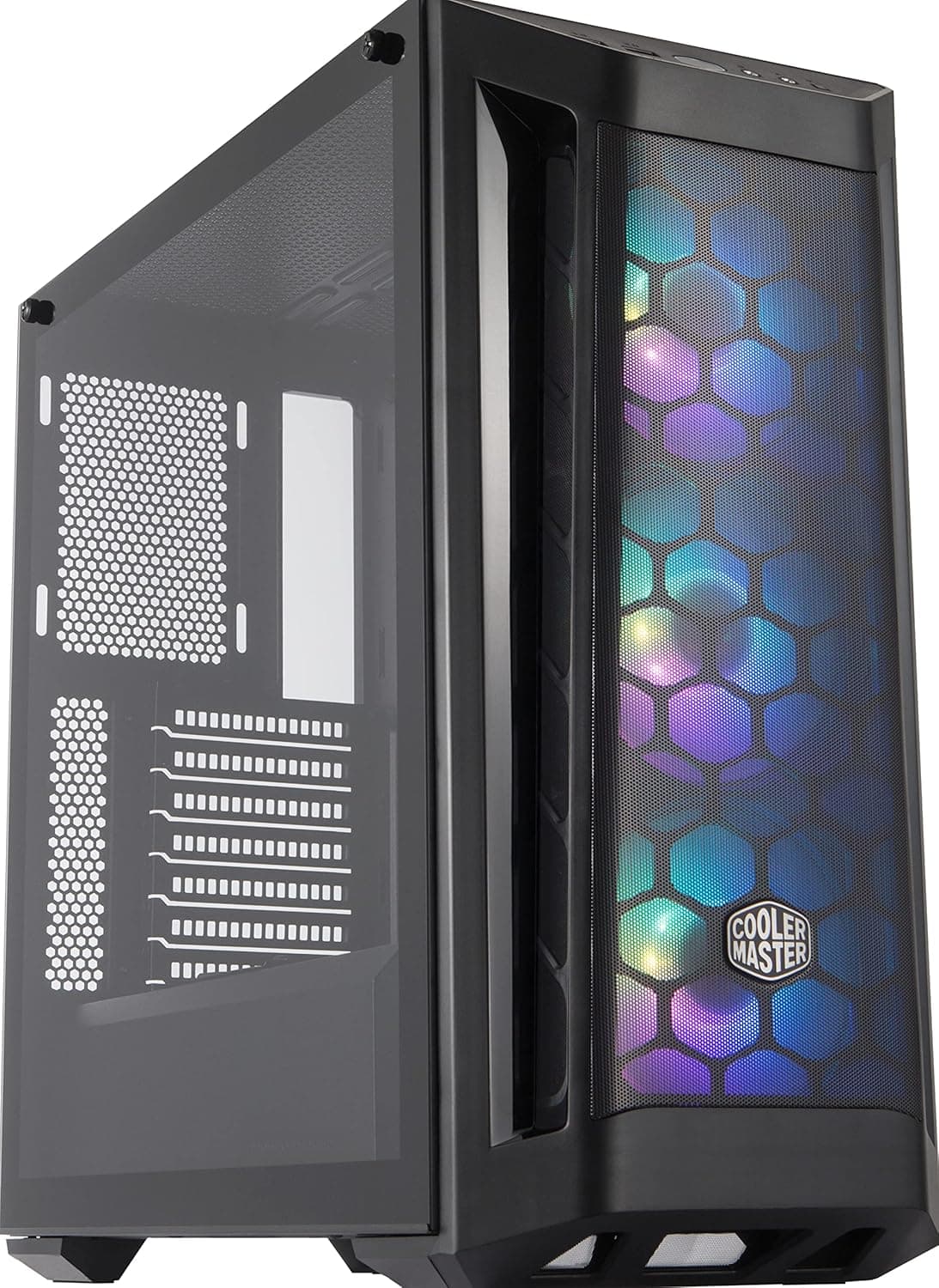
The Cooler Master MasterBox MB511 ARGB is a mid-tower case that strikes a strong balance between cooling performance and visual flair. Its fine mesh front panel, combined with three pre-installed addressable RGB fans, ensures ample airflow right out of the box. The tempered glass side panel lets you show off your components and the case’s integrated lighting, making it a great choice for builders who want a gaming-focused look without a big investment. Positioned in the entry-to-mid-range segment, the MB511 ARGB supports ATX, Micro-ATX, and Mini-ITX motherboards. It can accommodate CPU coolers up to 166mm in height and GPUs up to 295mm when the front fans are mounted. The case also includes a PSU shroud and multiple cable management channels for a clean build.
Compatibility Guide
The MasterBox MB511 ARGB fits almost any mainstream ATX build. It accepts standard ATX power supplies up to 180mm in length, making even larger modular units workable. Storage layout is flexible: two 3.5-inch drives and two 2.5-inch drives can be installed, though using both 3.5-inch bays may limit the lower 2.5-inch mounting position. Front I/O includes two USB 3.0 ports and a 3.5mm headphone/microphone combo jack. There is no USB Type-C port on the front panel, so if you rely on modern motherboard front-panel Type-C connectivity, you’ll need to use the rear I/O. Expansion slots count is seven, covering dual-slot and triple-slot GPUs comfortably. Water cooling support: up to 240mm radiator at the top, or 360mm at the front (with GPU length constraints).
Product Info
Released in 2020, the MB511 ARGB is widely available through major retailers and carries a 2-year warranty via Cooler Master’s official Japanese distributor. It belongs to the budget-to-mid-range tier, offering strong value for money especially in the ARGB-equipped segment. Key specifications: three 120mm ARGB fans pre-installed (voltage-controlled, PWM adapter required for independent control), tempered glass right-side panel, mesh front with side intake vents, and a standard ATX layout. The case weighs about 7 kg, which is typical for a steel-and-glass mid-tower.
Best Use Cases
First-time PC builders – The spacious interior and straightforward cable routing make the MB511 ARGB a forgiving case for beginners. The ARGB fans provide a “wow” factor without extra cost. Not ideal for those who want a minimalist, non-RGB aesthetic. Budget-to-mid-range gaming rigs – Paired with a Ryzen 5, Core i5, or similar processor and a mid-range GPU (e.g., RTX 3060 / Radeon RX 6600), the airflow is more than adequate. Add a couple of exhaust fans on top and you’ll have a quiet, cool system. * RGB enthusiasts on a budget – The three included addressable fans, combined with the glass panel, allow for a striking lighting show. Users must have a motherboard with a 5V addressable RGB header to unlock individual LED effects; otherwise, all fans will show the same color. ## Alternatives
Direct competitors include the Fractal Design Focus G (non-RGB, four fans, better silence) and the Thermaltake Versa H22 (no PSU shroud, fewer accessories). The MB511 ARGB wins on pre-installed ARGB cooling and glass panel aesthetics. If you prefer a more refined design with USB Type-C, the Cooler Master MasterBox NR600 is a step up, though it lacks pre-installed RGB fans.
Things to Consider
The bundled fans are 3-pin voltage-controlled, not PWM. That means you won’t get precise RPM control without a separate PWM adapter or a motherboard that supports voltage fan control. For silent operation at low load, you may want to upgrade to PWM fans later. As mentioned, there is no front USB-C port. If you frequently use the latest USB-C devices, this omission could be annoying. Additionally, the case does not come with a fan hub; the three ARGB fans must be connected to your motherboard’s RGB header (5V, 3-pin). For high-power builds (e.g., Ryzen 9 + RTX 4080), the stock fan setup will struggle with heat dissipation under sustained load. Adding at least two exhaust fans at the top and/or switching to a high-airflow front fan (such as Noctua NF-A12x25) is highly recommended. ## FAQ Q: Can I install a 360mm radiator in the front? A: Yes, but you will have to remove all three pre-installed front fans. Maximum GPU length drops to around 295mm. Verify radiator thickness and GPU clearance before purchase. Q: Does the case include a GPU support bracket? A: No, it does not. For large graphics cards, consider using a separate GPU support or zip-tie method to prevent sag. Q: Is the side panel made of tempered glass or acrylic? A: The right side panel (visible side) is tempered glass. The left side panel is steel.
Product Disclosure (Amazon)
- Manufacturer: Cooler Master
- ASIN: B0839XNV6H
- Note: This article covers a manufacturer-made product based on Amazon listing details.