Overview
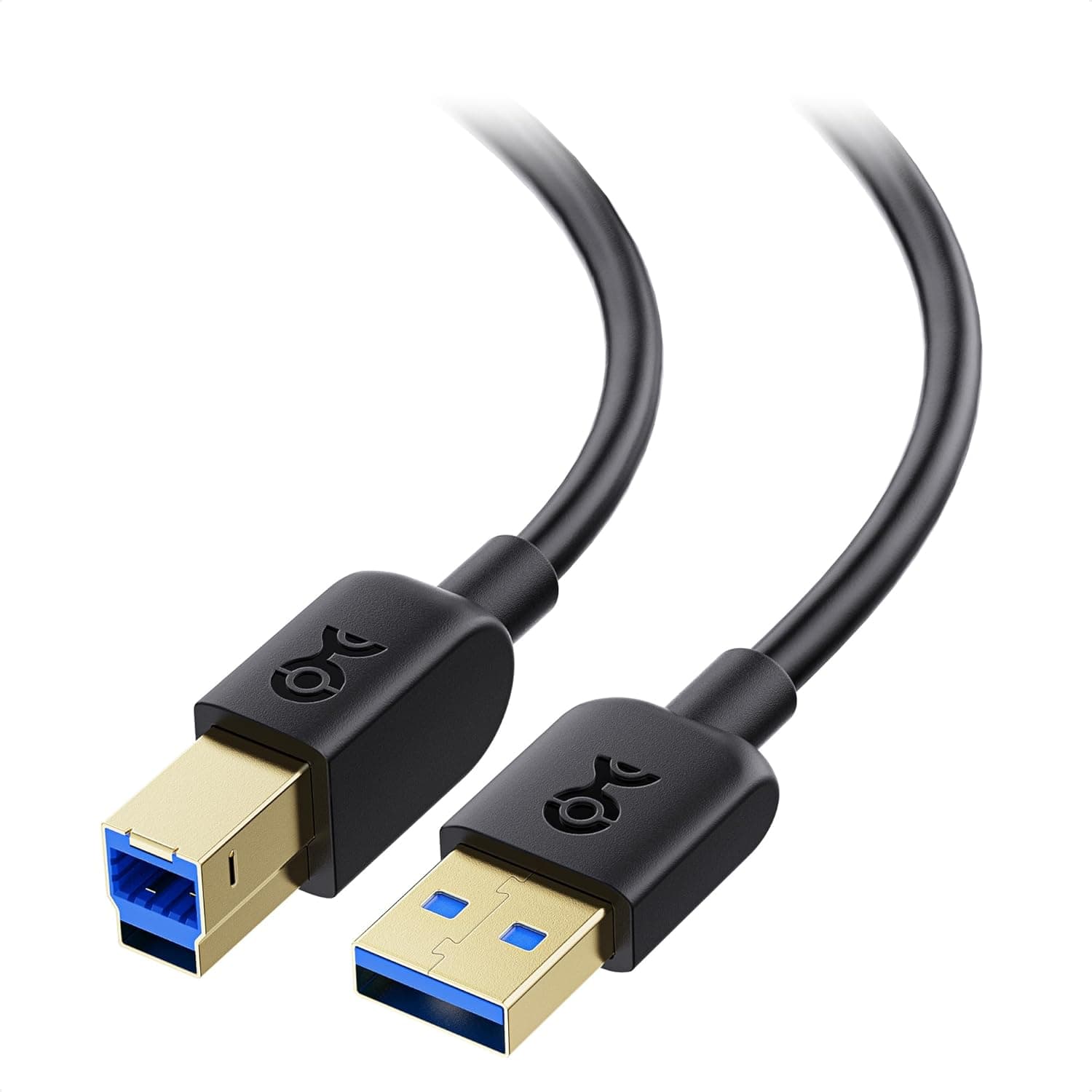
The Cable Matters 6 Ft USB 3.0 A to B Cable in Black is a 6-foot (1.8 m) cable that links a USB Type-A port on your computer to a USB Type-B port on a peripheral.
It is built to USB 3.0 (SuperSpeed) with a 5 Gbps ceiling and a 9-pin wiring scheme.
The natural targets are external HDD/SSD enclosures, hard drive docking stations, USB 3.0 scanners, and other gear whose upstream port is the boxy USB-B type.
Here is the conclusion first: the thing to check before buying is neither price nor speed, but the shape of the USB-B port on your device. A USB 3.0 Type-B plug is taller than the square USB 2.0 Type-B plug, with an extra tier on top, and it will not physically enter a square port.
Get this wrong and the cable is useless the day it arrives. The next section shows how to tell the two apart.
For a cable, that review count is high, and it suggests the product is at least not the kind that fails on arrival.
Compatibility Guide
The stated requirement is simple: a USB Type-A port on the host and a USB Type-B port on the device. But Type-B exists in two generations, and that is where most purchases go wrong.
| Device-side port | What it looks like | Does this cable fit? |
|---|---|---|
| USB 3.0 Type-B (SuperSpeed B) | Boxy body with an extra tier on top | Yes, up to 5 Gbps |
| USB 2.0 Type-B | Square with two clipped top corners | No, it will not physically enter |
In other words, the backward compatibility only applies on the computer side. The Type-A plug fits a USB 2.0 port and simply runs at USB 2.0 speed (480 Mbps).
The device side, however, must have a genuine USB 3.0 Type-B receptacle.
A USB 3.0 Type-B socket accepts a USB 2.0 B plug, but never the reverse.
Likely matches include USB 3.0 external drive enclosures, hard drive docking stations, professional scanners, and the upstream side of some docks and USB 3.0 hubs.
Home printers, all-in-ones, older audio interfaces, UPS monitoring ports, and most label printers use the square USB 2.0 Type-B instead, so this cable will not connect to them.
For those, a USB 2.0 A-B cable is the correct part.
On length: USB 3.0 does not define a hard maximum cable length, but roughly 3 m is the practical limit for stable 5 Gbps over copper.
At 1.8 m you can reach from a desktop device down to a floor-standing PC without a large surplus to hide.
Remember that rear USB-B ports often point downward, so a straight-line measurement usually comes up short.
Product Info
| Item | Value |
|---|---|
| Connectors | USB Type-A male to USB Type-B male |
| Standard | USB 3.0 (SuperSpeed) |
| Transfer rate | 5 Gbps |
| Length | 1.8 m |
| Pin count | 9 |
Check the retailer's page for the latest price. Sales, exchange rates, and the chosen seller all move that figure, so confirm the current price on the product page.
As cables go this is not the cheap end; generic USB 3.0 A-B cables start well below it.
The line-up is listed as 3, 6, 10, and 15 feet (about 0.9, 1.8, 3.0, and 4.6 m) in black and white.
When length and colour are selected on one page, price and stock differ per option. The box contains the cable alone, with no adapters.
The 9-pin count is the USB 2.0 quartet plus two SuperSpeed differential pairs and a drain ground.
A 4-wire USB 2.0 cable may look similar, but only this wiring can carry 5 Gbps.
Real-World Transfer Speed
5 Gbps is a signalling rate: 625 MB/s in bytes. USB 3.0 uses 8b/10b encoding, which already cuts that to 500 MB/s, and protocol overhead plus the bridge chip in your enclosure take more.
Plan on a practical ceiling of roughly 350-450 MB/s.
What that means in practice: a SATA SSD in an enclosure will essentially saturate the link, while a 3.5-inch HDD (150-200 MB/s in practice) never comes close to stressing it.
Against USB 2.0 (480 Mbps, or about 30-40 MB/s in practice) the gap is roughly tenfold, which turns hours of copying into minutes.
Conversely, for printers and scanners, where the data volume per job is tiny, moving to USB 3.0 changes nothing you can feel.
Buy a USB 3.0 cable for speed only when storage is involved.
How It Compares
| Option | Typical price level | Best for |
|---|---|---|
| Generic USB 3.0 A-B cable | Lowest | Spares, cost-first buying |
| This cable | ¥3,430 at capture time | Known quality and warranty, permanent installs |
| Braided heavy-duty types | Higher | Frequent plugging, gear you carry around |
Cables look binary — they work or they don't — but they usually fail in between: intermittent dropouts, errors mid-transfer, a connection that dies when you nudge the desk. For a permanent install, a few thousand yen is cheap insurance.
If instead you unplug it weekly or travel with the gear, a braided flex-rated cable will outlive this one. Treat this as a plug-it-in-and-leave-it product.
Who It's For
First, anyone permanently connecting a USB 3.0 drive enclosure or docking station.
Bundled cables are often too short and of unknown quality; swapping to a known 1.8 m improves both routing and stability.
Second, owners of professional scanners or other long-lived USB 3.0 peripherals.
When the hardware is still fine and only the cable has failed, a warranted replacement is the sensible fix.
Third, people who build a desk layout once and leave it alone. 1.8 m reaches from the back of a desk to a floor-standing PC with enough slack to dress the run tidily.
It is wrong for anyone whose device has a square USB 2.0 Type-B port (it will not fit), for USB-C devices (a different cable entirely), and for anyone who just wants a handful of cheap spares.
Before You Buy
The port shape is the big trap. A USB 3.0 Type-B plug does not enter a square USB 2.0 Type-B port.
Choosing this cable for a printer or an audio interface on the theory that USB 3.0 must be faster will almost always end in a return.
Photograph the back of your device first and look for the extra tier on top of the port. No tier means you need a USB 2.0 A-B cable.
Speed is set by the device, not the cable. If the peripheral's port or bridge chip is USB 2.0, you stay at 480 Mbps.
A cable raises the ceiling; it cannot raise the floor.
Mind the price timestamp. The ¥3,430 quoted here was captured on 2026-09-20.
Price varies by seller and by the length you select, and flash sales move it further. Note also that in the source data the entry labelled as the overseas store pointed at the same ASIN with the same yen price.
Two listings can look like separate domestic and international offers while actually being one.
Listing metadata occasionally disagrees with the physical product. When lengths and colours share one page, the displayed image can drift from the selected option.
Check the image, the title, the selected length, and the registered manufacturer and model before ordering.
Finally, do not abuse the strain relief. Clamping the cable in a tight bend right at the connector damages the thin SuperSpeed conductors first.
Avoid over-tightened zip ties and leave a few centimetres of slack at each end.
FAQ
Q. Can I use it with a printer?
A. Only if the printer has a USB 3.0 Type-B port with the raised upper tier.
Square USB 2.0 Type-B ports will not accept the plug, and most home printers use those.
Q. My PC only has USB 2.0 Type-A ports. Will it work?
A. Yes. Nothing is damaged by doing so.
Q. Do I really get 5 Gbps?
A. 5 Gbps is the signalling rate; expect roughly 350-450 MB/s in practice, and your device caps it further.
An HDD typically tops out at 150-200 MB/s.
Q. Can I extend it to 5 m?
A. Not recommended.
About 3 m is the practical limit for USB 3.0; beyond that, use an active repeater or fibre-optic cable.
If you already know you need the reach, buy the 3.0 m version instead.
Q. Are other colours or lengths available?
A. White is listed alongside black, and lengths of 3, 6, 10, and 15 feet are offered.
Stock and price differ per option, so check the product page.
Q. What about the warranty?
A. A limited lifetime warranty is advertised.
Confirm the conditions and claim process on the listing and with the manufacturer.
Product Disclosure (Amazon)
- Manufacturer: Cable Matters
- Seller: Amazon US
- Fulfilled by: Amazon US
- ASIN: B00C7RXR72
- Note: This article covers a manufacturer-made product based on Amazon listing details.