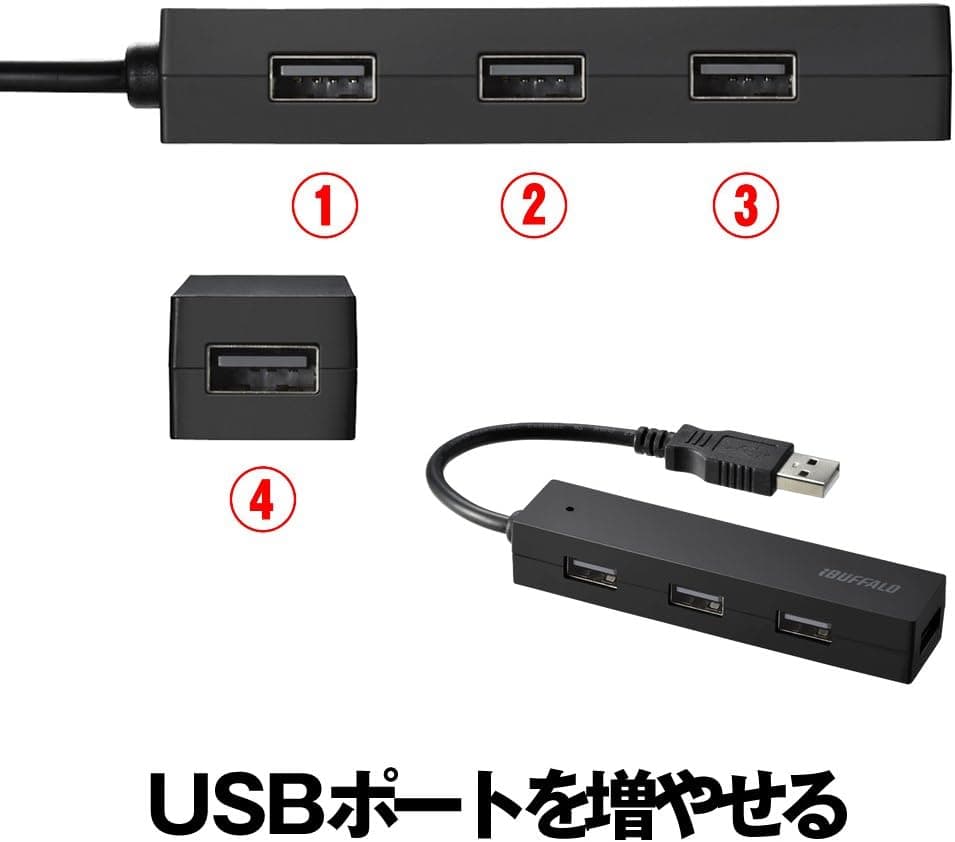
The Buffalo BSH4U25BK is a bus-powered hub that adds four USB 2.0 Type-A ports without an AC adapter, sold here as a 4-pack.
Neither its speed nor its power delivery matches modern standards, but for permanently attached low-draw peripherals — mice, keyboards, wireless dongles — spread across several machines, it remains a sensible choice. Buy it expecting to run an external HDD or fast flash storage and you will be disappointed.
This article draws the line between what it can and cannot do.
Overview
The BSH4U25BK supports USB 2.0 (480 Mbps max) and USB 1.1.
The layout is as simple as it gets: one USB Type-A male upstream connector, four USB Type-A female downstream ports. The cable is permanently attached and roughly 30 cm long.
No driver installation is required — it is recognized on Windows, macOS, and Chrome OS as soon as you plug it in.
The defining feature is the 4-pack format. Rather than one high-spec hub, this is a product for distributing identical units across multiple PCs, rooms, or desks.
That framing suits offices and classrooms where a uniform setup matters more than peak performance, and it keeps the per-unit cost low.
User sentiment matches that trade-off. As of the July 2026 data capture, Amazon.co.jp listed 8,701 reviews at 4.1 out of 5 stars (roughly 82% positive).
With a sample that large, 4.1 stars is the signature of a commodity accessory that does what it says without excelling — and the low scores most likely trace back to the power limits discussed below.
Compatibility Guide
Any device with a USB 2.0 / 1.1 Type-A host port will work: Windows PCs, Macs, Chromebooks, game consoles, and tablets with a Type-A host port.
Because no driver is needed, it also works on locked-down corporate machines where software installation is restricted.
It will function in a USB 3.0 or later port, but throughput stays capped at USB 2.0 speeds.
This trips people up regularly — a blue port does not make the hub faster. The 480 Mbps figure is theoretical; real-world throughput after protocol overhead is generally around 30 MB/s, and all four ports share that bandwidth, so simultaneous transfers divide it further.
Power is the more consequential limit. A USB 2.0 bus-powered hub splits the power drawn from a single host port across four downstream ports, with 500 mA (2.5 W) as the standard host-side figure.
Subtract the hub's own consumption and what reaches your devices is less still. That leads to the following split:
| Device | Verdict | Notes |
|---|---|---|
| Mouse / keyboard | Fine | Low draw, ideal for permanent connection |
| Wireless receiver (Bluetooth / 2.4 GHz) | Fine | Occupying one port full-time causes no trouble |
| USB flash drive | Usable | Capped at USB 2.0 speeds; poor for large copies |
| USB headset / webcam | Conditional | High-bitrate video may exceed available bandwidth |
| Bus-powered external HDD / SSD | Not recommended | Startup current is likely to cause dropouts or no detection |
| Phone charging | Not recommended | This is not designed as a charging hub |
If your laptop only has Type-C ports, you will need a separate Type-C to Type-A adapter — which adds another contact point and another potential source of detection problems. If Type-C is your primary environment, buy a native Type-C hub instead.
The roughly 30 cm cable also constrains placement. It will not reach from the rear ports of a desktop tower up to your desk surface.
Plan on front-panel ports, a monitor's ports, or a spot beside a laptop.
Product Info
| Item | Specification |
|---|---|
| USB standard | USB 2.0 (480 Mbps) / USB 1.1 compatible |
| Ports | 4 |
| Power | Bus-powered |
| Connectors | USB Type-A male ×1 (host), USB Type-A female ×4 (devices) |
| Cable length | Approx. 30 cm (permanently attached) |
| Supported OS | Windows / macOS / Chrome OS |
| Driver | Not required (plug and play) |
| Warranty | 1 year |
| Package contents | 4 × USB hub, instruction manual |
The attached cable cuts both ways. Nothing to carry separately and nothing to lose — but if the cable fails, the whole hub is replaced, and you cannot swap in a different length.
The 4-pack format fits that disposable premise, since a spare is always on hand.
Pricing varies by source. Rakuten (toppo88) showed ¥798 as of the 13 August 2026 capture, while Amazon.co.jp showed ¥2,360 as of the 10 July 2026 capture.
Both are point-in-time figures and move with sales and stock. A gap that large most likely means the two listings differ in unit count — one single hub versus the 4-pack.
Confirm on the product page whether you are buying one unit or four before ordering, and compare on a per-unit basis; the cheaper-looking option may not be.
How It Differs From the Competition
The hub market has largely moved to USB 3.0 and Type-C.
A four-port USB 3.0 bus-powered hub is an order of magnitude faster, and a self-powered hub with an AC adapter will run external storage reliably.
What the BSH4U25BK offers instead is procurement convenience: four identical units, cheaply, at once.
So the comparison axis is quantity, not performance. To seriously expand one machine, a self-powered USB 3.0 hub or a Type-C docking hub will satisfy you more.
To put a mouse, keyboard, and receiver port on five machines at once, this product does the job. Match the use case and it will not let you down.
Best Use Cases
- Office workers and IT staff managing multiple PCs — leave one permanently at each desk to cut down on swapping mice, keyboards, and dongles. Driverless operation means no per-machine setup.
- Laptop-centric remote workers — a simple way to keep a mouse, flash drive, and wireless receiver connected on a port-starved laptop, with no extra power brick to carry.
- Schools and small offices deploying in bulk — a uniform setup across many machines at a low per-unit cost, with a spare on hand for instant replacement.
- Anyone who wants backups — hubs are consumables. Having four identical low-cost units is itself the value proposition.
It is a poor fit if you move video assets over external SSDs, need USB 3.0 speeds, or work primarily on a modern laptop with Type-C ports only.
Things to Check Before Buying
The biggest pitfall is bus power. "Four ports means four devices" is the wrong assumption.
Power from a single host port is divided among four sockets, so a high-draw device may fail to be recognized, disconnect mid-use, or destabilize the other ports. Bus-powered external HDDs and portable SSDs draw a large inrush current at spin-up and are especially problematic — use a self-powered hub with an AC adapter for that.
Most of the negative reviews plausibly stem from this mismatch of expectations.
Speed is capped at USB 2.0. Plugging into a USB 3.0 port will not help.
Copying tens of gigabytes to a flash drive takes several times longer than on a USB 3.0 hub.
Do not substitute this for a USB 3.0 model purely on price.
Avoid daisy-chaining hubs. Plugging a hub into another hub thins the available power further and makes device detection unreliable.
Chaining two bus-powered hubs is not practical.
Verify the unit count. As noted, captured prices ranged from ¥798 to ¥2,360, suggesting single units and 4-packs are both in circulation.
Online listing metadata — manufacturer, model number, included items — is also occasionally wrong. Check the product images and title to confirm you are looking at the BSH4U25BK itself and at the quantity you expect before ordering.
Warranty is one year. This is not a long-warranty product, and because the cable is permanently attached, a broken cable means replacing the hub.
If it sits somewhere with frequent plugging and unplugging, route it so the cable's base is not under strain.
FAQ
Q. Can I plug it into a USB 3.0 port? A.
Yes, it works fine, but in backward-compatible mode — speed is limited to USB 2.0 regardless of the port's color or standard.
Q. Can I connect an external HDD? A.
Not recommended. Bus power cannot reliably supply an external HDD's startup current, so you may see failed detection or mid-session dropouts.
Use a self-powered hub for storage.
Q. Can I charge a phone from it? A.
It is not designed for charging. Available current is limited, so charging will be very slow or will not occur.
Use a dedicated USB charger.
Q. Does it work on Mac or Chromebook? A.
Yes. Supported operating systems are Windows, macOS, and Chrome OS, with no driver installation.
Type-C-only machines will need a separate Type-C to Type-A adapter.
Q. Can I use all four ports at once? A.
With low-draw devices — mouse, keyboard, receiver, flash drive — generally yes. Multiple high-draw devices will cause instability from insufficient power.
Q. Can the cable be replaced? A.
No. The roughly 30 cm cable is permanently attached.
For longer runs, add an extension cable or choose a different product.
Product Disclosure (Amazon)
- Manufacturer: バッファロー
- Seller: Amazon.co.jp
- Fulfilled by: Amazon.co.jp
- ASIN: B0H8DV3D41
- Note: This article covers a manufacturer-made product based on Amazon listing details.