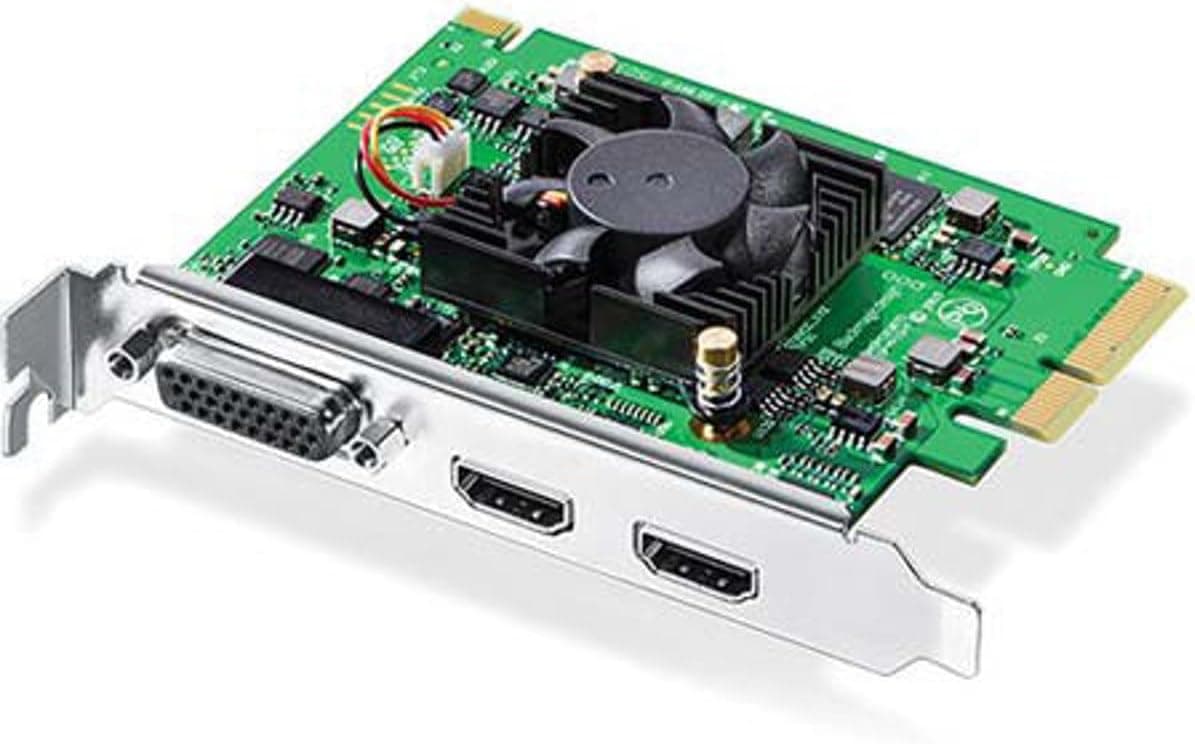
This article covers ブラックマジックデザイン Blackmagic Design キャプチャーカード Intensity Pro 4K 003062, the internal capture card sold as the Blackmagic Design Intensity Pro 4K. Rather than repeating the spec sheet, it focuses on where people actually get stuck.
Overview
The Blackmagic Design Intensity Pro 4K is a PCIe capture and playback card for desktop computers. Its HDMI input accepts signals up to 4K (3840x2160) at 30fps, and a dedicated breakout cable adds component, composite, and S-Video analog inputs.
Audio covers 8-channel embedded HDMI, RCA stereo, and S/PDIF, so a single card can absorb a mixed environment that ranges from an old VCR to a current mirrorless camera.
The short verdict: this card is built for editors who want uncompressed source material, not for people who want easy 4K60p game streaming. Customer reviews on the Amazon listing stand at 330 ratings and 4.1 out of 5 (82% positive, captured 2026-09-22), and most of the criticism traces back to two behaviors that are exactly as specified but often unexpected: the 4K30p ceiling and the refusal of HDCP-protected sources.
What It Can and Cannot Do
| Goal | Supported? |
|---|---|
| Uncompressed 1080p60 / 4K30p capture | Yes |
| 4K60p input | No (4K30p ceiling) |
| Digitizing VHS, Hi8 and similar tapes | Yes (breakout cable required) |
| HDCP-protected sources | No |
| Hardware encoding to offload the CPU | No encoder on board |
| Zero-latency passthrough | Partly; use a splitter |
The weaknesses reduce to three points: 4K stops at 30fps, protected signals are refused, and compression is left to software. In exchange, if your workflow is capture-now-grade-later, this card has better fundamentals than most USB boxes at the same price.
It trades streaming convenience for post-production quality.
Compatibility Guide
The card uses a PCI Express x4 interface and physically fits x4, x8, and x16 slots. The most common mistake is judging a slot by its shape: many boards wire an x16-shaped slot for only one or two lanes electrically, which starves the card and causes dropped frames or detection failures.
Check the block diagram in your motherboard manual for the real lane count. Even a PCIe 2.0 x4 link offers roughly 2GB/s, comfortably above the ~600MB/s that uncompressed 4K30p demands.
Physical clearance matters too. Modern graphics cards occupy 2.5 to 3 slots and frequently block the slot directly beneath them, and the breakout cable connector needs room behind the bracket.
Confirm card length and bracket requirements against your case before ordering, especially for slim or low-profile chassis.
On the software side, Blackmagic's Desktop Video driver is mandatory; the card will not work on generic OS drivers. Windows, macOS, and Linux are supported, though Linux support is limited to specific distributions.
On macOS, only Mac Pro class machines or a Thunderbolt expansion chassis provide an internal PCIe slot, so laptops and compact Macs are out. Media Express ships with the card, and DaVinci Resolve, Premiere Pro, Final Cut Pro, and OBS Studio can all use it as an input device.
Because the product launched in 2015, verify current OS support in the Desktop Video release notes before buying.
Storage and PC Requirements
There is no hardware encoder, so footage lands on disk uncompressed or in a software editing codec. The bandwidth math is simple arithmetic, and these theoretical figures are the number to plan around.
| Format | Throughput (approx.) | Per hour (approx.) |
|---|---|---|
| 1080p60 8-bit | ~250MB/s | ~0.9TB |
| 4K30p 8-bit | ~500MB/s | ~1.8TB |
| 4K30p 10-bit | ~620MB/s | ~2.2TB |
A single hard drive (100-200MB/s in practice) cannot sustain even uncompressed 1080p, and a SATA SSD capped near 550MB/s leaves no headroom for 10-bit 4K. Plan on NVMe storage and real capacity for long sessions.
Recording to an editing codec cuts these numbers substantially, but the available codecs depend on your OS and Desktop Video version, so check the bundled software's manual. "Bought the card, the disk could not keep up" is the single most common failure with this class of product.
Product Info
rmation
Released in 2015, the Intensity Pro 4K is still widely available. The Amazon listing showed 23,395 yen when the data was captured on 2026-09-22; prices move with stock and sales, so always confirm the current figure on the product page.
The same capture recorded 330 reviews averaging 4.1 out of 5 (82% positive).
The box contains the card, the analog breakout cable, and a software card, with Blackmagic Design's standard warranty (typically one year; follow the seller's stated terms).
One note on the bundled software: it was introduced as "DaVinci Resolve Lite," but the free version is now simply called DaVinci Resolve, and downloading the latest build directly from Blackmagic is more reliable than following the enclosed card. In market terms this is an entry-to-midrange internal 4K capture card.
It has fewer I/O ports and a lower frame-rate ceiling than the broadcast-oriented DeckLink line, yet it remains one of the few boards that pair uncompressed capture with legacy analog inputs.
Compared With Alternatives
Above it sit Blackmagic's own DeckLink models, including multi-channel cards like the Duo 2 and Quad 2 aimed at switching and multi-feed recording. Those are SDI-centric, so consumer HDMI gear needs conversion.
Below and beside it are USB capture devices that win on convenience, work with laptops, often include hardware encoding, and in some cases accept 4K60p.
The Intensity Pro 4K holds its ground on three counts: uncompressed capture, built-in component/composite/S-Video inputs, and tight integration with DaVinci Resolve. If portability, simplicity, or high frame rates matter more, an external USB unit fits the job better.
This is a fork in the road, not a ranking.
Recommended Users
- Anyone digitizing analog tapes. Composite and S-Video inputs handle VHS, Hi8, MiniDV decks, and retro consoles, and uncompressed capture leaves maximum room for later noise reduction and deinterlacing. Results still depend on the condition of the source tape.
- Editors who finish in post. Deferring compression suits grading and keying workflows, and the free DaVinci Resolve completes the chain without extra software purchases.
- Camera or seminar recording capped at 4K30p. For locked-off cameras feeding HDMI for long stretches, the 30fps ceiling rarely bites and the image-quality benefit remains.
- Not for you if you want 4K60p streaming, work primarily on a laptop, or expect plug-and-play simplicity.
Before You Buy
4K tops out at 30fps. Current consoles default to 4K60p output, which this card will not accept.
You must step the console down to 1080p or another supported mode. Nearly every "it says 4K but shows nothing" report comes from this.
HDCP-protected signals are refused. Blackmagic inputs reject copy-protected content by design, so streaming sticks and disc players generally cannot be captured.
Some consoles let you disable HDCP in system settings and some do not. Check whether your source can output unprotected video before buying.
Passthrough is not zero-latency. The HDMI output is for monitoring and carries some delay through software.
For competitive gaming, split the signal with an HDMI splitter and feed your play monitor directly.
The breakout cable is proprietary. Without it, every analog input is unusable.
When buying used or grey-market stock, confirm the cable is included, or you are effectively buying an HDMI-only card.
Analog quality depends on the source. The card is not advertised as including a time base corrector, so worn tapes or unstable sync can produce waving images or dropped frames.
An external TBC or a deck with one built in often helps.
Respect the uncompressed workload. Write speed and capacity decide what you can actually record, and the CPU needs headroom if you software-encode while previewing.
Listing data is sometimes wrong. Retail product pages occasionally carry metadata from a different item.
Match the photos, title, and model against the Intensity Pro 4K with its breakout cable before ordering, and treat any displayed price as a snapshot that may already have changed.
FAQ
Q. Can it capture 4K60p?
A. No. Input stops at 4K30p. Use 1080p60 instead, or choose a different device for 60fps 4K.
Q. What should I watch for with consoles? A.
Set video output to 4K30p or lower (1080p60 is the safe choice) and disable HDCP where the system allows it. Consoles that cannot disable it will not be captured.
Q. Does it work with OBS Studio? A.
Yes, once the Desktop Video driver is installed it appears as a capture device. Encoding is done by your CPU or GPU since the card has no encoder.
Q. Can I use it with a laptop?
A. Not directly. You would need a Thunderbolt expansion chassis, or a USB capture device instead.
Q. What do I need to digitize VHS? A.
The card, the proprietary breakout cable, a deck with composite or S-Video output, and plenty of free storage. Add a TBC if the tapes are in poor condition.
Q. How much disk space does an hour need? A.
Roughly 0.9TB for uncompressed 1080p60 and 1.8-2.2TB for 4K30p, theoretically.
Editing codecs reduce this considerably.
Product Disclosure (Amazon)
- Manufacturer: Blackmagic Design
- ASIN: B00U3QNP7Q
- Note: This article covers a manufacturer-made product based on Amazon listing details.
![SoundBeast 4K HDビデオキャプチャボックス - HDMIからビデオをキャプチャまたはライブストリーム (オーディオ付き) [コンテンツ保護ソース非対応]](/_next/image?url=https%3A%2F%2Fm.media-amazon.com%2Fimages%2FI%2F81a0z4VUxNL._AC_SL1500_.jpg&w=1920&q=75)