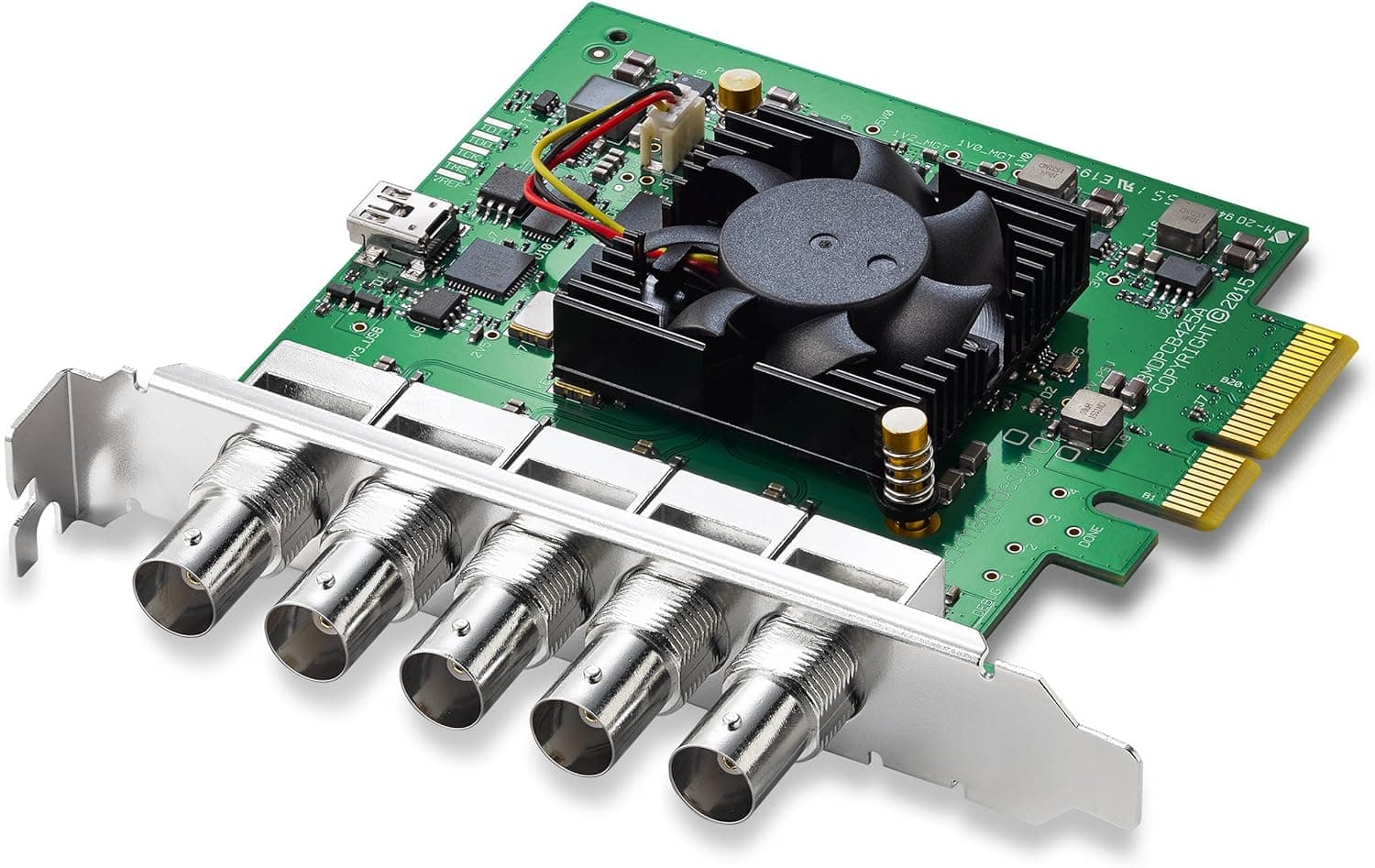
This article covers ブラックマジックデザイン Blackmagic Design キャプチャーカード Decklink Duo 2 003796 — the Blackmagic Design DeckLink Duo 2, a professional PCIe video I/O card with four independent 3G-SDI connections.
Overview
The DeckLink Duo 2 puts four independent 3G-SDI capture/playback channels on a single PCIe card. It handles SD-SDI, HD-SDI and 3G-SDI up to 1080p60.
That makes it a card for running several HD signals reliably, not for 4K acquisition.
The short version: if you need three or four simultaneous HD-or-below sources and your gear is already SDI, this is still a sensible buy. If your cameras or consoles only output HDMI, or 4K is a requirement, rule it out now — otherwise you will discover on delivery day that nothing plugs in.
As of the 2026-09-04 capture, the Amazon listing showed 248 reviews at 4.8 out of 5 stars (96% positive).
That volume on a broadcast-oriented card reflects how long this model has stayed in the lineup.
Specs at a Glance
| Item | Value |
|---|---|
| Interface | PCI Express x1 |
| Video input | 4x 3G-SDI (BNC) |
| Max resolution | 1080p60 |
| Supported OS | Windows 10/11, macOS 10.11+, Linux |
| Channels | 4 (independent) |
Two numbers matter most: "4 (independent)" and "1080p60". Independent means each BNC carries its own source on its own timeline — that is what makes multi-camera recording and multi-screen playback possible.
1080p60 is a hard ceiling; there is no way to stretch it to 4K, so plan accordingly if a UHD move is coming.
Compatibility Guide
Physically the requirement is simple: a desktop PC with a free PCI Express slot. The listing states PCI Express x1, but multi-channel SDI cards are often built around more lanes, so check both your motherboard manual and the manufacturer's spec page for how many lanes the slot actually runs — an x16-shaped slot can still operate at x1 depending on the chipset.
Even when the slot fits, clearance against the graphics card heatsink or CPU cooler is the single most common failure with add-in cards.
Supported operating systems are Windows 10/11, macOS 10.11 or later, and Linux.
In practice everything depends on Blackmagic Design's Desktop Video driver and utility, so confirm driver availability before upgrading the OS. macOS major releases in particular can leave the card unsupported for a while; never update a production machine ahead of a deadline.
Editing and streaming software (DaVinci Resolve, Premiere Pro, Media Composer, OBS, vMix) only sees the device once the driver is installed.
Cabling is easy to get wrong too. The connectors are BNC and you need 75-ohm video coax.
Generic 50-ohm BNC cables look identical and may work over short runs, then fall apart over distance. 3G-SDI carries a decent run only when cable quality holds up.
There is no auxiliary power connector, and the registered recommended PSU wattage is 0 W. You will not need a new power supply, but do make sure the card does not choke airflow around the slot.
Product Info
The price was ¥89,144 on Amazon JP as captured on 2026-09-05. Prices move with stock, exchange rates and sales, so always check the listing for the current figure.
The record labelled "Amazon US" carries the same ¥89,144 and points at the same Japanese listing, so it is not a useful international comparison. eBay pricing varies per listing, so read each seller's condition notes if you shop used.
Reviews stood at 248 with a 4.8-star average (96% positive) as of 2026-09-04.
That is a lot of feedback for a ¥90k-class professional add-in card, and the rating is stable. Assume most of that praise comes from all-SDI installations where the four channels simply appeared as expected; drop the card into an HDMI or 4K workflow and the verdict flips.
The box is essentially the card itself — no SDI cables. Using all four channels means four 75-ohm coax runs, plus adapters or extensions depending on the venue.
Budget for that. If you need it in a low-profile chassis, verify the bracket fits before ordering.
Product Disclosure (Amazon)
- Manufacturer: Blackmagic Design
- Seller: システムファイブ
- Fulfilled by: システムファイブ
- ASIN: B01EKGTZ8C
- Note: This article covers a manufacturer-made product based on Amazon listing details.
How It Compares to Other Add-In Cards
The DeckLink Duo 2 belongs to the capture/playback family, which has a different purpose from SATA or USB expansion cards even though listings lump them all under "interface card". The price gap is not about connector count; it is about broadcast-grade video handling done in hardware.
Against a USB capture box, the advantages are multiple synchronous channels inside one machine and freedom from USB bandwidth and driver quirks. The disadvantages are that it requires a desktop, cannot travel, and cannot take HDMI directly.
If you need a laptop rig you can carry to site, this is the wrong category entirely.
Best Use Cases
- Broadcast and production studios — simultaneous multi-camera recording, or mixing record and playout on one card. Three cameras plus one output feed is a valid asymmetric setup.
- Digital signage operators — four screens with four different feeds from a single card. Overkill for a single display.
- Live streaming and event video — feeding multiple SDI sources into OBS or vMix, matching venues already wired for SDI.
- Research and education — multi-view analysis or archiving where several sources must be captured together.
- Anyone with existing SDI gear — if cameras, switchers and monitors are already SDI, plugging in without converters is reason enough.
If you have one camera, or only HDMI signals, this card is not for you. Details below.
Before You Buy
There is no HDMI input at all. All four connectors are SDI on BNC.
Mirrorless cameras, consoles and PC outputs need an HDMI-to-SDI converter, adding cost, latency and another point of failure. For game capture or a single-camera stream, an HDMI capture product is cheaper and safer.
No 4K/UHD. The ceiling is 1080p60.
Buying this as future-proofing makes little sense; buying it because HD delivery is locked in for the foreseeable future makes plenty.
Desktop and a free PCIe slot are mandatory. Laptops are out.
Even a matching slot can collide with the graphics card. Photograph your case interior and check clearance around the target slot first.
Treat the manufacturer's spec sheet, not the listing, as the authority on lane count.
It is driver-dependent. Blackmagic cards only work once Desktop Video is installed.
"Updated the OS, card no longer detected on shoot day" is a real and recurring failure. Freeze the OS on production machines until support is confirmed.
Cables and brackets are extra. Four channels means four 75-ohm coax runs, and long runs deserve real cable budget.
The card price is not the project price.
Do not take the listing metadata at face value. Here the Amazon manufacturer field (Blackmagic Design) matches the product, but professional gear listings often mix resellers, grey imports and older models — DeckLink Duo and DeckLink Duo 2 are different products.
Confirm from the images and title that the model is "Duo 2", and check who honours the warranty. The price above is a snapshot; if it differs from what you see, the listing is right and the article is stale.
FAQ
Q. Can I connect an HDMI camera or console? A.
Not directly — all four ports are SDI (BNC). An HDMI-to-SDI converter works, but if that is your main use, buy an HDMI card instead.
Q. Can it capture 4K?
A. No. The maximum is 1080p60.
Q. Can all four channels be inputs? A.
Channels are independent and can mix capture and playback. Exact simultaneous-format limits depend on the driver version, so confirm against the manufacturer's specifications.
Q. Does it work on a Mac? A.
Supported systems are Windows 10/11, macOS 10.11+ and Linux.
Driver availability is the real gate — check before upgrading.
Q. Does it need auxiliary power?
A. Recommended PSU wattage is registered as 0 W; it runs from the slot. Just keep airflow clear.
Q. Is the price still accurate?
A. ¥89,144 was captured on 2026-09-05. Check the listing for the current price.