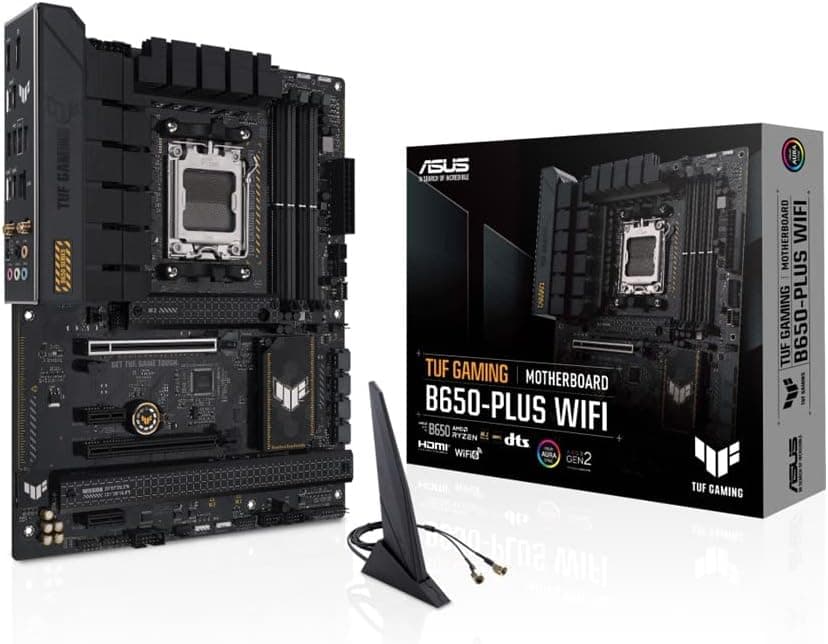
The ASUS TUF GAMING B650-PLUS WIFI AMD Ryzen 7000 シリーズ AM5 対応 B650 搭載 ATX マザーボード is a mid-range AM5 board that trades cutting-edge I/O for durability and a sane price. This article goes past the spec sheet into the parts that actually trip people up during a build — and who should skip this board entirely.
Overview
ASUS's TUF GAMING lineup offers the B650-PLUS WIFI, a mid-range ATX motherboard built around the AMD AM5 socket. It supports Ryzen 7000, 8000, and 9000 series processors, pairing the B650 chipset with DDR5 memory and PCIe 4.0 connectivity — a practical choice for builders who want modern features without the flagship price.
If you plan to run anything from a Ryzen 5 7600 to a Ryzen 7 7800X3D for several years, this is one of the lowest-risk picks in its class.
What sets this board apart is its emphasis on reliability. The 12+2 power stage design uses 60A DrMOS, ProCool power connectors, and MIL-STD-grade components, making it suitable for long-term operation or sustained workloads.
It does not match an X670 board on phase count, but within B650 it sits near the top, and an 8-core CPU at stock will never push the VRM to its limit.
What it does not have is equally important: no PCIe 5.0 lanes, no USB4. Whether you can live without those is the real decision point.
Compatibility Guide
Three things cause most build failures here: CPU generation and BIOS, memory tuning, and the fact that the M.2 slots are not identical.
| Item | Specification | What to watch for |
|---|---|---|
| CPU Socket | AM5 | Ryzen 7000 / 8000 / 9000. Newer CPUs may need a BIOS update |
| Memory | Dual-channel DDR5, 4 DIMM slots | Overclockable to 7600+ MT/s, AMD EXPO supported |
| Form Factor | ATX (305 x 244 mm) | Fits standard ATX and most mid-tower cases |
| Expansion | 1 x PCIe 4.0 x16, 1 x PCIe 3.0 x16 (x4 electrical), 2 x PCIe 3.0 x1 | The second x16 is x16 physically, x4 electrically |
| Storage | 3 x M.2 (all PCIe 4.0 x4), 4 x SATA 6Gb/s | One M.2 slot does not support SATA mode |
| Power | 24-pin ATX, 8-pin + 4-pin EPS | The 4-pin is optional but worth connecting under heavy load |
| Networking | Realtek 2.5GbE, Wi-Fi 6 (802.11ax), Bluetooth 5.2 | Wi-Fi 6, not 6E |
The supplied compatibility data lists 750W or more as the recommended PSU. In practice a Ryzen 5 7600 with a mid-range GPU runs fine on a good 650W unit, but if you are pairing a Ryzen 7 or higher with a high-end GPU — or expect a GPU upgrade later — budget for 750W.
A power supply outlives several builds, so this is a poor place to economize.
You need an AM5-compatible CPU cooler. Some AM4 backplate-mounted coolers do not fit without a retention kit, which is sometimes sold separately and sometimes provided free by the cooler vendor.
If you intend to reuse an AM4 cooler, check the cooler maker's compatibility list before ordering.
For memory, EXPO-certified DDR5-6000 (around CL30) remains the sweet spot. The 7600+ MT/s figure is a ceiling, not a guarantee of daily stability.
DDR5 platforms also tend to drop clocks with four sticks populated, so if you need capacity, a single 2 x 32GB kit is safer than four smaller modules.
A balanced example build pairs a Ryzen 7 7800X3D with DDR5-6000 memory and a GeForce RTX 4070 Super, using PCIe 4.0 bandwidth fully without overspending.
Product Info
Released alongside the B650 chipset in fall 2022, this board sits firmly in the mid-range tier. It forgoes the PCIe 5.0 lanes and dense USB configurations of X670/X870 boards, focusing instead on robust power delivery and durability.
As captured on 4 June 2026, the listed price on Amazon.co.jp was ¥24,980 — a normal figure for a mid-range B650 board.
Motherboard prices move by thousands of yen with sales, stock, and exchange rates, so treat that as a snapshot from that date and check the product page for the current price.
User feedback at the same capture point was 4.3 out of 5 stars across 131 Amazon.co.jp reviews, roughly an 86% favourable score.
That is a healthy sample for a motherboard listing, and the tone skews toward "it just works." Still, a three-digit review count is thin evidence for judging something like early failure rates.
Key specs: AMD B650 chipset, 12+2 phase VRM with 60A DrMOS, four DIMM slots, three M.2 slots (all PCIe 4.0 x4), four SATA 6Gb/s ports, Realtek 2.5GbE, Wi-Fi 6, and Bluetooth 5.2, built with TUF chokes and capacitors and MIL-STD-grade components.
Units sold through the official Japanese distributor typically carry a 3-year warranty; parallel-import or marketplace units may not.
Product Disclosure (Amazon)
- Manufacturer: ASUS
- Seller: 大地雑貨商店【返品の際は必ず事前にご連絡ください】
- Fulfilled by: 大地雑貨商店【返品の際は必ず事前にご連絡ください】
- ASIN: B0BJZNJYGW
- Note: This article covers a manufacturer-made product based on Amazon listing details.
Best Use Cases
- Budget-conscious gamers: Pair with a Ryzen 5 7600 or 7800X3D for a solid mid-range gaming PC. X3D chips have little overclocking headroom anyway, so a pricier chipset buys you almost nothing here.
- Reliability-first daily drivers: Office users, streamers, and video editors who leave a machine running for long hours benefit from the TUF-grade components and the 2.5GbE plus Wi-Fi 6 networking. Heavy NAS transfers make the 2.5GbE port pay for itself.
- First-time AM5 builders: A straightforward layout, clear documentation, and three M.2 slots mean you will not be juggling storage upgrades any time soon.
- Quiet-build enthusiasts: B650 draws less chipset power than X670 and typically ships without a chipset fan — a small but real win if you are chasing a low fan count.
Alternatives
Main competitors include the MSI PRO B650-S WiFi and Gigabyte B650 AORUS ELITE AX.
- MSI PRO B650-S WiFi: Slightly cheaper and simpler, but only 10+2 VRM phases — less headroom for Ryzen 9 processors under sustained load. Fine if you never plan to move up the CPU stack.
- Gigabyte B650 AORUS ELITE AX: Similar price with Wi-Fi 6E, which matters if you already run a 6GHz access point. Its VRM heatsink is smaller, so the TUF holds up better under long stress runs.
If you want PCIe 5.0 for a GPU or SSD slot, you need to step up to X670, B850, or X870.
In real use, PCIe 5.0 SSDs still deliver limited perceptible gain while costing more and running hotter, so for a PCIe 4.0 build today this board remains good value.
Things to Consider
The lack of PCIe 5.0 is the defining trade-off. The primary x16 slot tops out at PCIe 4.0, and all three M.2 slots are PCIe 4.0 x4.
Current GPUs are not bandwidth-starved on PCIe 4.0 x16, but this is the first thing that will feel dated if you intend to keep the board for five or six years.
One M.2 slot does not support SATA mode. If you are reusing an existing M.2 drive, confirm whether it is NVMe or SATA.
The two look nearly identical apart from the key notch, and people routinely discover the mismatch only after the build refuses to detect the drive.
EXPO is not a guaranteed one-click result. Stability depends on the CPU's integrated memory controller, and applying a profile can occasionally leave you with no POST or memtest errors.
Update to the latest BIOS and check the QVL before buying a high-speed kit; dropping one speed grade or nudging SoC voltage usually resolves it.
It can be overkill. For a stock 65W Ryzen 5 7600, an entry-level A620 board is genuinely sufficient, and the savings can go toward the GPU or SSD.
The 12+2 VRM here earns its keep with Ryzen 7 and above under sustained load.
The spec data itself is inconsistent. The collected specifications list maximum memory as both "up to 256GB DDR5" and "128 GB", and this data cannot settle which value applies to current firmware.
If you are targeting four 64GB DIMMs, verify against the ASUS product page. For typical 2 x 32GB or 2 x 48GB kits it makes no difference.
Check the seller details. The Amazon listing referenced here shows ASUS as manufacturer, which matches the product, but the seller and shipper are a third-party marketplace account.
Parallel-import units may fall outside the 3-year domestic distributor warranty. Listing metadata — model numbers, ASINs, supported generations — is also wrong often enough that you should confirm the product from the title and images before ordering.
Note too that one of the captured price entries is labelled "Amazon US" while pointing to a yen price and a Japanese URL, so do not read it as an overseas figure.
FAQ
Q. Can I drop in a Ryzen 9000 series CPU straight away? A.
It is supported, but older stock may need a BIOS update first. Some ASUS boards can flash the BIOS without a CPU installed; if you cannot borrow an older chip, check whether this model supports BIOS FlashBack before buying.
Q. Does it take DDR4 memory? A.
No. AM5 is DDR5-only and DDR4 will not physically fit.
Coming from AM4 means replacing CPU, memory, and motherboard together.
Q. Why Wi-Fi 6 instead of 6E or Wi-Fi 7? A.
This board ships with Wi-Fi 6 (802.11ax) and Bluetooth 5.2.
For 6GHz you would need a higher-tier board or an add-in card in a PCIe x1 slot. With 2.5GbE onboard, a wired run to the router is usually the better answer anyway.
Q. Will filling all three M.2 slots cost me bandwidth elsewhere? A.
All three are specified as PCIe 4.0 x4, but AM5 boards commonly share lanes between M.2 and SATA.
If you plan to populate every SATA port and every M.2 slot, check the manual's sharing table first.
Q. Is there a gaming performance difference versus X670 or B850? A.
With the same CPU and GPU, no. The difference is expansion — PCIe 5.0, USB4, lane count — and headroom for overclocking a Ryzen 9 as a daily configuration.