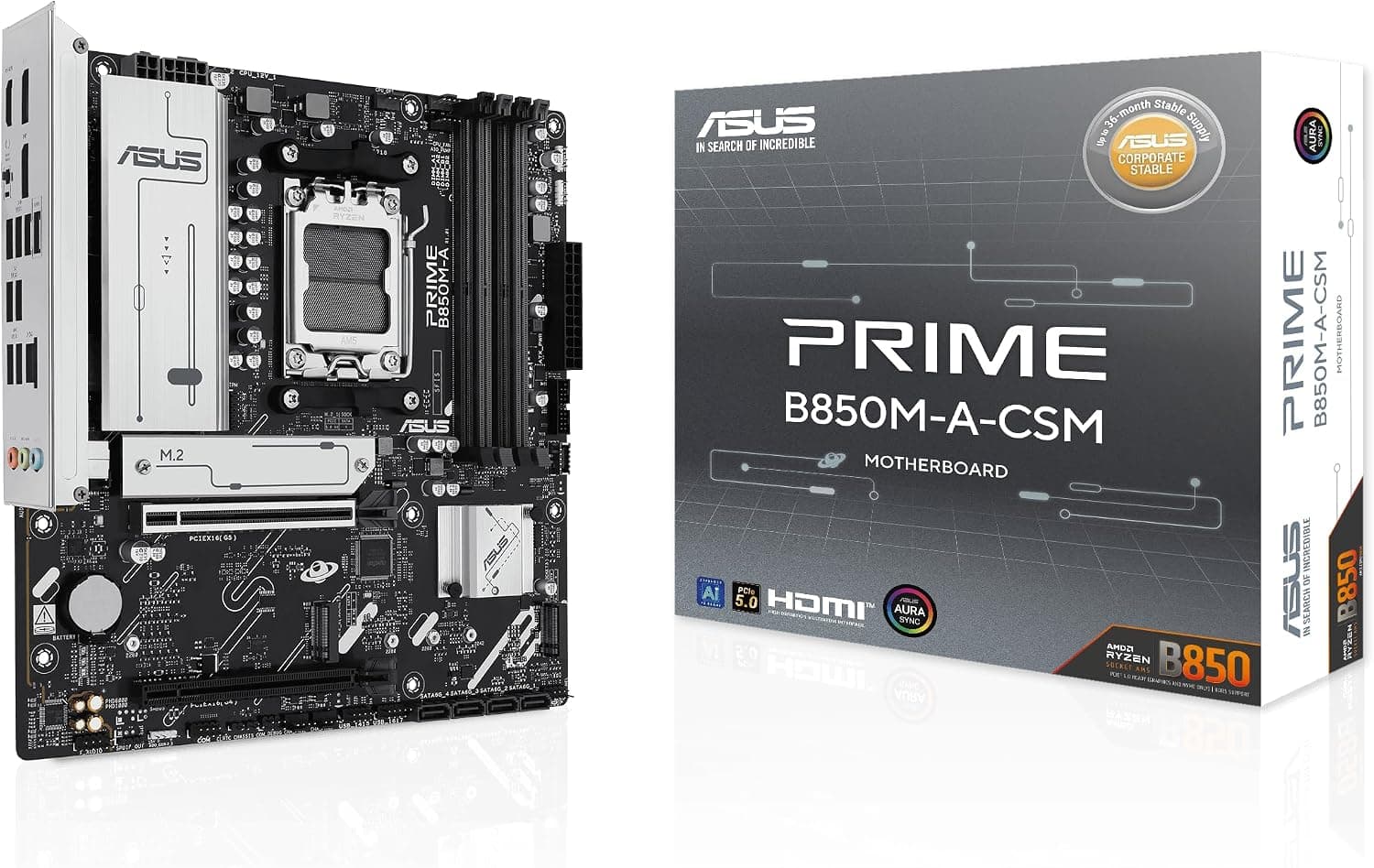
This article covers the ASUS PRIME B850M-A-CSM, listed in Japan as 【限定】ASUS AMD AMD Ryzen 9000シリーズプロセッサー AM5 対応 B850 chipset DDR5 Micro ATX マザーボード PRIME B850M-A-CSM, from the perspective of someone actually assembling the build rather than just reading a spec sheet.
Overview
It supports Ryzen 9000 series processors as its primary target, along with Ryzen 8000 and 7000 series chips. Memory is DDR5 only: four DIMM slots, up to 256GB, with overclocked settings listed beyond 8000 MT/s.
Storage and expansion cover one PCIe 5.0 x16 slot, three M.2 slots (one of them PCIe 5.0), and four SATA 6Gb/s ports.
The positioning is easy to summarise: it secures the next-generation foundation (DDR5, PCIe 5.0) and removes everything else that costs money.
The VRM is an 8+2+1 phase design with 60A power stages, fed by 8-pin plus 8-pin ProCool EPS connectors, and wired networking is handled by Realtek 2.5GbE.
Whether those omissions match your use case is the entire purchasing decision.
| Intended build | Fit | Why |
|---|---|---|
| Wired-network desktop | Excellent | Realtek 2.5GbE included as standard |
| Living-room PC that needs wireless | Marginal | No Wi-Fi; needs an M.2 Key E card or USB adapter |
| Multi-GPU or many add-in cards | Poor | Only one slot is a true x16 electrically |
The weaker ratings are not quality problems. They are deliberate omissions that keep the price down, and the correct response is to move the budget to a higher-tier chipset if you genuinely need those features.
Compatibility Guide
The socket is AM5 only. AM4 processors (up to Ryzen 5000) are physically different and will not fit.
The supported list covers Ryzen 7000, 8000, and 9000 series. Because B850 arrived after the 9000 series launch, boards normally boot with the shipping BIOS, but old stock is always a possibility, so check the CPU support list and BIOS table on the product page before buying.
Four slots take up to 256GB and AMD EXPO profiles are supported. One practical point matters more than the headline number: on AM5, populating all four slots usually lowers the speed you can run stably.
If the capacity works, two modules are the safer choice.
Power uses a 24-pin ATX connector plus 8-pin and 8-pin EPS for the CPU. That second EPS cable is the one people miss — smaller power supplies often ship with only one.
Many systems will boot with a single cable, but the board is designed around both being connected, so count the EPS cables on your PSU before you start.
Storage is three M.2 slots (one PCIe 5.0 x4, two PCIe 4.0) and four SATA 6Gb/s ports.
Boards in this class normally have shared-lane rules where certain M.2 and SATA ports cannot be used at once, so read the manual's exclusivity table first if you plan on four or more drives.
PCIe 5.0 SSDs also run hot, so assume a heatsink is mandatory rather than optional.
The second x16 is physically full length but electrically x4, which rules out serious dual-GPU use, and a triple-slot graphics card will physically block the x1 slot beneath it. In compact builds the real constraints are GPU length, cooler height, and clearance around the power supply, not the board itself.
On cooling, AM5 retains AM4 mounting hole spacing, so many AM4 coolers carry over, though the required bracket varies by model — check your cooler maker's AM5 compatibility list before reusing one. For wireless, you can add an M.2 Key E card or use a USB adapter.
The Key E route needs the antenna routed outside the chassis, which means a rear antenna hole or bracket; a USB adapter avoids that entirely.
Product Info
Check the retailer's page for the latest price.co.jp as captured on 11 September 2026.
Motherboard pricing moves with exchange rates and distributor stock while articles stay frozen, so always check the current listing before ordering. Note that in this data set the overseas (Amazon US) entry carries the same Japanese link and the same yen figure, so no real US-dollar street price is available here — do not use it for international price comparison.
The marketplace entry is a search link only, with no specific amount captured.
Check the retailer's page for the latest user reviews. That looks unremarkable, but seven reviews is statistically meaningless: a single one-star entry moves the average by more than 0.3, and one DOA unit or one memory-compatibility complaint drags the whole score down.
Read what the negative reviews actually describe — no-boot, instability with a specific memory kit, early BIOS behaviour — rather than the number itself.
The CSM suffix marks ASUS's corporate supply line (Corporate Stable Model), which emphasises longer availability and manageability over consumer extras. The underlying design is shared with the PRIME series, so there is nothing about it that complicates a home build.
How It Compares
If you do not, that price premium buys features you will never touch. For a typical build with one GPU and one or two NVMe drives, B850 leaves nothing meaningful on the table, and the parts that age well — PCIe 5.0 graphics and a Gen5 M.2 slot — are present here.
If you already know you need wireless, buying a Wi-Fi model outright is usually cheaper and tidier than adding a card and antenna later. The case for the PRIME B850M-A-CSM is strongest when three things line up: wired networking is enough, you are building micro ATX, and you do not want to pay for extras.
Against the previous generation, some B650E and X670E boards also offer a PCIe 5.0 graphics slot and Gen5 M.2, so clearance-priced stock is worth considering.
The catch is that older units may need a BIOS update before a current CPU will post, which raises the question of whether you can update without a working CPU. B850 sidesteps that, and that convenience is what the price difference is really buying.
Build Notes That Actually Matter
The time sinks during assembly are rarely on the spec sheet. First, the second EPS cable.
Second, M.2 and SATA lane sharing — most cases of a SATA drive vanishing from the BIOS trace back to this.
Third, physical interference in compact micro ATX cases, where a large GPU backplate can foul the connectors and fan headers along the bottom edge of the board.
It is also worth updating the BIOS as soon as the system posts. On AM5, BIOS releases frequently improve memory compatibility and boot times, and updating is the first thing to try when an EXPO profile refuses to run stably.
Note your BIOS settings beforehand so restoring them after the reset is quick.
Best Use Cases
- Budget-conscious DDR5 platforms — at ¥22,020 as captured on 11 September 2026, it delivers the modern foundation and leaves headroom for future GPU and SSD upgrades.
- Sustained creative or business workloads — the 8+2+1 phase VRM with 60A stages and dual 8-pin EPS has margin at stock settings, and the CSM line suits fleets of identical machines.
- First-time builders who want simplicity — fewer slots and fewer options mean fewer decisions and a cleaner cable run.
Things to Consider
The headline compromise is the lack of Wi-Fi. Adding it means either an M.2 Key E card (plus antenna and a mounting point on the rear panel) or a USB adapter.
Once you add that cost and effort, a board with Wi-Fi built in is often the cheaper overall purchase — and discovering this after the build means opening the case and redoing cables.
Know the expansion ceiling in advance. There are two full-length slots, but the second runs at x4, so dual-GPU setups are not realistic.
Only the first M.2 slot is PCIe 5.0; the other two are PCIe 4.0, so running several Gen5 SSDs at full speed is out.
For memory, plan around the fact that four-module configurations often will not hold high clocks. The 8000+ MT/s figure is a ceiling, not a promise.
Also note that the 【限定】 (limited) prefix in the Japanese product name is a seller's marketing label and says nothing about specification or warranty coverage.
One note on the listing data itself: the captured information here shows inconsistencies, such as the overseas price field repeating the Japanese link and yen figure. Amazon listings sometimes carry manufacturer or model-number metadata that does not match the physical product.
Before buying, confirm from the product images, title, and the seller and shipper fields that the item really is the PRIME B850M-A-CSM, and cross-check the specs against the manufacturer's own page — especially given the small review count.
FAQ
Q: Will it work with a Ryzen 5 7600 or Ryzen 7 7800X3D? A: Yes.
Both are supported AM5 processors, and because B850 postdates the 9000 series launch, boards normally post on the shipping BIOS. The VRM has margin for stock operation and light PBO tuning.
Check the product page's CPU support list before purchase to be certain.
Q: How fast can the memory run? A: The specification allows overclocked settings beyond 8000 MT/s, but the achievable speed depends on the CPU memory controller and the modules themselves.
Expect lower ceilings if all four slots are populated.
Q: Can I add Wi-Fi later? A: Yes, via an M.2 Key E card or a USB wireless adapter.
With a Key E card, the antenna must exit the chassis, so you need a rear antenna hole or bracket — an easy detail to overlook. A USB adapter is the simpler route.
Q: What wattage power supply should I use?
The more commonly overlooked factor is the EPS connector count: this board uses 8-pin plus 8-pin, so choose a PSU that supplies two EPS cables.
Q: Can it be installed in an ATX case? A: Yes.
Micro ATX standoff positions are a subset of ATX, so any ATX case accepts it. The tighter constraint is a small mATX chassis, where GPU length, cooler height, and PSU clearance should be checked first.
Product Disclosure (Amazon)
- Manufacturer: ASUS
- Seller: Amazon.co.jp
- Fulfilled by: Amazon.co.jp
- ASIN: B0FHPMVJRN
- Note: This article covers a manufacturer-made product based on Amazon listing details.